Number Formatting in Excel
What This Tutorial Covers
Built-In Formats
Currency, percentage, accounting, scientific.
Custom Codes
Build precision formats with format strings.
Conditional Formats
Different formatting for positive, negative, zero.
Noble Desktop's Excel Bootcamp covers formulas, PivotTables, Power Query, and VBA so you can move from spreadsheets to professional data analysis.
Explore the different ways to effectively format numbers in Excel, including shortcuts, custom categories, and understanding the use of individual characters.
As you know, there are many ways to format a number. Just by looking at the Home tab, in the Number group, the top dropdown shows
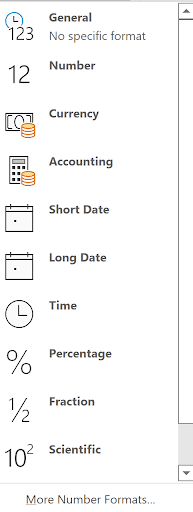
And if you were to press CTRL/1 on any selection of cells, or selecting the bottom of the above illustration, “More Number Formats…”, you’d see this dialog:
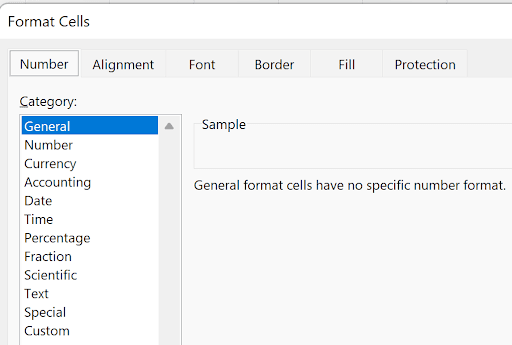
In addition, there are these shortcuts under the “General” dropdown:

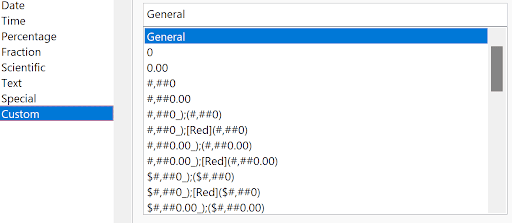
We will explore all these choices as well as the real “winner”, clicking the Custom category, which shows this (and more, when you scroll):
Sometimes, Excel formats a cell by the way you enter it. If you enter 5/6/29, for example, that cell is then formatted as a date. Similarly, if you enter $123, that cell is formatted as currency. If you enter $1234, Excel will insert the comma, because that’s currency. Also with 10%—it’s now a percentage. Sometimes you get a surprise, like entering 1/2 and expecting the fraction, Excel interprets this as a date (January 2!) and you see 2-Jan, an odd date format in the author’s opinion! (To enter a fraction you need to include the leading whole number, like 0 1/2, and you’d see 1/2 and it would be recognized as a fraction).
Understanding each of the characters will be explained in this article. They are 0, comma, #, parentheses, {color], semicolon, $, %, ?, m, d, y, AM/PM, *, and _. You will then be a master at formatting numbers in Excel! Let’s get started.
Consider General (shortcut key CTRL/Shift/~). This is “no specific format” and if you have a cell containing 4% and apply the General format, you would see.04. Applying General format on a date is also sometimes unexpected because you see the “serial” number for a date – for 5/6/29 you would see 47244. (That’s the 47,244th day since January 1,1900!) Try entering 1/1/1900 and format it as General – you will see 1! (1/1/00 would assume 1/1/,000).
0: this means to always show a digit in that place. A format of 0,000 will always show at least 5 digits – great for zip codes which might begin with a 0. A number like 1234 formatted with a single 0 will show 1234. A number like 12 formatted with 00,000 will show 000012. This is only for display purposes. The value is still 12. A value of 2.3 with a format of 00.00 will show 02.30. Get it?
, (comma): show a comma if it’s in a thousand's place or millions, billions, etc. A value of 1234 formatted as 0,000 will show 01234, but formatted as 00,000 will show 01,234. The comma also has another function. Ending a format with a comma will effectively divide the value by,000! This value, 1234567, formatted as 0,000, (ending with the comma) will display 1,235 (yes, it also rounds!).
#: This placeholder shows a digit if it is non-0. A value of 1234 with a common format of #, ### will show 1,234. The value 12345 with the same format will show 12,345. You don’t need #, ###, ### to display 1234567 as 1,234,567. The format of simply #, ### will do the trick! And the value 1234567 formatted as #, ##, will show 1,235. The format #, ###,, will show 1! (Dividing by 1,000,000!)
Period: Used to show a period. A value of 45.99 with a format of #, ###.00 will show 45.99. A value of 0 will show.00. To see 0.00 you need a format of something like 0.00. #, ##0.00.
; (semicolon): This separates formatting sections. There are 4 sections in formatting: Positive numbers, then negative, then zero, then text. For example, using the ones we’ve discussed so far, this format: #, ###;0,000;; says that if the value is positive, format it as #, ###. If negative, 0,000, if zero show nothing(!), if text show nothing (we’ll discuss text in a bit…). So 55 would show as 55. -55 would show as 0,055. Zero or any text, won’t show. Yes, if you enter Hello with that format, the cell will appear blank!
$: This places a “$” where you’d expect it to go. A value of 12345 with a format of $#, ###.00 would show #12,345.00.
Parentheses: Often you want negative numbers to be surrounded by parentheses. Instead of -55, you may want to see (55). Or ($55.00). The format could be #, ##0;(#, ##0). 55 shows as 55, and -55 shows as (55). If you use a format of #, ###, a zero would not show! But notice a 55 and -55 in A1:A2, both formatted as #, ##0.00;(#, ##0.00):
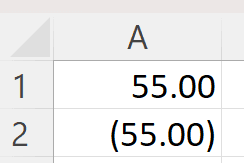
—you see the formats are correct, but notice the decimals don’t line up! The next code is used to fix that (and other conditions as well).
_ (underscore): This is a code which says “leave enough space in the cell for the width of the next character”. For example, #, ###_) says to leave enough room for the width of a right parenthesis. So the above example with a format of #, ##0.00_);(#, ##0.00) would display as
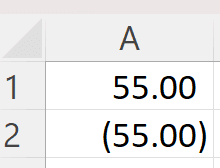
—notice the decimals are aligned! There’s a little space at the end of the value in cell A1! It’s as wide as a right-parenthesis. A silly format of #, ##0.00_W;(#, ##0.00) would show as because now there’s enough space at the end of A1 to hold a W!
Colors: You can put a color code in square brackets in any section. Example: A format of [blue]0;[red]0 says to show positive values in blue, negative values in red. Both show integers only. A1 contains 55 and A2 contains -55 again:
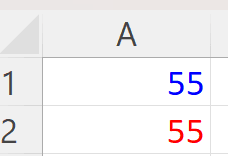
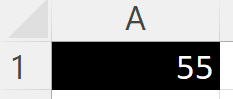
The colors you can use are red, blue, black, green, yellow, cyan, magenta, white, and color1 thru color56! (A cell formatted as [white]0 is useful on a black-colored cell, for example (or it wouldn’t show!))
M, d, y: Used for dates. M (case insensive) shows a month with 1 or 2 digits; mm shows 2 digits. So 8/6/29 with a format of m shows 8, with a format of mm shows 08. Mmm shows a 3-character month, Aug, and mmmm shows a full month name, August. D shows the day of the month, dd shows 2 digits, ddd shows a 3-character weekday and dddd shows full weekday. Ddddd shows the first letter of the month, like A – useful for chart labels! 8/6/29 would show 6,06, Mon, Monday (yes, 8/6/29 is a Monday!) and A (for August). y or yy show 2-digit year; yyy or yyyy shows 4-digit year.
H, m, s: Used for times the m (minute) is distinguished from the m (month) because these contain colons. For example, h:mm – Excel knows these are minutes, not months, because of the : before it. 3:30, formatted as h:mm would simply be 3:30. Usually you can add AM/PM (h:mm AM/PM – the space between is important) would show this as 3:30 AM. The value.75 (which is ¾ of a day, or 6PM), formatted as h:mm would be 6:00 PM..25 would show as 6:00 AM.
Time formats display 22:00 + 5:00 as 3:00! This is because it only goes to 23:59:59 then starts over. However, an hour format of [h] will override that, as will [m] or even [s]. 2:30 PM formatted as [m] is 870! (870 minutes is 14.5 hours which is 2:30 PM!) 5/6/29 formatted as [s] is over 4 billion! (1 billion seconds is about 32 years!)
%: This one is pretty self-explanatory. The number 1 formatted as 0% is 100%.
Fractions: The value.25 formatted as # ?/? displays as 1/4. The question marks are varying values. If you used # ?/8 (specifying the denominator must be 8) it would show 2/4. 1.33333 formatted as # ?/? would be 1/3. The same formatted as # ?/10 would be 1 3/10. Excel does the best it can! You can specify more than one question mark. The value 0.338291102831665 formatted as # ?/? displays as 8825/26087.
E is used for scientific notation. The value 276384726 formatted as 0.00E+00 shows as 2.76E+08. You can use 0.00E+00 or a variant of ##0.0E+0, in which case you’d see 276.4E+6.
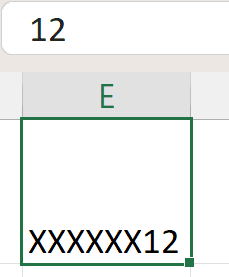
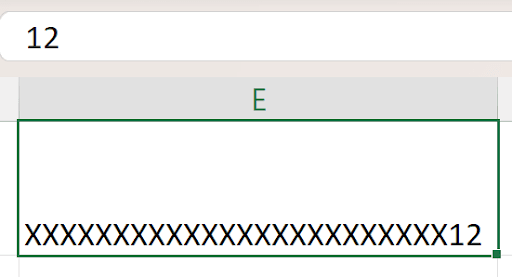
*: This, like the underscore, is a special symbol saying to fill the cell with whatever the next character is. For example, the value 12 with this format X0 would look like this:
If I widen the cell:
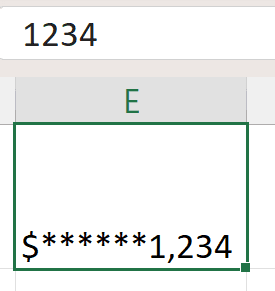
It’s used mostly inside currency formats – called check protection. The value 1234, with the format $**#, ### would show as $***1,234 – depending on how wide the cell is. The first * is the “code”, the 2nd is the character to fill the cell with:. Any character is allowed.
You can format cells with adding text, like “The answer is ”0. The value 123 with that format would show “The answer is 123”. The @ symbol represents the text in the cell, so a format of “My name is ”@ with the value Bob would show “My name is Bob”.
Lastly, you can use the Excel function TEXT to format a cell in a formula. Any of the formats above, aside from the colors, can go in the TEXT function. Here’s a sample.
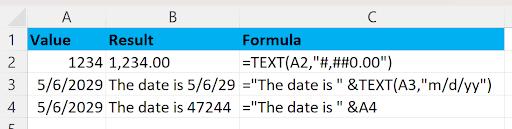
Note that row 4 is a common error. The correct way is in row 3.