April 1, 2026Bob Umlas/3 min read

Using the JUSTIFY Command: Reflow Text in Microsoft Excel

Master Excel text formatting with built-in commands

Hidden Excel Feature

The Justify command is one of Excel's most underutilized text formatting tools, capable of automatically reflowing text across multiple cells and columns.

What the Justify Command Does

Text Reflow

Automatically redistributes text content across selected cells based on column widths and available space.

Dynamic Formatting

Adjusts text layout in real-time based on your selection range and column configurations.

Multi-Column Support

Works across multiple columns with different widths to optimize text distribution.

Basic Justify Command Process

1

Locate the Command

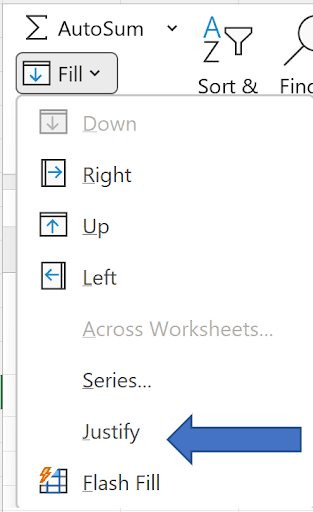
Find the Justify command on the right side of the Home tab in Excel's ribbon interface.

2

Make Proper Selection

Select the range that includes your text and extends to where you want the text to flow.

3

Execute Command

Click the Justify button to automatically reflow your text across the selected range.

Selection Strategy

The key to successful text justification is selecting the right range. Your selection must include the source text and extend to cover the area where you want the text to flow.

Selection Range Impact

FeatureNarrow Selection (A1:B3)Wide Selection (A1:G3)
Text DistributionMore lines, narrower widthFewer lines, wider spread
Result FormatCompact vertical layoutExpanded horizontal layout
Best Use CaseLimited horizontal spaceAmple horizontal space
Recommended: Choose selection width based on your desired text layout and available space.
Column Width Matters

The Justify command aligns text distribution with column widths. Wider columns will accommodate more text, while narrow columns force text to wrap to additional rows.

Text Flow Direction Control

3 lines to 2 lines (A1:D3)
33
3 lines to 1 line (A1:G3)
67

Working with List Data

1

Prepare Text Format

Convert list items to text format and add separators using formulas like =A1&', ' to create comma-separated values.

2

Handle End Items

Modify the last item formula to avoid trailing separators by using =A7&'' to append an empty string.

3

Convert to Values

Copy the formula results and paste as values only, since Justify command cannot work with formulas.

4

Apply Justify

Select the appropriate range and execute the Justify command to reflow the text.

Formula Limitation

The Justify command cannot process cells containing formulas. You must convert formula results to values using Paste Special before applying the command.

Pre-Justify Checklist

0/4

Justify Command Analysis

Pros
Built-in Excel feature requiring no add-ins
Automatically adjusts to column widths
Works with multiple selection ranges
Handles both expansion and compression of text
Cons
Cannot process cells containing formulas
Requires specific selection technique
Limited control over exact text placement
May need data preparation for complex formatting

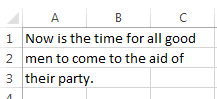
Suppose you're working with this data:

This Data

And you need to transform it into this polished format:

Look Like This

Most Excel users don't realize that Excel includes a powerful built-in feature for exactly this purpose: the Justify command. You'll find this hidden gem on the right side of the Home tab, often overlooked among the more commonly used formatting options:

Home Tab

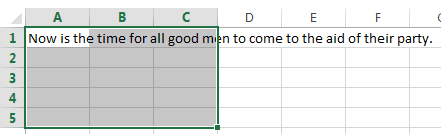
The Justify command intelligently reflows text across multiple cells, distributing content based on your selection parameters. However, the key to success lies in making the correct selection first. For the example above, your selection must encompass at least A1:C3, though it can extend further (A1:C4, A1:C100, etc.) to provide Excel with adequate space for the reflow operation:

Screenshot of an Excel spreadsheet with cells A1 through C5 selected. Cell A1 contains the text, 'Now is the time for all good men to come to the aid of their party.'

Once you've made this selection, executing the Justify command produces the clean, reflowed text layout we demonstrated earlier.

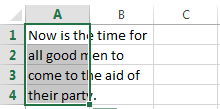
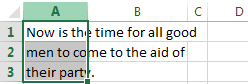
The beauty of this feature becomes apparent when you experiment with different selection ranges. For instance, selecting just columns A and B and reapplying the command yields a different text distribution pattern:

For This Result

(Note that the resulting selection A1:A4 appears after the command completes. The original selection of entire columns A:B was made prior to executing Justify.)

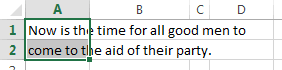
Excel's Justify feature adapts intelligently to your column widths, creating layouts that respect your spreadsheet's visual structure. Notice how dramatically different column widths affect the text flow—here, column B is wider while column C remains narrow, with range A:C selected:


Was Different

Here's where the feature becomes particularly powerful: Justify can also compress text layouts. By selecting A1:D3 and executing the justify command, you can consolidate three lines of text into just two:

Would Get This

The compression becomes even more dramatic with wider selections. Selecting A1:G3 demonstrates how text can be efficiently packed into a single, well-formatted line:

Youd See This

This flexibility makes Justify an invaluable tool for creating professional-looking reports and presentations directly within Excel.

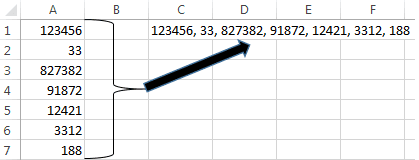
Let's explore a more complex scenario that many professionals encounter. Consider this common situation: you have numerical data in column A that you need to format as a comma-separated list in cell C1:

Like Cell C1

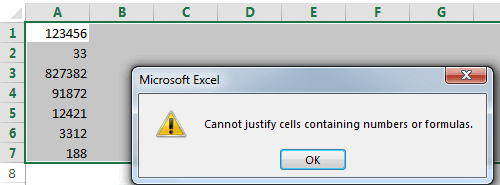
Your first instinct might be to select A1:J7 and apply the Justify command directly. However, Excel will immediately present you with this roadblock:

Screenshot of an Excel worksheet with multiple numeric cells selected. A pop-up dialog displays the error message: 'Cannot justify cells containing numbers or formulas.'

This limitation requires a strategic workaround that transforms numbers into text while adding necessary formatting. The solution involves creating formulas that convert your numerical data into text strings with proper comma separation.

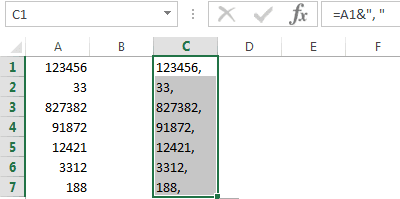
In cell C1, enter the formula =A1&", " and fill this formula down through C7. This approach converts each number to text while appending a comma and space:


Fill Down C7

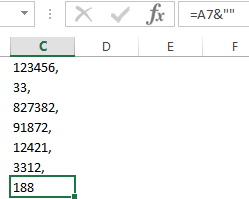
You'll notice an unwanted trailing comma in cell C7. To eliminate this, modify the formula in C7 to =A7&"" which appends an empty string, converting the number to text without adding punctuation:

Its Now Text

However, you're not quite ready to apply the Justify command. Remember Excel's restriction: the feature cannot work with formulas, only with actual text values. This requires one additional step to convert your formulas to static text values.

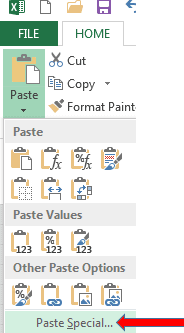
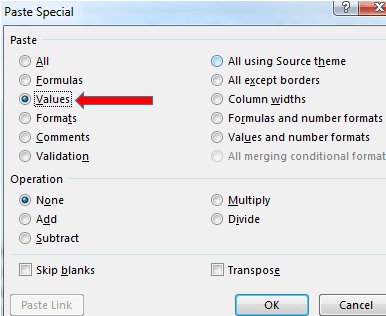
Select the range C1:C7, copy it using Ctrl+C, then use Paste Special to paste only the values back into the same location. This removes the formulas while preserving the text content:

Paste Just The Values 1

Paste Special 2

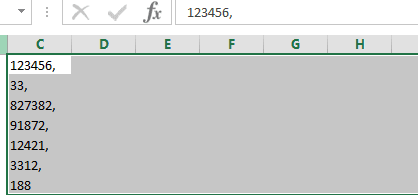
Now you have the properly formatted text data required for the Justify command:

So This

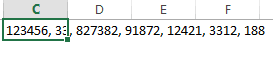
Applying the Justify command transforms your vertical list into a professional, horizontal comma-separated format that flows naturally across your worksheet:

Screenshot of an Excel worksheet row where cell C displays '123456,33, ' followed by other cells containing multiple numeric values (827382,91872,12421,3312,188) in adjacent columns.

And with that, you've successfully transformed raw numerical data into a polished, professional presentation format using Excel's built-in capabilities. This technique proves invaluable for creating reports, summaries, and data presentations that require clean, readable formatting without the need for external tools or complex workarounds.


Key Takeaways

1Excel's Justify command is located on the right side of the Home tab and provides automatic text reflow capabilities
2Proper selection range is critical - must include source text and extend to cover the desired reflow area
3Column widths directly impact text distribution, with wider columns accommodating more text per line
4The command can both expand text across more columns and compress text into fewer lines
5Formulas must be converted to values using Paste Special before applying the Justify command
6List data requires preparation with separator formulas and careful handling of trailing characters
7Selection size determines final layout - narrow selections create vertical layouts while wide selections create horizontal spreads
8The feature works dynamically with different column configurations to optimize text presentation

RELATED ARTICLES