March 23, 2026Tziporah Zions/13 min read

Particle Emitters in After Effects

Master professional particle effects for motion graphics

Core Particle Effects You'll Master

Star Burst

Create stunning interstellar space backgrounds with rushing star field effects that add depth and motion to any scene.

Particle Playground

Generate realistic smoke effects with customizable direction, spread, and opacity controls for engine exhaust animations.

CC Particle Systems II

Build dynamic spark effects with gravity physics and color customization for realistic engine ignition visuals.

Image11

Getting the Project Files

  1. Download the project files.
  2. After the download completes, extract the contents if your system hasn't done so automatically. You should have an After Effects Particle Emitters folder containing all the assets needed for this tutorial.

Project Overview

In this comprehensive tutorial, we'll master three powerful particle effects that will transform your motion graphics work: Star Burst for creating dynamic interstellar backgrounds, Particle Playground combined with Gaussian Blur for realistic smoke effects, and CC Particle Systems II for convincing engine sparks. While these effect names might sound intimidating, the implementation is surprisingly straightforward—most of the work involves applying effects and adjusting parameters to achieve professional results. We'll also enhance the visual impact with strategic opacity animations that create seamless transitions.

These techniques remain fundamental to motion graphics work in 2026, and mastering them will significantly expand your creative toolkit for everything from sci-fi sequences to industrial animations.

Don't Be Intimidated by Complex Names

The process largely involves just dropping effects onto layers and adjusting settings. These powerful tools are more accessible than their technical names suggest.

Star Field

We'll begin by creating a dynamic star field that gives our composition depth and movement, establishing the cosmic environment for our rocket sequence.

1. Open the project file and examine the pre-animated layers. We'll focus on adding three key effects to transform this basic animation into a polished piece. Start by creating a new solid: go to Layer > New > Solid.

Image4

2. Click Solid to proceed.

3. Name this layer Star Field—clear naming conventions are essential for complex compositions.

4. Click the color swatch to open the color picker dialog.

Image9

5. Set the color to #FFFFFF (pure white) by either dragging the picker to the top-left corner or entering the hex value directly. This white base will serve as the foundation for our star effect.

6. Click OK to confirm the color selection.

7. Click OK again to create the solid.

8. Position the new layer in your composition by dragging it below the globe layer in the timeline. Layer order is crucial for proper visual hierarchy.

9. Now we'll apply the star field effect. Navigate to Effects > Simulation > CC Star Burst. This effect transforms any solid into a dynamic star field with minimal setup.

10. Select CC Star Burst to apply it to your solid.

11. The effect instantly transforms your white solid into an animated star field with stars rushing toward the viewer—a classic sci-fi aesthetic achieved with a single effect.

12. The default star density is quite intense, so let's refine it. In the Effect Controls panel, reduce the Size parameter to 50. This creates a more balanced star field that won't overwhelm other elements.

13. Press Spacebar to preview the animation. Notice how the rushing stars immediately establish a sense of speed and cosmic scale.

Creating the Star Field Effect

1

Create White Solid Layer

Add a new solid layer named 'Star Field' with pure white color (#FFFFFF) and position it below the globe layer

2

Apply CC Star Burst

Navigate to Effects > Simulation > CC Star Burst to instantly transform your solid into a rushing star field

3

Adjust Star Density

Reduce the Size parameter to 50 in Effect Controls to create optimal star density for your composition

Instant Space Atmosphere

With just one effect application, you can transform a basic white solid into an amazing star field that rushes toward the viewer, creating that authentic space travel feeling.

Smoke

Next, we'll create realistic engine exhaust that reinforces the rocket's power and movement. This effect combines particle generation with blur techniques to achieve convincing smoke dynamics.

1. Create another solid for the smoke effect: Layer > New > Solid.

2. Click Solid to proceed.

3. Name this layer Smoke for easy identification.

4. Click OK to create the solid with default settings.

5. Apply the particle effect: Effects > Simulation > Particle Playground. This versatile effect allows precise control over particle behavior and emission patterns.

6. Click Particle Playground to apply the effect.

7. In the Effect Controls panel, expand the Cannon section to access emission parameters.

8. Set the Position to 960,870 to align the particle emitter with the rocket's engine nozzles. Precise positioning ensures the smoke appears to originate from the correct source.

9. Change the Direction to 180 degrees, directing the particles downward to simulate exhaust flow.

10. Set Direction Random Spread to 150 degrees. This creates natural variation in particle direction, making the smoke spread realistically as it disperses.

11. Click the color swatch to customize the particle appearance.

Image3

12. Set the color to #3F3F3F, a medium gray that suggests engine exhaust.

13. Click OK to confirm the color.

14. Increase the Particle Radius to 25 to make individual particles more substantial and visible.

15. While the particles now move like smoke, they still appear too sharp and defined. To achieve realistic smoke texture, we need to blur them significantly. Go to Effects > Blur & Sharpen > Gaussian Blur.

Image4

16. With the blur effect now in your Effects panel, set the Blurriness to 100. This heavy blur transforms the sharp particles into soft, cloud-like smoke.

17. Enable Repeat Edge Pixels to ensure the smoke effect extends naturally to the composition edges without creating hard boundaries.

18. Drag the smoke layer below the Rocket Ship layer so the smoke appears behind the vessel, maintaining proper visual depth.

Now we'll add timing refinements to make the smoke feel integrated with the rocket's movement cycle.

19. In the layer panel's In column Image8, change the timing to 0;00;00;25. This shifts the smoke animation earlier, so it begins as the rocket powers up rather than after it's already moving.

20. Position the playhead Image5 at 00;00;01;27.

21. With the Smoke layer selected, press T to reveal the Opacity property.

22. Click the stopwatch icon Image1 to enable keyframe animation for opacity.

23. Set the Opacity to 0%. The smoke will disappear temporarily—we're creating a fade-out point.

24. Move the playhead Image5 to 00;00;01;16.

25. Change the Opacity to 100%. After Effects automatically creates a keyframe since we enabled keyframing.

26. Select both keyframes using Shift-click to modify them simultaneously.

27. Press F9 to apply Easy Ease to both keyframes, creating smooth acceleration and deceleration in the opacity change.

28. Return the playhead Image5 to the beginning: 00;00;00;00.

29. Press Spacebar to preview the complete animation. The smoke now emerges naturally from the engines and fades out as the rocket departs—a professional touch that sells the illusion.

Smoke Effect Configuration Values

Direction (Degrees)
180
Direction Random Spread
150
Particle Radius
25
Gaussian Blur
100

Smoke Animation Timing Sequence

00:00:00:25

Animation Start

Smoke layer timing adjusted to 00:00:00:25 for early engine startup

00:00:01:16

Full Opacity

Smoke reaches 100% opacity as rocket engines engage

00:00:01:27

Fade Out

Smoke fades to 0% opacity as rocket completes ignition sequence

Sparks

Our final effect adds dynamic sparks that will follow the rocket's movement, creating visual interest and reinforcing the sense of a powerful propulsion system.

1. Create the foundation for our spark effect: Layer > New > Solid.

Image4

2. Click Solid to proceed.

3. Name this layer Sparks to maintain our clear naming system.

4. Click OK to create the solid.

5. Ensure the sparks layer is at the top of your layer stack for maximum visibility during setup. You can always reorder layers later.

Image2

6. Apply the particle system: Effects > Simulation > CC Particle Systems II. This advanced particle system offers extensive control over particle behavior and appearance.

7. Select CC Particle Systems II to apply the effect.

8. In the Effect Controls, expand the Producer section. This controls where particles spawn and how they're distributed in your composition.

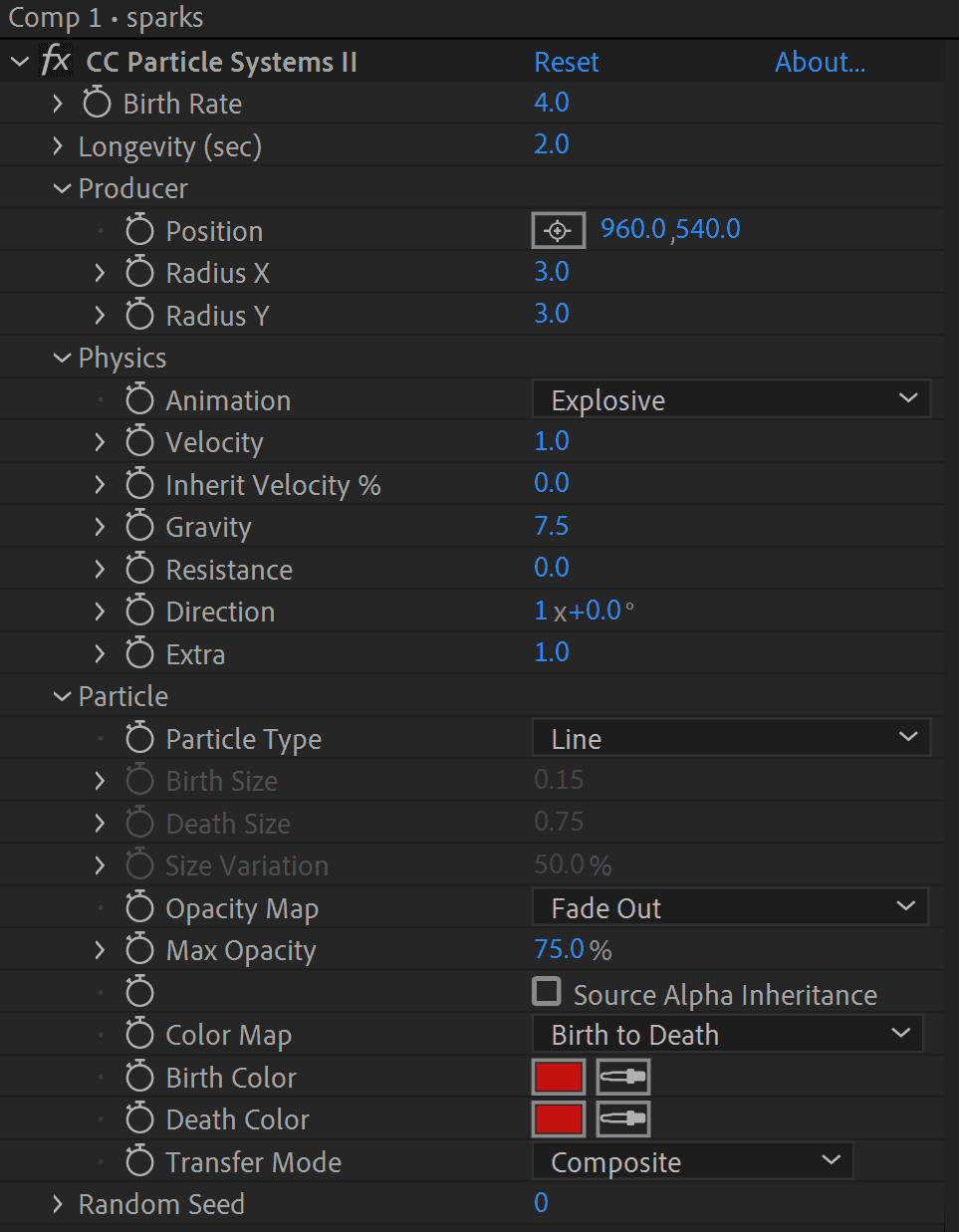
9. Set the Position to 960,540 to center the spark emission point.

10. Expand the Physics section to control particle behavior over time.

11. Adjust Gravity to 7.5. This subtle gravitational pull creates more natural particle trajectories and prevents sparks from dispersing too randomly.

12. Expand the Particle section to customize the visual appearance of individual particles.

13. In the Birth Color field, click the color swatch to modify the spark color.

Image10

14. Set the color to #C31313, a vibrant red that suggests hot metal sparks.

15. Click OK to apply the color. Your effect controls should now resemble this configuration. Don't be overwhelmed by the interface—we've only modified a few key parameters to achieve this result.

Image6

Now we'll make the sparks follow the rocket's movement using After Effects' powerful parenting system.

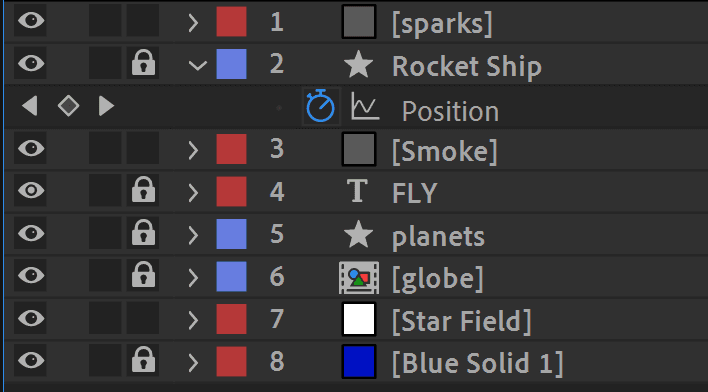
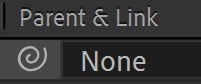
16. In the Parent & Link column, locate the dropdown menu for the Sparks layer. Image7

17. Select Rocket Ship from the dropdown menu. Alternatively, drag from the pick whip (spiral icon) to the Rocket Ship layer. This parent-child relationship means the sparks will automatically follow the rocket's position and movement without requiring additional keyframes.

18. Reorder the layers by dragging the Sparks layer below the Rocket Ship layer. This ensures the sparks appear to trail behind the rocket rather than obscuring it.

Finally, we'll add timing controls to make the sparks appear at the optimal moment in our animation.

19. Move the playhead Image5 to 00;00;01;17.

20. With the Sparks layer selected, press T to access Opacity controls.

21. Click the stopwatch Image1 next to Opacity to enable keyframe animation.

22. Set the Opacity to 0% to create the fade-in starting point.

23. Move the playhead Image5 to 00;00;01;27.

24. Change the Opacity to 100% to complete the fade-in animation.

25. Select both keyframes to modify them together.

26. Press F9 to apply Easy Ease, creating smooth, professional transitions. Your particle system is now complete!

Spark Effect Setup Process

1

Configure Producer Position

Set Position to 960,540 in Producer settings to determine where sparks spawn in the composition

2

Apply Physics Settings

Adjust Gravity to 7.5 in Physics panel to create realistic spark behavior and clustering

3

Customize Particle Appearance

Set Birth Color to red (#C31313) for authentic engine spark coloring

4

Parent to Rocket Layer

Link Sparks layer to Rocket Ship in Parent & Link column for automatic motion tracking

Parenting Eliminates Manual Keyframing

By parenting the Sparks layer to the Rocket Ship layer, the sparks automatically follow the ship's motion without requiring manual keyframe animation.

Conclusion

Congratulations! You've successfully implemented three sophisticated particle effects that dramatically enhance your animation's visual impact and professional quality. These particle emitters—Star Burst, Particle Playground with Gaussian Blur, and CC Particle Systems II—demonstrate how strategic effects application can transform basic motion graphics into compelling, cinema-quality sequences.

The beauty of particle systems lies in their flexibility and customization potential. Every parameter we've adjusted can be modified to create entirely different effects: adjust emission rates for intensity, modify colors for different moods, change physics settings for varied behaviors, or alter timing for different dramatic effects. Consider how these same techniques could enhance a coffee commercial with steam effects, create magical atmospheres with floating particles, simulate weather conditions like rain or snow, or add energy to product reveals with dynamic spark systems.

As motion graphics continue to evolve in 2026, particle systems remain essential tools for creating organic, dynamic movement that would be prohibitively time-consuming to animate manually. Master these fundamentals, and you'll have a powerful foundation for tackling increasingly complex visual challenges.

Happy animating!

Creative Applications Beyond This Tutorial

Beverage Effects

Create foamy rim animations for coffee commercials using particle playground with adjusted direction and density settings.

Fantasy Elements

Generate dragon's breath effects by modifying particle color, direction, and adding motion blur for mystical scenes.

Weather Systems

Design snowfall or rain scenes using particle systems with gravity adjustments and varying particle sizes.

Particle Emitters vs Manual Animation

Pros
Massive time savings compared to animating individual elements
Consistent physics-based motion across all particles
Easy to modify settings for different creative variations
Built-in randomization creates natural, organic movement
Single effect generates hundreds of animated elements
Cons
Can be processor-intensive for real-time preview
Learning curve for understanding parameter relationships
Limited control over individual particle behavior

Learn More About Motion Graphics

We offer the best motion graphics training in NYC. Our expert instructors guide you step-by-step through projects with real-world applications. Sign up today and start growing your career!

Professional Training Available

Noble Desktop offers comprehensive motion graphics training in NYC with expert instructors who guide students through real-world projects step-by-step.

Video Transcript

    Hello. This is Tziporah Zions from Noble Desktop. In this tutorial, I'm going to demonstrate how to create custom particle emitters in Adobe After Effects. We'll be using the powerful CC Particle World effect to generate this dynamic bee swarm formation. Let me show you the final result—watch as hundreds of bees emerge from the hive, creating a realistic swarm effect that would be impossible to animate individually.

    The core concept here is leveraging particle systems to create complex animations using any shape or object as the particle source. This approach is invaluable for motion graphics professionals because it dramatically reduces production time while increasing creative flexibility. Rather than manually animating dozens or hundreds of individual elements—whether they're birds, bees, fireworks, or abstract shapes—particle systems handle the heavy lifting while giving you precise control over the overall behavior.

    This technique has become even more essential in 2026 as client expectations for dynamic, complex animations continue to rise while production timelines remain tight. Particle systems also perform better than individual animated layers, making them crucial for maintaining smooth playback in complex compositions.

    I'll walk you through setting up the effect to produce our bee swarm, fine-tuning the essential parameters for realistic movement, and then adding custom animations to the source bee element for enhanced visual interest. The project files include pre-built illustrative elements: the animated bee, the hive structure, and the garden background. You can find these assets linked in the video description.

    Let's dive into the technical implementation. First, I'll remove this completed version so we can build the effect from scratch. In your project panel, locate the layer labeled 'Bee'—this will serve as our particle template. Drag it into the timeline. Notice it appears quite large initially, and it includes some pre-built animation that we'll need to modify.

    I'm going to remove the existing animation because we'll be implementing our own particle-based movement system that's more suitable for swarm behavior. This large bee won't be directly visible in our final animation—instead, it serves as the visual template that the particle system will replicate hundreds of times.

    Now, here's where the magic happens. Create a new solid layer: Layer > New > Solid. This solid will host our particle effect. Choose a pale yellow color that complements our bee theme, and name it 'Bee Swarm' for clear organization.

    With your solid selected, navigate to Effects and Presets and search for 'CC Particle World'. Apply this effect to your bee swarm layer. Initially, the solid disappears—this is normal behavior. The particle system is now active, but we need to configure it to display our custom bee particles instead of the default spark effect.

    Let's configure the essential parameters. In the Effect Controls, expand the Particle section. Change Particle Type to 'Textured Square'—this tells the system we want to use a custom texture rather than built-in shapes. Under Texture, set the Texture Layer to reference our bee layer. This is the crucial connection that transforms generic particles into animated bees.

    You can now hide the original bee layer since it's serving purely as a texture source. The particles are quite small by default, so let's adjust their scale. Birth Size controls the initial scale when particles appear, while Death Size determines their scale when they disappear. Set birth size to 1.0 and death size slightly larger—perhaps 1.2—to suggest the bees growing more prominent as they disperse.

    Size Variation adds natural randomness to particle scaling. A moderate value like 0.5 prevents all bees from appearing identical. Set Max Opacity to 100% for fully opaque bees—transparency would look unnatural for this organic effect.

    Color control is handled through the birth and death color parameters. Since we want consistent yellow bees throughout their lifespan, set both birth and death colors to the same yellow tone. This maintains visual consistency across the swarm.

    Birth Rate determines particle density—how many bees are generated. For a dramatic swarm, you might want 20-30 particles per second, but adjust based on your composition needs and computer performance. Longevity controls how long individual particles remain active before disappearing. Longer longevity creates denser swarms but requires more processing power.

    Under Physics, the animation type significantly impacts visual character. 'Explosive' creates an expanding burst pattern, while 'Directional' offers more controlled movement. For our bee swarm, 'Directional' provides better control over the emergence pattern.

    Velocity controls emission speed—how quickly bees leave the hive. Start with moderate values and adjust based on the energy level you want to convey. Gravity adds natural weight to the particles. Interestingly, you can animate gravity over time: start with low values so bees emerge easily, then increase gravity to make them settle or change direction as they disperse.

    The Producer section controls emission location and spread. Position the emission point precisely at your hive entrance using the X and Y position controls. Radius X and Radius Y determine the emission area size—larger values create broader emergence patterns.

    This systematic approach to particle system configuration applies to countless motion graphics scenarios. Whether you're creating magical sparkles, industrial smoke, organic swarms, or abstract design elements, these core principles remain consistent. The key is understanding how each parameter contributes to the overall behavior, then adjusting them methodically to achieve your creative vision.

    Remember that particle systems excel at creating organic, unpredictable movement that feels natural rather than overly designed. This makes them particularly valuable for adding life and energy to motion graphics projects across all industries.

    Key Takeaways

    1Three core particle effects (Star Burst, Particle Playground, CC Particle Systems II) can dramatically enhance motion graphics projects with minimal setup complexity
    2Particle emitters save significant time compared to manually animating individual elements like stars, smoke particles, or sparks
    3Proper layer organization and positioning is crucial - place particle layers below foreground elements and use precise coordinate positioning for realistic placement
    4Combining particle effects with additional filters like Gaussian Blur transforms basic particles into convincing natural phenomena like smoke
    5Opacity keyframing with Easy Ease creates smooth fade-in and fade-out transitions that synchronize particle effects with scene timing
    6Parenting particle layers to moving objects eliminates the need for manual keyframe animation while maintaining dynamic relationships
    7Color customization using hex codes ensures particle effects match the overall design aesthetic and lighting conditions
    8The same particle systems can be repurposed for diverse creative applications from coffee foam to dragon breath to weather effects

    RELATED ARTICLES