March 23, 2026Tziporah Zions/10 min read

Create a Liquid Animation in After Effects

Master Professional Liquid Animation Effects in After Effects

Tutorial Overview

3
Primary Effects Used
7
Main Layers to Work With
3
Seconds Final Animation Length

Image6

Getting the Project Files

  1. Download the project files.
  2. Once the download completes, extract the ZIP file if your system hasn't done so automatically. You'll find an After Effects project folder labeled Liquid Animation, containing all the assets you'll need for this tutorial.
Project Organization

Proper file organization is crucial for After Effects projects. Always unzip project files completely and keep all assets in the designated folder structure to maintain proper links.

Overview

Creating realistic liquid motion in After Effects requires mastering a few key effects that work in harmony. This comprehensive tutorial will walk you through using Wave Warp to simulate authentic liquid dynamics, while leveraging Turbulent Displace and Drop Shadow to add convincing depth and texture. We'll animate multiple liquid layers and incorporate text elements to create a professional wave animation that rivals what you'd see in high-end motion graphics work.

The project files have been pre-configured with essential setup elements, allowing you to focus entirely on the animation techniques that make liquid motion compelling. By the end of this tutorial, you'll have both a finished animation and the skills to apply these principles to your own creative projects.

Key Effects for Liquid Animation

Wave Warp

The primary effect that simulates natural liquid motion by creating wave-like distortions across your layer geometry.

Turbulent Displace

Adds organic randomness to create more realistic foam texture and movement patterns in your liquid animation.

Drop Shadow

Provides depth and dimension to separate the foam layer from the base liquid for enhanced visual realism.

File Setup and Effects

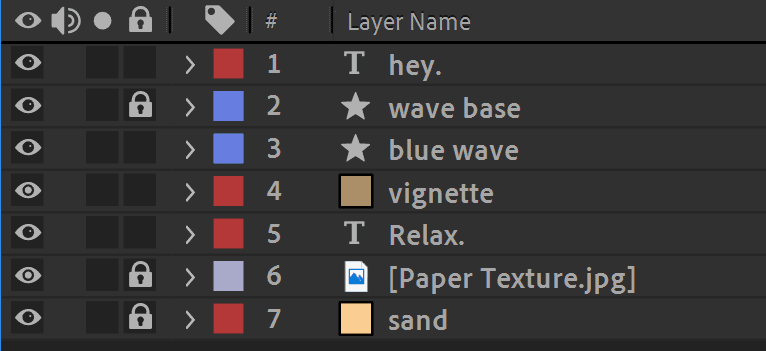
1. Open the project file and examine the layer structure. You'll find a text layer at the top, followed by two shape layers that will become our liquid elements. Below those are a vignette layer, another text layer, and background elements including a JPEG and solid. While this may seem like a complex setup, we'll be working primarily with just three key layers.

Image11

2. Familiarize yourself with each layer by toggling the Visibility on and off using the eye icon. This quick identification process will help you understand how each element contributes to the final composition.

3. We'll begin by applying Wave Warp, the cornerstone effect that drives our liquid simulation. This effect creates the undulating motion that makes shapes appear fluid and organic.

4. Select the blue wave layer in your timeline.

5. Navigate to the Effect menu in the top toolbar.

Image2

6. Choose Effect > Distort > Wave Warp. You'll find this at the bottom of the Distort submenu.

7. Apply Wave Warp to your selected layer.

8. The Effect Controls panel should appear on the left side of your interface. If it doesn't automatically open, click the Effect Controls tab to access it.

9. In the Effect Controls panel, you'll see both a pre-applied Gradient Ramp effect and your newly added Wave Warp. The Gradient Ramp creates the color transition in your wave, so leave it untouched and focus on the Wave Warp parameters below.

10. Set the Wave Height to 35. This controls the amplitude of your wave motion—how dramatically the liquid undulates.

11. Change the Wave Width to 250. This parameter determines the frequency of the waves, affecting how many peaks and valleys appear across your shape.

12. Press the Spacebar to preview your animation. You've just created your first animated liquid element! The Wave Warp effect automatically animates over time, creating continuous flowing motion.

13. Hide the wave base layer by clicking its Visibility icon—we'll reveal this later to add depth to our composition.

14. Also hide the blue wave layer temporarily so we can work on our foam layer.

15. Real ocean waves feature white foam at their crests, adding realism and visual interest. Rather than building this from scratch, we'll duplicate our existing wave and modify it. Select the blue wave layer.

16. Press Cmd+D (Mac) or Ctrl+D (Windows) to duplicate the layer. This preserves all our Wave Warp settings while giving us a new layer to customize.

17. Make the duplicated layer visible by clicking its Visibility icon. Image4

18. In the Effect Controls panel for this duplicated layer, locate the Gradient Ramp effect that was copied over.

19. Select the Gradient Ramp effect and press Delete to remove it. This will make our layer a solid color, perfect for foam.

20. Look for the Fill property in the layer's main controls. Image7

21. Click the color box next to the Fill property to open the color picker.

22. In the color picker, either drag the selector to the top-left corner for pure white, or enter #FFFFFF directly in the hex code field for precision.

23. Click OK to apply the white color to your foam layer.

24. Select the layer name blue wave 2 in the timeline.

25. Press Return (Mac) or Enter (Windows) to enter edit mode.

26. Rename the layer to white wave for clarity in your project organization.

27. Drag the white wave layer below the blue wave layer in the timeline. This stacking order ensures the white foam appears behind the main wave body.

28. Now we'll add effects that differentiate our foam from the main wave, creating more organic, realistic motion. Ensure the white wave layer remains selected.

29. Navigate to Effect > Perspective > Drop Shadow. This will add dimension and help separate our foam from the background.

30. Apply the Drop Shadow effect.

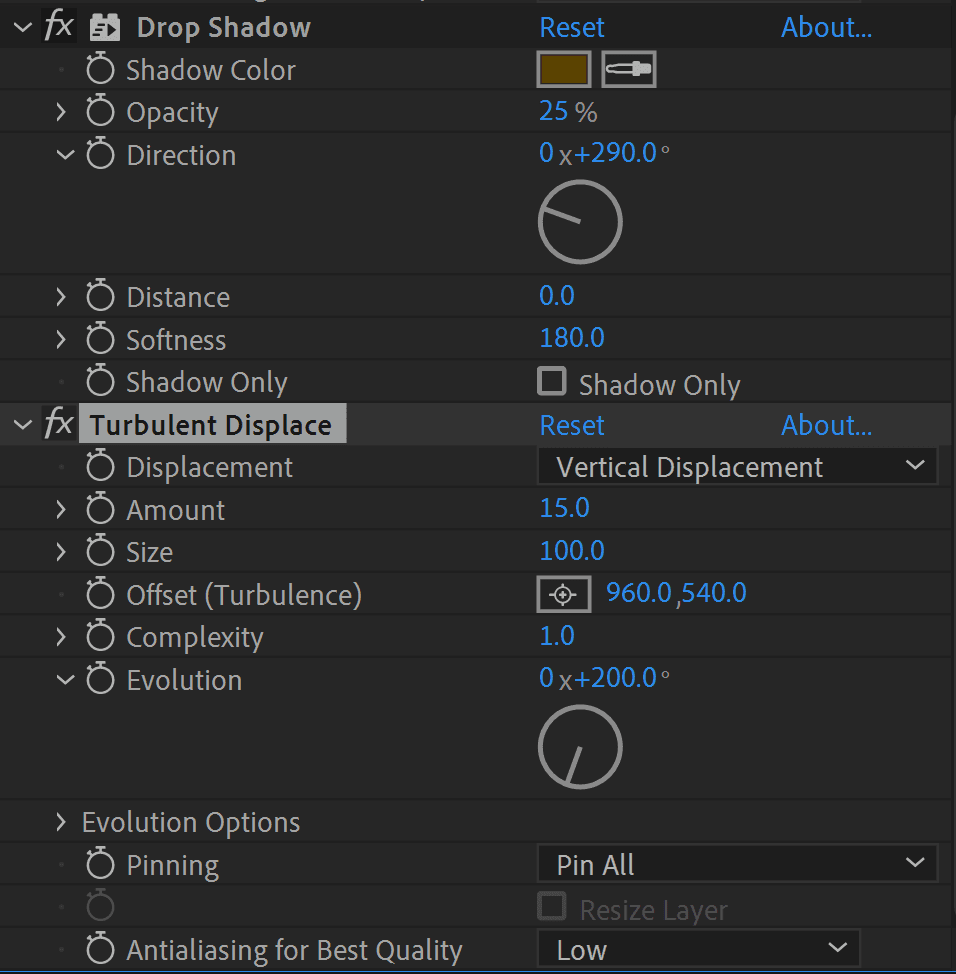
31. In the Effect Controls panel, click the color box next to Shadow Color.

Image3

32. Enter #5B4300 in the hex field, or manually select a rich, medium-dark brown. This warm shadow color mimics the way foam casts shadows on wet sand or rock.

33. Click OK to apply the color.

34. Set the Opacity to 25% for a subtle shadow that won't overpower the foam.

35. Increase the Softness to 180% to create a naturally diffused shadow edge.

36. Set the Distance to 0%—we want an inner glow effect rather than an offset shadow.

37. Adjust the Direction to 290 degrees to match natural lighting conditions.

38. Add one final effect to give our foam that characteristic bubbly, irregular appearance. Go to Effect > Distort > Turbulent Displace.

39. Apply Turbulent Displace to the white wave layer.

40. In the Turbulent Displace controls, set the Amount to 15. This creates subtle, random distortions that break up the perfect wave shape.

41. Change the Evolution to 200 degrees. This parameter controls how the turbulence changes over time, adding to the organic feel. Your effect settings should match the reference image below.

Image10

With our effects configured, we've created the foundation for convincing liquid motion. The Wave Warp provides the primary undulation, while Turbulent Displace adds natural irregularity, and Drop Shadow gives dimensional depth.

Wave Warp Configuration Process

1

Apply Wave Warp Effect

Navigate to Effect > Distort > Wave Warp and apply to your blue wave layer

2

Adjust Wave Parameters

Set Wave Height to 35 and Wave Width to 250 for optimal liquid motion

3

Create Foam Layer

Duplicate the blue wave layer and modify it to create white foam effect

Wave Warp Settings Breakdown

Wave Height
35
Wave Width
250
Drop Shadow Opacity
25
Drop Shadow Softness
180

Animating the Waves

Now we'll bring our waves to life with carefully timed position animations that simulate the natural flow of water across the frame.

1. Make the blue wave layer visible again by clicking its Visibility icon.

2. Also turn on the visibility of the wave base layer to see the full composition coming together.

3. Select the blue wave layer to begin animating its movement.

4. Press the P key to reveal the layer's Position property—this keyboard shortcut is essential for efficient animation workflow.

5. Move your playhead to 00:00:00:25 (25 frames into the timeline).

6. Click the stopwatch icon next to Position to activate keyframe recording. This creates your starting keyframe at the current playhead position.

7. Advance the playhead to 00:02:05:00 to set the endpoint of your wave's journey.

8. Change the Position values to 960, 1077. This moves the wave from its starting position down through the frame.

9. Select both keyframes by dragging across them or Shift-clicking each one.

10. Press F9 to apply Easy Ease to both keyframes. This creates natural acceleration and deceleration, mimicking how real waves build momentum and gradually slow.

11. With your main wave animated, select the white wave layer to create our foam animation.

12. Press P to bring up the Position property for this layer as well.

13. Move the playhead to 00:02:05:00—we're starting this animation later to create a natural foam-follows-wave effect.

14. Click the stopwatch to begin keyframing the foam layer.

15. Set the Position to 960, 470, positioning the foam higher in the frame initially.

16. Move the playhead to 00:02:07:00—this slight offset creates realistic timing where foam appears just after the main wave.

17. Change the Position to 960, 1077, matching the final position of the blue wave.

18. Select both keyframes for the white wave layer.

19. Apply Easy Ease with F9 to smooth the foam's motion as well.

20. Return the playhead to the beginning at 00:00:00:00.

21. Press spacebar to preview your wave animation. You should see the blue wave flow through first, followed by the white foam, creating a convincing two-layer liquid effect.

Wave Animation Timeline

00:00:00:25

Blue Wave Start

Initial keyframe set at starting position

00:02:05

Blue Wave End

Final position keyframe at 960,1077

00:02:07

White Wave End

Foam layer animation completes slightly offset

Easy Ease for Natural Motion

Using F9 to apply Easy Ease to all keyframes creates smooth, natural acceleration and deceleration that mimics real liquid physics.

Text Animation

To complete our scene, we'll animate the text to interact naturally with our approaching wave, creating a cohesive narrative where the liquid motion affects other elements in the composition.

1. Select the top text layer to begin adding effects that will make it appear to be overwhelmed by the incoming wave.

2. Navigate to Effect > Blur & Sharpen > Gaussian Blur to simulate the text becoming obscured underwater.

3. Apply Gaussian Blur to the text layer.

4. Ensure your playhead is positioned at 00:00:00:00 (the beginning of the timeline).

5. Click the stopwatch next to Blurriness to activate keyframing, establishing that the text starts in perfect focus.

6. Move the playhead to 00:00:02:08—timed to coincide with the wave's approach.

7. Set the Blurriness value to 100, creating the effect of text becoming completely unfocused as water covers it.

8. Select both blur keyframes.

9. Press F9 to apply Easy Ease, making the blur transition feel natural rather than mechanical.

10. Return the playhead to the beginning and press T to reveal the layer's Opacity controls—we'll fade the text out completely as it "goes underwater."

11. Click the stopwatch next to Opacity to start keyframing the fade animation.

12. Move the playhead back to 00:00:02:08 to match your blur animation timing.

13. Set the Opacity to 0%, making the text completely invisible.

14. Select both opacity keyframes.

15. Apply Easy Ease with F9 to create smooth fading.

16. Position the playhead at 00:00:03:10 to set the optimal end point for your animation.

17. Press the N key to set the work area end point, trimming your composition to approximately three seconds—the ideal length for showcasing your effect without overstaying its welcome.

Congratulations! You've created a sophisticated wave animation that combines multiple effects and precise timing. The Wave Warp effect forms the foundation, while Turbulent Displace and Drop Shadow add realism and depth. The coordinated animations between your blue wave, white foam, and disappearing text create a cohesive story.

Consider experimenting with different shapes and masks to create various liquid forms—perhaps coffee pouring into a cup, or paint flowing across a canvas. You can modify the solid colors to simulate different liquids, or incorporate After Effects' Simulate effects to add bubbles and particles. Advanced users might explore using Track Mattes to contain liquid within text shapes, opening up exciting typography possibilities.

Happy animating!

Text Animation Approach

Pros
Combines blur and opacity fade for smooth transition
Synchronized timing with wave movement creates cohesion
Easy Ease maintains consistent animation feel
Simple two-keyframe setup for efficient workflow
Cons
Requires precise timing coordination with wave animation
Limited to fade-out effect only
May need adjustment if wave timing changes

Learn More About Motion Graphics

Master the art of professional motion graphics with our industry-leading training programs. Our expert instructors bring real-world experience from top studios and agencies, guiding you through hands-on projects that build portfolio-worthy skills. Whether you're starting your career or advancing to the next level, our comprehensive curriculum covers the latest techniques and industry standards that studios demand in 2026.

Advanced Liquid Animation Techniques

Shape Masking

Use Track Mattes to contain liquid effects within custom shapes or text for more complex compositions.

Particle Integration

Add bubbles and particles using Simulate Effects to enhance realism and visual interest in your liquid animations.

Color Variations

Experiment with different solid colors and gradient combinations to create unique liquid materials and surfaces.

Professional Animation Workflow

0/4

Key Takeaways

1Wave Warp effect is the foundation for creating realistic liquid motion in After Effects, requiring Wave Height of 35 and Wave Width of 250 for optimal results
2Layering techniques with duplicated elements create depth - use a white foam layer beneath the main liquid layer with Drop Shadow and Turbulent Displace effects
3Proper keyframe timing is crucial - offset white wave animation by 2 frames from blue wave to create natural, non-synchronized movement
4Easy Ease (F9) should be applied to all keyframes to achieve smooth, natural acceleration that mimics real liquid physics
5Text animation synchronization enhances the overall effect - combine Gaussian Blur and opacity fade timed with wave movement for professional results
6Layer organization and visibility management streamlines the workflow - toggle layer visibility to identify and work with specific elements efficiently
7Turbulent Displace with Amount set to 15 and Evolution at 200 degrees creates organic randomness essential for realistic foam texture
8Timeline trimming to 3 seconds using the N key ensures optimal preview and render performance while maintaining the complete animation cycle

RELATED ARTICLES