April 1, 2026Jerron Smith/9 min read

Green Screen Removal

Master professional green screen removal techniques

Core Skills You'll Master

Chroma Keying

Remove green screen backgrounds using professional techniques. Learn to work with Keylight effect for clean, precise color removal.

Video Compositing

Combine multiple video layers seamlessly. Replace backgrounds and create professional-quality composite footage.

Mask Creation

Use garbage mattes to isolate subjects and improve keying efficiency. Create precise selections for cleaner results.

Topics Covered in This After Effects Tutorial:

Advanced Green Screen Compositing Techniques, Professional Chroma Keying Workflows, Multi-Layer Video Compositing

Exercise Preview

preview greenscreen

What You'll Create

Transform video footage of a woman shot against a green screen into a professional composite with a completely different background environment.

Exercise Overview

In this hands-on exercise, you'll master one of the most essential skills in professional video production: seamless green screen compositing. We'll work with real-world footage shot against a chroma key background, demonstrating industry-standard techniques to "key out" the green screen and replace it with a compelling new environment. This workflow is fundamental to everything from social media content to Hollywood blockbusters.

Project Workflow Overview

1

Setup and Preparation

Configure workspace and open the green screen removal project file

2

Footage Preparation

Create compositions from video footage and set up proper timing

3

Chroma Key Application

Use Keylight effect to remove green screen background professionally

Previewing the Final Video

Before diving into the technical work, let's examine the polished result you'll achieve using professional-grade compositing techniques.

  1. To see a preview of your final composition, keep After Effects open but switch to your Desktop to examine the reference material.
  2. On the Desktop, navigate to Class Files > After Effects Class > Green Screen Removal > Preview Movie and double–click Putting on Headphones.mp4.
  3. Study how the subject appears naturally integrated into the background environment. This seamless integration was achieved entirely through chroma keying—the original footage contained no background elements you're seeing.
  4. Watch the clip multiple times to analyze the edge quality, color matching, and overall realism before closing the preview.

Setting up the Workspace

Proper workspace configuration is crucial for efficient compositing workflows. We'll establish an optimized environment for chroma key work.

  1. In After Effects, go to Window > Workspace > Standard.

  2. Choose Window > Workspace > Reset "Standard" to Saved Layout to ensure consistent panel positioning.

  3. Maximize your workspace for optimal visibility during detailed compositing work:

    Mac: At the top left of the window, click the green button (the maximize control).
    Windows: At the top right of the window, click the Maximize button (the middle control).

Workspace Setup Checklist

0/3

Getting Started

Now we'll open the project files and establish proper file management practices that are essential in professional post-production workflows.

  1. In After Effects, save any existing project work by choosing File > Save.

  2. Choose File > Open Project and navigate to the exercise files:

    • Navigate to Desktop > Class Files > After Effects Class > Green Screen Removal.
    • Double–click on Green Screen Removal—Started.aep to open the template project.
  3. Immediately create your working version to prevent data loss:

    • Choose File > Save As > Save As
    • Name the file Your Name—Green Screen Removal.aep
    • Save it into Desktop > Class Files > After Effects Class > Green Screen Removal
File Management Best Practice

Always save your current project before opening a new one, and immediately save the new project with your name to avoid losing work.

Creating Compositions from Footage

Professional compositing begins with proper project setup. When working with video footage, creating compositions that precisely match your source material's technical specifications ensures optimal quality and prevents rendering artifacts that can compromise your final output.

  1. In the Project panel, expand the 01—Video folder to access your source footage.

    • Double–click Putting on Headphones.mp4 to open it in the Footage panel for detailed examination.
  2. Navigate to a specific frame for precise editing. At the bottom left of the Footage panel, click the Preview Time button preview time menu 0 footage.

    • Type in 15 and hit OK to jump to frame 15.
  3. Set the In Point for your working clip. At the bottom of the Footage panel, click the Set In Point button in point.

    This establishes the beginning of your usable footage range. In professional workflows, precise trimming eliminates unusable content and focuses your composition on the best performance takes.

  4. Navigate to the end of your desired clip range. Click the Preview Time button preview time menu 0 footage again.

    • Type in 1414 and hit OK to jump to the ending frame.
  5. Click the Set Out Point button out point to establish the clip's end point.

    You now have a precisely trimmed 14-second clip optimized for compositing work.

  6. Close the Footage panel by clicking the X to the left of the tab.

  7. In the Project panel, CTRL–click (Mac) or Right–click (Windows) on Putting on Headphones.mp4 and choose New Comp from Selection.

    This powerful feature automatically creates a composition matching all technical parameters of your footage—resolution, frame rate, pixel aspect ratio, and duration—ensuring perfect compatibility.

  8. Organize your project by dragging the new composition Putting on Headphones out of the 01—Video folder to the project root level.

  9. Establish clear layer naming conventions for professional workflows. In the Timeline, select the Putting on Headphones.mp4 layer:

    • Hit Return (Mac) or Enter (Windows) and rename the layer talent—green screen
    • Hit Return (Mac) or Enter (Windows) again to confirm the change
  10. Add your background plate by dragging simulation.mp4 from the Project panel into the timeline below the talent—green screen layer. This stacking order ensures your keyed subject will appear in front of the background.

Footage Trimming Process

Step 1

Set Preview Time to 15 seconds

Navigate to the starting point of useful footage

Step 2

Mark In Point

Establish the beginning of the 14-second clip

Step 3

Set Preview Time to 1414

Move to the desired end point of the footage

Step 4

Mark Out Point

Complete the 14-second clip duration

Composition Matching

Using 'New Comp from Selection' automatically matches composition settings to your footage dimensions, length, and framerate, ensuring optimal quality.

Using Keylight for Chroma Keying

Keylight represents the industry standard for chroma keying, developed by The Foundry and included with After Effects. This sophisticated tool powers green screen work across film, television, and digital content production. We'll use it in combination with supporting effects to achieve broadcast-quality results.

  1. Position your playhead at the beginning of the timeline to establish consistent starting conditions.

  2. Select the talent—green screen layer to prepare it for effect application.

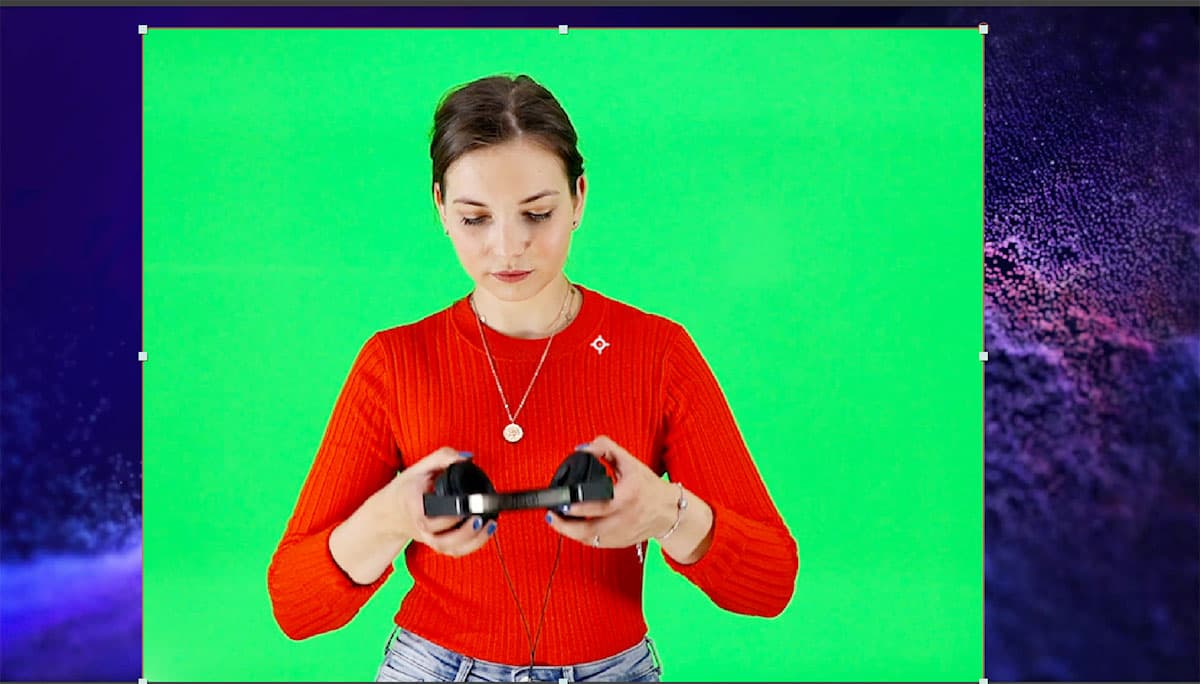
  3. In the Tools panel, choose the Rectangle tool rectangle tool to create a garbage matte.

  4. Draw a rectangular mask around the subject, maintaining generous boundaries to avoid accidentally cropping body parts during movement. This "garbage matte" technique is essential in professional compositing—it isolates your subject and eliminates problematic background areas that could interfere with the keying process.

    green screen 01

  5. Return to the Selection tool selection tool by clicking it in the Tools panel or pressing the V key.

  6. Verify your mask coverage by scrubbing through the timeline. If the subject moves outside your mask boundaries at any point:

    • Double–click any vertex (corner point) to activate free transform mode
    • Scale the rectangle to accommodate the full range of movement
    • Hit Return (Mac) or Enter (Windows) to apply your adjustments

    This garbage matte optimization ensures Keylight only processes the green screen within the mask, dramatically improving processing efficiency and key quality.

  7. Access the effects library by opening Window > Effects & Presets if the panel isn't currently visible.
  8. In the Effects & Presets search field, type keylight to filter the available options.
  9. Apply the comprehensive keying preset by double–clicking Keylight + Key Cleaner + Advanced Spill Suppressor (located in Presets > Image—Utilities).

    This preset combines three essential tools: Keylight for primary keying, Key Cleaner for matte refinement, and Advanced Spill Suppressor for color contamination removal. In professional workflows, this multi-effect approach typically yields superior results compared to single-effect solutions.

  10. Fine-tune the Key Cleaner settings in the Effect Controls panel:

    • Locate the Key Cleaner effect section
    • Change Additional Edge Radius to 0 to eliminate unwanted edge processing that can soften your mask boundaries
  11. Configure Keylight's primary color selection. In the Keylight (1.2) section, click the eyedropper tool eyedropper next to Screen Colour:

    • Hold Cmd (Mac) or CTRL (Windows) and click on a representative green area near the subject's face—avoid areas with lighting variations or shadows

    green screen 02

    Professional tip: For consistency across projects, you can manually set the color value by clicking the color box and entering hex code #2AEA55

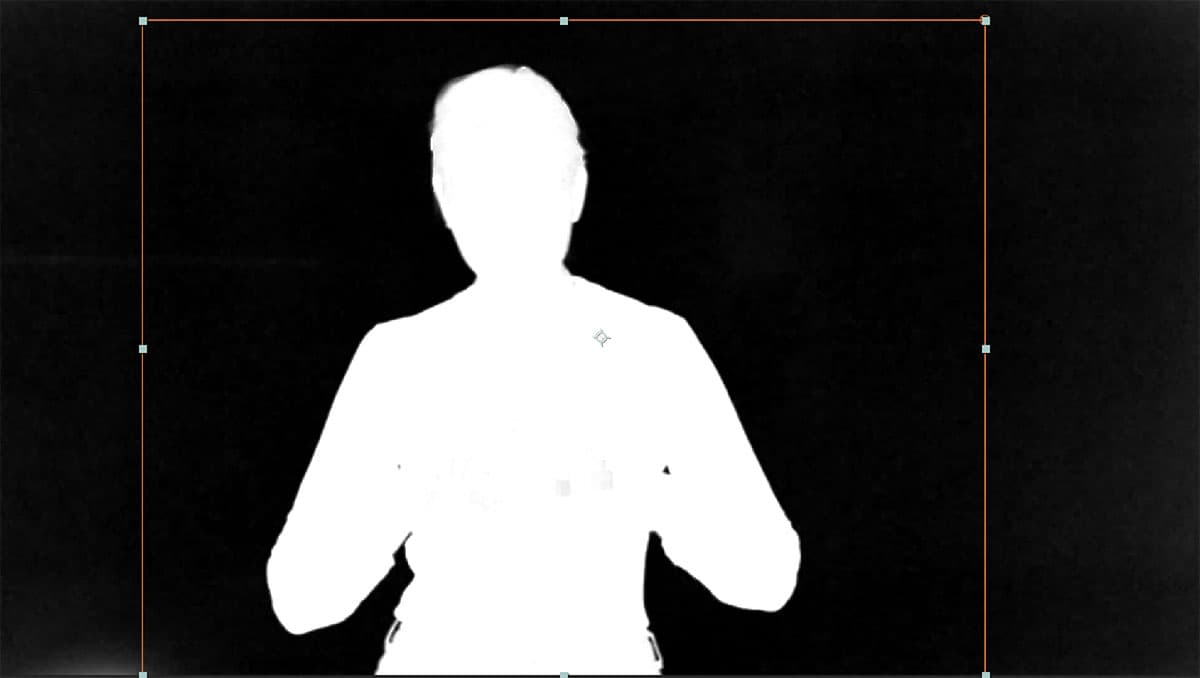
  12. Switch to diagnostic view mode to analyze your key quality. In the Keylight (1.2) effect, change the View dropdown from Intermediate Result to Screen Matte.

    green screen 03

    The Screen Matte display shows your alpha channel as a grayscale image: pure white areas are completely opaque, pure black areas are fully transparent, and gray areas represent partial transparency. Professional compositors rely on this view to diagnose and solve keying problems.

  13. Expand the key's sensitivity by adjusting Screen Gain to 115.

    Screen Gain controls the tolerance range for color matching. Higher values capture more variations of your screen color, essential when dealing with lighting inconsistencies or screen material variations that are common in real-world shooting conditions.

  14. Access advanced matte controls by clicking the arrow next to Screen Matte to expand the section.

  15. Eliminate gray areas within the subject by holding Cmd (Mac) or CTRL (Windows) and scrubbing the Clip White parameter leftward until internal gray areas turn solid white.

    We achieved optimal results at 89. This parameter forces near-white values to pure white, creating cleaner matte edges.

  16. Return to composite view by changing the View menu back to Intermediate Result. Examine the edges carefully for color contamination—you'll likely notice green fringing, particularly visible in hair and fine details.

  17. Eliminate edge contamination by holding Cmd (Mac) or CTRL (Windows) and scrubbing Screen Shrink/Grow to the left until green fringing disappears.

    Our optimal setting was -2. Negative values shrink the matte slightly inward, removing contaminated edge pixels.

  18. Soften matte edges for natural integration by setting Screen Softness to 0.5.

    This subtle feathering helps your subject blend naturally with the new background, mimicking the soft edges that occur in natural photography.

  19. Enhance matte stability in the Key Cleaner section by enabling Reduce Chatter.

    This feature minimizes flickering and rough edges that can occur with compressed footage or suboptimal lighting conditions.

  20. Activate color spill removal by clicking the empty checkbox next to Advanced Spill Suppressor to make the fx indicator appear.

    Spill suppression removes color contamination that occurs when green screen light reflects onto your subject. This is particularly important for achieving realistic skin tones and natural-looking edges.

  21. Test your composite by pressing the Spacebar to preview the full animation.

    While perfection isn't always achievable—you may notice occasional issues with fine details like headphone components or slight edge softness—this quality level is professionally acceptable for social media and web content. Remember that platform compression will further minimize visible artifacts. The key insight for professional work is that different footage presents unique challenges, and there are no universal "magic settings" that work for every green screen scenario.

  22. Save your progress by choosing File > Save or using the keyboard shortcut Cmd–S (Mac) or CTRL–S (Windows).

  23. Complete the exercise by choosing File > Close Project when you're satisfied with your results.

Keylight Effect Setup Process

1

Create Garbage Matte

Draw rectangular mask around subject to isolate green screen area and improve processing efficiency

2

Apply Keylight Preset

Use Keylight + Key Cleaner + Advanced Spill Suppressor for comprehensive chroma keying

3

Configure Key Settings

Sample green color with eyedropper and adjust Screen Gain for optimal color removal

4

Refine Edge Quality

Use Screen Matte view to perfect the key with Clip White and Screen Shrink/Grow adjustments

Key Keylight Settings Used

Screen Gain
115
Clip White
89
Screen Shrink/Grow
-2
Screen Softness
0.5

Green Screen Keying Results

Pros
Effective background removal with proper settings
Good enough quality for social media posting
Spill suppressor removes unwanted green edges
Key cleaner reduces rough edge artifacts
Cons
Some headphone parts may disappear occasionally
Edge quality can be inconsistent in places
Requires manual adjustment for each video
Not suitable for high-end broadcast quality
Quality Expectations

No two green screen removals are identical. Each video requires custom settings adjustments, and some footage will be significantly easier to key than others.

Key Takeaways

1Green screen removal requires systematic approach starting with proper workspace setup and file organization for consistent results
2Creating compositions from footage automatically matches technical settings like dimensions, framerate and duration to source video
3Garbage mattes significantly improve keying efficiency by isolating the subject and reducing processing area
4Keylight effect combined with Key Cleaner and Advanced Spill Suppressor provides comprehensive chroma keying solution
5Screen Matte view is essential for evaluating key quality, showing actual black and white matte being generated
6Key settings like Screen Gain (115), Clip White (89), and Screen Shrink/Grow (-2) require custom adjustment per project
7Professional green screen removal balances multiple factors including edge softness, spill suppression and chatter reduction
8Final quality suitable for social media may not meet broadcast standards, but compression often masks minor imperfections

RELATED ARTICLES