April 1, 2026Dan Rodney/10 min read

Exporting Assets for Web: SVG, JPEG, & PNG

Master Adobe XD Asset Export for Web Development

File Formats for Web Export

SVG

Scalable Vector Graphics for logos and icons. Maintains crisp quality at any size with small file sizes.

JPEG

Best for photographs and complex images. Excellent compression but no transparency support.

PNG

Ideal for images requiring transparency. Larger files but perfect quality preservation.

Topics Covered in This Adobe XD Tutorial:

Exporting Individual Assets, Exporting Artboards

Exercise Preview

preview exporting for web

Exercise Overview

In this comprehensive exercise, you'll master the essential skill of exporting graphics from Adobe XD for web production. Whether you're preparing assets for development handoff or creating resources for your own projects, understanding XD's export capabilities is crucial for maintaining design integrity across digital platforms. You'll learn to optimize different asset types using the most appropriate formats and settings for professional web deployment.

Getting Started

  1. If you still have Pulse—Prototyping Done.xd open from the previous exercise, skip to the next step. Otherwise open it as follows:

    • In Adobe XD, go to File > Open from Your Computer or hit Cmd–Shift–O (Mac) or CTRL–Shift–O (Windows).
    • Navigate into Desktop > Class Files > Adobe XD Class > Pulse and double–click on Pulse—Prototyping Done.xd to open it.
  2. At the top of the Home Page artboard, select the black navbar.
  3. Zoom to the selection by hitting Cmd–3 (Mac) or CTRL–3 (Windows). This focused view will make it easier to work with individual elements within the navigation component.

Now that your workspace is prepared, let's begin with vector graphics—the backbone of scalable web design.

Opening Your Adobe XD Project

1

Access File Menu

Use File > Open from Your Computer or keyboard shortcut Cmd-Shift-O (Mac) or Ctrl-Shift-O (Windows)

2

Navigate to Project

Go to Desktop > Class Files > Adobe XD Class > Pulse folder

3

Open Project File

Double-click on Pulse—Prototyping Done.xd to launch the project

Exporting Vector Graphics As SVG

  1. We need to select the logo, which is nested within the navbar component. Double–click on the black navbar to enter edit mode for this component. While the visual change is subtle, you'll now have access to select individual elements within this component structure.
  2. Hover over the PULSE logo and when you see the green selection outline appear around the logo, click once to select it.
  3. With the PULSE logo selected, you're working with vector artwork.

    Vector logos should always be exported as SVG (Scalable Vector Graphics) for web use. Unlike raster formats, SVG maintains crisp edges at any size and typically results in smaller file sizes for logo-style graphics. This format is also easily customizable with CSS and remains sharp on high-resolution displays without requiring multiple asset versions.

  4. If the Layers panel isn't visible, click the layers panel icon icon at the bottom left of the window.
  5. Notice the selected layer is named Pulse logo in the Layers panel.
  6. Layer names become your exported file names, so proper naming is essential for organized asset management. Double–click on the Pulse logo name to edit it.
  7. Rename it to pulse-logo and hit Return (Mac) or Enter (Windows). Web-friendly filenames should use hyphens instead of spaces and follow consistent naming conventions.
  8. With the logo selected, go to File > Export > Selected.
  9. Windows users only: next to Export to, click Choose Destination (or Change).
  10. If you're already in the Pulse folder, navigate into the Web Assets folder. (Otherwise, navigate to Desktop > Class Files > Adobe XD Class > Pulse > Web Assets.) Organizing assets into dedicated folders from the start saves significant time during development.
  11. Windows users only: click Select Folder.
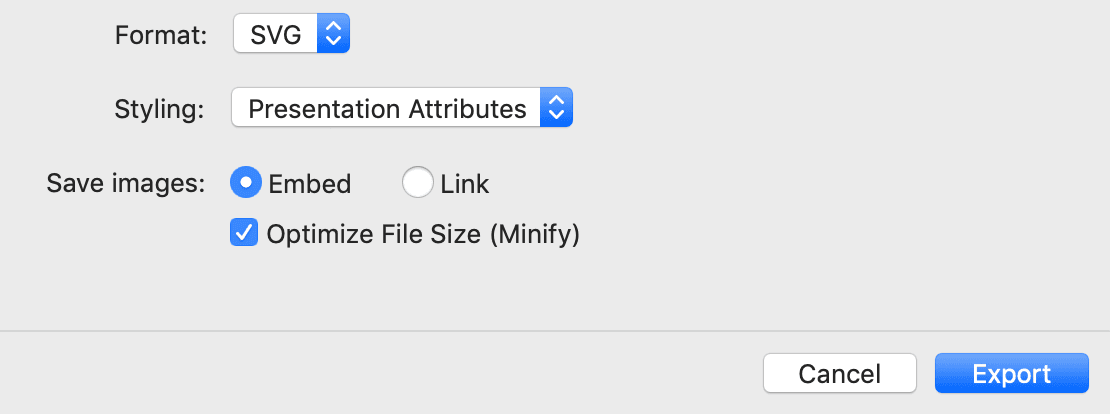
  12. Configure the export settings as follows (Mac users: If options aren't visible, click the Options button):

    • Set Format to SVG.
    • Set Styling to Presentation Attributes.

      NOTE: This setting affects how styling information is embedded in your SVG. Presentation Attributes applies styling directly to each element (fill, stroke, etc.), while Internal CSS creates class-based rules in an embedded style tag. Although Internal CSS can produce smaller files for complex graphics, Presentation Attributes typically yield smaller file sizes for simple graphics and offer greater flexibility when overriding styles with external CSS—making them the preferred choice for most web implementations.

    • Set Save images to Embed. While our current selection contains no raster images, this setting ensures any pixel-based elements are embedded directly into the SVG rather than saved as separate files—maintaining asset organization and reducing HTTP requests.
    • Check Optimize File Size (Minify). This removes unnecessary whitespace and comments, reducing file size for faster loading—essential for production websites.

  13. Click Export.

    TIP: When multiple elements are selected simultaneously, XD exports each as a separate file using their respective layer names—a powerful workflow for batch processing similar assets.

With vector assets handled, let's move on to photographic content, which requires different optimization strategies.

SVG Export Best Practices

Use Presentation Attributes instead of Internal CSS for better compatibility and easier CSS overrides. Always enable Optimize File Size for web-ready assets.

SVG Styling Options Comparison

FeaturePresentation AttributesInternal CSS
File SizeTypically smallerEfficient for complex graphics
CSS OverrideEasy to overrideMore difficult
CompatibilityBetter browser supportModern browsers only
Recommended: Use Presentation Attributes for most web projects

Exporting Pixel-Based Graphics As JPEG

  1. Select the hero image below the black navbar (the photo behind the New Autumn Attire text overlay).
  2. In the Layers panel, double–click on the feature photo name to edit it.
  3. Web filenames cannot contain spaces, which can cause server issues and broken links. Change the space to a hyphen, making it feature-photo, then hit Return (Mac) or Enter (Windows) to apply the change.
  4. Rather than selecting objects individually, you can use XD's batch export feature for efficiency. In the Layers panel, hover over feature-photo and click the Mark for Export mark for batch export icon to the right of the layer name.

    NOTE: XD automatically marks imported images for export, but this feature wasn't available in earlier versions, and users can disable it. Always verify the export status of your assets before proceeding.

  5. In the Layers panel, mark the following additional photos for batch export: women-photo and men-photo. This batch approach streamlines the export process when handling multiple similar assets.
  6. Now export all marked assets simultaneously. Go to File > Export > Batch.

    • Mac users: You should still be in the Web Assets folder.
    • Windows users: Export to should still be set to the Web Assets folder.
  7. Configure the export settings as follows (Mac users: If options aren't visible, click the Options button):

    Format: JPG
    Quality: 30%
    Export Size: Choose 2x from the menu (or type in 2).

    NOTE: For projects requiring both standard and high-resolution versions, choose Web from the Export Size menu to generate both 1x and 2x files automatically.

  8. Click Export.
  9. Let's examine the exported files. Switch to your system's file manager (the Finder on Mac or Windows Explorer on Windows).
  10. Navigate to Desktop > Class Files > Adobe XD Class > Pulse > Web Assets and observe the following:

    • The feature-photo was exported at 2x resolution, optimized for high-DPI displays.
    • The pulse-logo SVG renders at full resolution regardless of display density, eliminating the need for multiple size variants—one of the key advantages of vector formats.

JPEG Export Preparation

0/3

Exporting & JPEG Quality

Understanding the relationship between image resolution and compression is crucial for web optimization. A 2x image contains four times as many pixels as its 1x counterpart, but when displayed on a webpage, it occupies the same visual space. This means each pixel in the 2x image appears at half the size, making compression artifacts significantly less noticeable.

This characteristic allows—and requires—more aggressive compression for 2x images. You can use quality settings that would be unacceptable for 1x images while maintaining visual quality. Failing to increase compression for 2x images results in unnecessarily large files that slow down your website without providing visual benefits.

As high-resolution displays have become standard, many professionals now exclusively use 2x assets. However, if your project requires both resolutions, avoid XD's Web Export Size option, which applies identical quality settings to both versions. Instead, perform two separate exports:

  • Export at 1x size with higher quality (approximately 60%) for standard displays.
  • Export at 2x size with lower quality (approximately 30%) for high-resolution displays.

This approach delivers optimal compression for each resolution, balancing visual quality with performance.

Individual asset export covers most production needs, but there are times when you'll need to share complete design systems or create presentation materials.

2x Image Compression Strategy

2x images can be compressed more aggressively than 1x images because their pixels appear smaller on screen. This allows for significant file size savings without visible quality loss.

Optimal JPEG Quality Settings

Feature1x Images2x Images
Recommended Quality60%30%
File Size ImpactLarger files neededSmaller files acceptable
Visual QualityFull pixel densityHalf pixel density display
Recommended: Always export 1x and 2x at different quality levels for optimal performance

Exporting Artboards

While XD's online sharing capabilities (covered in the next exercise) provide the most efficient method for client and developer collaboration, certain workflows require exported files. Whether you're creating presentation materials, documentation, or working within organizations with strict file-sharing policies, artboard export provides essential flexibility.

  1. Keep the Web Assets folder open on your Desktop, but switch back to XD.
  2. Click on an empty area of the canvas to deselect all objects—this ensures you're exporting artboards rather than individual elements.
  3. Go to File > Export > All Artboards.

    • Mac users: You should still be in the Web Assets folder.
    • Windows users: Export to should still be set to the Web Assets folder.
  4. Configure the following settings (Mac users: If options aren't visible, click the Options button):

    Format: PNG
    Export Size: 2x

    NOTE: This exports only 2x versions of each artboard. For projects requiring both resolutions, set Export Size to Web to generate both 1x and 2x files.

  5. Click Export All Artboards.
  6. For presentation purposes or client reviews, a multi-page PDF often provides better organization than individual image files. Return to File > Export > All Artboards.

    • Mac users: You should still be in the Web Assets folder.
    • Windows users: Export to should still be set to the Web Assets folder.
  7. Update the settings as follows (Mac users: If options aren't visible, click the Options button):

    Format: PDF
    Save selected assets as: Single PDF file
  8. Click Export All Artboards.
  9. Return to the Web Assets folder on your Desktop.
  10. You'll find individual PNG files for each artboard, with filenames matching their artboard names from XD—maintaining clear organization between your design file and exported assets.
  11. Double–click on Pulse—Prototyping Done.pdf to open it.
  12. Browse through the PDF to see how each artboard appears as a separate page, creating a cohesive presentation document ideal for client reviews or stakeholder presentations.
  13. Close the PDF file.
  14. Switch back to XD.
  15. Save and close the current file to prepare for the final export scenario.

Our final export type addresses a common web requirement: images that need transparent backgrounds for flexible placement within layouts.

Artboard Export Methods

Pros
PNG export preserves exact design quality
PDF export creates multi-page documents for review
Batch export saves time for multiple artboards
Filenames automatically match artboard names
Cons
Large file sizes for high-resolution exports
PNG format doesn't compress as well as JPEG
PDF files may not reflect interactive elements

Exporting Pixel-Based Graphics As PNG

  1. In Adobe XD, go to File > Open from Your Computer or hit Cmd–Shift–O (Mac) or CTRL–Shift–O (Windows).
  2. Navigate into Desktop > Class Files > Adobe XD Class > Pulse and double–click on iTastify Design Done.sketch to open it.

    NOTE: This demonstrates XD's cross-platform compatibility—it can open Sketch files directly. While conversion accuracy has improved significantly since XD's introduction, always inspect imported files carefully to ensure design integrity, particularly for complex layouts or custom symbols.

  3. Locate the hand holding an iPhone near the top of the artboard. This image requires transparency to integrate seamlessly with the background pattern in the final webpage implementation. While JPEG excels at compressing photographic content, it doesn't support transparency—making PNG the necessary choice despite larger file sizes.

    The photo is nested within multiple group layers. Hold Cmd (Mac) or CTRL (Windows) and click directly on the hand holding the iPhone to select it through the group structure.

  4. With the photo selected, go to File > Export > Selected.
  5. Windows users only: next to Export to, click Change.
  6. Navigate to Desktop > Class Files > Adobe XD Class.
  7. Windows users only: click Select Folder.
  8. Configure the export settings as follows (Mac users: If options aren't visible, click the Options button):

    Format: PNG
    Export Size: Choose 2x from the menu (or type in 2).
  9. Click Export.
  10. You can close this file without saving changes, as we only needed it for the export demonstration.

    You've now mastered the three essential export workflows in Adobe XD: SVG for scalable vector graphics, JPEG for photographic content, and PNG for images requiring transparency. Understanding when and how to use each format ensures your designs translate effectively to web platforms while maintaining optimal performance.

Cross-Platform Compatibility

Adobe XD can open Sketch files directly, making it easy to work with designs from different platforms. Always inspect converted files carefully to ensure accuracy.

When to Choose PNG Format

Transparency Required

Images that need to overlay other elements or backgrounds require PNG's alpha channel support.

Sharp Graphics

Screenshots, UI elements, and graphics with hard edges benefit from PNG's lossless compression.

Key Takeaways

1SVG format is ideal for vector graphics like logos because it maintains quality at any size and produces small file sizes
2Layer names in Adobe XD become the exported filenames, so use web-friendly naming conventions without spaces
3JPEG quality can be set lower for 2x images (30%) compared to 1x images (60%) due to pixel density differences
4PNG format is necessary when transparency is required, as JPEG does not support alpha channels
5Use Presentation Attributes for SVG exports to ensure better CSS compatibility and easier style overrides
6Batch export functionality allows multiple marked assets to be exported simultaneously with consistent settings
7Adobe XD can open and convert Sketch files, though careful inspection is recommended for accuracy
8Export size settings of 2x provide high-resolution assets suitable for modern high-DPI displays

RELATED ARTICLES