March 22, 2026Dan Rodney/7 min read

What’s New in Photoshop CC 2019?

Master the Latest Creative Tools and Features

Major Interface Change Alert

Photoshop CC 2019 fundamentally changed how transformations work - proportional scaling is now the default behavior without holding Shift, reversing decades of user muscle memory.

Transforming Objects: The Great Shift Key Reversal

Adobe fundamentally changed how transformations work in Photoshop CC 2019, and it caught many professionals off guard. For decades, holding Shift while transforming maintained proportional scaling—a muscle memory ingrained in millions of users. Now, proportional transformation is the default behavior, and holding Shift actually allows non-proportional scaling.

This reversal created significant workflow disruption, particularly because Adobe implemented this change exclusively in Photoshop while leaving the traditional behavior intact in InDesign and Illustrator. For professionals working across the Creative Suite, this inconsistency remains frustrating even today. Fortunately, you can restore the legacy behavior and maintain consistency across your workflow.

In Photoshop version 20.0.5 (June 2019 release) and later:

  1. Navigate to Photoshop > Preferences > General (Mac) or Edit > Preferences > General (Windows).
  2. Enable Use Legacy Free Transform.
  3. Restart Photoshop to apply the changes.

In Photoshop 20.0–20.0.4:

Adobe significantly simplified this process in version 20.0.5, so updating is highly recommended. However, if you're working with an earlier version, you'll need to manually configure the behavior through a text file:

  1. Quit Photoshop completely.
  2. Create a new plain text file using TextEdit (Mac) or Notepad (Windows).
  3. Enter the following command exactly as shown:
    TransformProportionalScale 0
  4. Follow the platform-specific instructions below:
    Mac users:
    1. In TextEdit, choose Format > Make Plain Text to ensure proper formatting.
    2. Save the file as PSUserConfig.txt to your desktop.
    3. Select PSUserConfig.txt and press Cmd–C to copy.
    4. In Finder, choose Go > Go To Folder.
    5. Enter ~/Library/Preferences/Adobe Photoshop CC 2019 Settings/ and click Go.
    6. Press Cmd–V to paste the configuration file into the settings folder.
    Windows users:
    1. Save the file as PSUserConfig.txt directly to your Photoshop settings folder: [Installation Drive]:\Users\[User Name]\AppData\Roaming\Adobe\Adobe Photoshop CC 2019\Adobe Photoshop CC 2019 Settings\
  5. Restart Photoshop. The Shift key behavior will now match pre-2019 versions.

Reverting to Legacy Transform (20.0-20.0.4)

1

Create Text File

Create a plain text file and type 'TransformProportionalScale 0'

2

Save as PSUserConfig.txt

Save the file with exact filename PSUserConfig.txt

3

Place in Settings Folder

Copy file to Adobe Photoshop CC 2019 Settings directory

4

Restart Application

Restart Photoshop to apply the configuration changes

New Frame Tool: InDesign-Style Layout Capabilities

The Frame tool represents Adobe's effort to bring InDesign's sophisticated layout capabilities into Photoshop. This tool streamlines the process of creating image placeholders and managing visual content within defined boundaries—particularly valuable for web designers, social media managers, and anyone creating template-based designs.

  1. Select the Frame tool from the Tools panel (or press K).
  2. Choose Rectangle or Oval from the Options bar at the top of your workspace.
  3. Draw your frame anywhere in the document.
  4. Drag images directly from your desktop, Adobe Libraries, or Creative Cloud assets onto the frame to automatically place and crop them.

For more complex shapes, you can convert existing elements: Ctrl–Click (Mac) or Right–Click (Windows) on any shape layer or text layer name in the Layers panel and select Convert To Frame. This technique is particularly useful for creating custom image masks or branded content templates.

Additional frame creation methods include:

  • Select an existing image layer, then draw a frame over it to crop non-destructively.
  • Drag layers directly onto existing frame layers in the Layers panel for quick content swapping.

Note: Images placed into frames automatically convert to Smart Objects, preserving editability and allowing for non-destructive scaling and filtering.

Frame Tool Applications

Layout Design

Create placeholder frames for images similar to InDesign workflows. Perfect for mockups and template creation.

Image Cropping

Crop existing images into specific shapes like rectangles and ovals with non-destructive editing capabilities.

Smart Object Integration

Automatically converts placed images into Smart Objects, preserving original quality and enabling future adjustments.

Enhanced Content-Aware Fill: Precision Object Removal

While the traditional Edit > Fill with Content-Aware remains available for quick fixes, the new dedicated Edit > Content-Aware Fill workspace provides professional-level control over object removal and image reconstruction.

This enhanced workspace includes sampling area controls, color adaptation settings, and real-time preview capabilities that dramatically improve results for complex removals. The interface allows you to specify exactly which areas Photoshop should sample from, preventing common issues like unwanted pattern repetition or color mismatches. For detailed guidance on leveraging these advanced controls, consult Adobe's comprehensive guide: Remove objects from your photos with Content-Aware Fill.

Distribute Spacing: Professional Layout Control

A long-requested feature finally arrived: the ability to distribute spacing evenly between multiple selected layers. This capability brings Photoshop closer to professional layout applications and significantly streamlines interface design and composition work.

Photoshopcc2019 Distribute Spacing

This feature is particularly valuable for UI designers creating button arrays, photographers organizing gallery layouts, and graphic designers building grid-based compositions.

When you have multiple layers selected, you can finally distribute the space evenly between them!

A long-requested feature that brings Photoshop closer to layout application capabilities

Double-Click Text Editing: Streamlined Typography Workflow

A simple but impactful improvement: when using the Move tool, double-clicking any text element immediately activates editing mode without requiring a tool switch. This enhancement eliminates countless minor workflow interruptions, particularly beneficial for designers making frequent copy adjustments or clients reviewing text-heavy compositions.

Live Blending Mode Previews: Real-Time Visual Feedback

Blending mode selection becomes significantly more intuitive with live previews. As you hover over or scroll through blending modes in the Layers panel, effects render immediately on the canvas. This real-time feedback eliminates guesswork and accelerates the creative exploration process, particularly valuable when working with complex layer compositions or experimental effects.

Scalable User Interface: Accessibility and High-DPI Support

As display technology has evolved toward higher pixel densities and professionals increasingly work on varied screen sizes, interface scalability has become essential. Photoshop's enhanced UI scaling options address both accessibility concerns and the practical challenges of working across different display configurations.

  1. Access Photoshop menu (Mac) or Edit menu (Windows), then select Preferences > Interface.
  2. Enable Scale UI to Font.
  3. Adjust UI Font Size to your preferred readability level.
  4. Restart Photoshop to apply the scaling changes.

This feature particularly benefits professionals working on high-resolution displays, those with visual accessibility needs, or anyone sharing workstations with team members who have different interface preferences.

Mathematical Calculations in Input Fields: Enhanced Precision

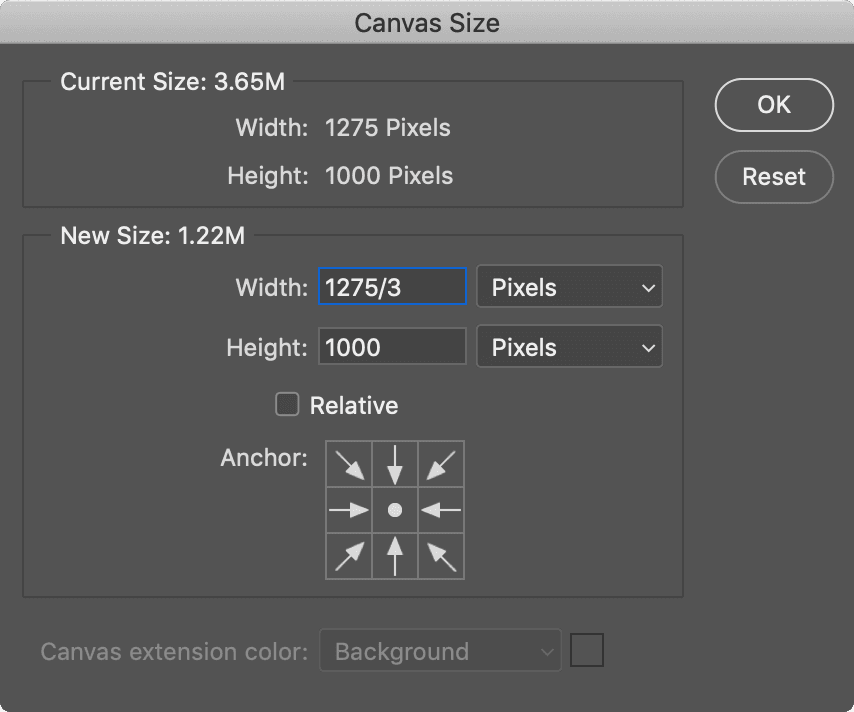
Following the lead of other Creative Suite applications, Photoshop now accepts basic mathematical expressions in numerical input fields. Enter calculations like 1275/3 (equals 425) directly into dimension, positioning, or effect value fields. This capability proves invaluable for precise measurements, proportional scaling calculations, and maintaining mathematical relationships within designs.

Photoshopcc2019 Math

This feature streamlines workflows requiring precise calculations, such as grid-based layouts, proportional scaling, or converting between measurement units.

Automatic Lorem Ipsum: Rapid Prototyping Support

New text layers automatically populate with lorem ipsum placeholder text, accelerating the mockup and prototyping process. Simply press Delete to clear the placeholder when ready to add actual content. This feature aligns Photoshop with modern design tool conventions and supports rapid iteration workflows.

To disable this behavior:

  1. Navigate to Photoshop menu (Mac) or Edit menu (Windows) and choose Preferences > Type.
  2. Uncheck Fill new type layers with placeholder text.
Automatic Placeholder Text

New text layers now automatically fill with lorem ipsum placeholder text. Disable this in Preferences > Type if you prefer empty text layers.

Symmetrical Painting: Advanced Creative Capabilities

The symmetrical painting feature transforms Photoshop into a powerful tool for creating mandalas, patterns, and symmetrical artwork. This capability opens new creative possibilities for digital artists, pattern designers, and anyone exploring geometric or organic symmetrical compositions.

Photoshopcc2019 Mandala

To activate symmetrical painting:

  1. Select any painting tool, then click the butterfly icon in the Options bar and choose your desired symmetry type (vertical, horizontal, dual axis, diagonal, wavy, circle, spiral, parallel lines, radial, or mandala).
  2. Position and scale the symmetry guide overlay. Press Return (Mac) or Enter (Windows) to confirm the guide placement.
  3. Begin painting—your brush strokes automatically replicate across all symmetrical sections in real-time.

This feature supports various symmetry types beyond simple mirroring, enabling complex pattern creation and geometric artwork that would require significant manual effort using traditional techniques.

Symmetrical Painting Use Cases

Mandala Creation

Perfect for creating intricate mandala designs with automatic symmetrical repetition. Ideal for decorative and spiritual artwork.

Pattern Design

Generate complex symmetrical patterns for textiles, wallpapers, and graphic design elements with precise mathematical accuracy.

Character Design

Create symmetrical character faces and designs efficiently, ensuring perfect bilateral symmetry in digital illustrations.

Master Adobe Photoshop & Professional Design

These CC 2019 enhancements represent significant workflow improvements that continue to benefit professionals today. To fully leverage Photoshop's evolving capabilities, consider structured learning approaches that cover both fundamental techniques and advanced features.

Noble Desktop offers comprehensive hands-on training through Adobe Photoshop classes and graphic design courses. Each program includes detailed workbooks and real-world project experience designed to build practical expertise with current industry tools and techniques.

For those pursuing graphic design professionally, the licensed Graphic Design Certificate Program provides comprehensive training across essential design applications, design theory fundamentals, and portfolio development strategies necessary for career advancement in today's competitive creative marketplace.

Key Takeaways

1Photoshop CC 2019 reversed the traditional Shift-key behavior for proportional transformations, now making proportional scaling the default without holding Shift
2The new Frame Tool brings InDesign-like frame functionality to Photoshop, automatically converting placed images to Smart Objects for non-destructive editing
3Content-Aware Fill now features a dedicated workspace with advanced controls, moving beyond the basic fill functionality for more precise object removal
4Multiple workflow improvements include distribute spacing for layers, double-click text editing with Move tool, and live previews for blending modes
5Interface accessibility is enhanced with scalable UI options, helping users with visibility issues customize the interface size to their needs
6Mathematical calculations can now be performed directly in number fields, bringing parity with other Adobe applications like InDesign
7Automatic lorem ipsum text generation for new text layers streamlines the design process, though it can be disabled in preferences
8Symmetrical painting tools enable creation of complex mandala patterns and symmetrical artwork with built-in mathematical precision and guide systems

RELATED ARTICLES