March 22, 2026Noble Desktop/7 min read

The Best Text Editor

Comprehensive comparison of popular text editors for developers

Editor Selection Guide

Choosing the right text editor is crucial for developer productivity. This comparison examines Atom and Sublime Text across interface design, customization options, and core features.

Let’s start with the similarities

Both Atom and Sublime Text share fundamental strengths that have made them enduring choices among developers. Each supports multi-language programming with robust syntax highlighting, auto-completion, and customizable keyboard shortcuts that significantly accelerate coding workflows. Both editors offer extensive plugin ecosystems that allow developers to tailor their environment to specific needs, from advanced debugging tools to specialized language support.

From a cost perspective, both remain accessible options: Sublime Text operates on an honor-system model with an unlimited evaluation period (though a $99 license is required for continued commercial use), while Atom was completely free during its active development. Both editors provide deep customization capabilities, allowing developers to modify everything from color schemes to core functionality through packages and configuration files.

Shared Core Features

Multi-Language Support

Both editors support programming in a variety of languages with syntax highlighting and language-specific features.

Time-Saving Tools

Pre-populated fields and keyboard shortcuts enhance coding efficiency and reduce repetitive tasks.

Extensible Platform

Both offer plugins and packages to extend functionality and customize the development experience.

How do the interfaces compare?

The interface design philosophy differs significantly between these editors, reflecting their respective development approaches and target audiences.

Interface Feature Comparison

FeatureAtomSublime Text
Intuitive DesignHighModerate
Drag and DropYesNo
Built-in GitYesVia Packages
Terminal IntegrationBuilt-inBuilt-in
Learning CurveMinimalModerate
Recommended: Atom provides a more intuitive interface experience, while Sublime requires some learning but offers robust functionality.

Atom’s Interface

Atom Interface

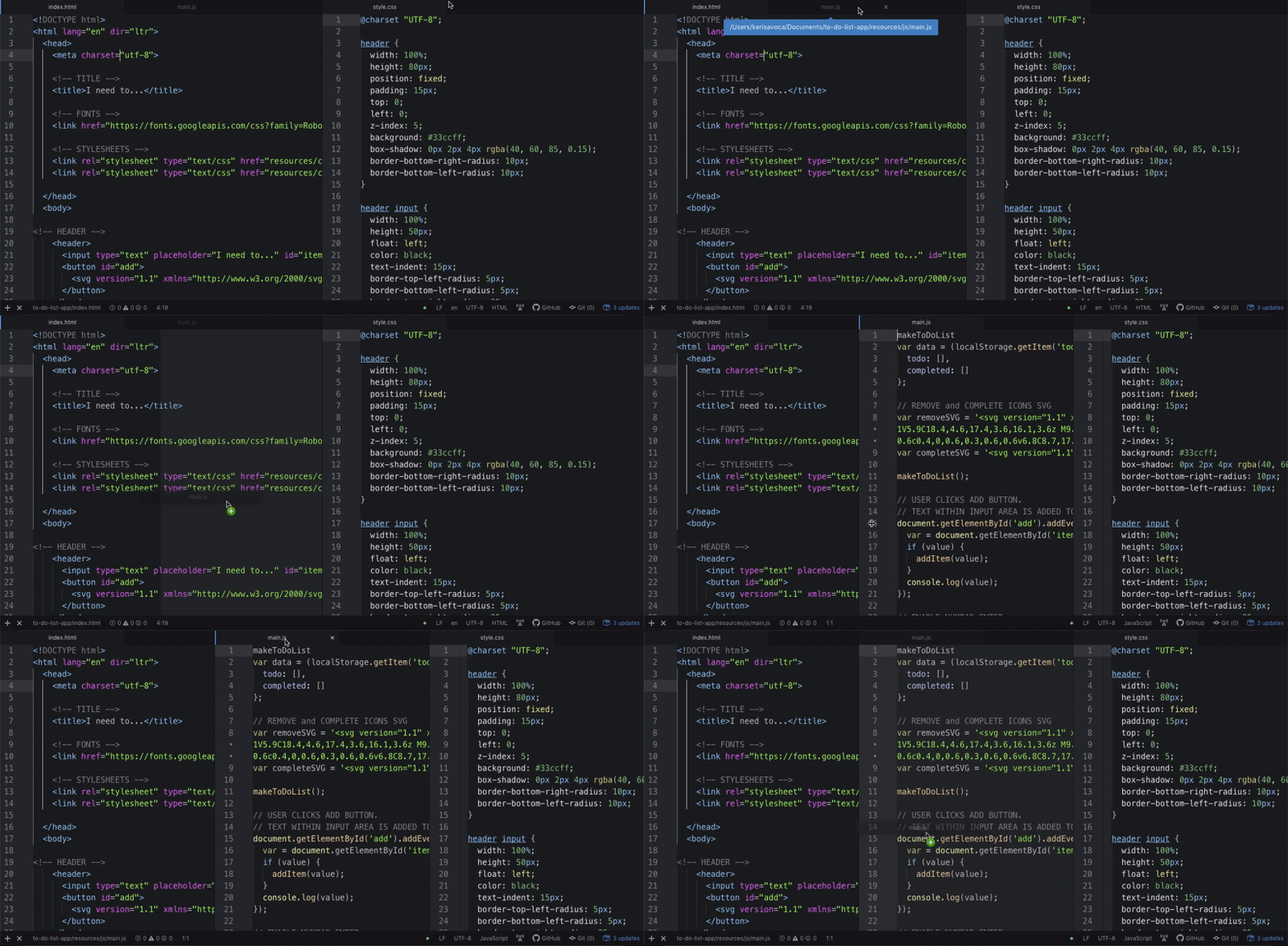
Atom pioneered a modern, web-based interface built on Electron technology. Its intuitive design allows developers to effortlessly manage multiple files through a flexible tab system with drag-and-drop functionality. The interface feels familiar to users accustomed to modern web applications, with smooth animations and responsive layout adjustments.

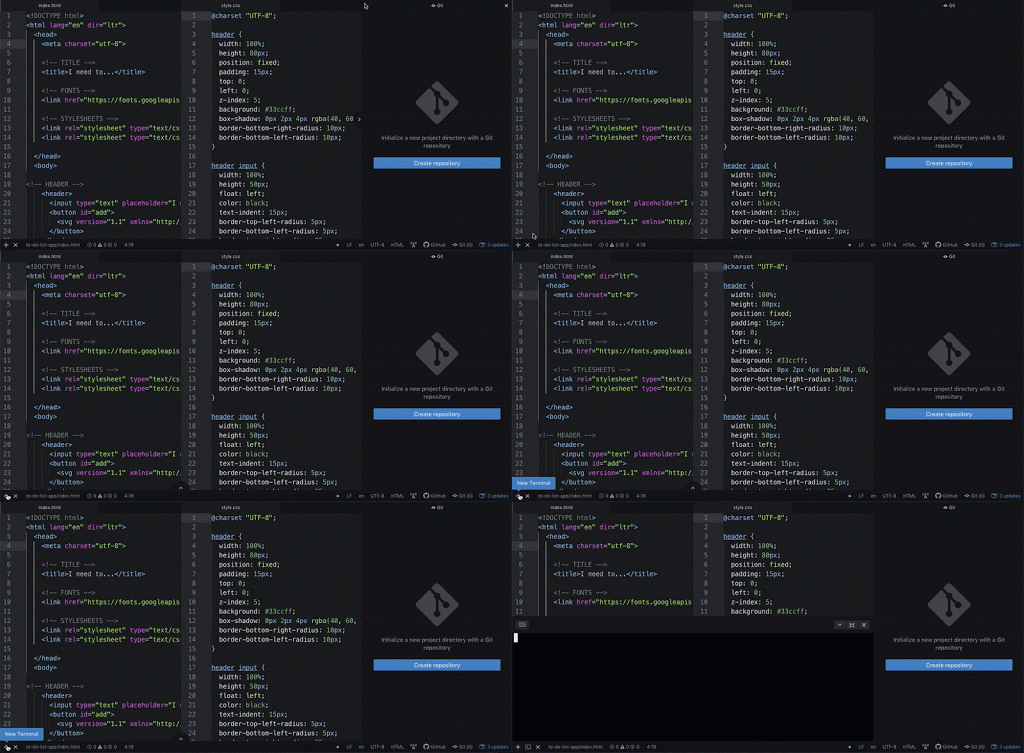
The integrated Git functionality and terminal access represent Atom's philosophy of unified workflow management. This integration eliminates the context switching that often disrupts coding flow.

Atom's interface with GitHib and Terminal

Rather than juggling separate terminal windows, Git clients, and browser tabs for repository management, developers can execute commits, pushes, and branch operations directly within their coding environment. This streamlined approach reduces cognitive overhead and maintains focus on the development task at hand.

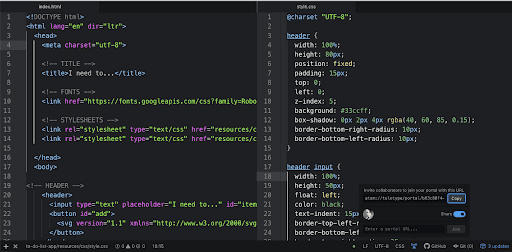
Atom's standout feature was Teletype, which introduced real-time collaborative editing years before it became commonplace. This feature transformed pair programming and remote collaboration workflows.

Using Teletype with Atom's Interface

The implementation was remarkably simple: generate a share URL, have collaborators enter it in their Teletype panel, and begin simultaneous editing with live cursor tracking and change synchronization. This capability positioned Atom ahead of its time, anticipating the remote-first development practices that became essential during the 2020s.

Atom Interface Analysis

Pros
Sleek and adaptable design
Multiple file viewing with drag functionality
Integrated Git and Terminal access
Real-time collaboration via Teletype feature
No need for external tools
Cons
Occasional startup lag
Performance issues with Teletype feature
Resource intensive for large files

Sublime’s Interface

Sublime Interface

Sublime Text takes a more traditional approach to editor design, prioritizing performance and efficiency over visual modernism. The interface feels purposefully minimal, dedicating maximum screen real estate to code while keeping essential tools accessible. Built as a native application rather than web technology, Sublime Text delivers consistently responsive performance regardless of project size.

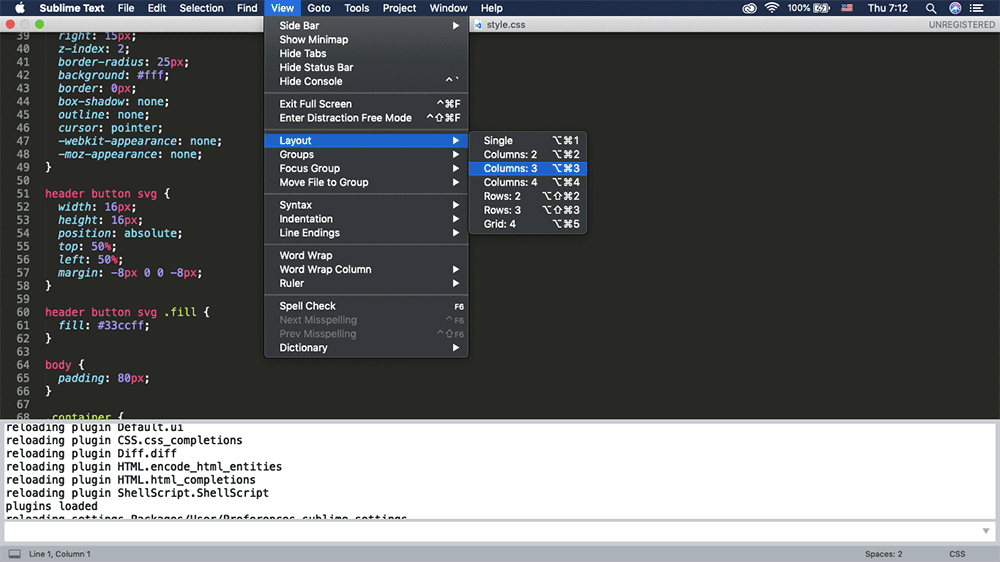
However, this performance focus comes with interface trade-offs. Multi-pane layouts require manual file arrangement—creating a three-column layout won't automatically distribute open files across columns, and drag-and-drop functionality remains limited compared to more modern editors.

Drag and Drop does not work in Sublime's three column viewer

Sublime Text rewards investment in learning its keyboard-driven workflow. While this creates an initial learning curve, experienced users often achieve faster navigation and file management than mouse-dependent interfaces allow. The editor's command palette and "Goto Anything" functionality become second nature with practice, enabling rapid file switching and symbol navigation that can outpace visual browsing methods.

Sublime's Strength

While Sublime has a steeper learning curve, its ability to handle enormous files and provide consistently stable performance makes it a preferred choice for enterprise development.

How do the packages and themes compare?

Both editors built thriving ecosystems around extensibility, though they approached package management and discovery differently.

Customization Capabilities

Package Libraries

Both editors feature massive libraries of packages including spell checkers, code cleaners, and linters for enhanced functionality.

Theme Variety

Extensive theme collections allow developers to customize the look and feel according to personal preferences and workflows.

Atom’s Packages and Themes

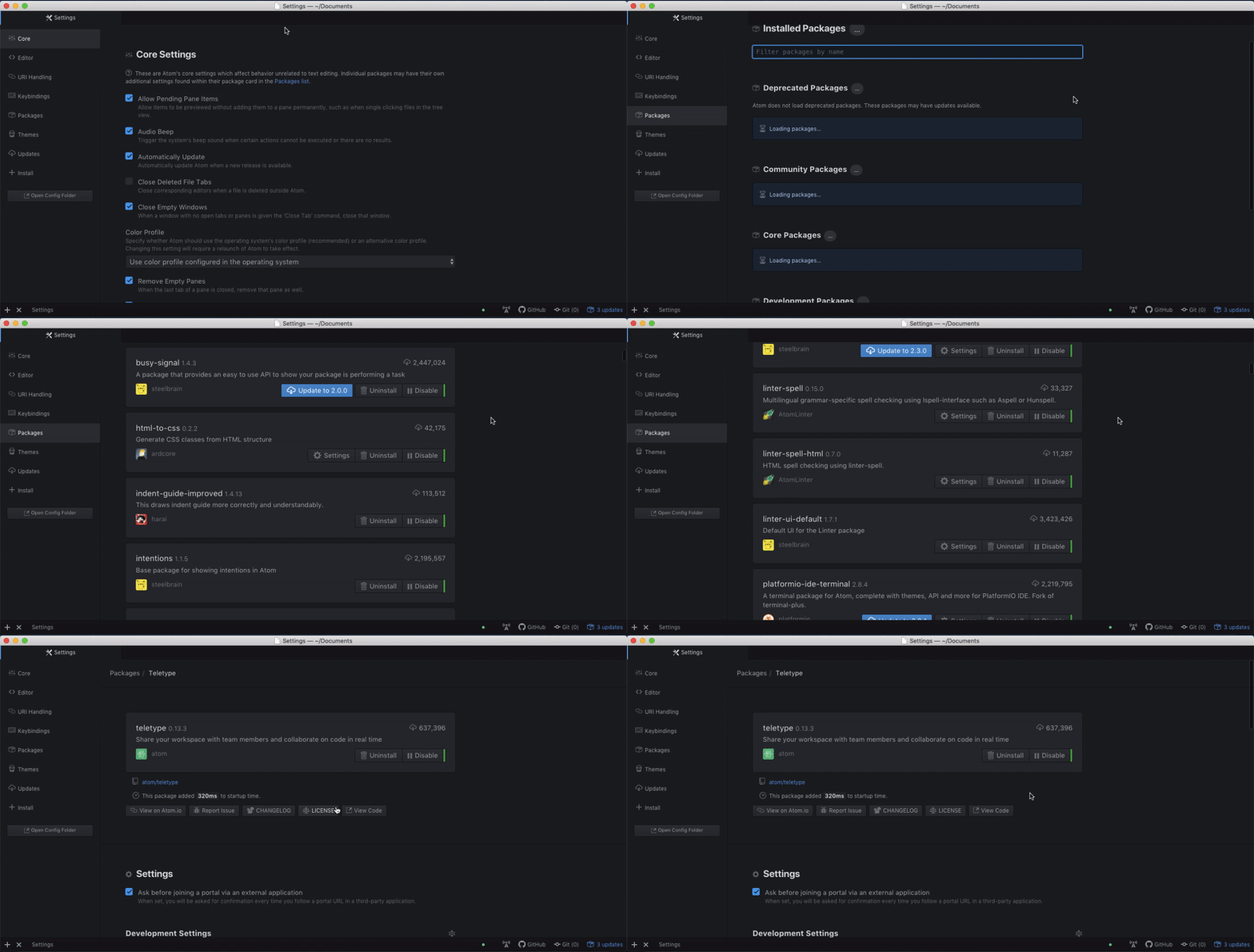
Atom's package ecosystem was one of its strongest assets, featuring thousands of community-contributed extensions that transformed the editor's capabilities. The built-in package manager provided a user-friendly interface for discovering and installing extensions.

Atom's Library of Packages and Themes

The package library included essential development tools: sophisticated linters for code quality enforcement, formatters for consistent styling, language servers for advanced IntelliSense-style features, and productivity enhancers like advanced file search and project management tools. Popular packages like "atom-beautify" and "linter" became nearly universal among Atom users, demonstrating the community's ability to identify and solve common development pain points.

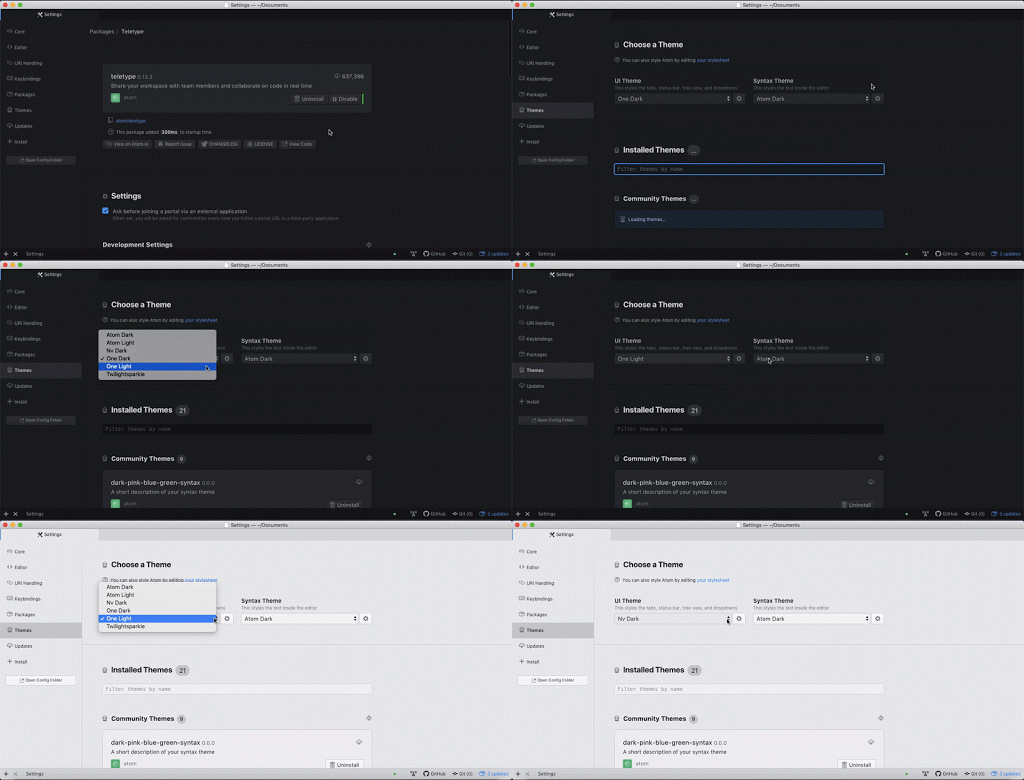
Theme customization in Atom was particularly robust, supporting both UI themes (affecting the editor chrome) and syntax themes (controlling code highlighting). The separation allowed for granular visual customization.

Choosing a Theme in Atom

Sublime’s Packages and Themes

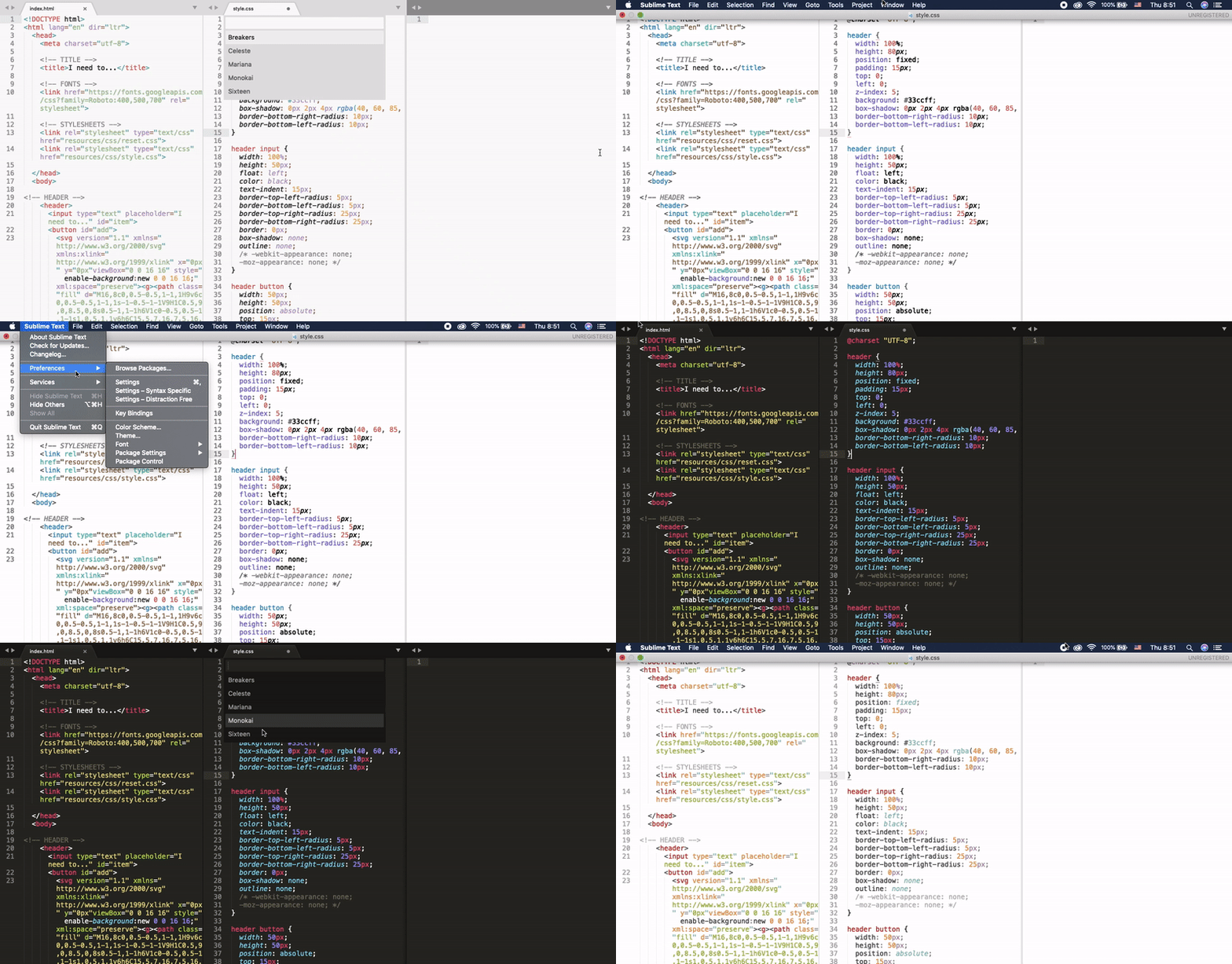
Sublime Text's Package Control system, while requiring initial manual installation, provided access to a mature ecosystem of high-quality extensions. The community's focus on performance and reliability resulted in packages that maintained Sublime's responsive feel.

Sublime's Packages and Themes

Package discovery and management required more deliberate navigation through menus and command palettes, reflecting Sublime's keyboard-centric philosophy. While this approach demanded more initial learning, it aligned with experienced developers' preferences for efficient, repeatable workflows. Popular packages like "Emmet" for HTML/CSS acceleration and "GitGutter" for inline Git status became essential tools that demonstrated the platform's extensibility.

The additional complexity in package management proved inconsequential for most users, who typically configure their environment once and rely on that setup for extended periods. Sublime's stability advantage became particularly apparent with large files and complex projects, where Atom's Electron-based architecture sometimes struggled under heavy loads.

Most people install packages and themes, set them, and forget them. You won't need to change your color scheme on a regular basis.
The slightly more complex navigation in Sublime for packages and themes becomes less significant given the infrequent nature of these changes.

A few important differences:

  1. Git Integration Philosophy: Atom treated Git as a first-class citizen with native integration for repository creation, branch management, and push operations directly within the editor interface. Sublime Text maintained a more modular approach, relying on packages like "GitGutter" and "Sublime Merge" integration for version control functionality, which some developers preferred for its flexibility and performance.
  2. Collaboration Features: Atom's Teletype represented a pioneering approach to real-time collaborative editing that predated similar features in VS Code Live Share and other modern solutions. Sublime Text's collaboration capabilities remained package-dependent, though many developers preferred external tools for pair programming.
  3. Market Maturity and Adoption: Sublime Text enjoyed a significant head start, building a substantial user base and ecosystem before Atom's 2014 release. This maturity translated to more stable packages, extensive documentation, and established best practices within the community.
  4. Performance Characteristics: Sublime Text's native architecture provided superior performance with large files (100MB+) and complex projects, while Atom's Electron foundation occasionally exhibited startup lag and memory consumption issues, particularly when heavily customized with packages.
  5. Development Philosophy: Atom's open-source nature fostered rapid innovation and community contribution, leading to frequent updates and new features. Sublime Text's closed-source model prioritized stability and performance optimization, resulting in less frequent but more thoroughly tested releases. However, it's important to note that GitHub sunset Atom in December 2022, ending active development and support.

Key Differentiators

FeatureAtomSublime Text
GitHub IntegrationBuilt-inPackage Required
Real-time CollaborationTeletype FeatureThird-party Packages
User Base SizeGrowingEstablished
Large File PerformanceModerateSuperior
Source CodeOpen SourceProprietary
Recommended: Choose Atom for GitHub integration and collaboration; choose Sublime for performance with large files.

So, what’s the verdict?

The editor landscape has evolved significantly since Atom and Sublime Text's peak competition. While both editors served their communities well, the reality in 2026 is that Atom is no longer actively maintained following GitHub's decision to sunset the project in December 2022. Many former Atom users have migrated to Visual Studio Code, which inherited many of Atom's collaborative and integration features while offering better performance.

For educational environments, instructor-student editor alignment remains valuable for reducing friction during live coding sessions. Consistent syntax highlighting and layout ensure that code differences are immediately apparent rather than being masked by visual discrepancies. This consideration often outweighs personal preference in classroom settings.

The fundamental truth remains that editor choice rarely impacts final output quality. Whether building responsive web applications in our web development classes and bootcamps or developing full-stack applications in our Full Stack Web Development Certificate Program, the code quality, architecture decisions, and problem-solving approach matter far more than the tool used to write the code. Professional developers often use multiple editors depending on context—a lightweight editor for quick edits, an IDE for complex debugging, and specialized tools for specific languages or frameworks.

In our coding classes, we encourage students to experiment with different editors to discover their personal preferences while focusing on developing strong programming fundamentals that transcend any particular tool.

The Bottom Line

There is no clear winner between text editors. The choice often depends on personal preference, team consistency, and specific project requirements.

Editor Selection Checklist

0/4

Key Takeaways

1Both Atom and Sublime Text offer comprehensive programming support across multiple languages with extensive customization options
2Atom provides a more intuitive interface with superior drag-and-drop functionality and built-in Git integration
3Sublime Text excels in performance when handling large files and offers consistently stable coding environments
4Atom's Teletype feature enables real-time collaboration, setting it apart from Sublime's package-dependent solutions
5Sublime Text has an established user base and longer market presence, while Atom offers open-source transparency
6The choice between editors often depends on team consistency and instructor preferences in educational settings
7Both editors support extensive package libraries and themes, though navigation differs between platforms
8Final project quality remains unaffected by editor choice, making personal preference the primary deciding factor

RELATED ARTICLES