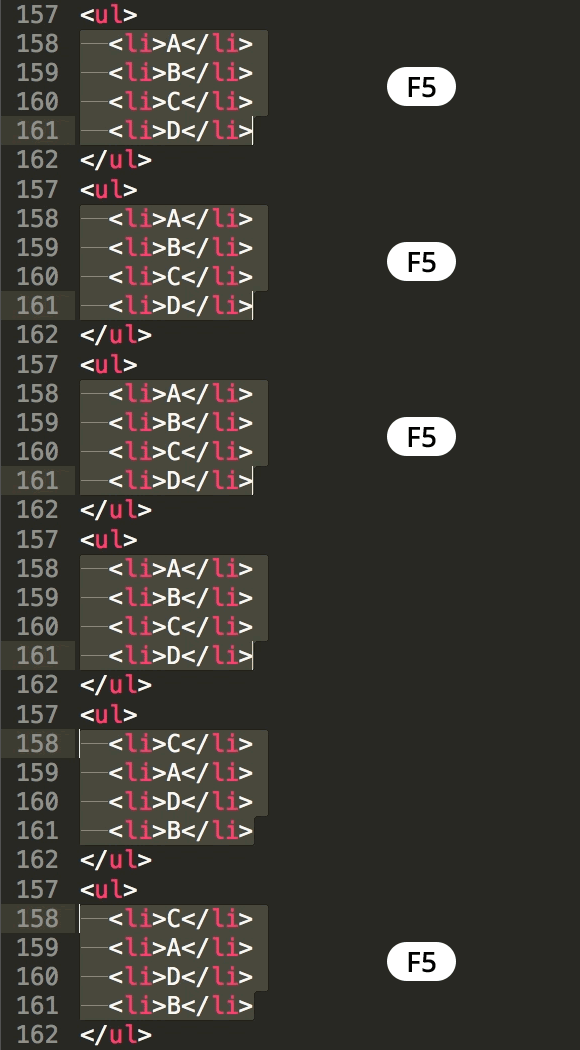
Sort Lines in Sublime Text
Master Text Manipulation in Sublime Text Editor
Sorting lines is a fundamental text manipulation technique that can save developers significant time when organizing code, data, or configuration files.
Common Use Cases for Line Sorting
CSS Properties
Alphabetizing CSS properties within selectors improves code readability and maintainability. Many development teams enforce this as a coding standard.
Import Statements
Organizing import statements alphabetically helps prevent duplicates and makes dependencies easier to scan. Essential for clean code organization.
Configuration Files
Sorting configuration parameters or environment variables makes files more organized and reduces merge conflicts in team environments.
Key Takeaways
RELATED ARTICLES
Quickly Write Nested Tags in Sublime Text
Use > (greater-than symbol) to quickly write nested tags. For example, if you type article>h1and hit Tab, Emmet expands article>h1 to <article>...
Quickly Delete a Word in Any Text Editor
Hit Option–Delete (Mac) or Ctrl–Backspace (Windows) to delete the word to the left of the cursor. This is an operating system feature so it should work in any...
Proper Character Encoding with Unicode
To ensure special characters display properly on your website, do one of the following: Add <meta charset="UTF-8"> into the <head> of every HTML page....