March 22, 2026Noble Desktop/1 min read

Select Next or Previous Item in Sublime Text

Master efficient text navigation in Sublime Text

Prerequisite Required

This guide requires Emmet to be installed in Sublime Text. Make sure you have it set up before following these steps.

Navigation Benefits

Improved Productivity

Quickly move through similar elements without manual cursor placement. Reduces time spent on repetitive navigation tasks.

Enhanced Workflow

Seamlessly navigate between related code elements. Maintains coding flow and reduces context switching overhead.

Better Code Editing

Perfect for editing HTML structures, CSS properties, or similar code patterns. Enables rapid iteration through elements.

Before You Begin

0/4

Navigation Process

1

Position Your Cursor

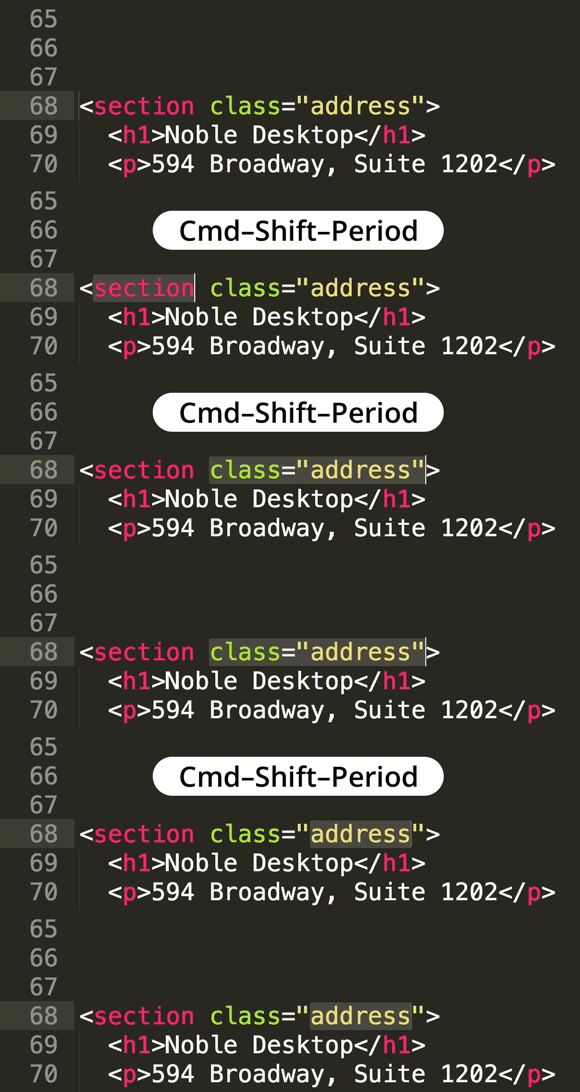
Place the cursor on the element you want to start navigating from, such as an HTML tag or CSS property.

2

Use Keyboard Shortcuts

Apply the appropriate Emmet keyboard shortcuts to move to the next or previous similar item in your code.

3

Continue Navigation

Repeat the shortcuts to move through multiple similar elements efficiently throughout your document.

Note: This coding tip requires Emmet to be installed in Sublime Text. If you haven't already set up this essential productivity extension, download our comprehensive Sublime Text Enhancements Installation Guide for step-by-step instructions. Emmet remains one of the most valuable tools for accelerating HTML and CSS development workflows in 2026.

Key Takeaways

1Emmet installation is required in Sublime Text for this navigation functionality to work properly
2Navigation shortcuts enable quick movement between similar code elements without manual cursor placement
3This feature is particularly useful for HTML structures, CSS properties, and repetitive code patterns
4Proper cursor positioning on the target element is essential before using navigation shortcuts
5The navigation functionality maintains coding workflow by reducing context switching and manual scrolling
6Practice with simple code structures first to master the navigation technique
7This method significantly improves productivity when editing structured documents with similar elements

RELATED ARTICLES