March 22, 2026Noble Desktop/1 min read

Quickly Start an HTML File in Sublime Text

Master HTML workflow efficiency with Sublime Text

Prerequisites Required

This tutorial requires Emmet to be installed in Sublime Text. Make sure you have completed the installation before proceeding with these HTML workflow tips.

Essential Sublime Text Resources

Emmet Integration

Powerful toolkit for HTML and CSS abbreviations. Essential for rapid HTML file creation and markup expansion.

Installation Guide

Step-by-step instructions for setting up Sublime Text enhancements. Includes configuration tips for optimal development workflow.

Advanced Coding Tips

Collection of productivity techniques for Sublime Text. Covers shortcuts, snippets, and automation features for developers.

Getting Started with HTML in Sublime Text

1

Install Emmet Package

Download and install Emmet through Package Control or manual installation. Verify installation through the Tools menu.

2

Create New HTML File

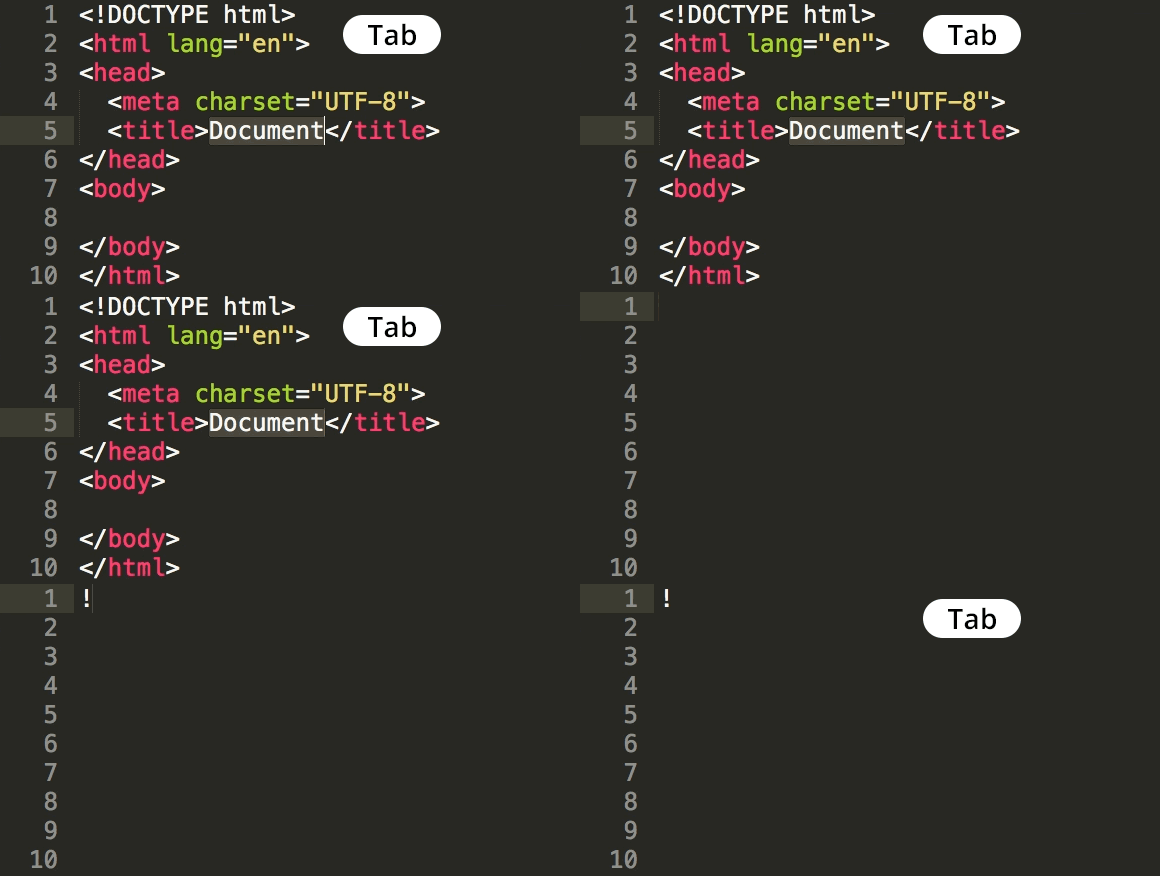
Open Sublime Text and create a new file. Save with .html extension to enable HTML syntax highlighting and Emmet functionality.

3

Use HTML Abbreviations

Type HTML abbreviations and use Tab key to expand. Start with basic structures like html:5 for complete HTML5 boilerplate.

Prerequisites: This coding tip requires Emmet to be installed in Sublime Text. If you haven't already set up this powerful toolkit, download our comprehensive Sublime Text Enhancements Installation Guide for step-by-step instructions that will have you up and running in minutes.

Ready to supercharge your development workflow? Explore our complete collection of Sublime Text Coding Tips designed to help you code faster and more efficiently. These battle-tested techniques are taught in our hands-on coding classes and bootcamps in NYC, where thousands of developers have accelerated their careers through practical, industry-relevant training.

Master these skills with Noble Desktop’s professional training programs:

Key Takeaways

1Emmet installation is required before implementing HTML workflow shortcuts in Sublime Text
2Noble Desktop offers comprehensive web development certificate programs in NYC with hands-on instruction
3Front-end and full-stack development certificates provide different levels of technical depth and career preparation
4Specialized courses in coding efficiency tools like Emmet and Sass can significantly improve development productivity
5Proper setup of development tools and editor enhancements is crucial for efficient HTML workflow
6Formal training programs provide structured learning paths with expert guidance and portfolio development opportunities
7Installation guides and coding tips resources support self-directed learning alongside formal instruction
8Web development bootcamps and certificate programs offer intensive training for career transition or skill advancement

RELATED ARTICLES