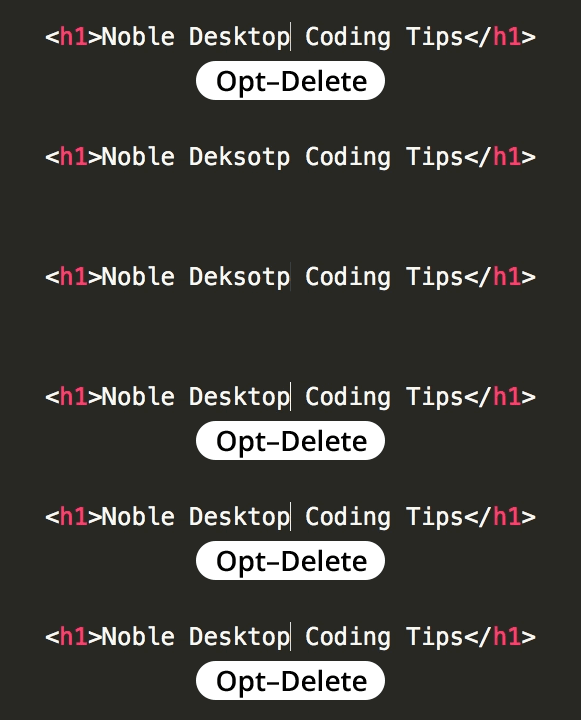
Quickly Delete a Word
Master Essential Text Editing Shortcuts for Efficiency
Mastering word deletion shortcuts can significantly improve your typing efficiency and reduce editing time across all applications.
Common Word Deletion Scenarios
Text Editors
Code editors and IDEs where precise text manipulation is crucial for programming efficiency. Quick word deletion helps maintain coding flow.
Document Writing
Word processors and note-taking apps where content editing is frequent. Keyboard shortcuts reduce reliance on mouse interactions.
Web Forms
Online forms and text fields where quick corrections improve user experience. Universal shortcuts work across different browsers.
Deletion Methods Comparison
| Feature | Character by Character | Word by Word |
|---|---|---|
| Speed | Slow | Fast |
| Precision | High | Medium |
| Use Case | Fine editing | Bulk deletion |
| Cognitive Load | Low | Medium |
Platform-Specific Word Deletion Steps
Identify Your Platform
Determine whether you're using Windows, macOS, or Linux as keyboard shortcuts vary between operating systems
Position Cursor
Place your text cursor at the beginning or end of the word you want to delete for optimal results
Apply Shortcut
Use the appropriate key combination for your platform to delete the entire word in one action
Practice Consistency
Regular use of these shortcuts will build muscle memory and improve your overall typing efficiency
Word Deletion Shortcuts
Mastering Word Deletion
Windows, macOS, and Linux have different key combinations
Use test documents to avoid accidental data loss
Word boundaries affect which text gets deleted
Use with selection and navigation keys for efficiency
Verify shortcuts work in your commonly used programs
Always save your work before practicing new keyboard shortcuts. Accidental deletions can be frustrating when working on important documents.
Key Takeaways
RELATED ARTICLES
Quickly Write Nested Tags in Sublime Text
Use > (greater-than symbol) to quickly write nested tags. For example, if you type article>h1and hit Tab, Emmet expands article>h1 to <article>...
Quickly Delete a Word in Any Text Editor
Hit Option–Delete (Mac) or Ctrl–Backspace (Windows) to delete the word to the left of the cursor. This is an operating system feature so it should work in any...
Proper Character Encoding with Unicode
To ensure special characters display properly on your website, do one of the following: Add <meta charset="UTF-8"> into the <head> of every HTML page....