March 22, 2026Noble Desktop/1 min read

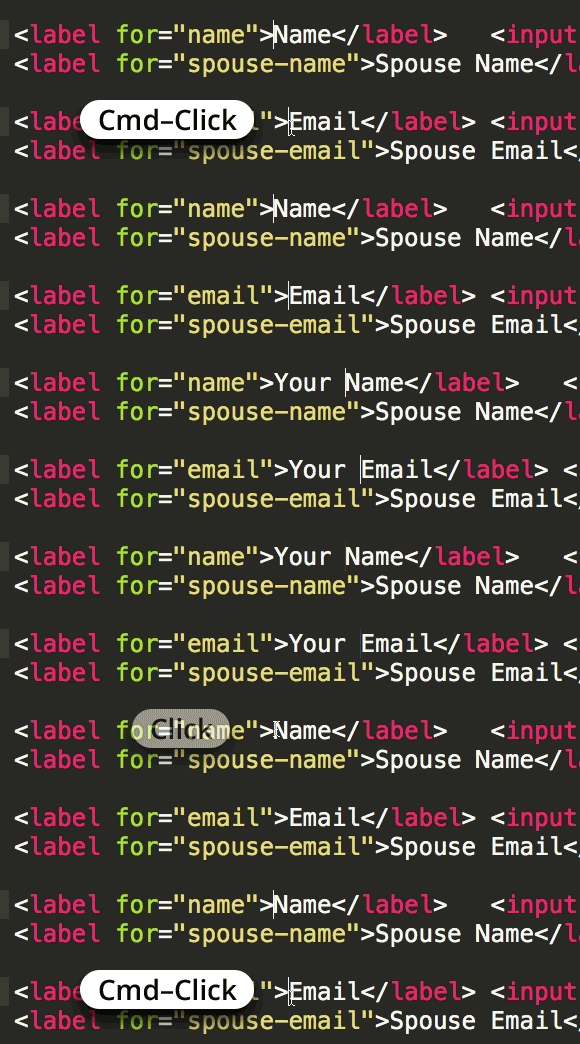
Place Multiple Text Cursors in Sublime Text

Master Multiple Cursor Techniques for Efficient Coding

Pro Tip

Multiple cursors can dramatically speed up your editing workflow by allowing you to make simultaneous changes across different lines of code.

Essential Sublime Text Skills

Multiple Cursors

Edit multiple lines simultaneously for faster code modifications. Perfect for repetitive tasks and bulk editing operations.

Emmet Integration

Write HTML and CSS faster with abbreviations. Streamlines front-end development with powerful shortcuts and snippets.

Sass Preprocessing

Advanced CSS with variables, nesting, and mixins. Essential for modern web development and maintainable stylesheets.

Learning Path for Sublime Text Mastery

1

Master Basic Features

Start with multiple cursors, basic shortcuts, and essential editing techniques to build a solid foundation.

2

Learn Advanced Tools

Explore Emmet for HTML/CSS acceleration and Sass for advanced stylesheet management and preprocessing.

3

Apply in Real Projects

Practice techniques in actual web development projects through structured bootcamps and certificate programs.

Master advanced Sublime Text Coding Tips through proven techniques that professional developers rely on daily. These industry-standard coding strategies and workflow optimizations are taught in our comprehensive hands-on coding classes and bootcamps in NYC, where you'll learn alongside experienced instructors who work in the field.

Ready to accelerate your development skills? Explore Noble Desktop’s professional training programs:

Key Takeaways

1Multiple cursor functionality in Sublime Text enables simultaneous editing across multiple lines for increased productivity
2Sublime Text integrates with powerful tools like Emmet and Sass for enhanced web development workflows
3Noble Desktop offers both targeted skill workshops and comprehensive certificate programs for different learning needs
4Hands-on coding classes provide practical experience with real-world development scenarios
5Certificate programs cover front-end, full-stack, and specialized web development tracks
6Learning advanced editor techniques significantly improves coding efficiency and development speed
7Professional development through structured bootcamps accelerates career advancement in web development
8Combining multiple tools like Sublime Text, Emmet, and Sass creates a powerful development environment

RELATED ARTICLES