March 22, 2026 (Updated April 1, 2026)Dan Rodney/2 min read

Optimizing SVG Files

Streamline Your SVG Workflow for Better Performance

What is SVG Optimization

SVG optimization removes unnecessary code, reduces file sizes, and improves loading performance without compromising visual quality.

How to Optimize SVG Files

SVGO stands as the industry standard command-line tool for SVG optimization, but its technical interface can intimidate designers and developers who prefer visual workflows. Enter SVGOMG—SVGO's Missing GUI that transforms this powerful optimization engine into an intuitive, browser-based interface accessible to professionals at any technical level.

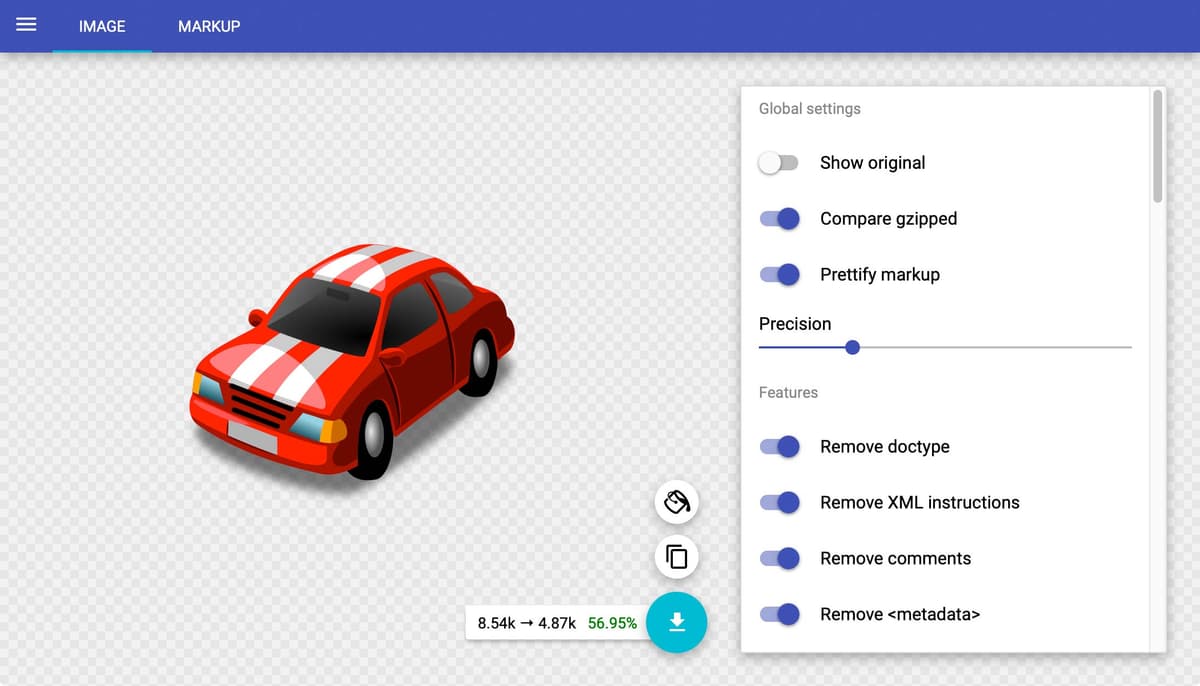
Screenshot of the SVGOMG website

SVGOMG streamlines the optimization process through drag-and-drop functionality or direct code pasting. The interface presents a comprehensive array of optimization settings—from removing unused definitions and cleaning up attributes to converting colors and simplifying transforms. What sets SVGOMG apart is its real-time preview system: you can instantly see how each optimization affects your graphic while monitoring file size reduction. The split-pane code view reveals exactly which markup gets modified, giving you complete transparency over the optimization process. This visibility proves invaluable when working with complex illustrations or when specific SVG features must be preserved for animation or interactivity.

Whether you're optimizing icons for a design system, preparing illustrations for web deployment, or cleaning up exported graphics from design tools, SVGOMG delivers professional-grade results without requiring command-line expertise.

SVGO vs SVGOMG Comparison

FeatureSVGOSVGOMG
InterfaceCommand-lineGraphical
User-friendlinessTechnicalBeginner-friendly
Preview capabilityNoYes
Code comparisonNoBefore/after view
Recommended: SVGOMG is recommended for most users due to its intuitive interface and visual feedback.

How to Use SVGOMG

1

Open SVGOMG

Navigate to SVGOMG website and access the web-based interface

2

Load Your SVG

Upload an existing SVG file or paste the SVG code directly into the tool

3

Configure Options

Review and adjust the variety of optimization options available

4

Preview Results

Examine the optimized graphic preview and compare before/after code changes

SVG Optimization Benefits and Considerations

Pros
Reduced file sizes improve website loading speed
Visual preview ensures no quality loss during optimization
Before and after code comparison shows exact changes
User-friendly interface requires no command-line knowledge
Cons
May require testing to ensure all optimizations work with your use case
Some complex SVGs might need manual review after optimization

Learn Design & Coding at Noble Desktop

Design Course Offerings

Sketch Training

Learn digital design fundamentals using Sketch for creating user interfaces and graphics. Master vector-based design workflows.

Adobe XD Course

Develop user experience design skills with Adobe XD. Create interactive prototypes and design systems.

Illustrator Classes

Master vector graphics creation with Adobe Illustrator. Learn to create scalable graphics including SVG files.

UI Visual Design

Comprehensive training in user interface design principles and visual design best practices.

Web Development Programs

HTML & CSS Fundamentals

Build solid foundation in web markup and styling. Learn semantic HTML structure and modern CSS techniques.

JavaScript Programming

Master interactive web development with JavaScript. Create dynamic user experiences and web applications.

Web Development Level 2

Advanced web development concepts including SVG implementation and optimization techniques for production websites.

SVG Integration in Web Development

The Web Development Level 2 course specifically covers how to implement and optimize SVG files in real-world web projects.

Key Takeaways

1SVGO is a powerful command-line tool for SVG optimization but lacks user-friendly interface
2SVGOMG provides a graphical interface for SVGO, making SVG optimization accessible to all skill levels
3Visual preview and before/after code comparison ensure optimization quality and transparency
4Noble Desktop offers comprehensive UX design courses covering Sketch, Adobe XD, Illustrator, and UI design
5Web development classes teach HTML, CSS, and JavaScript fundamentals for modern website creation
6Web Development Level 2 course specifically covers SVG file implementation and optimization techniques
7SVG optimization improves website performance without compromising visual quality
8Both design and development skills are essential for creating optimized web graphics and interfaces

RELATED ARTICLES