March 22, 2026Noble Desktop/4 min read

Noble Desktop Website Redesign

Real-world insights from a comprehensive website redesign project

Key Focus Areas of the Redesign

User Experience Testing

Conducted comprehensive user testing with both new and returning students to identify pain points and improvement opportunities.

Content Management

Developed strategies to handle extensive content without overwhelming users, especially on mobile devices.

Performance Optimization

Focused on speed improvements to align with Google's mobile search ranking factors introduced in July 2018.

Insights from User Testing

We conducted comprehensive user testing sessions at Noble, inviting both prospective and returning students to navigate our website while performing real-world tasks. The observations revealed critical gaps between our assumptions and actual user behavior—insights that fundamentally shaped our redesign strategy.

A prime example emerged from how users interacted with our class syllabi. Our original design displayed comprehensive technical specifications upfront, but we discovered this overwhelmed users who lacked the context to interpret detailed curriculum information. Rather than removing this valuable content entirely, we implemented a progressive disclosure approach: essential information now appears as a scannable bulleted list, while comprehensive details remain accessible via a dedicated link. This solution serves both user types—those seeking quick overviews and those requiring thorough technical specifications—while preventing cognitive overload that previously caused users to abandon pages.

screenshot of bulleted list of class details

User feedback also revealed significant friction in our enrollment process. We streamlined the checkout flow by eliminating redundant screens and consolidating related questions, reducing completion time by nearly 40%. This optimization proved especially valuable for mobile users, who represented the majority of our enrollment traffic.

For organizations not yet incorporating user testing into their design process, the ROI is undeniable. Direct observation of user behavior reveals blind spots that analytics alone cannot capture, often challenging fundamental assumptions about how your audience interacts with your product.

Syllabus Presentation: Before vs After

FeaturePrevious DesignRedesign
Information DisplayEntire detailed syllabusEssential bulleted list
Technical DetailsAll technical info visibleLink to view detailed info
User ExperienceOverwhelming for some usersEasier to understand and scan
Page LayoutInformation overloadClean, focused presentation
Recommended: Provide essential information upfront with optional detailed access
User Testing Implementation

If you're not currently incorporating user testing into your design process, we highly encourage you to start. You don't even know what you're missing out on.

Handling Lots of Content

Balancing comprehensive content requirements with user experience presents a persistent challenge, particularly as search engines demand depth while users—especially on mobile devices—expect immediate access to relevant information.

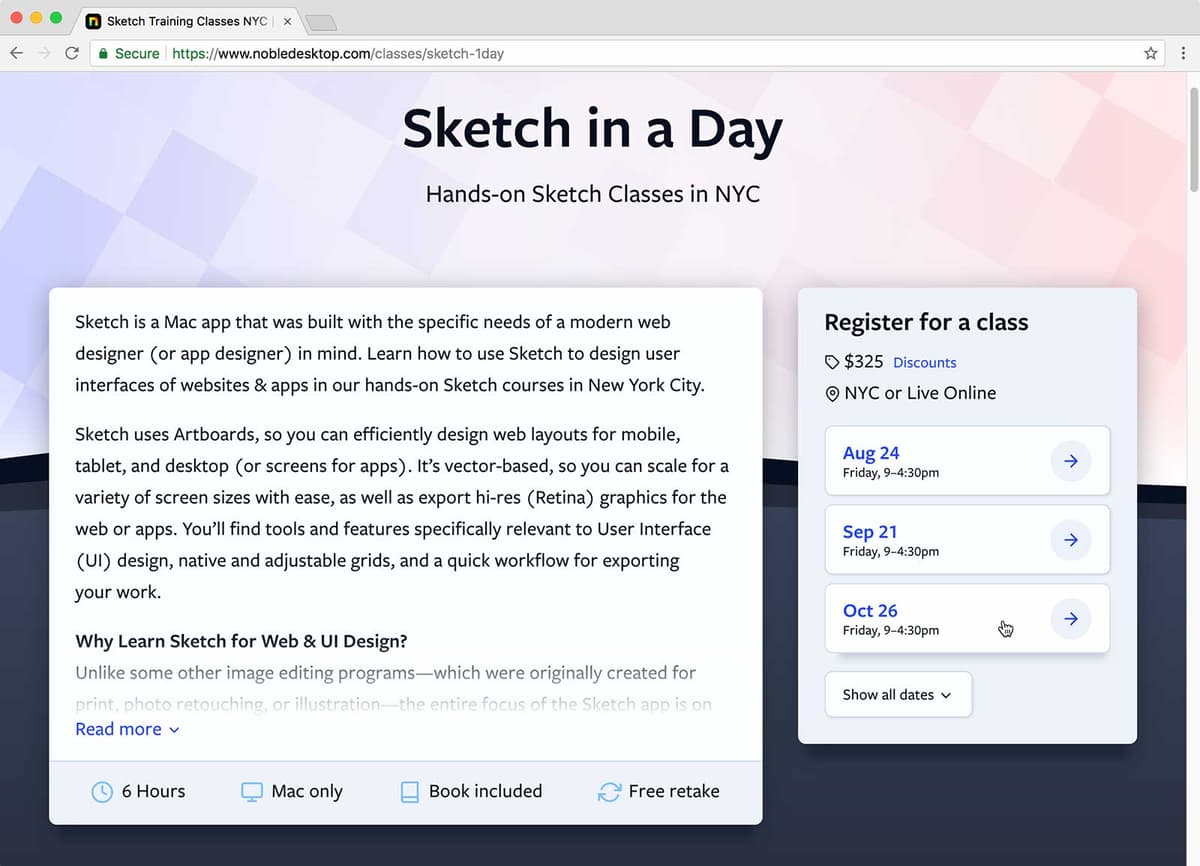
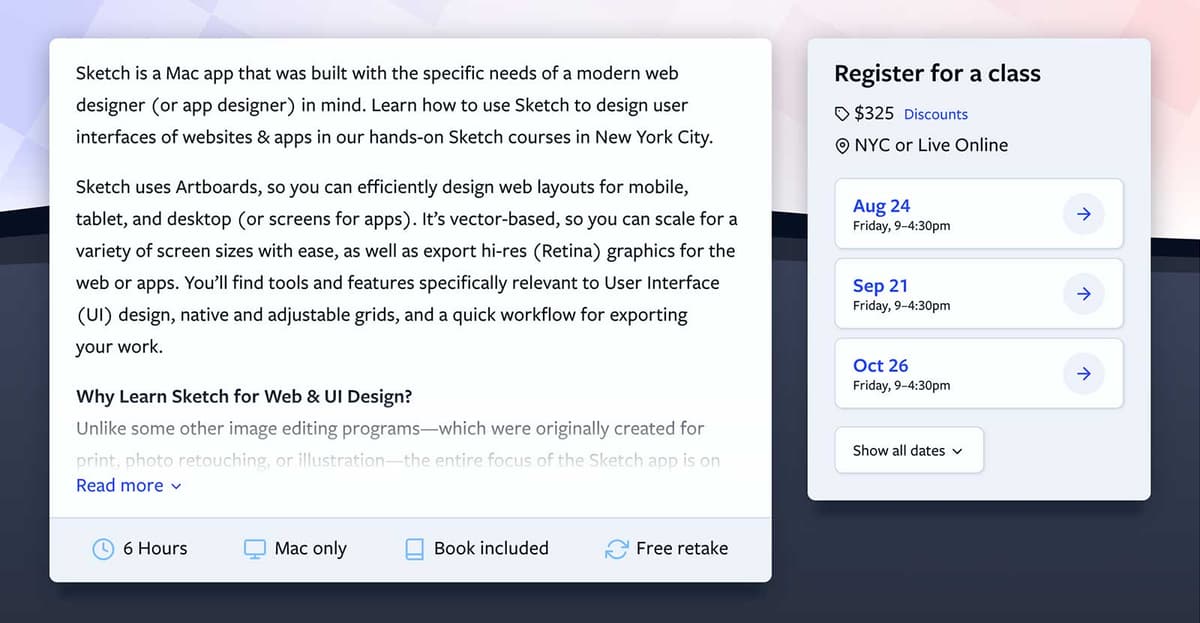
Our solution centers on progressive disclosure mechanisms that respect both user attention and SEO requirements. For class descriptions, we display concise summaries with expandable "Read more" functionality that reveals detailed content on demand. Similarly, our scheduling displays upcoming dates prominently while offering a "Show all dates" option for users planning further ahead. This approach reduces initial cognitive load while maintaining content completeness for search indexing.

screenshot of site with read more and show more date buttons

The strategy proves particularly effective on mobile devices, where excessive scrolling traditionally creates poor user experiences. By front-loading essential information and making additional details opt-in, we've seen significant improvements in engagement metrics and reduced bounce rates across all device types.

Progressive Content Disclosure Strategy

1

Identify Content Priorities

Determine which content is essential for immediate viewing versus detailed information that can be revealed on demand.

2

Implement Read More Links

Add expandable sections for longer class descriptions to prevent overwhelming users, especially on mobile devices.

3

Show Selective Information

Display a few key class dates with a 'Show all dates' option rather than listing everything at once.

Progressive Content Disclosure

Pros
Reduces cognitive load for users
Improves mobile experience with less scrolling
Maintains access to detailed information
Allows content to serve both users and search engines
Cons
Requires additional development time
Some users may miss hidden content
Need to balance between brevity and completeness

CSS Grid & Flexbox

Our technical implementation leverages modern CSS layout systems—CSS Grid and Flexbox—strategically deployed where each excels. This approach dramatically simplified complex layouts while reducing development time and improving maintainability.

Browser support for Flexbox remains excellent across all modern browsers, making it our go-to solution for component-level layouts. CSS Grid support, while historically limited, now enjoys broad adoption with the notable exception of Internet Explorer's partial implementation requiring vendor prefixes.

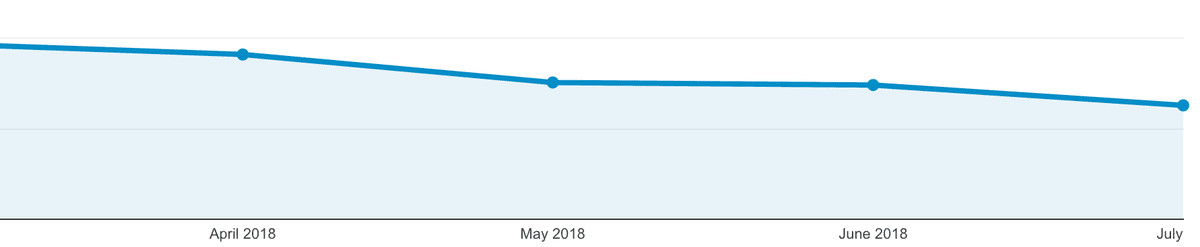
Our analytics from the original launch period (June 2018) showed Internet Explorer representing only 3.59% of total traffic—a figure that continued declining monthly. Today, with Internet Explorer officially deprecated and Edge dominating Microsoft's browser strategy, this decision has proven prescient.

Analytics Chart showing decline in Internet Explorer usage

We made the strategic decision to deprioritize Internet Explorer compatibility, accepting that some layout elements wouldn't render properly while ensuring core functionality remained intact. This resource allocation allowed us to focus on optimizing experiences for the 96%+ of users on modern browsers, delivering faster development cycles and more sophisticated interfaces. In today's landscape, this approach has become standard practice as legacy browser usage has virtually disappeared.

Browser Support Analysis (June 2018)

359%
Internet Explorer traffic percentage

Modern CSS Technologies Assessment

FeatureFlexboxCSS Grid
Browser SupportVery goodGood on modern browsers
Internet ExplorerSupportedPartial with vendor prefixing
Development BenefitsEasier layoutsComplex grid systems
Implementation DecisionUsed extensivelyUsed selectively
Recommended: Focus resources on modern browsers due to IE's declining usage

Speed

Site performance optimization became critical as Google began incorporating page speed into mobile search rankings in 2018, a factor that has only grown in importance. Our optimization strategy focused on reducing file requests and implementing modern delivery protocols to achieve measurable speed improvements.

We consolidated assets wherever possible, concatenating files and implementing HTTP/2 to reduce connection overhead. While HTTP/2 mitigates some performance penalties of multiple requests, fewer files still deliver superior load times. For teams looking to understand HTTP/2 optimization strategies, this comprehensive guide provides valuable technical insights.

Third-party scripts presented our biggest optimization challenge. Two remarketing pixels were generating over 30 server connections despite loading only 100KB of data—effectively doubling our total connection count. After removing these scripts, overall load times improved dramatically despite slightly larger total downloads due to high-resolution graphics optimized for Retina displays.

The lesson proved instructive: connection quantity often impacts performance more significantly than file size, making script auditing essential for any serious performance optimization effort.

Google Search Ranking Update

Starting in July 2018, Google began using page speed in mobile search ranking, making performance optimization a critical SEO factor.

Performance Optimization Impact

30+
Connections made by two remarketing scripts
100k
Kilobytes loaded by remarketing scripts

Speed Optimization Actions Taken

0/5

We're Not Done

This redesign represents a milestone, not a destination. Our development roadmap includes additional user experience enhancements and feature expansions that we'll deploy iteratively based on ongoing user feedback and performance data.

Effective web design requires continuous evolution, responding to changing user needs, technological advances, and business objectives. We remain committed to this iterative approach, ensuring our platform continues serving our community's educational goals effectively.

Design is iterative, and we will continue improving the site based on user feedback and our own ideas.
Noble Desktop's approach to ongoing website development and improvement
Continuous Improvement Philosophy

The redesign represents a milestone, not a finish line. Future enhancements will be rolled out based on user feedback and emerging needs.

Key Takeaways

1User testing reveals critical insights that assumptions cannot provide, such as information overwhelm and checkout friction points
2Progressive content disclosure helps balance comprehensive information needs with user experience, especially on mobile devices
3Modern CSS technologies like Flexbox and CSS Grid significantly improve development efficiency and layout capabilities
4Browser support decisions should be data-driven rather than comprehensive, focusing resources where they provide maximum impact
5Page speed became a Google mobile ranking factor in July 2018, making performance optimization essential for SEO
6Remarketing scripts can be major performance bottlenecks, sometimes creating dozens of unnecessary server connections
7File concatenation and HTTP/2 implementation work together to reduce load times despite larger total file sizes
8Website redesign should be viewed as an iterative process rather than a one-time project, with ongoing improvements based on user feedback

RELATED ARTICLES