March 22, 2026Noble Desktop/1 min read

Multiple Text Cursors with Arrow Keys in Sublime Text

Master Advanced Text Editing with Sublime Text

Essential Sublime Text Skill

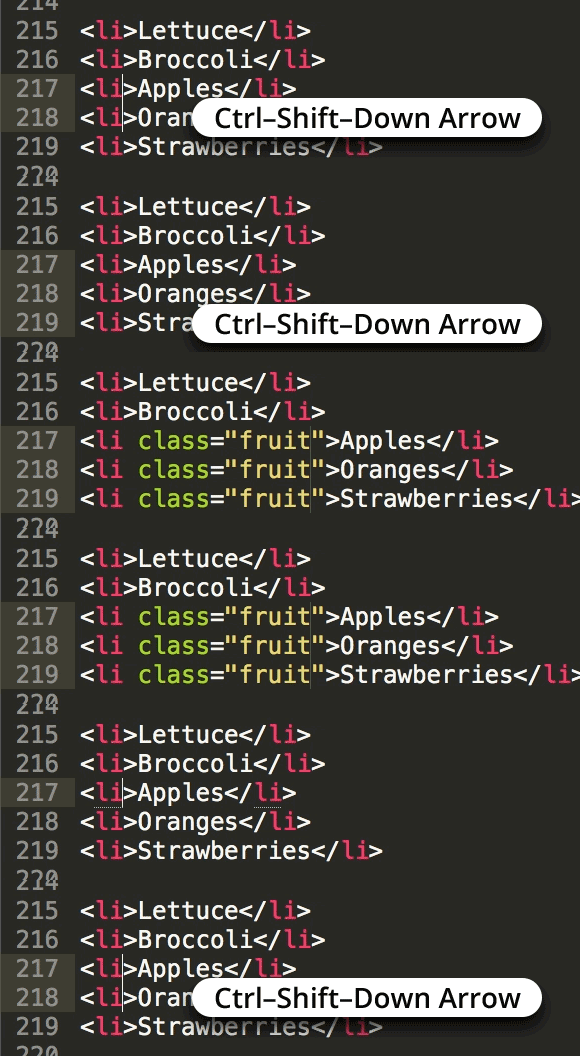
Multiple text cursors with arrow key navigation is a fundamental technique that significantly accelerates code editing and text manipulation workflows for developers.

Core Sublime Text Technologies

Emmet

High-speed HTML and CSS coding toolkit that uses abbreviations to generate complete code structures. Essential for front-end development efficiency.

Sass

Advanced CSS preprocessor that adds variables, nesting, and functions to stylesheets. Streamlines complex styling workflows.

Sublime Text

Professional code editor renowned for its speed, flexibility, and powerful multi-cursor editing capabilities. Industry standard for many developers.

Mastering Multiple Text Cursors

1

Position Initial Cursor

Place your primary cursor at the starting location where you want to begin multiple selections or edits.

2

Add Secondary Cursors

Use keyboard shortcuts to create additional cursors at strategic locations throughout your document.

3

Navigate with Arrow Keys

Move all cursors simultaneously using arrow keys to maintain relative positioning while editing multiple locations.

4

Execute Synchronized Edits

Type or edit content that will be applied across all cursor positions simultaneously for maximum efficiency.

Ready to elevate your development workflow? Explore our comprehensive Sublime Text Coding Tips to master one of the industry's most powerful text editors. These proven techniques and advanced workflows are integrated throughout our hands-on coding classes and bootcamps in NYC, where you'll learn to code faster and more efficiently alongside experienced developers.

Take your skills to the next level with Noble Desktop's professional training programs:

Key Takeaways

1Multiple text cursors with arrow key navigation dramatically improves coding efficiency in Sublime Text
2Emmet, Sass, and Sublime Text form a powerful trio for modern front-end development workflows
3Noble Desktop offers both targeted coding tips courses and comprehensive certificate programs
4Hands-on learning in NYC provides practical experience with professional coding tools
5Front-End, Full-Stack, and general Web Development certificates cater to different career paths
6Mastering text editor shortcuts and multiple cursor techniques is essential for professional developers
7Bootcamp-style learning accelerates skill acquisition compared to self-directed study
8Professional coding education should combine tool mastery with broader development concepts

RELATED ARTICLES