April 1, 2026Noble Desktop Publishing Team/5 min read

The WordPress Loop: Free WordPress Tutorial

Master WordPress Dynamic Content with Professional Loop Implementation

Essential WordPress Knowledge

The WordPress Loop is the backbone of all dynamic content in WordPress. Understanding this fundamental concept is crucial for any WordPress developer looking to create professional, data-driven websites.

Topics Covered in This WordPress Tutorial:

Displaying Posts Dynamically, Adding and Customizing Post Content

Core WordPress Loop Concepts

Dynamic Post Display

Learn how WordPress automatically displays the latest 5-10 posts on your blog pages. Master the fundamental Loop structure that powers all WordPress content.

Loop Functions

Understand essential WordPress functions like have_posts(), the_post(), the_content(), and the_title() that extract and display post data.

Content Customization

Discover how to customize post display with titles, permalinks, and content formatting for professional blog layouts.

Exercise Preview

loop started

WordPress Loop Implementation Process

1

Setup Development Environment

Configure local WordPress installation and activate the custom theme for development work.

2

Implement Basic Loop Structure

Add the fundamental WordPress Loop code to index.php to enable dynamic post retrieval.

3

Add Content Display Functions

Integrate the_content() and the_title() functions to properly display post information.

4

Create Interactive Elements

Implement permalink functionality to enable clickable post titles and individual post pages.

Exercise Overview

In this exercise, we'll construct the dynamic blog functionality that powers modern WordPress sites. Professional blogs typically display 5–10 recent posts on their homepage, creating an engaging entry point for visitors. WordPress achieves this through a sophisticated system of functions collectively known as The Loop—the engine that drives content display across the platform.

The Loop earned its name because it systematically cycles through available posts, extracting titles, content, metadata, comment links, and other essential elements. This isn't just a convenience feature—it's the fundamental architecture that makes WordPress a dynamic content management system rather than a static website builder. Understanding The Loop is crucial for any developer working with WordPress, as it forms the backbone of virtually every content-driven page on the platform.

It's called the Loop because it loops through all of the available posts to pull out all their titles, content, tags, comment links, etc. This is the backbone of WordPress content.
Understanding the fundamental concept behind WordPress's dynamic content system
WordPress Loop Architecture

The Loop systematically processes each available post, extracting titles, content, metadata, and other elements. This iterative approach ensures consistent display across all your blog content.

If You Did Not Do the Previous Exercise

  1. In a web browser, navigate to localhost:8888/mrp/wp-admin (Mac) or localhost/mrp/wp-admin (Windows) and authenticate if prompted.
  2. In the Dashboard sidebar, hover over Appearance and select Themes.
  3. Click the Add New button.
  4. Select the Upload link, then click Browse (or Choose File).
  5. Navigate to Desktop > Class Files > WordPress.org Class and double-click mrpTheme-ready-for-blog.zip to select it.
  6. Click Install Now, then click Activate to enable the theme.

Now that we understand the importance of The Loop, let's implement it in your theme to create a fully functional blog display.

WordPress Theme Setup Requirements

0/3

Implementing the WordPress Loop

  1. In your code editor, open index.php from the mrpTheme folder if it isn't already accessible.

  2. Locate lines 28–57 and delete all content within the #primary div. This removes the static placeholder content we'll replace with dynamic post data.

  3. You should now have a clean container ready for The Loop:

    <div id="primary">
    
    </div><!—end primary—>
  4. Insert the core Loop structure within the #primary div:

    <div id="primary">
       <?php if ( have_posts() ) : while ( have_posts() ) : the_post(); ?>
       <?php endwhile; ?>
       <?php endif; ?>
    </div><!—end primary—>

    This conditional structure follows WordPress best practices: it checks for available posts, then iterates through each one. The have_posts() function prevents errors on empty blogs, while the_post() sets up global post data for each iteration.

  5. Add the content display function between the Loop tags to render each post's content:

    <div id="primary">
       <?php if ( have_posts() ) : while ( have_posts() ) : the_post(); ?>
          <?php the_content(); ?>
       <?php endwhile; ?>
       <?php endif; ?>
    </div><!—end primary—>
  6. Save the file to preserve your changes.

  7. Test your implementation by opening your browser and navigating to:
    • Mac: localhost:8888/mrp
    • Windows: localhost/mrp

    You should see WordPress's default "Hello World" post displayed dynamically. This confirms that your site has successfully transitioned from static HTML to dynamic content management—a significant milestone in WordPress development.

  8. To verify The Loop is working correctly with multiple posts, let's add additional content. Navigate to your admin panel:
    • Mac: localhost:8888/mrp/wp-admin
    • Windows: localhost/mrp/wp-admin
  9. Enter your credentials if prompted to authenticate.

  10. In the sidebar, hover over Posts and select Add New.

  11. Enter the title: New Post

  12. Add content: This is the new post content.

  13. Click Publish in the sidebar to make the post live.

  14. Click the Monteith Restoration & Performance link at the top to return to your site's frontend.

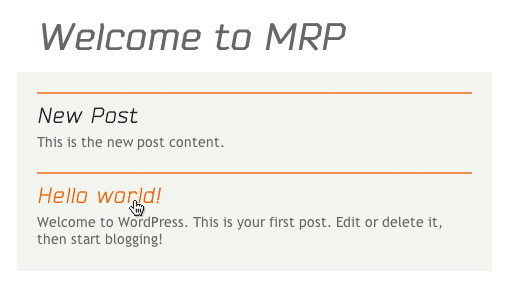
  15. The new post appears, but it's difficult to distinguish from other content without proper formatting. Let's enhance the display by adding post titles. Return to index.php in your code editor.

  16. Above the the_content() function (around line 29), add the title display function:

    <div id="primary">
       <?php if ( have_posts() ) : while ( have_posts() ) : the_post(); ?>
          <h2><?php the_title(); ?></h2>
          <?php the_content(); ?>
       <?php endwhile; ?>
       <?php endif; ?>
    </div><!—end primary—>

    The the_title() function retrieves each post's title dynamically. Remember: although this code appears once in your template, The Loop executes it for every post, creating individual headlines automatically.

  17. Save your changes to update the template.

  18. Refresh your browser to view the updated display:
    • Mac: localhost:8888/mrp
    • Windows: localhost/mrp
  19. Try clicking a post title—nothing happens yet. Professional blogs typically link titles to individual post pages where users can read full articles and engage with comments. Let's implement this essential functionality.

  20. Return to your code editor to add the permalink functionality.

  21. Wrap each title in a dynamic link that points to its individual post page:

    <div id="primary">
       <?php if ( have_posts() ) : while ( have_posts() ) : the_post(); ?>
          <h2><a href="<?php the_permalink(); ?>"><?php the_title(); ?></a></h2>
          <?php the_content(); ?>
       <?php endwhile; ?>
       <?php endif; ?>
    </div><!—end primary—>

    The the_permalink() function generates the correct URL for each post automatically, supporting WordPress's flexible permalink structure and ensuring your links work regardless of your URL settings.

  22. Save the file to implement the linking functionality.

  23. Test the enhanced navigation in your browser:
    • Mac: localhost:8888/mrp
    • Windows: localhost/mrp
  24. Click any post title—you should navigate to a dedicated page displaying only that post. This individual post view is powered by WordPress's template hierarchy, demonstrating how The Loop adapts to different contexts while maintaining consistent functionality.

Key Takeaways

1The WordPress Loop is the fundamental mechanism for displaying dynamic content, automatically iterating through available posts to extract titles, content, and metadata
2Basic Loop structure uses have_posts() to check for content and while(have_posts()) to iterate through each post systematically
3Essential Loop functions include the_content() for post body, the_title() for post titles, and the_permalink() for individual post URLs
4Dynamic content implementation eliminates the need for manual HTML updates when new posts are published to the WordPress site
5Loop code executes once in the template but processes multiple posts, making it an efficient solution for scalable content display
6Proper Loop implementation enables interactive features like clickable post titles that navigate to individual post pages
7Testing Loop functionality requires creating multiple posts to verify that WordPress correctly iterates through all available content
8WordPress Loop serves as the backbone of all WordPress themes, making it essential knowledge for any WordPress developer or site administrator

RELATED ARTICLES