March 23, 2026/6 min read

Getting started with the new Relationships feature in Tableau

Master Tableau's Revolutionary Data Relationship Features

Tableau 2020.2 Major Update

This comprehensive guide covers the revolutionary Relationships feature introduced in Tableau 2020.2, representing a fundamental shift in how data visualization professionals combine and analyze data.

This post was written by Faycal Bouguir. Faycal is a UX & Data Visualization/Infographics specialist based in NYC. He teaches Data Visualization using Tableau at the Career Centers.
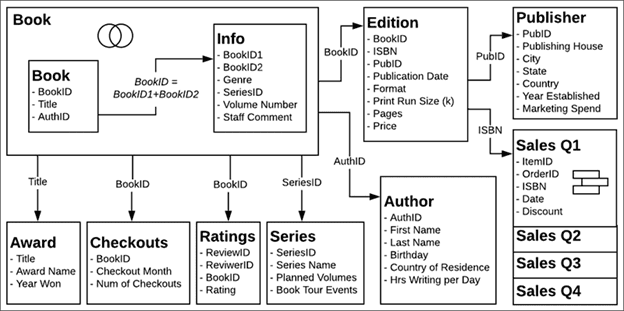
Relationship Diagram Source: Tableau.com

When Tableau introduced Relationships in version 2020.2, it fundamentally transformed how analysts approach data modeling. This feature represents more than just another way to combine tables—it's a paradigm shift that addresses long-standing pain points in traditional join-based workflows. Understanding how Relationships differ from conventional Joins is crucial for maximizing your analytical efficiency and creating more robust visualizations that adapt intelligently to your analysis needs.

What Are Relationships in Tableau?

Relationships represent a flexible, intelligent approach to data modeling that maintains table independence while enabling seamless cross-table analysis. Unlike traditional joins that physically merge tables into a single structure, relationships create dynamic connections between separate data tables. When you establish a relationship, Tableau automatically identifies common fields, determines optimal aggregation levels, and intelligently handles null values—eliminating much of the manual configuration required with joins.

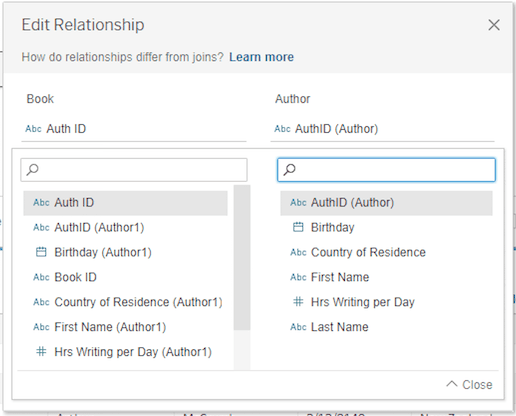
How to edit relationship Fig. 1

The intelligence behind relationships operates through two sophisticated mechanisms that distinguish it from traditional data modeling approaches:

  • Smart Aggregations automatically aggregate measures to match the granularity of their source table, preserving data integrity across different levels of detail without requiring manual LOD calculations.
  • Contextual Joins dynamically determine how to handle unmatched values based on your current visualization context, adapting the join behavior to optimize each specific analysis rather than forcing a one-size-fits-all approach.

It's important to note that relationships cannot be established using calculated fields or geographic fields—they require native table fields with matching data types.

Core Relationship Components

Smart Aggregations

Automatically aggregate measures to the level of detail of their source table before joining. This ensures accurate calculations without manual intervention.

Contextual Joins

Handle unmatched values individually based on the current visualization context. This provides flexibility in data analysis across different scenarios.

Relationship Limitations

You cannot define relationships based on calculated fields or geographic fields. Additionally, relationships can only be equal, meaning they require matching fields between tables.

How to Proceed

The relationship creation process maintains Tableau's intuitive drag-and-drop interface while introducing more intelligent automation. Using the bookshop dataset from Tableau's sample data collection demonstrates this workflow effectively.

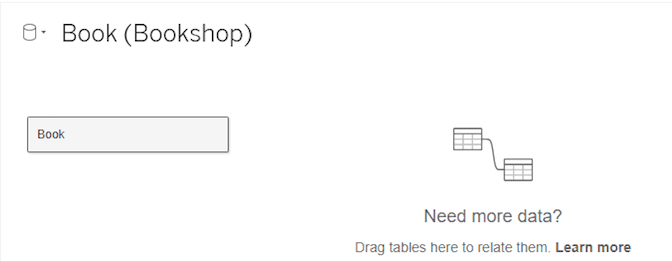
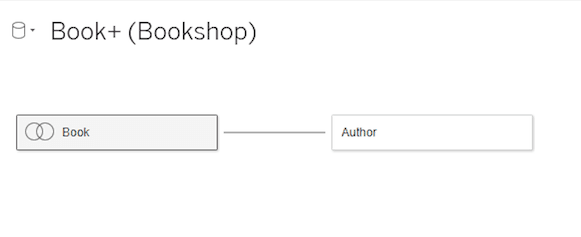
Begin by connecting to your data source and dragging your primary table into the canvas (fig. 2). This establishes your logical layer foundation. When you introduce a second table (fig. 3), Tableau immediately analyzes both structures, seeking matching field names and compatible data types. The orange connecting line that appears represents Tableau's automatic relationship detection—a visual cue that the software has identified potential connection points.

Drag a table to the view Fig. 2

Bring out a second table Fig. 3

What makes relationships particularly powerful is their support for many-to-many cardinalities and full outer join behavior by default. This flexibility extends across data sources—you can create relationships between tables from entirely different connections, something that required complex workarounds in previous versions.

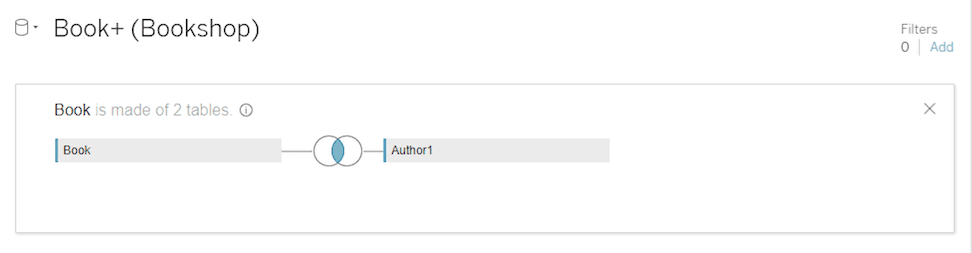
For analysts who still need traditional join functionality, the option remains available through the physical layer. Double-clicking any table opens the physical modeling interface (fig. 4), where you can create joins, unions, and other traditional data preparation operations. This dual-layer approach provides both modern flexibility and backward compatibility.

Create a join table Fig. 4

Creating Relationships in Tableau

1

Connect to Dataset

Start by connecting to your dataset and dragging the first table to the view, just as you would in previous Tableau versions.

2

Add Second Table

Bring out a second table and observe the orange line that automatically appears, connecting both tables based on matching fields.

3

Configure Relationship

Tableau automatically detects matching fields. You can modify these fields and add more field pairs to strengthen the relationship between tables.

Alternative Options Still Available

If you prefer traditional joins, double-click the first table, then drag the second table to create a join. Union and Blend functions remain accessible through the same method.

Differences with Previous Versions of Tableau

The architectural evolution from join-based to relationship-based modeling introduces a fundamental shift in how Tableau structures and presents your data. The new two-layer approach—logical and physical—creates clear separation between relationship modeling and traditional data preparation tasks.

At the logical layer, you work with relationships using the intuitive connection lines visible in the data source canvas. This layer focuses on defining how tables relate conceptually without forcing immediate decisions about join types or null handling. The physical layer, accessed by double-clicking tables, maintains the familiar join and union functionality for scenarios requiring precise control over data combination.

The key distinction lies in how tables maintain their independence within relationships. Rather than creating a flattened, merged structure, relationships preserve individual table characteristics while enabling cross-table analysis. Tableau dynamically generates the appropriate joins at query time based on the fields actually used in your visualization—a significant improvement in both performance and flexibility.

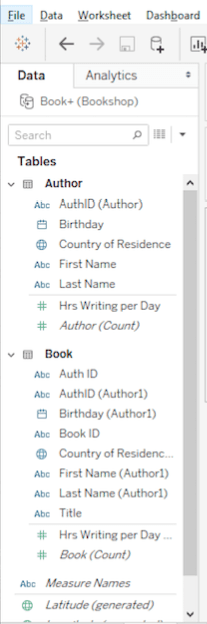
In the worksheet environment, several interface changes reflect this new architecture (fig. 5):

  • Each table now displays as a distinct section with its own dimension-measure separator, replacing the previous unified field list that grouped all dimensions together at the top.
  • Calculated fields are organized by their source table, with multi-table calculations appearing at the bottom of the data pane for easy identification of cross-table dependencies.
  • The universal Number of Records field has been replaced with table-specific Count fields, providing more granular control over record counting across different tables in your model.

The sheet tab with some differences from previous versions of Tableau Fig. 5

New vs Previous Data Model Structure

FeatureNew Relationships ModelPrevious Join Model
Table StructureTwo-layer system (logical + physical)Single-layer structure
Data CombinationTables remain separate but relatedTables merged together
Join Type SelectionAutomatic based on contextManual selection required
Field OrganizationSeparated by table with dimension/measure linesAll dimensions top, measures bottom
Recommended: The new model provides greater flexibility and automation while maintaining access to traditional methods when needed.

Interface Changes in Data Pane

Table-Specific Organization

Each table now displays with a line separating dimensions from measures, replacing the previous top-bottom organization across all tables.

Calculation Display

Calculations appear per table, with multi-table calculations displayed at the bottom of the data pane for better organization and clarity.

Record Count Changes

Number of Records for the data source has been replaced with local Count fields where COUNT of table equals SUM of Number of Records per table.

Advantages of Using Relationships

The practical benefits of relationships extend far beyond simplified setup, fundamentally changing how analysts approach data modeling and exploration:

  • Relationships dramatically reduce upfront data preparation time by eliminating the need to predetermine join strategies. Tableau automatically queries only the relevant tables for each analysis, reducing both complexity and processing overhead.
  • Data nuances that were previously obscured by rigid join structures now surface naturally. Relationships preserve measure granularity and highlight unmatched values, leading to more accurate insights and fewer analytical blind spots.
  • A single relationship simultaneously supports multiple join behaviors, adapting to your visualization needs rather than forcing you to create separate data sources for different analytical approaches. This flexibility is particularly valuable in exploratory analysis where requirements evolve dynamically.

Relationships vs Traditional Joins

Pros
Reduced data preparation requirements with automatic table combination
Highlights data nuances like measure detail levels and unmatched values
Single relationship supports all four join types simultaneously
Maintains row and column data availability from related tables
Automatic join creation based on fields currently in use
Cons
Limited to equal relationships only
Cannot use calculated fields or geographic fields for relationships
Requires same data type for relationship-defining fields
Key Performance Benefit

Relationships combine only relevant tables at analysis time, reducing processing overhead and improving performance compared to pre-joined datasets.

Strategic Implementation Considerations

As organizations increasingly adopt relationship-based modeling, several factors should guide your implementation strategy. Relationships work best with well-structured data that includes clear primary and foreign key relationships. While Tableau can automatically detect potential connections, the quality of your relationships depends heavily on consistent naming conventions and data types across tables.

For teams transitioning from join-based workflows, the shift to relationships often requires adjusting established analytical patterns. The dynamic nature of relationships means that some previously predictable behaviors may change, particularly around null handling and aggregation levels. This evolution ultimately leads to more accurate analysis, but may require period of adaptation for analysts accustomed to join-based certainties.

Conclusion

Relationships represent Tableau's evolution toward more intelligent, adaptive data modeling that reduces friction between analysts and their data. By maintaining table independence while enabling seamless cross-table analysis, relationships eliminate many traditional constraints that limited analytical agility.

The contrast with joins is instructive: where joins create static, predetermined data structures, relationships provide dynamic connections that adapt to analytical context. This flexibility preserves row-level detail when needed while supporting aggregated analysis across multiple granularities—all within a single, coherent data model.

As data complexity continues to grow and analytical requirements become more varied, the relationship model's ability to adapt intelligently to different use cases makes it an essential tool for modern data professionals. The requirement for exact field matches may seem limiting, but it enforces the data quality standards necessary for reliable cross-table analysis while maintaining the semantic clarity that enables Tableau's automated optimizations.

Implementation Readiness Checklist

0/5

Key Takeaways

1Tableau 2020.2 introduces Relationships as the new default method for combining data, offering more flexibility than traditional joins while maintaining table separation
2The new data model features two layers: a logical layer for creating relationships and a physical layer for joins and unions, accessed by double-clicking tables
3Smart Aggregations automatically handle measure aggregation to source table detail levels, while Contextual Joins manage unmatched values based on visualization context
4Relationships support many-to-many connections and full outer joins, with automatic detection of matching fields and join types based on analysis context
5The interface now organizes fields by table with dimension-measure separators, replacing the previous all-dimensions-top, all-measures-bottom structure
6Key limitations include restriction to equal relationships only, inability to use calculated or geographic fields for relationship definition, and requirement for matching data types
7Performance benefits include reduced data preparation time, automatic combination of only relevant tables during analysis, and preserved data nuances previously overlooked
8Traditional join, union, and blend functionality remains available through the physical layer, ensuring backward compatibility for existing workflows

RELATED ARTICLES