March 23, 2026/1 min read

SQL COUNT Tutorial

Master SQL COUNT Function for Database Queries

What You'll Learn

This tutorial covers the SQL COUNT function syntax, practical applications, and real-world examples using a basketball league database scenario.

SQL COUNT Function Essentials

Primary Purpose

Returns the number of rows that match specified criteria in your database query. Essential for data analysis and reporting tasks.

Common Use Cases

Count total records, filter by conditions, generate reports, and validate data integrity across database tables.

Return Value

Always returns a numeric value representing the count of entries or rows that meet your specified condition.

COUNT Function

  • The COUNT function returns the number of rows in a dataset that match your specified criteria, making it one of the most fundamental aggregate functions in SQL.

  • It provides an exact count of entries or records that satisfy your defined conditions, enabling precise data analysis and reporting.

  • Syntax: SELECT COUNT(column_1) FROM table WHERE condition ;

COUNT Function Syntax Breakdown

1

SELECT Statement

Begin with SELECT keyword followed by COUNT function to specify you want to count rows rather than retrieve actual data values.

2

Column Specification

Specify the column name within COUNT parentheses. Use COUNT(*) to count all rows or COUNT(column_name) for specific column.

3

FROM Clause

Indicate the source table using FROM keyword followed by the table name where you want to perform the count operation.

4

WHERE Condition

Add optional WHERE clause to filter rows based on specific criteria before counting. This narrows down your results.

COUNT Variations Comparison

FeatureCOUNT(*)COUNT(column)
Null ValuesIncludes nullsExcludes nulls
PerformanceFasterSlightly slower
Use CaseTotal row countNon-null entries
Recommended: Use COUNT(*) for total row counts and COUNT(column) when you need to exclude null values from your count.

Example

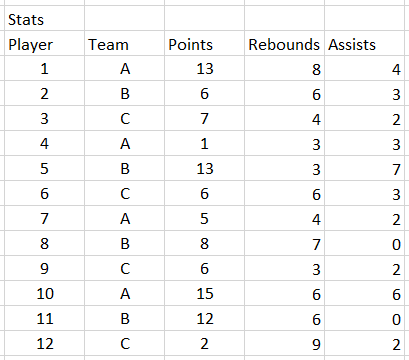
To illustrate how the COUNT function works in practice, let's examine a real-world scenario using a basketball league database that tracks player information, team assignments, and performance statistics.

Stats Table

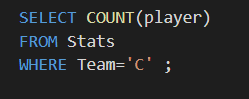
Suppose you need to determine roster sizes for budget planning or compliance verification. To find the exact number of players assigned to team C using a SQL query, you would execute the following command:

SQL COUNT Function

When you execute this query, the result returns 4, confirming that team C currently has four players on their roster. This type of query proves invaluable for team management, salary cap calculations, and ensuring league compliance with roster requirements. The COUNT function's reliability and speed make it essential for both ad-hoc analysis and automated reporting systems that modern sports organizations depend on for data-driven decision making.

Basketball League Database Context

The example uses a sports database containing player records, team assignments, and statistics to demonstrate practical COUNT function usage.

Team C Player Count Result

Team C Players
4
Expected Result
4

Query Execution Steps

0/5

Key Takeaways

1COUNT function returns the number of rows matching specified criteria in database queries
2Basic syntax follows SELECT COUNT(column) FROM table WHERE condition pattern
3COUNT(*) includes null values while COUNT(column_name) excludes null entries
4WHERE clause is optional but essential for filtering results by specific conditions
5Real-world applications include counting team members, inventory items, or customer records
6Query execution requires pressing ENTER to run and display the numeric result
7COUNT function is fundamental for data analysis and generating statistical reports
8Basketball league example demonstrates practical usage for counting players by team assignment

RELATED ARTICLES