April 1, 2026Noble Desktop Publishing Team/9 min read

Many-to-Many Relationships: Part Two

Master Advanced Ruby on Rails Database Relationships

Tutorial Continuation

This tutorial builds directly on Part One. You'll learn to overcome limitations of has_and_belongs_to_many relationships by implementing the more powerful has_many through pattern.

Topics Covered in This Ruby on Rails Tutorial:

The Has_many, Through Relationship and Setting Quantity Properties

Relationship Types: HABTM vs Has Many Through

Featurehas_and_belongs_to_manyhas_many through
Join Table AccessLimitedFull Model
Additional FieldsNot PossibleSupported
ComplexitySimpleModerate
FlexibilityBasicAdvanced
Recommended: Use has_many through when you need to store additional data in the relationship

Exercise Overview

The has_and_belongs_to_many relationship creates a direct connection between two models through a join table. Every time you relate two model objects together, Rails automatically creates an entry in this join table. While this approach works well for simple many-to-many relationships, it reveals a significant limitation: you cannot directly access or manipulate the join table itself, which means adding additional fields (like quantity, timestamps, or other metadata) becomes impossible. This constraint has led us to a common crossroads in Rails development.

Encountering this limitation is not just normal—it's expected. Professional Rails development embraces an Agile methodology that recognizes these moments as natural evolution points in your application's architecture. Rather than viewing this as a setback, we treat it as valuable feedback from our code, indicating it's time to refactor toward a more robust solution.

Agile Development in Modern Rails

Agile software development has evolved significantly since its inception and remains the dominant methodology in Rails development as of 2026. The philosophy centers on iterative development, where you build the minimum viable solution first, then enhance it based on real-world feedback and requirements.

This approach proves particularly valuable because software requirements often shift during development. Complex database diagrams, exhaustive API specifications, and countless mockups can lead to analysis paralysis without writing actual code. Agile methodology advocates for starting with a basic implementation—even one sketched on a napkin—and evolving it through real-world testing and user feedback. This process frequently reveals unexpected challenges while simultaneously showing that many anticipated problems never materialize.

Rails architecture inherently supports Agile development through several key features: Ruby's expressive syntax enables rapid prototyping; built-in generators create substantial code scaffolds quickly; database migrations provide version control for schema changes with full rollback capabilities; and comprehensive testing frameworks ensure that iterative changes don't break existing functionality. These tools make Rails particularly well-suited for the iterative development cycles that Agile methodology demands.

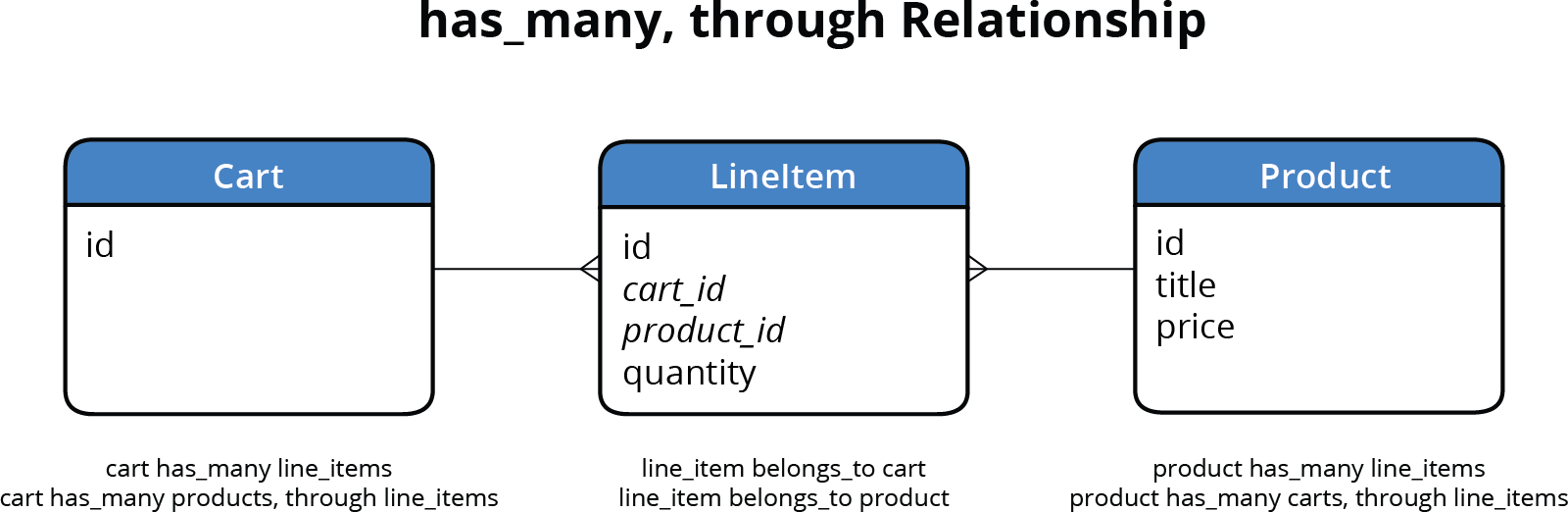
To solve our current limitation, we'll implement a more sophisticated approach: creating a dedicated line_item model. This model will serve as an intelligent intermediary between products and carts, transforming our simple join table into a full-featured Rails model. This architectural pattern is called has_many, through, where products have many carts through line_items, and vice versa. By elevating our join table to a proper model, we gain the ability to store additional attributes like quantity directly on the line_item itself.

This transformation elevates our Line Item from a simple database relationship to a central business logic component, enabling sophisticated e-commerce functionality that scales with your application's growth.

relationship diagram has_many through

  1. If you completed the previous exercises (8A–9A), you can proceed directly to the next section. For those who haven't completed the prerequisites, follow the setup instructions below to ensure your development environment matches the expected state.

    Rails Tools for Agile Development

    Ruby Language

    Simple syntax enables rapid prototyping and iteration. Clean code structure makes refactoring straightforward.

    Generators

    Build standard code blocks quickly with built-in generators. Scaffold entire features in minutes.

    Database Migrations

    Track and reverse database changes safely. Version control your schema evolution.

    Integrated Testing

    Ensure changes don't break existing features. Automated testing catches regressions early.

    It's not only possible to take what's written on the back of a napkin and just start building it in code—it can even be preferable.
    Agile development philosophy emphasizes building over extensive planning

If You Did Not Complete Previous Exercises (8A–9A)

  1. Close any open files in your code editor.
  2. Open the Finder and navigate to Class Files > yourname-Rails Class
  3. Open Terminal.
  4. Type cd followed by a single space (do NOT press Return yet).
  5. Drag the yourname-Rails Class folder from the Finder to the Terminal window and press ENTER.
  6. Run rm -rf nutty to remove your existing copy of the nutty application.
  7. Run git clone https://bitbucket.org/Noble Desktop/nutty.git to clone the That Nutty Guy repository.
  8. Type cd nutty to enter the project directory.
  9. Type git checkout 9A to synchronize with the end state of the previous exercise.
  10. Run bundle install to install required Ruby gems.
  11. Run yarn install --check-files to install JavaScript dependencies and verify file integrity.

Implementing the Has_many, Through Relationship

Now we'll migrate from our simple join table to the more powerful has_many, through pattern. This process involves creating the new model, updating existing relationships, and ensuring data integrity throughout the transition.

  1. Navigate to the nutty project folder located in Desktop > Class Files > yourname-Rails Class > nutty

    If your code editor supports project-level file management (like VS Code or Sublime Text), open the entire nutty folder as a project to streamline file navigation during this exercise.

  2. Ensure you have two Terminal tabs open: one running the Rails server and another for executing commands. If your server isn't running, follow these steps to restore the proper development environment.

Restarting the Rails Development Server

  1. Navigate to the nutty project directory in Terminal:
  • Type cd followed by a space.
  • Drag the nutty folder from Desktop > Class Files > yourname-Rails Class onto the Terminal window to auto-complete the path.
  • Press Return to change to the project directory.
  1. Start the Rails server:

    rails server
  2. Open a new Terminal tab (Cmd–T) while keeping the server running in the original tab.
  3. In the new tab, navigate to the nutty directory using the same process as step 1.
  • In the Terminal tab where the server isn't running, rollback the most recent migration to prepare for our architectural changes:

    rails db:rollback

    This command undoes the last migration, allowing us to replace our simple join table with the more sophisticated line_item model.

  • Navigate to the migration files directory: Class Files > yourname-Rails Level 2 Class > nutty > db > migrate

  • Locate the migration file ending with create_carts_products.rb and note its filename for the next step.

  • Remove the outdated migration file by running:

    rails destroy migration create_carts_products

    This command removes both the migration file and any associated references, ensuring a clean slate for our new approach.

  • Generate the new line_item model with proper relationships and attributes:

    rails generate model line_item quantity:integer cart:references product:references
    rails db:migrate

    The references type automatically creates foreign key columns and indexes, establishing proper database relationships while maintaining referential integrity.

  • Update the Cart model to use the new relationship pattern. Open nutty > app > models > cart.rb

  • Remove the obsolete relationship declaration (around line 4):

    has_and_belongs_to_many :products
  • Replace it with the has_many, through relationship:

    class Cart < ApplicationRecord
       belongs_to :customer
    
       has_many :line_items, dependent: :destroy
       has_many :products, through: :line_items
    end

    This configuration provides two access patterns: cart.line_items for direct line item manipulation (including quantity), and cart.products for traversing directly to associated products. The dependent: :destroy ensures line items are automatically removed when a cart is deleted, maintaining database integrity.

  • Save and close the cart.rb file.

  • Apply the same relationship pattern to the Product model. Open nutty > app > models > product.rb

  • Remove the outdated relationship (around line 5):

    has_and_belongs_to_many :carts
  • Add the corresponding has_many, through relationships:

    class Product < ApplicationRecord
       validates :title, :sku, :price, presence: true
       validates :price, numericality: true
    
       has_many :line_items, dependent: :destroy
       has_many :carts, through: :line_items
    
       has_one_attached :image
    end
  • Save and close the product.rb file.

  • Test the new relationship structure by navigating to localhost:3000 in your browser.

  • Click the Cart link in the navigation. The cart appears empty because rolling back the migration removed the existing cart data—this is expected behavior during architectural changes.

  • Return to the homepage and select any product.

  • Click Add To Cart for that product. The item should appear in your cart, demonstrating that our new relationship structure works seamlessly with existing controller logic—a testament to Rails' consistent interface design.

  • Implementing the Quantity Field Functionality

    With our has_many, through relationship established, we can now implement quantity tracking—a feature impossible with the simple join table approach. This enhancement transforms our basic cart into a proper e-commerce solution.

    1. Open the cart controller to modify how products are added: nutty > app > controllers > cart_controller.rb

      We need to update the create action to work with line_items directly, enabling quantity specification and proper inventory management.

    2. Locate the product addition logic around line 10:

      @cart.products << product
    3. Replace this direct product association with line_item creation:

      def create
         product = Product.find(params[:product_id])
         @cart.line_items.build(product: product, quantity: params[:quantity])
         @cart.save
      end

      The build method creates a new line_item associated with the cart while allowing us to set both the product reference and quantity in a single operation.

    4. Save the controller file.

    5. Update the cart view to display and manage quantities. Open nutty > app > views > cart > index.html.erb

      To properly display quantities, we need to iterate through line_items rather than products directly, since quantity is a property of the line_item, not the product itself.

    6. Modify the iteration logic around line 20:

      <tbody>
         <% @cart.line_items.each do |line_item| %>
            <tr>
    7. Update all product references within the loop to access products through line_items. Replace each instance of product with line_item.product:

      Pro Tip: In Sublime Text, select the word product and press Ctrl–Cmd–G (Mac) to select all instances. Use the Left Arrow key to position cursors before each instance, then type line_item. to make all changes simultaneously.

      <% @cart.line_items.each do |line_item| %>
         <tr>
            <td id="thumbnail-div" class="hidden-xs">
               <%= link_to line_item.product do %>
                  <%= image_tag url_for(line_item.product.image.variant(resize_to_limit: [200,200])), alt: line_item.product.title, class: 'cart-thumbnail' %>
               <% end %>
            </td>
            <td>
               <%= link_to line_item.product do %>
                  <p><%= line_item.product.title %></p>
               <% end %>
               <p class="gray-text">Item #<%= line_item.product.sku %></p>
            </td>
            <td><input type="number" name="quantity" min="1" max="100" value="1">
               <a href="#"><span class="glyphicon-refresh"></span>update</a>
               <a href="#"><span class="glyphicon-remove"></span>remove</a>
            </td>
            <td class="hidden-xs"><%= number_to_currency line_item.product.price %></td>
            <td class="total-price"><%= number_to_currency line_item.product.price %></td>
         </tr>
      <% end %>
    8. Replace the static quantity input field around line 33:

      <td><input type="number" name="quantity" min="1" max="100" value="1">
    9. Delete this line and replace it with a Rails form helper that displays the actual quantity:

      <td>
         <%= number_field_tag :quantity, line_item.quantity, min: 1, max: 100, class: 'form-control' %>
         <a href="#"><span class="glyphicon-refresh"></span>update</a>

      The number_field_tag creates an HTML5 number input with built-in validation, populated with the line_item's actual quantity value.

    10. Save the view file.

    11. Test the quantity functionality by reloading localhost:3000 in your browser.

    12. Select any product from the homepage.

    13. Set the quantity to 8 and click Add To Cart.

      You should be redirected to the cart page showing the product with a quantity of 8. Note that any previously added items may show no quantity since they were added before we implemented quantity tracking—this demonstrates the difference between our old and new approaches. In the next exercise, we'll implement the remove functionality to complete our cart management system.

    Controller and View Updates

    1

    Modify Cart Controller

    Update create method to use @cart.line_items.build instead of direct product assignment

    2

    Update Cart View

    Change iteration from @cart.products to @cart.line_items for quantity access

    3

    Fix Product References

    Add line_item prefix to all product references in the view template

    4

    Implement Quantity Field

    Replace static HTML input with number_field_tag using line_item.quantity

    Sublime Text Productivity Tip

    Use CTRL-Cmd-G to select all instances of 'product' then add 'line_item.' prefix efficiently across the entire file.

    Key Takeaways

    1The has_and_belongs_to_many relationship becomes limiting when you need to store additional fields in the join table, requiring a transition to has_many through
    2Agile development in Rails means starting with simple solutions and refactoring when you encounter limitations, rather than over-engineering from the start
    3The has_many through relationship pattern uses a full model as an intermediary, providing access to additional fields like quantity in e-commerce applications
    4Database migrations in Rails can be rolled back safely, allowing you to undo schema changes when refactoring relationships
    5Rails generators accelerate development by creating models with proper references and relationships in a single command
    6The line_item model serves as a bridge between products and carts, storing both the relationship and additional data like quantity
    7View templates must be updated when changing from direct relationships to through relationships, requiring line_item prefixes for product access
    8Rails relationship flexibility allows you to access data either through the intermediate model or directly across the relationship using the through option

    RELATED ARTICLES