Forms in Rails: Creating a Form
What This Tutorial Covers
form_with
Rails' modern form builder helper.
Field Helpers
text_field, select, and other input generators.
Strong Parameters
Permit specific fields to prevent mass assignment attacks.
Noble Desktop's Full-Stack Web Development Certificate teaches modern web development concepts that transfer across Ruby, Python, and JavaScript stacks.
Dive into the intricacies of the Ruby on Rails framework in this detailed tutorial, covering key aspects such as form_with, checkboxes, radio buttons, select boxes, and adding a dropdown menu or a date selector and submit button.
Topics Covered in This Ruby on Rails Tutorial:
Form_with, Checkboxes, Radio Buttons, & Select Boxes, Adding a Dropdown Menu, Adding a Date Selector & Submit Button
Exercise Preview
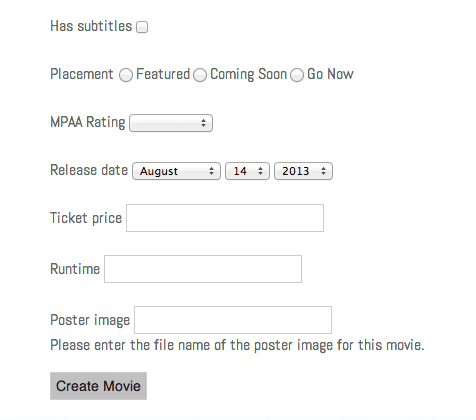
Exercise Overview
In this exercise, we are going to work on forms for updating models. Forms provide the ultimate intersection between controllers, views, and model objects. Forms are easy in Rails, and as you will see in this exercise, forms for model objects (like our movies model) are even easier.
If you completed the previous exercises, you can skip the following sidebar. We recommend you finish the previous exercises before starting this one. If you haven’t finished them, do the following sidebar.
If You Did Not Do the Previous Exercises (3A–3D)
- Close any files you may have open.
- Open the Finder and navigate to Class Files > yourname-Rails Class
- Open Terminal.
- Type
cdand a single space (do NOT press Return yet). - Drag the yourname-Rails Class folder from the Finder to the Terminal window and press ENTER.
- Run
rm -rf flixto delete your copy of the Flix site. - Run
Git clone https://bitbucket.org/Noble Desktop/flix.Gitto copy the Flix Git repository. - Type
cd flixto enter the new directory. - Type
Git checkout 3Dto bring the site up to the end of the previous exercise. - Run
bundleto install any necessary gems. - Run
yarn install—check-filesto install JavaScript dependencies.
Getting Started
We need to create a details page view for each movie. Before we do that, though, we’ll create the controller action that displays the view.
Open the Finder and navigate to Class Files > yourname-Rails Class
Open Terminal.
Type
cdand a single space (do NOT press Return yet).Drag the flix folder from the Finder to the Terminal window.
Make sure you’re in Terminal and hit Return to change into the new folder.
Type the following to launch the server:
rails serverOpen a browser and navigate to localhost:3000 just to check that everything is up and running. You should see the Flix website.
In your code editor open flix > app > controllers > movies_controller.rb
We suggest opening the entire flix folder in your code editor if it allows you to (like Sublime Text does).
Scroll to the bottom and before the final
endadd the following bold code:def new @movie = Movie.new end endThe action is called
newbecause it’ll be used for creating new movies.Save the file.
Create a new file in your code editor. This will be our view!
Type the following on the very first line of the blank file:
<h1>Add Movie</h1>- Save the file:
- Into yourname-Rails Class > flix > app > views > movies
- Name it new.html.erb
Form_with Model
We’re ready to add our form. Forms in Rails typically consist of a do…end block of code. When making a form that deals with model objects we can use the helper method form_with.
Still editing new.html.erb in your code editor, add the following bold code:
<h1>Add Movie</h1>
<%= form_with model: @movie do |f| %>

<% end %>
This code means: we are printing
form_with(which yields a form builder object) to the screen, passing it our model object@movie, and in between thedoandendwe are going to build the movie form using the|f|parameter (fis short for form).The
|f|parameter knows a great deal about the model object in question. Let’s start with something simple, the title field.Add the following bold code to create the first label and text field in the form:
<%= form_with @movie do |f| %>
   <p>
      <%= f.label :title %>
      <%= f.text_field :title %>
   </p>
<% end %>
Save the file.
Switch to Chrome (we’ll be using its DevTools).
Navigate to localhost:3000/movies/new and notice that the title input field is up and running.
Right–click or CTRL–click inside the input field and select Inspect to take a closer look at the code that Rails generated automatically. If you’ve never used the DevTools, they help you examine your code from the browser to see how things are looking behind the scenes so you can see why things may (or may not) be working.
We can see that Rails added the basic HTML markup for the form tag with all the important properties (including class and id for CSS styling) pre-populated:
<form action="/movies" accept-charset="UTF-8" data-remote="true" method="post">Notice that under the
formtag is a hidden field withname="authenticity_token". This is a security feature of Rails that helps prevent cross-site request forgeries. These fields are automatically created and populated by Rails, so you don’t need to worry about them, but it’s important to know they are there…and that you won’t get them if you write your own form tags. This is another important reason to always useform_withwhen constructing forms in Rails.Finally, there is the label and input for the Title field with an id that was automatically generated by Rails and could be used for CSS styling if we desired:
<label for="movie_title">Title</label>
<input type="text" name="movie[title]" id="movie_title">
Let’s flesh out the form with additional properties of our movie. Add the following bold code to add a multi-line text area for the movie description:
<%= f.text_field :title %>
   </p>
   <p>
      <%= f.label :description %>
      <%= f.text_area :description %>
   </p>
<% end %>
NOTE: Keep in mind that Rails is just crazy about underscores. If an HTML tag has two words like
<textarea>, they are probably separated by an underscore in Rails!Save the file.
Switch back to Chrome and reload localhost:3000/movies/new
Notice that the Description text area has appeared, but it looks too narrow and too small overall. How can we make it a little bigger, even though we’re not writing the HTML directly? Well, most form helpers take a number of additional parameters—let’s try using some of them.
Switch to new.html.erb in your code editor.
Add the following bold code (don’t forget the comma!):
<%= f.text_area :description, cols: 60, rows: 10 %>Save the file.
Switch back to Chrome and reload localhost:3000/movies/new
Notice that the Description text area is looking much better. You can type a proper description in a text area that size!
Checkboxes, Radio Buttons, & Select Boxes
Switch to new.html.erb in your code editor.
Let’s add the subtitles field. This is a boolean (yes/no) value, so it’s a good opportunity to use checkboxes. Add the following bold code:
<p>
      <%= f.label :description %>
      <%= f.text_area :description, cols: 60, rows: 10 %>
   </p>
   <p>
      <%= f.label :has_subtitles %>
      <%= f.check_box :has_subtitles %>
   </p>
<% end %>
Save the file.
Switch back to Chrome and reload localhost:3000/movies/new
Notice the nice little checkbox. Nothing wrong with that! If you click on the Has subtitles text, it’ll select/deselect the checkbox, which is a very user-friendly feature.
Let’s work on the Placement category, which will dictate the movie’s position in the three tabs on the main page (In Theaters, Coming Soon, Go Now). Considering that there are only three values, it makes sense to use a radio button for this portion of the form.
Switch back to new.html.erb in your code editor.
Add the following bold code:
<p>
      <%= f.label :has_subtitles %>
      <%= f.check_box :has_subtitles %>
   </p>
   <p>
      <%= f.label :placement %>
      <%= f.radio_button :placement, 'in_theaters' %>
   </p>
<% end %>
Radio button syntax is simple. Just like when writing other tags, we put the name of the field as a symbol first (
:placement), then its value as a string ('in_theaters'), not a symbol—and we repeat this for all the possible values.Add the other two radio button options as follows:
<p>
   <%= f.label :placement %>
   <%= f.radio_button :placement, 'in_theaters' %>
   <%= f.radio_button :placement, 'coming_soon' %>
   <%= f.radio_button :placement, 'go_now' %>
</p>
Save the file.
Switch back to Chrome and reload localhost:3000/movies/new
Well… there are three radio buttons, and you can toggle between them, but they have no labels yet. It would be quick to add them as plain text—let’s try that now.
Switch back to new.html.erb in your code editor.
Add the following bold code:
<%= f.label :placement %>
<%= f.radio_button :placement, 'in_theaters' %> In Theaters
<%= f.radio_button :placement, 'coming_soon' %> Coming Soon
<%= f.radio_button :placement, 'go_now' %> Go Now
Save the file.
Switch back to Chrome and reload localhost:3000/movies/new
Although these labels look a little better, this isn’t really the proper way of creating labels. Try clicking on the text that says Coming Soon; it won’t select the radio button the way it should on a well-designed site. Most users don’t want to aim for that teeny-tiny radio button!
Let’s do this the right way, by using the
f.labelhelper in combination with each button’s value. Switch back to new.html.erb in your code editor.Revise the code as follows, removing the plain-text labels added a moment ago:
<%= f.label :placement %>
      <%= f.radio_button :placement, 'in_theaters' %>
      <%= f.label :placement_in_theaters %>
      <%= f.radio_button :placement, 'coming_soon' %>
      <%= f.label :placement_coming_soon %>
      <%= f.radio_button :placement, 'go_now' %>
      <%= f.label :placement_go_now %>
   </p>
<% end %>
Rails will know that these labels are meant to go with the corresponding radio button.
Save the file.
Switch back to Chrome and reload localhost:3000/movies/new
Try clicking on the labels; they do indeed select the radio buttons when clicked, but we want to remove the unsightly word Placement at the beginning of each option. It’s really easy to tweak that—all we have to do is pass a second parameter to each label which will identify exactly what we want each label to say.
Switch back to new.html.erb in your code editor.
Add the following bold code, paying special attention to the commas:
<%= f.label :placement %>
<%= f.radio_button :placement, 'in_theaters' %>
<%= f.label :placement_in_theaters, "In Theaters" %>
<%= f.radio_button :placement, 'coming_soon' %>
<%= f.label :placement_coming_soon, "Coming Soon" %>
<%= f.radio_button :placement, 'go_now' %>
<%= f.label :placement_go_now, "Go Now" %>
Save the file.
Switch back to Chrome and reload localhost:3000/movies/new
Notice that the labels now display the proper text. Passing a second parameter to specify a label’s text, like we just did, will work with any sort of label.
Adding a Dropdown Menu to the Form
Let’s move on to coding the MPAA Ratings portion of the form. There are quite a few values, so let’s use a dropdown menu in this case.
Switch back to new.html.erb in your code editor.
Add the following code beneath the radio button section:
<%= f.label :placement_go_now, "Go Now" %>
   </p>
   <p>
      <%= f.label :mpaa_rating %>
      <%= f.select :mpaa_rating %>
   </p>
<% end %>
Save the file.
Switch back to Chrome and reload localhost:3000/movies/new
Rails will throw an error message, objecting that there are the
wrong number of arguments (1 for 2..4)and highlighting thef.selectline where things got messed up. This error is appearing because Rails doesn’t know which options to put in the select box. Let’s enter the MPAA Rating options now.Switch back to new.html.erb in your code editor.
Add the following bold code:
<p>
   <% mpaa_ratings = options_for_select ["G", "PG", "R", "NR"] %>
   <%= f.label :mpaa_rating %>
   <%= f.select :mpaa_rating, mpaa_ratings %>
</p>
Notice that there is no = equals sign at the start of the new ERB tag because we don’t want the value to print to the screen. Here we established a new variable (
mpaa_ratings) and set it equal to theoptions_for_selecthelper method. We also added our ratings list here.Save the file.
Switch back to Chrome and reload localhost:3000/movies/new
Try using the new Mpaa rating menu. It’s looking pretty good!
This select box has a default value of G, but we don’t want any option to be selected when the user navigates to the page. We want them to take a moment to make a choice, not encourage them to click through the form too quickly. We can fix this issue with one simple line of code. Switch back to new.html.erb in your code editor.
To remove the default value, add the following bold code around line 27:
<% mpaa_ratings = options_for_select ["G", "PG", "R", "NR"] %>
<%= f.label :mpaa_rating %>
<%= f.select :mpaa_rating, mpaa_ratings, include_blank: true %>
Save the file.
Switch back to Chrome and reload localhost:3000/movies/new
Notice that the menu now starts with a blank rating so we can compel our user to select a rating option.
The menu is almost done—but its label, which currently reads Mpaa rating, doesn’t look quite right; it should read MPAA Rating. When we added the nested arrays we saw how easy it was to assign a label that differs from the value by passing an additional parameter. Switch back to new.html.erb in your code editor to try it.
Around line 26 add the following bold code (and don’t miss the comma!):
<% mpaa_ratings = options_for_select(["G", "PG", "R", "NR"]) %>
<%= f.label :mpaa_rating, "MPAA Rating" %>
<%= f.select :mpaa_rating, mpaa_ratings, include_blank: true %>
Save the file.
Switch back to Chrome and reload localhost:3000/movies/new
The label should be looking good! The menu is all set. Next let’s tackle a date-selector field for the release date of the movie.
Adding a Date-Selector Field
Switch back to new.html.erb in your code editor.
Around line 29 add the following bold code beneath the select box section:
<%= f.select :mpaa_rating, mpaa_ratings, include_blank: true %>
   </p>
   <p>
      <%= f.label :release_date %>
      <%= f.date_select :release_date %>
   </p>
<% end %>
The
date_selecthelper method is a very helpful one; it will provide dropdown select menus with day, month, and year options.Save the file.
Switch back to Chrome and reload localhost:3000/movies/new
Try using the new date selectors. They’re not bad looking, but let’s try re-arranging the order so the year comes last.
Switch back to new.html.erb in your code editor and add the following bold code:
<%= f.date_select :release_date, order: [:month, :day, :year] %>With this new bit of code, we have just passed an additional parameter (
order) tof.date_selectand included an array withmonth,day, andyearall as symbols in the order we want them to display.Save the file.
Switch back to Chrome and reload localhost:3000/movies/new
Notice that the order looks much more natural.
Finishing the Form and Adding a ‘Submit’ Button
Let’s add the remaining text fields to the form, then add a button that can submit the form data.
Switch back to editing new.html.erb.
Create text fields for the ticket price and runtime by adding the following bold code beneath the release date selector:
<%= f.date_select :release_date, order: [:month, :day, :year] %>
   </p>
   <p>
      <%= f.label :ticket_price %>
      <%= f.text_field :ticket_price %>
   </p>
   <p>
      <%= f.label :runtime %>
      <%= f.text_field :runtime %>
   </p>
<% end %>
We also need a text box for the filename of the poster image. Let’s also add a little text explanation to make the end user’s life a bit easier:
<%= f.text_field :runtime %>
   </p>
   <p>
      <%= f.label :poster_image %>
      <%= f.text_field :poster_image %>
      <br>
      Please enter the filename of the poster image for this movie.
   </p>
<% end %>
Save the file.
Switch back to Chrome and reload localhost:3000/movies/new The new text fields should be looking good. Let’s add a submit button to complete the form.
Switch back to editing new.html.erb. Add the following bold code beneath the poster image text field to create a submit button:
Please enter the filename of the poster image for this movie.
   </p>
   <p>
      <%= f.submit %>
   </p>
<% end %>
Save the file.
Switch back to Chrome and reload localhost:3000/movies/new
Notice we now have a new Create Movie button. Before we can submit the form, we’ll need to create a method that will deal with the form data. Rails is pretty magic, but it’s not THAT magic! In the next exercise we’ll finish making this form function.
Back in Terminal hit CTRL–C to shut down the server.