April 1, 2026Noble Desktop Publishing Team/12 min read

Adding Price Functionality to the Cart

Build Dynamic Shopping Cart with Ruby on Rails

Core Concepts Covered

Subtotal Calculations

Learn to implement accurate product pricing with quantity-based subtotals for cart items.

Rails Delegates

Master delegation patterns to write cleaner, more maintainable code by sharing methods between models.

Order Summary Logic

Build functional order summaries with proper total calculations and extensible architecture.

Topics Covered in This Ruby on Rails Tutorial:

Calculating the Subtotal, Delegates, Fixing the Order Summary, Displaying the Number of Items in the Cart

Exercise Overview

In this exercise, we'll tackle one of the most critical aspects of e-commerce development: ensuring accurate price calculations throughout your shopping cart system. You'll learn how to implement proper subtotal calculations that reflect item quantities, create functional order summaries, and leverage Rails' powerful delegation pattern to write cleaner, more maintainable code. These are foundational skills that every professional Rails developer must master when building commercial applications.

  1. If you completed the previous exercises, you can skip the following sidebar. We strongly recommend completing exercises 8A-9C before starting this one, as they establish the essential cart infrastructure we'll be building upon. If you haven't finished them, follow the setup instructions below.

    Exercise Objectives

    0/4

If You Did Not Do the Previous Exercises (8A-9C)

  1. Close any files you may have open.
  2. Open the Finder and navigate to Class Files > yourname-Rails Class
  3. Open Terminal.
  4. Type cd and a single space (do NOT press Return yet).
  5. Drag the yourname-Rails Class folder from the Finder to the Terminal window and press ENTER.
  6. Run rm -rf nutty to delete your copy of the nutty site.
  7. Run Git clone https://bitbucket.org/Noble Desktop/nutty.Git to copy the That Nutty Guy Git repository.
  8. Type cd nutty to enter the new directory.
  9. Type Git checkout 9C to bring the site up to the end of the previous exercise.
  10. Run bundle to install any necessary gems.
  11. Run yarn install—check-files to install JavaScript dependencies.

Git Repository Setup Process

1

Navigate to Project Directory

Open Terminal and use cd command with drag-and-drop to navigate to your Rails class folder

2

Clone Repository

Run git clone command to copy the Nutty Guy repository from Bitbucket

3

Checkout Specific Version

Use git checkout 9C to bring the site up to the end of the previous exercise

4

Install Dependencies

Run bundle and yarn install commands to set up all necessary gems and JavaScript dependencies

Displaying an Accurate Product Price with Subtotals

Currently, our cart displays individual product prices regardless of quantity—a critical flaw that would confuse customers and potentially cost your business money. Let's implement proper subtotal calculations that multiply price by quantity for each line item.

  1. For this exercise, we'll continue working with the nutty folder located in Desktop > Class Files > yourname-Rails Class > nutty.

    If you haven't already done so, we suggest opening the nutty folder in your code editor if it allows you to (like Sublime Text does). Modern editors like VS Code, RubyMine, or Sublime Text with proper folder navigation will significantly improve your development workflow.

  2. You should still have a window with two tabs open in Terminal from the last exercise, the first of which is running the server. If you don't, complete the following sidebar to get your development environment back up and running.

    Model Method Implementation

    The subtotal method in LineItem calculates accurate pricing by multiplying product.price * quantity, ensuring each cart item displays the correct total based on quantity selected.

Restarting the Rails Server

  1. In Terminal, cd into the nutty folder:
  • Type cd and a space.
  • Drag the nutty folder from Desktop > Class Files > yourname-Rails Class onto the Terminal window (so it will type out the path for you).
  • In Terminal, hit Return to change directory.
  1. In Terminal, type the following:

    rails s
  2. Open a new tab (Cmd–T) leaving our server running in the old tab.
  3. In the new tab, cd into the nutty folder:
  • Type cd and a space.
  • Drag the nutty folder from Desktop > Class Files > yourname-Rails Class onto the Terminal window (so it will type out the path for you).
  • In Terminal, hit Return to change directory.
  • In your code editor, open nutty > app > views > cart > index.html.erb

  • Look around line 41. This is the code that sets the Total Price column:

    <td class="total-price"><%= number_to_currency line_item.product.price %></td>

    Notice how this currently shows just the individual product price, not accounting for quantity. This is exactly the kind of bug that would frustrate customers and undermine trust in your application.

  • Edit that line as shown in bold:

    <td class="total-price"><%= number_to_currency line_item.subtotal %></td>
  • Save the file.

  • In your code editor, open nutty > app > models > line_item.rb

  • Add the following code shown in bold:

    class LineItem < ApplicationRecord
       belongs_to :cart
       belongs_to :product
    
       def subtotal
          product.price * quantity
       end
    end

    This method encapsulates the business logic for calculating subtotals, keeping our view clean and our calculations centralized. This approach follows the principle of putting business logic in models, not views.

  • Save the file.

  • Go to the browser where localhost:3000/cart should be open and reload the page. If you closed the browser or didn't do the last exercise:

    • Go to localhost:3000 and click on any product.
    • Set the Quantity to 9 and click Add to Cart.

    The Total Price of the products in the cart now accurately reflects their quantities. This is the foundation of reliable e-commerce functionality.

  • Delegates

    Now that we have working subtotals, let's explore one of Rails' most elegant features: delegation. This pattern allows you to write cleaner, more intuitive code by letting related models pass methods to each other seamlessly.

    1. In your code editor, open nutty > app > models > line_item.rb

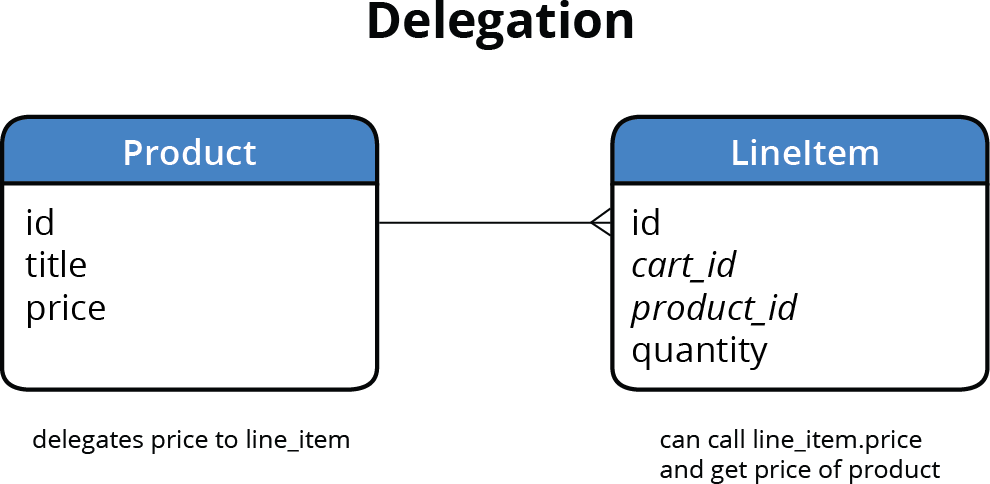
      Wouldn't it be more intuitive if we could simply call line_item.price instead of the verbose line_item.product.price? Remember that line_item doesn't have its own price field; the product always provides it. Rather than duplicating data or writing repetitive accessor methods, Rails gives us delegation—a powerful pattern that lets related models seamlessly pass their methods to each other.

      relationship diagram delegation

      This approach reduces coupling between your models while maintaining clean, readable code—a hallmark of professional Rails development.

    2. Edit the code as shown in bold:

      class LineItem < ApplicationRecord
         belongs_to :cart
         belongs_to :product
      
      delegate :price, to: :product
      
         def subtotal
            price * quantity
         end
      end

      Notice how much cleaner our subtotal method becomes when we can reference price directly instead of product.price.

    3. Save the file.

    4. In your code editor, open nutty > app > views > cart > index.html.erb.

    5. Around line 40, delete the bold code (don't miss the period):

      <td class="hidden-xs"><%= number_to_currency line_item.product.price %></td>
    6. Save the file once it looks like the following:

      <td class="hidden-xs"><%= number_to_currency line_item.price %></td>
    7. Go back to the browser and reload localhost:3000/cart

      Everything should remain the same, demonstrating that our refactoring worked perfectly. This is the power of delegation: cleaner code with identical functionality. In professional development, this kind of code clarity becomes crucial as your applications grow in complexity.

    8. In your code editor, open nutty > app > models > line_item.rb.

    9. Add the following bold code around line 5:

      delegate :price, :title, :image, :sku, to: :product

      We can delegate multiple attributes in a single line, making our model even more convenient to work with throughout the application.

    10. Save the file.

    11. In your code editor, open nutty > app > views > cart > index.html.erb.

    12. Delete the instances of product. (including the period after it) around lines 24, 29, and 31:

      <td id="thumbnail-div" class="hidden-xs">
         <%= link_to line_item.product do %>
            <%= image_tag line_item.product.image.url(:medium), ALT: product.title, class: 'cart-thumbnail' %>
         <% end %>
      </td>
      <td>
         <%= link_to line_item.product do %>
            <p><%= line_item.product.title %></p>
         <% end %>
         <p class="gray-text">Item #<%= line_item.product.sku %></p>
      </td>
    13. Save the file.

    14. Reload localhost:3000/cart in the browser to verify that everything still displays correctly.

    To delegate is a way of having related models pass their methods down to each other
    Rails delegation allows you to call line_item.price directly instead of line_item.product.price, making your code cleaner and more intuitive to work with.

    Benefits and Considerations of Rails Delegates

    Pros
    Cleaner, more readable code with shorter method calls
    Reduces repetitive product. references throughout views
    Centralizes method access patterns in model definitions
    Makes code more maintainable and easier to refactor
    Cons
    Can obscure the actual relationship between models
    May make debugging slightly more complex for beginners
    Adds another layer of abstraction to understand

    Making the Order Summary Functional

    With individual line item calculations working, it's time to implement the order summary functionality. We'll architect this thoughtfully, creating separate methods for subtotal and total so we can easily add shipping, taxes, and discounts later—exactly how you'd approach this in a production e-commerce system.

    1. In your code editor, open nutty > app > models > cart.rb

    2. Add the following bold code to add subtotal and total methods:

      has_many :products, through: :line_items
      
         def subtotal
            line_items.sum(&:subtotal)
         end
      
         def total
            subtotal
         end
      end
    3. Let's break down the code you just wrote:
      • For the subtotal method, we're summing up the subtotal of all our line items using Ruby's elegant sum method with the ampersand syntax. The &:subtotal syntax is shorthand for { |item| item.subtotal }—a more concise way to apply the subtotal method to each line item.
      • We created a separate total method that currently mirrors subtotal. This architectural decision gives us a clean foundation for future enhancements like shipping calculations, tax computation, or discount applications without breaking existing code.
    4. Save the file, then close it.

    5. In your code editor, open nutty > app > views > cart > index.html.erb.

    6. Edit the Subtotal and Total fields (around lines 55 and 67):

      <tr>
         <td>Subtotal</td>
         <td><%= number_to_currency @cart.subtotal %></td>
      </tr>

      Code Omitted To Save Space

      <tr>
         <td>Estimated Tax</td>
         <td>$0.00</td>
      </tr>
      <tr class="total-price">
         <td>Total</td>
         <td><%= number_to_currency @cart.total %></td>
      </tr>
    7. Save the file.

    8. Reload localhost:3000/cart in the browser to see that now the Subtotal and Total in the Order Summary section are working perfectly!

    Extensible Architecture Pattern

    Setting up separate subtotal and total methods now creates a foundation for future enhancements. When you add shipping and taxes later, you'll only need to modify the total method without changing the entire codebase.

    Cart Model Methods

    Subtotal Method

    Uses line_items.sum(&:subtotal) to calculate the sum of all line item subtotals in the cart.

    Total Method

    Currently returns subtotal but provides extensibility for adding shipping, taxes, and discounts later.

    Optional Bonus: Adding a Customers Who Want to Buy This Product Field

    Let's enhance our admin interface with valuable business intelligence. We'll add functionality to show which customers have added specific products to their carts—the kind of insight that's invaluable for inventory planning and marketing decisions.

    1. In the browser go to: localhost:3000/admin and sign in.

    2. Click the Products link at the top.

    3. To the far right of any product you've added to your cart, click View.

      On this page, we'll add a section showing all customers who have expressed interest in this product by adding it to their cart. This kind of customer intelligence is crucial for understanding demand patterns.

    4. In your code editor, open nutty > app > models > cart.rb

    5. Around line 7, add a delegate for :email so we can refer directly to the customer's username (their email) from the cart:

      has_many :products, through: :line_items
      
      delegate :email, to: :customer
      
      def subtotal
    6. Save the file, then close it.

    7. In your code editor, open nutty > app > admin > product.rb

    8. Around line 30, add a new row:

      row :title
      row :sku
      row 'Customers who want to buy this product' do
         product.carts.map(&:email).join(", ")
      end
      row :price
      row :description

      NOTE: This elegant line of code demonstrates Rails' power by traversing four models seamlessly. We're going from Product → LineItem → Cart → Customer with minimal code. The has_many :through relationship lets us jump directly from products to carts, while delegation handles the email access. When we call map(&:email), we're invisibly invoking the customer model through our cart delegate. This is the kind of concise, expressive code that makes Rails so powerful for rapid development.

    9. Save the file.

    10. Go back to the browser and reload the product page in the admin. You should now see a new Customers who want to buy… row with your email in it (since you're the only one who's added anything so far)!

    11. If you want to explore this feature further, you can create additional customer accounts and use them to add products to their carts. Their emails will then appear in this business intelligence display, giving you insight into customer demand patterns.

    Advanced Model Relationships

    This implementation demonstrates traversing four models with a single line of code. The has_many through relationship allows direct access from products to carts without explicitly invoking line_items.

    Optional Bonus: Displaying the Number of Items in the Cart

    Finally, let's implement a professional touch: a dynamic cart counter that updates across your entire application. This seemingly small feature significantly improves user experience by providing constant feedback about cart contents.

    1. In the browser, go to localhost:3000

    2. Click on Cart to go to the cart page.

    3. Notice that the Cart icon on the top right has a static 3 next to it. This is currently just part of the mockup design and doesn't reflect actual cart contents—the kind of detail that makes the difference between a prototype and a production-ready application.

      There are several approaches to implementing this feature, from simple server-side rendering to complex JavaScript solutions with real-time updates. We'll show you a solid, reliable server-side approach that works consistently across all browsers and connection types.

    4. In your code editor, open nutty > app > controllers > application_controller.rb

    5. Look at the load_cart_or_redirect_customer method (around line 7). Currently, this method combines two distinct responsibilities: loading the cart and handling authentication redirects.

      Following the single responsibility principle, we should separate these concerns. The products controller needs cart loading capability but shouldn't trigger authentication redirects, while cart and line_items controllers need both functionalities.

    6. Cut (Cmd–X) the code shown in bold (around lines 8–11):

      private
         def load_cart_or_redirect_customer
            if customer_signed_in?
               current_customer.create_cart if current_customer.cart.nil?
               @cart = current_customer.cart  
            else
               redirect_to new_customer_session_path, alert: "Please sign in to access your cart." and return
            end
    7. Paste the cut code starting around line 7:

      private
            if customer_signed_in?
               current_customer.create_cart if current_customer.cart.nil?
               @cart = current_customer.cart  
            else
      
         def load_cart_or_redirect_customer
    8. Now add the code shown in bold:

      private
         def load_cart
            if customer_signed_in?
               current_customer.create_cart if current_customer.cart.nil?
               @cart = current_customer.cart  
            else
         end
      
         def load_cart_or_redirect_customer
            unless load_cart
               redirect_to new_customer_session_path, alert: "Please sign in to access your cart." and return
            end
    9. Edit the pasted code as shown and delete the else around line 11:

      private
         def load_cart
            return false unless customer_signed_in?
            current_customer.create_cart if current_customer.cart.nil?
            @cart = current_customer.cart  
         end
    10. Save the file, then close it.

    11. In your code editor, open nutty > app > controllers > products_controller.rb.

    12. Add the code in bold:

      before_action :load_cart

      This before_action ensures that cart data is available on all product pages, enabling our cart counter to display accurate information throughout the shopping experience.

    13. Save the file, then close it.

    14. In your code editor, open nutty > app > views > layouts > application.html.erb.

    15. Starting around line 45, edit the code as shown:

      <a id="cart" href="/cart">
         <span></span>Cart
         <% if @cart %>
            <span class="badge"><%= @cart.line_items.count %></span>
         <% end %>
      </a>

      The conditional check ensures the badge only appears when a cart exists, preventing errors on pages where customers aren't signed in.

    16. Save the file, then close it.

    17. In the browser, go to localhost:3000

    18. Try adding more products to the cart to see that the Cart icon at the top updates accordingly. This provides immediate visual feedback to users about their cart status—a crucial UX improvement!

    19. Want an extra challenge? This implementation counts the number of unique line items in the cart. Some e-commerce sites prefer showing the total quantity instead. So if you have 11 Pantone Toothbrushes and 4 Finger Tentacles in your cart, the current implementation shows "2" while the alternative would show "15". Can you modify the code to display total quantity? Hint: You'll need to sum the quantities of all line items rather than just counting the line items themselves.

    20. Leave your code editor and browser open, as well as the server running in Terminal, so we can continue with them in the following exercises. You've just implemented professional-grade e-commerce functionality that forms the foundation of any successful online store.

    Controller Refactoring Process

    1

    Separate Concerns

    Split load_cart_or_redirect_customer into two distinct methods for better code organization

    2

    Create Load Cart Method

    Implement load_cart method that returns false if customer not signed in, true otherwise

    3

    Update Controllers

    Add before_action :load_cart to products_controller for cart access across all product pages

    4

    Update View Logic

    Modify application layout to display dynamic cart count using @cart.line_items.count

    Enhancement Challenge

    The current implementation counts line items. For displaying total quantity (e.g., 11 toothbrushes + 4 tentacles = 15), you would need to sum the quantity field across all line items instead of just counting them.

    Key Takeaways

    1Implement subtotal calculations by creating methods that multiply product price by quantity for accurate cart totals
    2Use Rails delegates to create cleaner code by allowing models to share methods without repetitive references
    3Build extensible architecture with separate subtotal and total methods to accommodate future features like taxes and shipping
    4Leverage Rails associations and delegates to traverse multiple models with concise, readable code
    5Separate controller concerns by creating focused methods that handle single responsibilities like cart loading vs redirection
    6Implement dynamic UI updates using conditional rendering in views based on model state
    7Use Rails sum method with symbol-to-proc syntax for efficient collection calculations across related models
    8Design admin interfaces that provide valuable business intelligence by showing customer purchase intent data

    RELATED ARTICLES