March 23, 2026/6 min read

Intro to HTML & Web Scraping

Master HTML fundamentals and web scraping techniques

If you can see it on a website, it can be scraped, mined, and put into a dataframe
This fundamental principle underlies all web scraping projects and demonstrates the vast potential of web data extraction.

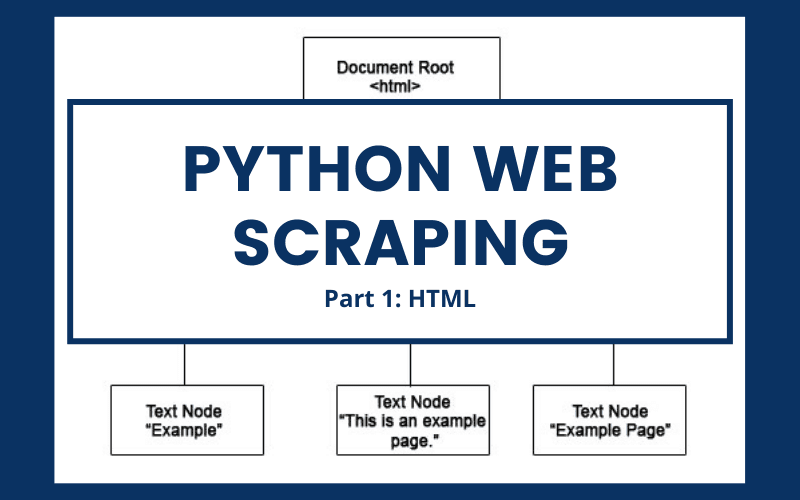
Python Web Scraping HTML Hero Image

The world's largest data repository isn't housed in any corporate server farm—it's the web itself. If there's one principle that will transform your approach to data collection, it's this: "If you can view it in a browser, you can extract it programmatically." This fundamental truth opens doors to virtually unlimited data sources, from e-commerce product catalogs to financial markets, social media trends, and research databases.

However, successful web scraping requires more than just enthusiasm—it demands a solid understanding of how web content is structured. Before we dive into extraction techniques, we need to master the foundation: HyperText Markup Language (HTML) and its document structure. This article will guide you through reading and navigating HTML like a seasoned developer, then demonstrate practical scraping using Beautiful Soup and Requests on a real website. In our follow-up article, we'll explore advanced techniques with XPath selectors and enterprise-grade workflows using the Scrapy framework.

Understanding the HTML Document Object Model (DOM) is crucial for effective scraping. In the DOM architecture, every component is classified as a specific type of node:

  • The document serves as the root document node
  • HTML elements function as element nodes (divs, headers, paragraphs)
  • All HTML attributes operate as attribute nodes (class, id, href values)
  • Text content within HTML elements exists as text nodes
    • These text nodes represent your primary target in most scraping projects—the actual data you're seeking beneath layers of markup structure

HTML Hierarchy

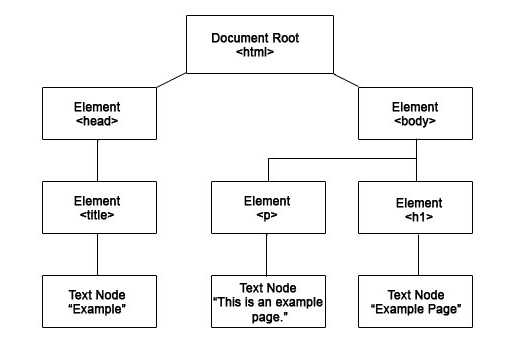
HTML Hierarchy Diagram

Visualizing this node structure reveals a tree-like hierarchy where the document node serves as the root, branching into multiple elements that contain progressively smaller elements like titles, paragraphs, and headers. Each of these nested elements houses the text nodes that contain your target data. Think of HTML navigation like traversing a family tree—you need to understand parent-child relationships to locate specific information efficiently.

Let's examine how these abstract concepts translate into actual code structure that you'll encounter in real-world scraping scenarios.

HTML Node Types

Document Node

The root node that contains the entire HTML document. This is the starting point for all web scraping operations.

Element Nodes

HTML elements like div, p, and title tags that structure the content and contain the data you want to extract.

Text Nodes

The actual text content inside HTML elements. This is typically what web scrapers target for data extraction.

Elements

HTML elements are defined by opening and closing tags with identical namespace identifiers. Mastering element recognition is essential for targeting the right data. Here are fundamental examples:

<title>I am a title.</title>

<p>I am a paragraph.</p>

<strong>I am bold.</strong>

Real websites typically contain dozens or hundreds of identical elements on a single page. Frontend developers assign unique ID values to differentiate these elements and create specific reference points for styling and functionality. Here's how ID assignment works in practice:

<title id = 'title_1'>I am the first title.</title>

<p id = 'paragraph_1'>I am the first paragraph.</p>

<title id = 'title_2'>I am the second title.</title>

<p id = 'paragraph_2'>I am the second paragraph.</p>

These unique identifiers become powerful tools for precise data extraction—instead of grabbing every paragraph on a page, you can target exactly the content you need.

HTML Tag Structure

All HTML elements follow the same pattern: opening tag, content, and closing tag. The namespace in both tags must match exactly for valid HTML.

Common HTML Elements

Title Tags

Used for page titles and headings. Example: <title>Content</title>

Paragraph Tags

Contains paragraph text content. Example: <p>Text content</p>

Strong Tags

Makes text bold for emphasis. Example: <strong>Bold text</strong>

Parents and Children

HTML's nested structure creates parent-child relationships that are crucial for navigation-based scraping strategies. Elements can simultaneously serve as both parents and children depending on your reference point, creating a hierarchical chain that you'll need to traverse programmatically:

<body id = 'parent'>

  <div id = 'child_1'>I am the child of 'parent.' # also parent of child_2

    <div id = 'child_2'>I am the child of 'child_1.' # also parent of child_3

      <div id = 'child_3'>I am the child of 'child_2.' # also parent of child_4

        <div id = 'child_4'>I am the child of 'child_3.'</div> # not a parent

      </div>

    </div>

  </div>

</body>

This hierarchical relationship system allows you to use relative positioning in your scraping logic. For instance, you might locate a specific header element, then extract data from its sibling paragraphs or child elements. The comments (marked with #) demonstrate how elements can serve multiple roles—understanding this flexibility is key to writing robust scraping code that adapts to various HTML structures.

Understanding HTML Relationships

Elements can be both parents and children depending on your reference point. This hierarchical structure is crucial for navigating HTML during web scraping.

Attributes

Attributes define element properties and characteristics, controlling how pages render and behave in browsers. For scrapers, attributes often contain metadata that's just as valuable as visible text content. The most recognizable example is the anchor element with its "href" attribute—essentially creating clickable links:

<a href = "https://www.youtube.com/watch?v=dQw4w9WgXcQ">Click Me!</a>

This renders in your browser as: Click me!

Beyond links, attributes can contain URLs to images, CSS class names that indicate content types, data attributes with structured information, and various other metadata that enhance your scraping capabilities.

Now that we've established the foundational knowledge, let's transition from theory to practice with a real-world scraping implementation.

HTML Attributes

href Attribute

Used in anchor tags to specify link destinations. Essential for extracting URLs from web pages.

id Attribute

Provides unique identifiers for elements, making them easier to target during web scraping operations.

Installing Requests and Beautiful Soup to Extract Data

Before we begin extracting data, you'll need to install the essential Python libraries for web scraping. Open your terminal or command prompt and execute these commands:

  1. pip install beautifulsoup4
  2. pip install lxml
  3. pip install requests

Beautiful Soup handles HTML parsing and navigation, while lxml provides fast XML and HTML processing capabilities. The requests library manages HTTP communication with target websites. Once installation completes, launch your preferred IDE—we'll demonstrate using Jupyter Notebook for its interactive development advantages—and target www.datatau.net to extract article titles and metadata.

Installation Process

1

Install Beautiful Soup

Run 'pip install beautifulsoup4' in your terminal or command prompt to install the HTML parsing library.

2

Install LXML Parser

Run 'pip install lxml' to install the XML and HTML parser that works with Beautiful Soup for better performance.

3

Open Your IDE

Launch Jupyter Notebook or your preferred IDE to begin importing the libraries and setting up your scraping environment.

Data Import and URL Request

Import Requests and Check Python Code

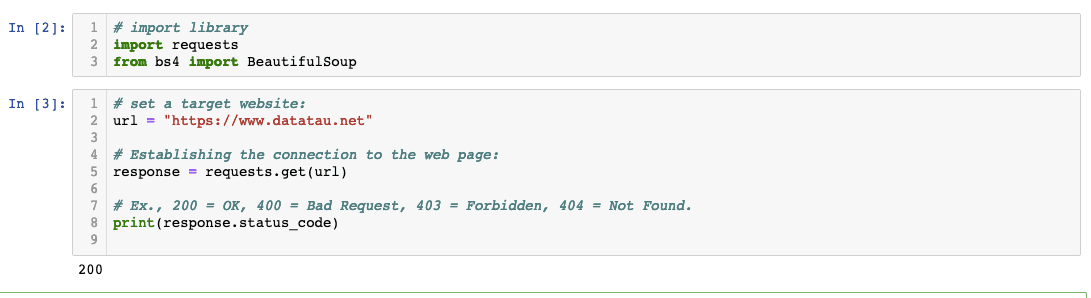
Always verify response.status_code before proceeding with data extraction. A status code of 200 indicates successful communication, while codes like 403 (Forbidden) or 429 (Too Many Requests) signal that the website is blocking or rate-limiting your requests. Implementing proper response code checking prevents your scraping scripts from failing silently and helps you handle various server responses appropriately.

Professional scraping practices also include setting appropriate headers, implementing retry logic, and respecting robots.txt files to maintain ethical scraping standards.

Check Response Status

Always verify response.status_code equals 200. Some websites block requests, and you need to confirm successful connection before proceeding with scraping.

Scraping Code

Python Scraping Code

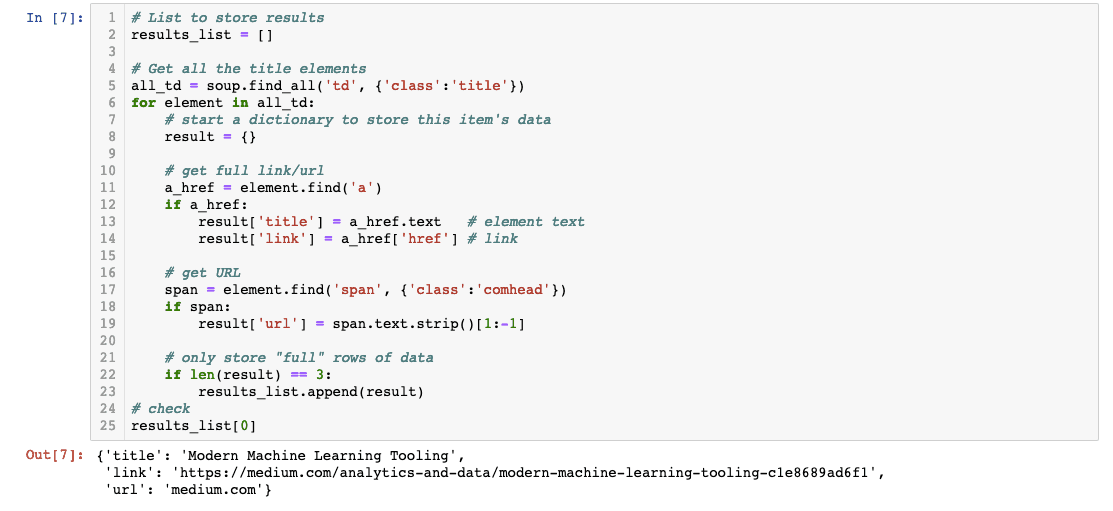
Excellent! Our scraper successfully extracted the title, link, and origin URL from each article. This code demonstrates several important scraping concepts: using CSS selectors to target specific elements, iterating through multiple matches, and structuring extracted data into organized dictionaries. The beauty of this approach lies in its scalability—the same logic can be adapted to extract data from thousands of similar pages.

Notice how we're building a list of dictionaries, which provides a clean data structure that translates seamlessly into various formats including CSV files, databases, or pandas DataFrames.

Successful Data Extraction

The scraping code successfully extracted three key data points: article titles, links, and origin URLs from the target website.

Extracted Data Types

Article Titles

The main headlines or titles of articles found on the scraped webpage.

Article Links

Direct URLs linking to the full articles for further processing or analysis.

Origin URLs

Source website URLs where the original content is hosted.

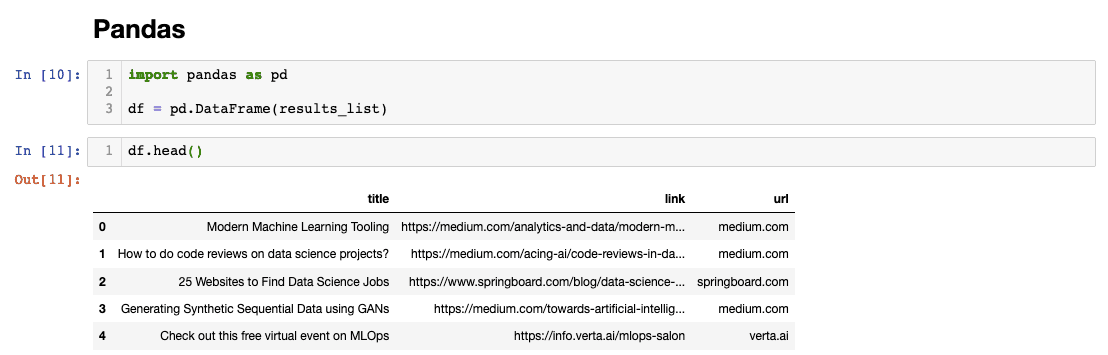
List to Pandas Dataframe

Converting our extracted data into a pandas DataFrame unlocks powerful data analysis capabilities. With structured data in a DataFrame, you can perform filtering, sorting, statistical analysis, and easy export to various formats:

Import Pandas and Check Python Code

This DataFrame structure provides immediate benefits: you can now filter articles by specific keywords, analyze URL patterns, export results to Excel or CSV files, or integrate this data into larger analytical workflows. The transformation from raw HTML to structured data represents the core value proposition of web scraping.

Congratulations on completing your first web scraping project! While the transition from HTML basics to functional scraping code might feel steep, you've just learned skills that open doors to countless data sources across the internet. If you found certain concepts challenging, that's completely normal—web scraping combines knowledge from multiple domains including HTTP protocols, HTML structure, and Python programming.

For those looking to deepen their Python expertise, our comprehensive Python course provides the programming foundation that will accelerate your data extraction capabilities. In our upcoming Part II of this web scraping series, we'll explore XPath selectors for more precise element targeting and introduce enterprise-grade scraping workflows using the Scrapy framework—essential tools for scaling your scraping operations in 2026's increasingly complex web landscape.

Converting to DataFrame

1

Create List of Dictionaries

Organize your scraped data into a structured list where each item is a dictionary containing the extracted information.

2

Import Pandas

Import the Pandas library to access data manipulation and analysis tools for your scraped data.

3

Use DataFrame Method

Apply the DataFrame method to convert your list of dictionaries into a structured, analyzable Pandas DataFrame.

Next Steps

Part II of this web scraping series will cover XPath techniques and introduce the Scrapy framework for more advanced scraping workflows.

Key Takeaways

1HTML uses a hierarchical Document Object Model where everything is considered a node, including documents, elements, attributes, and text content
2HTML elements consist of opening and closing tags with matching namespaces, and can be uniquely identified using ID attributes
3Elements have parent-child relationships that create a tree-like structure essential for navigating and targeting specific content during scraping
4Attributes like href and id provide additional properties and characteristics that help describe element behavior and create unique reference points
5Beautiful Soup and Requests libraries provide the essential tools needed to extract data from websites through HTML parsing and HTTP requests
6Always check response status codes to ensure successful connection before attempting to scrape content from target websites
7Scraped data can be efficiently organized into lists of dictionaries and then converted into Pandas DataFrames for analysis and manipulation
8Any visible content on a website can potentially be scraped and transformed into structured data for analysis and processing

RELATED ARTICLES