March 23, 2026/5 min read

Python Data Wrangling Guide

Master Python Data Wrangling for Professional Analysis

What is Data Wrangling?

Data wrangling, also known as data munging or preprocessing, is the process of transforming raw data into a format suitable for analysis. It's a critical step that directly impacts the quality and reliability of your data science results.

Core Data Wrangling Components

Data Exploration

Checking feature data types, unique values, and describing data characteristics to understand your dataset's structure and quality.

Null Value Handling

Counting and strategically managing missing values through removal, imputation, or other appropriate methods.

Feature Engineering

Transforming raw data through techniques like one-hot encoding, aggregation, joins, and grouping for better analysis.

Text Processing

Using tools like BeautifulSoup and Regex to clean and extract meaningful information from HTML, XML, and text documents.

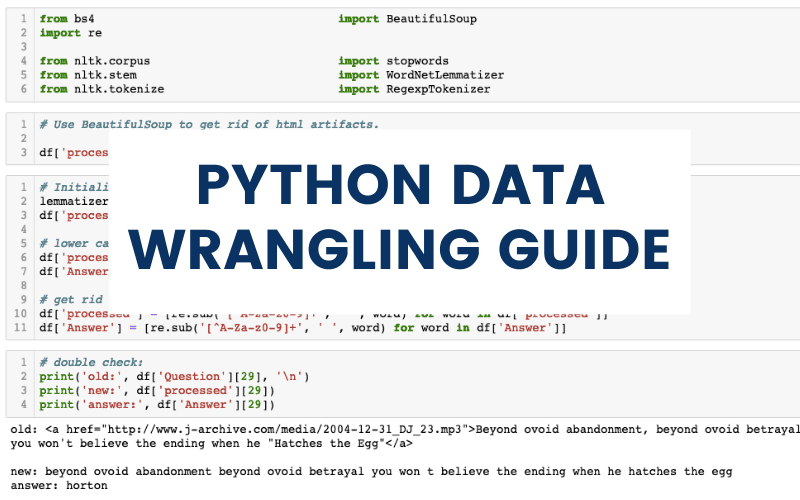
Python Data Wrangling Cover Photo

Data wrangling—also called data munging or preprocessing—represents the foundation of every successful data science project. This critical process transforms raw, messy data into a clean, structured format optimized for analysis, directly impacting the quality and reliability of your insights. In this comprehensive tutorial, we'll demonstrate these techniques using Jeopardy questions from the Jeopardy Archive, showing you how to wrangle textual data and prepare it for classification algorithms.

While every dataset presents unique challenges, professional data scientists rely on a systematic preprocessing workflow that encompasses four essential phases:

  1. Data Exploration: Systematically examining feature data types, identifying unique values, and generating descriptive statistics to understand your dataset's structure and characteristics.
  2. Null Value Management: Quantifying missing data patterns and implementing strategic decisions for handling gaps—whether through imputation, removal, or alternative approaches.
  3. Reshaping and Feature Engineering: Transforming raw data into analytically useful formats through techniques like one-hot encoding, aggregation, joins, grouping, and creating derived variables that capture hidden patterns.
  4. Text Processing: Leveraging tools like BeautifulSoup and regular expressions to extract, clean, and standardize textual content from web-scraped HTML and XML documents.

Importing Libraries

Let's establish our analytical environment by importing the essential libraries that form the backbone of modern data wrangling workflows:

  1. Pandas: The cornerstone library for data manipulation, providing powerful DataFrame operations for exploring column data types, identifying null values, and analyzing unique value distributions.
  2. NumPy: The fundamental package underlying Python's scientific computing ecosystem, offering optimized mathematical functions that operate efficiently on multi-dimensional arrays and data structures.
  3. Matplotlib & Seaborn: Industry-standard visualization libraries that transform raw data into compelling, publication-ready graphics that reveal patterns and insights at a glance.

Essential Python Libraries for Data Wrangling

Pandas

Navigate dataframes, check column data types, identify null values, and explore unique values efficiently.

NumPy

Provides mathematical functions for multi-dimensional arrays and dataframes, essential for any data science project.

Matplotlib & Seaborn

Plotting and graphing libraries for creating intuitive data visualizations and exploratory analysis charts.

Loading the Data

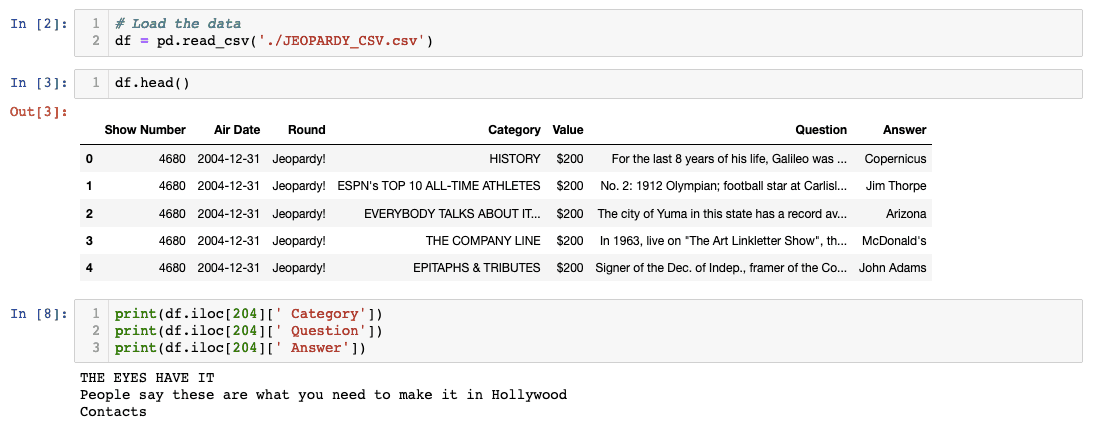
With our environment configured, let's load the Jeopardy dataset and conduct our initial inspection using df.head() to understand the data structure and content quality:

Uploading Data Python

Excellent news—our initial data inspection reveals a relatively clean dataset structure. However, even seasoned data scientists must remain vigilant for subtle issues that can derail analysis. I've immediately noticed extraneous spaces in column names, a common artifact from data extraction processes that we'll address systematically. This attention to detail separates professional data wrangling from amateur attempts.

Data Loading Best Practice

Always run df.head() immediately after loading data to get a quick overview of your dataset structure and identify potential issues early in the process.

Initial Data Assessment Process

1

Load and Preview

Use df.head() to examine the first few rows and identify obvious data quality issues like formatting problems or extra spaces in column names.

2

Check Shape

Verify the dimensions of your dataframe to understand the scale of your dataset and ensure it loaded completely.

3

Identify Null Values

Count missing values across all columns to understand data completeness and plan your cleaning strategy.

Exploratory Data Analysis

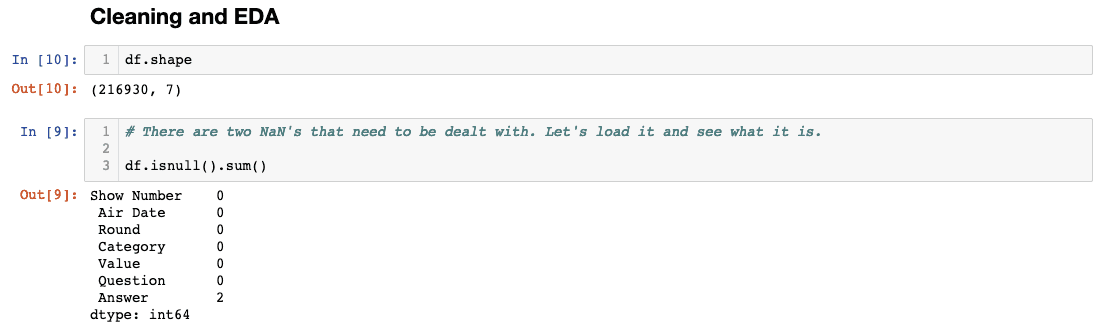
Before diving into cleaning operations, we need to understand our data's completeness and quality through systematic exploration. Let's examine the dataset dimensions and conduct a comprehensive null value audit:

Cleaning and EDA Null Check Python

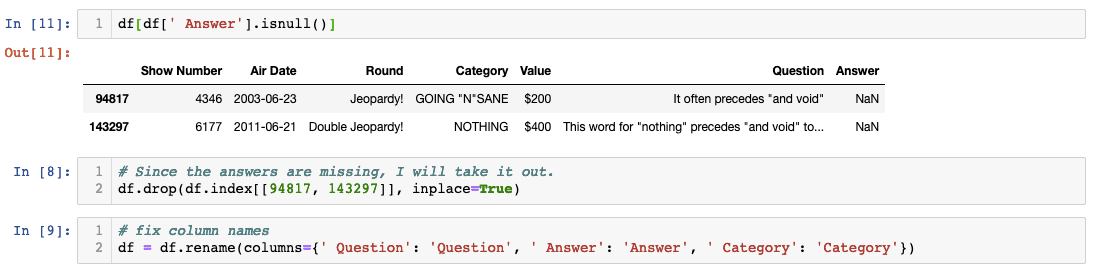
Our analysis reveals two missing values in the Answer column—a relatively minor issue that nonetheless requires careful consideration. The next step involves examining these specific rows to make an informed decision about handling strategy:

Masking Python Null Values

Here I've implemented boolean masking, a powerful pandas technique that allows precise identification of problematic rows. By examining the index numbers and content context, I can make data-driven decisions about remediation strategies. Given that we're dealing with only two null text values in questions where manual imputation would be inappropriate, removal represents the optimal approach. Additionally, I've standardized the column naming convention to eliminate those problematic spaces.

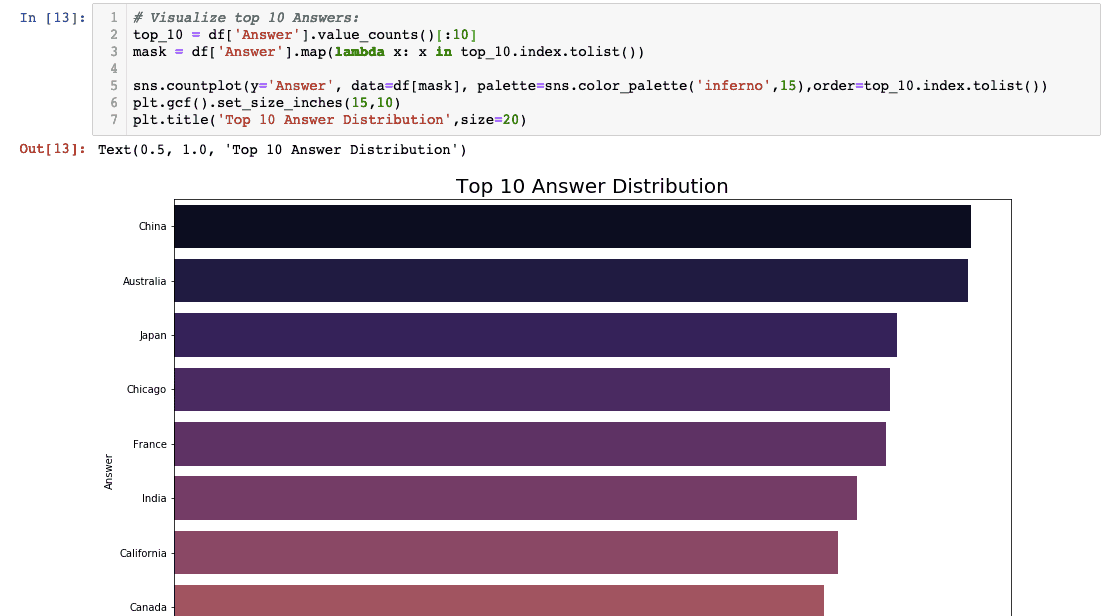
With data quality issues resolved, let's conduct meaningful exploratory analysis to understand content patterns. Our first investigation focuses on identifying the most frequently occurring Jeopardy answers:

Top 10 answers visualization

This analysis employs the value_counts() method—a fundamental tool for categorical data analysis—combined with slice notation [:10] to extract the top occurrences. The resulting horizontal bar chart, generated through Seaborn's intuitive API, provides immediate visual insight into answer frequency distributions. This type of visualization often reveals unexpected patterns that inform subsequent analysis decisions.

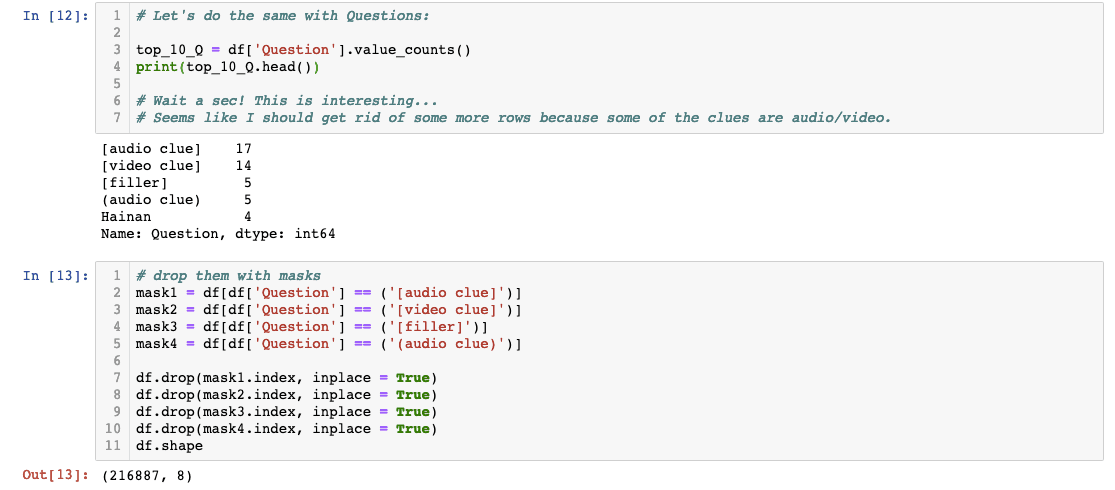
To maintain analytical rigor, let's apply the same methodology to examine question frequency patterns. While conventional wisdom suggests that Jeopardy questions should be unique, data-driven verification remains essential:

Top 10 Questions Python code

This investigation validates the importance of challenging assumptions during exploratory analysis. The discovery of numerous audio and video clues represents a significant finding that could compromise downstream classification models. These multimedia references lack the textual content necessary for natural language processing algorithms, making their removal essential for model performance. I've explicitly listed each removal operation for transparency, though production environments would typically employ vectorized operations for efficiency.

Missing Data Discovery

The Answer column contained two missing values. Using masking techniques to identify and examine null value rows helps make informed decisions about data cleaning strategies.

EDA Workflow for Text Data

1

Identify Missing Values

Use masking to highlight rows with null values and examine their context to determine appropriate handling strategies.

2

Handle Null Values

Drop rows with missing text data when the missing information cannot be reasonably imputed or recovered.

3

Fix Column Names

Clean up formatting issues like extra spaces in column names to prevent future processing problems.

4

Analyze Value Distributions

Use value_counts() to identify the most common answers and questions, revealing patterns and potential data quality issues.

Challenging Assumptions

Despite expecting all Jeopardy questions to be unique, the analysis revealed numerous audio and video clues that needed to be removed for classification tasks. Always verify your assumptions with data.

Text Preprocessing

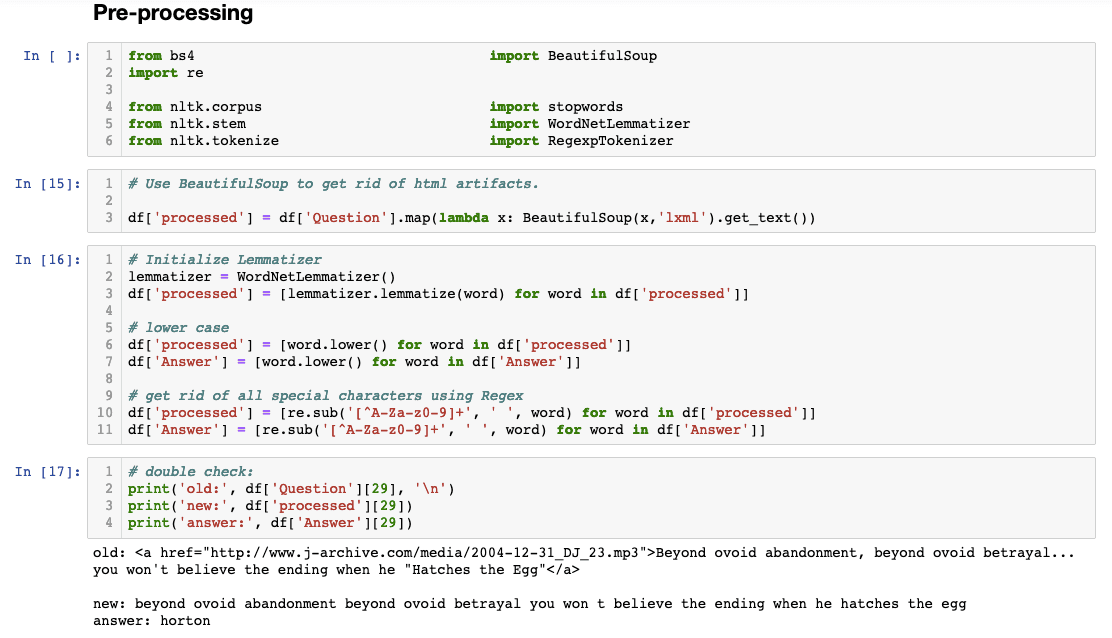
Real-world textual data rarely arrives in analysis-ready format. Our dataset contains embedded URLs and HTML tags—common artifacts from web scraping operations that require systematic cleaning. This phase demonstrates why text preprocessing represents both an art and a science in professional data science workflows.

Our comprehensive text cleaning pipeline will address multiple standardization requirements: HTML artifact removal using BeautifulSoup, punctuation elimination through regular expressions, case normalization via Python's built-in methods, and lemmatization for semantic consistency. BeautifulSoup remains the gold standard for extracting clean text from markup documents, particularly when dealing with inconsistent or malformed HTML structures common in scraped datasets.

Before modifying our data, let's implement a critical best practice: preserving original data integrity. Professional workflows always maintain source data immutability by creating dedicated processed columns rather than overwriting original values. This approach enables reproducibility and facilitates debugging when preprocessing decisions require revision:

Data PreProcessing Python

The side-by-side comparison demonstrates the dramatic transformation achieved through systematic text preprocessing. Notice how the processed version eliminates formatting artifacts while preserving semantic content—exactly what machine learning algorithms require for optimal performance.

Text Cleaning Techniques

HTML Tag Removal

Use BeautifulSoup to extract clean text from HTML and XML documents, removing embedded tags and formatting artifacts.

Punctuation Cleaning

Apply regular expressions to remove punctuation marks and special characters that don't contribute to text analysis.

Text Normalization

Convert all text to lowercase and apply lemmatization to standardize word forms for consistent analysis.

Data Preservation Best Practice

Always create a copy of your original data and process it in a new column rather than modifying the source data directly. This preserves your original dataset for comparison and troubleshooting.

Recap

This comprehensive walkthrough illustrates why exploratory data analysis remains indispensable, even when working with seemingly straightforward textual datasets. Our systematic approach uncovered multiple data quality issues—from multimedia content incompatible with text analysis to HTML artifacts requiring specialized cleaning—that could have severely compromised model performance if left unaddressed.

Professional data wrangling demands this level of methodical attention to detail. In today's data-driven business environment, the quality of your preprocessing directly determines the reliability of your insights and the success of your analytical initiatives. The investment in thorough data wrangling pays dividends throughout the entire project lifecycle, from initial modeling through production deployment and ongoing maintenance.

Data Wrangling Completion Checklist

0/5

Key Takeaways

1Data wrangling is essential for transforming raw data into analysis-ready formats and directly impacts the quality of data science results
2Always preview data with df.head() immediately after loading to identify structural issues and formatting problems early
3Use masking techniques to identify and examine null values systematically before deciding on removal or imputation strategies
4Challenge your assumptions about data consistency - even unique datasets like Jeopardy questions can contain unexpected duplicates or variations
5BeautifulSoup is crucial for cleaning web-scraped data by removing HTML tags and extracting clean text from structured documents
6Preserve data integrity by creating copies of original datasets rather than modifying source data directly during preprocessing
7Combine multiple text preprocessing techniques including punctuation removal, case normalization, and lemmatization for optimal results
8Exploratory data analysis on text data can reveal hidden patterns and data quality issues that would otherwise compromise model performance

RELATED ARTICLES