March 23, 2026Tziporah Zions/6 min read

Premiere Pro Glitch Effect

Master Professional Glitch Effects in Premiere Pro

What You'll Master

VR Chromatic Aberration

Learn to manipulate RGB color channels for authentic chromatic distortion. Create realistic color separation effects that mimic analog video glitches.

Keyframe Animation

Master precise timing control for glitch sequences. Set multiple keyframes to create seamless transitions between normal and distorted states.

Mosaic Effects

Apply pixelation techniques for digital corruption aesthetics. Control block sizes to simulate various levels of data degradation.

Glitch%20Effect%20GIF

Getting the Project Files

  1. Download the project files.
  2. After the download completes, extract the ZIP file if your system hasn't done so automatically. You'll find a Premiere Pro Glitch Effect folder containing all necessary assets and project files.
Project Setup Best Practice

Always organize your project files in dedicated folders before starting. This ensures all assets remain linked and your timeline stays stable throughout the editing process.

Overview

Digital glitch effects have become essential tools in modern video production, offering editors a way to create visual tension, emphasize transitions, or add cyberpunk aesthetics to their projects. In this tutorial, we'll construct a professional glitch effect using Premiere Pro's built-in effects—no third-party plugins required.

Our approach involves layering multiple effects to achieve maximum visual impact. We'll start by applying a VR Chromatic Aberration effect to an Adjustment Layer, creating color channel separation that mimics analog video interference. Next, we'll duplicate this effect on our footage layer and add strategic keyframe animation. Finally, we'll introduce a Mosaic effect to simulate digital corruption and data loss artifacts.

This technique works particularly well for tech demos, music videos, sci-fi content, and any project requiring a distressed, digital aesthetic. Let's dive into the technical implementation.

Effect Creation Workflow

Step 1

Adjustment Layer Setup

Apply VR Chromatic Aberration to adjustment layer for global effect control

Step 2

Color Channel Keyframing

Set keyframes for RGB aberration values to create color separation

Step 3

Footage-Specific Effects

Copy effects to individual clips and add Mosaic for pixelation

VR Chromatic Aberration

  1. In the Effects panel, search for VR Chromatic Aberration using the search field.
  2. Drag the effect onto the Adjustment Layer in your timeline. This layer-based approach gives you maximum flexibility for future adjustments.
  3. Select the Adjustment Layer to make it active.
  4. Navigate to the Effect Controls panel and locate your newly applied effect.
  5. Position the Playhead at 00;00;02;07—this marks our glitch sequence starting point.
  6. Click the stopwatch icon next to Aberration (Red) to enable keyframe animation.
  7. Set the initial value to 0 for a clean starting point.
  8. Activate keyframes for Aberration (Green) by clicking its stopwatch icon.
  9. Set this value to 0 as well.
  10. Enable keyframes for Aberration (Blue) using the same method.
  11. Set the blue channel value to 0 to complete our baseline keyframes.
  12. Advance the Playhead to 00;00;02;12 for our first glitch peak.
  13. Adjust Aberration (Red) to 30—this creates horizontal red channel displacement.
  14. Set Aberration (Green) to -80 for dramatic opposing movement.
  15. Configure Aberration (Blue) to 15 for subtle blue separation.
  16. Move the Playhead to 00;00;02;18 for our second variation.
  17. Change Aberration (Red) to -25, reversing the displacement direction.
  18. Adjust Aberration (Green) to -10 for reduced intensity.
  19. Set Aberration (Blue) to 60 for maximum blue channel separation.
  20. Position the Playhead at 00;00;02;24 to create our return to normal.
  21. Reset Aberration (Red) to 0.
  22. Return Aberration (Green) to 0.
  23. Set Aberration (Blue) to 0 to complete the glitch cycle.
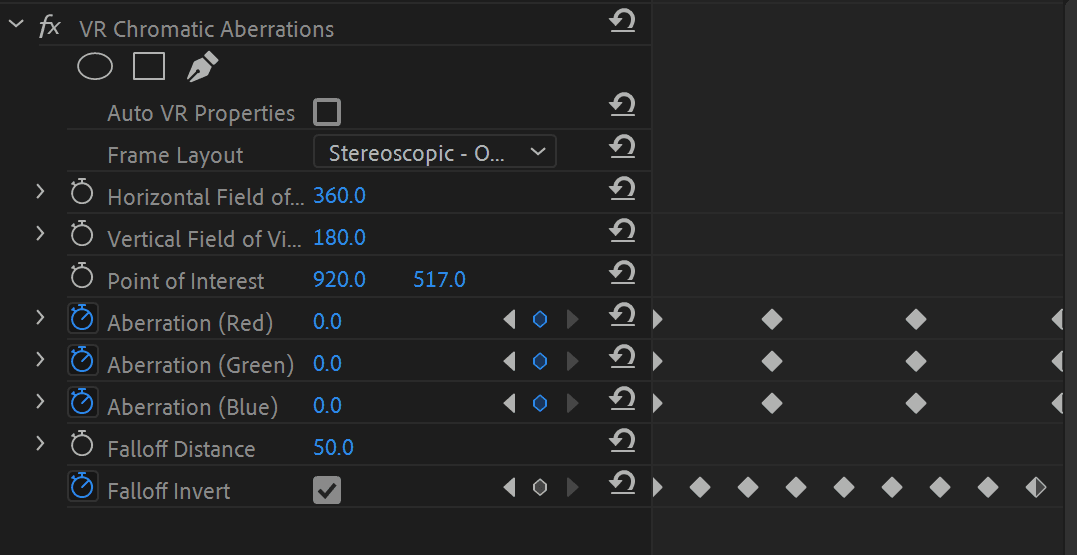
  24. Check the Auto VR Properties box to enable additional VR-specific controls.
  25. From the dropdown menu, select Stereoscopic (Over/Under) for enhanced depth processing.
  26. Return the Playhead to 00;00;02;07 to add screen jitter effects.
  27. Click the Falloff Invert checkbox to create the first jitter keyframe.
  28. Press the right arrow key twice to advance two frames.
  29. Toggle the Falloff Invert checkbox again to create alternating jitter.
  30. Repeat this two-frame advance and toggle process until you reach 00;00;02;24, creating rapid screen distortion.

Your Effect Controls panel should now display a complex keyframe pattern similar to this reference:

Image4

RGB Channel Configuration

1

Initialize at Zero

Set all RGB aberration values to 0 at timeline position 00;00;02;07 to establish baseline

2

Peak Distortion

Create maximum separation: Red 30, Green -80, Blue 15 at 00;00;02;12

3

Secondary Peak

Shift channels again: Red -25, Green -10, Blue 60 at 00;00;02;18

4

Return to Normal

Reset all values to 0 at 00;00;02;24 for smooth transition completion

Stereoscopic Enhancement

The Over/Under stereoscopic setting amplifies the chromatic aberration effect by processing the image as if it were VR content, creating more pronounced color separation.

Glitch Effect

Now we'll extend our glitch treatment to the footage itself, creating a layered effect that combines global adjustment with footage-specific distortion.

  1. Select the VR Chromatic Aberration effect name in the Effect Controls panel to highlight the entire effect.
  2. Copy the effect using Cmd-C (Mac) or Ctrl-C (PC).
  3. Select the New York City footage layer in your timeline.
  4. Paste the effect with Cmd-V (Mac) or Ctrl-V (PC).
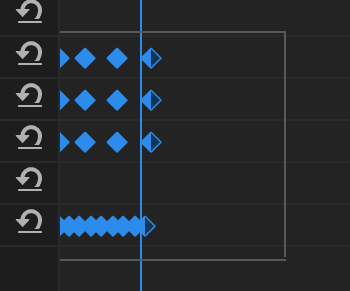
  5. In the Effect Controls panel, you'll notice the keyframes have been placed at the clip's beginning. We need to reposition them for proper timing. Drag to select all keyframes across all three color channels: Image2
  6. Move the Playhead to 00;00;03;06—this creates separation between our two glitch sequences.
  7. With all keyframes selected, drag them to align with the Playhead position at 00;00;03;06.
  8. Access the Effects panel and search for Mosaic to add digital corruption effects.
  9. Apply the Mosaic effect to the New York City footage.
  10. In Effect Controls, ensure Sharp Colors is checked for clean pixelation edges.
  11. With the Playhead at 00;00;03;06, set Horizontal Blocks to 500 for maximum pixelation.
  12. Set Vertical Blocks to 500 to match the horizontal intensity.
  13. Advance to 00;00;03;15 for the peak glitch moment.
  14. Reduce Horizontal Blocks to 20 for large, visible pixel blocks.
  15. Set Vertical Blocks to 10 for rectangular distortion patterns.
  16. Move to 00;00;03;23 to maintain the effect.
  17. Keep Horizontal Blocks at 20.
  18. Maintain Vertical Blocks at 10 for consistency.
  19. Return the Playhead to 00;00;00;00 to preview from the beginning.
  20. Press Spacebar to play your sequence. You'll see sophisticated glitch transitions between clips and digital corruption effects on the second clip.

Mosaic Block Progression

Initial Horizontal
500
Final Horizontal
20
Initial Vertical
500
Final Vertical
10
Effect Transfer Technique

Copying and pasting effects between clips maintains all keyframe relationships while allowing independent timing adjustments. This workflow saves significant setup time for complex animations.

Conclusion

You've successfully created a professional-grade glitch effect that rivals expensive third-party plugins. This technique demonstrates the power of Premiere Pro's native effects when used strategically and with proper keyframe animation.

The beauty of this approach lies in its flexibility. Experiment with different VR Chromatic Aberration values to create unique color separation patterns—try extreme negative values for inverse effects, or subtle positive values for understated distortion. Layer additional Mosaic effects with different block sizes for more complex digital artifacts. Consider adding Gaussian Blur keyframes that sync with your glitch timing to simulate focus pulls during signal interference.

For extended glitch sequences, duplicate your keyframe sets along the timeline, varying the intensity values to prevent repetitive patterns. Professional tip: overlay static footage or noise generators with blend modes like Overlay or Screen for authentic analog interference. You can also experiment with the RGB Curves effect to crush specific color channels during glitch peaks, mimicking the way analog video systems fail under stress.

This effect works exceptionally well for corporate tech presentations, electronic music videos, cyberpunk narratives, and any content requiring a cutting-edge digital aesthetic. The key to professional results is restraint—strategic placement of glitch effects creates more impact than constant distortion.

Happy editing!

Creative Expansion Ideas

Color Experimentation

Modify RGB channel values for different color palettes. Try inverse values or extreme ranges for unique aesthetic variations.

Layered Effects

Combine multiple Mosaic instances or add Gaussian Blur for depth. Stack effects create more complex digital corruption patterns.

Extended Sequences

Duplicate effect instances across timeline for longer glitch segments. Add static overlay footage for enhanced authenticity.

Learn Motion Graphics

We offer the best motion graphics training in NYC. Our expert instructors guide students step-by-step through projects with real-world applications. Classes are available live online and in-person at our Midtown office. Sign up today and start growing your career!

Professional Training Benefits

Pros
Expert instructor guidance with real-world project experience
Flexible learning options with both online and in-person classes
Midtown NYC location for convenient access
Comprehensive curriculum covering multiple Adobe applications
Cons
Geographic limitation for in-person classes in NYC area
Time commitment required for structured learning programs

Key Takeaways

1VR Chromatic Aberration effect creates authentic color channel separation by manipulating RGB values independently across keyframes
2Adjustment layers provide efficient workflow for applying effects globally while maintaining individual clip control
3Keyframe animation at specific timeline positions enables precise control over glitch timing and intensity transitions
4Stereoscopic Over/Under settings enhance chromatic aberration by processing footage as VR content for stronger visual impact
5Falloff Invert keyframing creates screen jitter effects by toggling the setting across multiple frames rapidly
6Copying and pasting effects between clips preserves all keyframe relationships while allowing independent timing adjustments
7Mosaic effects simulate digital corruption by controlling horizontal and vertical block sizes from high to low values
8Sharp Colors option in Mosaic effect maintains color integrity while creating pixelation for cleaner digital glitch aesthetics

RELATED ARTICLES