jQuery Image Carousel
What This Tutorial Covers
Slide Logic
Track current slide index and animate transitions.
Auto-Rotation
Timed advancement with pause-on-hover.
Modern Alternative
Pure CSS or modern JS libraries handle this without jQuery.
Noble Desktop's JavaScript Development Certificate teaches modern JavaScript and React.
Delve into this comprehensive JavaScript and jQuery tutorial that covers topics like linking to plugin files, creating and customizing carousels, adding custom prev and next buttons, controlling visible items at various screen sizes, and lazy loading content.
Topics Covered in This JavaScript & JQuery Tutorial:
Linking to the Plugin Files, Creating & Customizing the Carousel, Adding Prev & Next Buttons, Adding Custom Prev & Next Buttons, Controlling How Many Items Are Visible at Various Screen Sizes, Lazy Loading Content
Exercise Preview
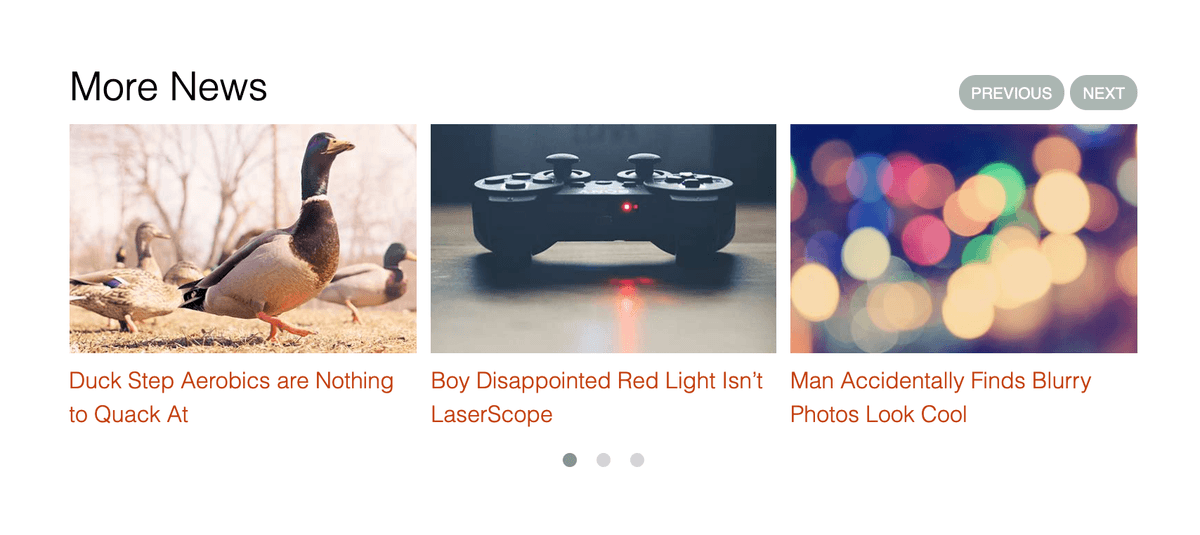
Exercise Overview
Carousels are one way to present a series of images and/or text for users to scroll through. The free Owl Carousel plugin makes creating these easy.
Linking to the Plugin Files
Open your code editor if it isn’t already open.
Close any files you may have open.
For this exercise we’ll be working with the Carousel folder located in Desktop > Class Files > yourname-JavaScript jQuery Class. You may want to open that folder in your code editor if it allows you to (like Visual Studio Code does).
Open index.html from the Carousel folder.
To save you some time, we’ve already linked to jQuery and main.js for you, but you need to link to the Owl Carousel script. Near the bottom, add the bold link as show below:
<script src="js/vendor/jquery-3.5.0.min.js"></script>
<script src="js/vendor/owl-carousel/owl.carousel.min.js"></script>
<script src="js/main.js"></script>
</body>
NOTE: We’ve included the Owl Carousel files with the class files, but to download future updates, view examples, and read documentation, you can visit owlcarousel2.GitHub.io/OwlCarousel2
The JS file will create the carousel functionality, but we also need some CSS to style it. Scroll up to the top of the code.
After the link to normalize.css, add the following bold code:
<link rel="stylesheet" href="css/normalize.css">
   <link rel="stylesheet" href="js/vendor/owl-carousel/assets/owl.carousel.css">
   <link rel="stylesheet" href="js/vendor/owl-carousel/assets/owl.theme.default.css">
   <link rel="stylesheet" href="css/main.css">
</head>
Save the file.
Creating & Customizing the Carousel
A carousel displays multiple items. Each item can have any content you like (images, text, etc.) but you want to wrap all the content for an item in a div tag. All of the item div tags should be wrapped in a parent div tag with a class of owl-carousel. Here’s a simple example of what we mean:
<div class="owl-carousel">
   <div> Your Content </div>
   <div> Your Content </div>
</div>
We’ve already coded up lots of items to save you time. Find the div with a class of moreNews and look at all the divs inside it. Notice the following:
- Each div contains an image and a heading.
- The content in each div is wrapped in a link. In our example files, we have not built all the linked pages, but that won’t matter for building the carousel. (Just don’t bother clicking any of those links in a browser because you’d get a missing page error.)
Preview index.html in a browser.
Scroll down to the More News heading. Currently, all the items are large and you have to scroll down to see them all. This is the content for our carousel.
Leave the page open in the browser so we can come back to it later.
Switch back to your code editor.
Any div that is used for an Owl Carousel must have an owl-carousel class, so it will get some styling (such as hiding the carousel to avoid a flash of unstyled content). Find the div with the moreNews class and add the bold class:
<div class="moreNews owl-carousel">Save the file.
Switch to the browser and reload index.html.
Scroll down to the More News heading. Notice that the content is hidden! Don’t worry, once we get the carousel working it will come back!
Switch back to your code editor.
From the js folder open main.js.
To initialize the Owl Carousel, add the following bold code:
$(document).ready(function() {

   // Carousel
   $('.moreNews').owlCarousel();

});
Save the file.
Switch to the browser and reload index.html.
We have a working carousel! Try the following:
- Drag directly on the carousel content (images or text) to move around. Not only does dragging work on mobile devices, it works on desktops too. Cool!
- Resize the window and notice there will always be 3 items displayed, which get scaled to fit the content area. Soon we’ll see how to customize how many items are visible at various screen sizes.
- Notice there are no previous or next buttons or any visible controls, which would be nice.
Switch to index.html in your code editor.
Find the moreNews div and add the bold class:
<div class="moreNews owl-carousel owl-theme">NOTE: This indicates that we want to use the default theme, which we linked to with owl.theme.default.css.
Save the file.
Switch to the browser and reload index.html.
- Gray dots should now be visible below the carousel.
- Click the gray dot to switch sections.
Let’s add some space between the carousel items using a built in setting for that. Switch to main.js in your code editor.
Place your cursor in between the parentheses of owlCarousel() and add the following bold code. Don’t miss the curly braces
{}on the opening and closing lines!$('.moreNews').owlCarousel({ margin: 10 });Save the file and preview index.html in a browser.
Notice that there’s now a bit of white space between each carousel item.
Adding Prev & Next Buttons
Let’s add next and previous buttons. Switch to main.js in your code editor.
Place your cursor in between the parentheses of owlCarousel() and add the following bold code. Don’t miss the comma at the end of the previous line!
$('.moreNews').owlCarousel({
   margin: 10,
   nav: true
});
Save the file and preview index.html in a browser. Notice the following:
- Try out the tiny prev and next buttons below the carousel (above the gray dots).
- Click the next arrow to see it moves the carousel one item per click. That requires people to click a lot to view the remaining items, and many won’t bother. We think it should advance to a whole new section of items (however many are currently displayed).
- This was an easy way to add nav buttons, but our design calls for these buttons to be on top of the carousel, to the far right of the More News line. That means we’ll need to create custom buttons.
Switch back to main.js in your code editor.
Let’s make the carousel scroll through the items faster. Add the following option shown below in bold, and don’t miss the comma at the end of the previous line!
$('.moreNews').owlCarousel({
   margin: 10,
   nav: true,
   slideBy: 3
});
Save the file.
Switch to the browser and reload index.html.
Try out the prev and next buttons again. This time they should move one whole group of items at a time, instead of one at a time. Much better!
Adding Custom Prev & Next Buttons
The default prev and next buttons are placed below the carousel, but our design calls for them to be above the images (and aligned to the right). For that we’ll need to define a custom nav.
First we need to code up the buttons. Switch back to your code editor.
To save you some typing, we’ve provided you with the code. From the snippets folder, open carousel-custom-nav.html.
Select and copy all the code.
Switch to index.html.
Find the start of the moreNews div.
Between that and the h2 above, paste the code. You should end up with:
<h2>More News</h2>
<div class="customNav">
   <button class="customPrev">Previous</button>
   <button class="customNext">Next</button>
</div>
<div class="moreNews owl-carousel owl-theme">
NOTE: These are standard HTML buttons that can be placed anywhere, which means you can style them however you like. Take note of the classes we have added. These are not special to Owl Carousel (we created them), but we’ll need to target them later in our JS code. We’ve also created CSS (in main.css) using the classes to make them match our page design.
- Notice that we’re also using button tags, instead of links (the a tag). Buttons can be nice when you don’t need an href, because the user isn’t going anywhere. While span or div tags could also work, they require us to add CSS to prevent text selection.
- Save the file.
- Switch to main.js.
The first thing we need to do is remove the original prev/next buttons. Remove the nav: true, line so you end up with the following code:
$('.moreNews').owlCarousel({
   margin: 10,
   slideBy: 3
});
To programmatically control this carousel, we need to be able to refer to it. Let’s store a reference to it in a variable by adding the following bold code:
var moreNewsCarousel = $('.moreNews').owlCarousel({Now we have to look for when the next and previous buttons are clicked. Add the following bold code:
var moreNewsCarousel = $(".moreNews").owlCarousel({
      margin: 10,
      slideBy: 3
   });

   $('.customNext').click(function(){

   });
   $('.customPrev').click(function(){

   });

});
Owl Carousel provides events for next and previous. We can use jQuery’s trigger() method to trigger those events. Add the following bold code to trigger the appropriate event on our carousel:
$('.customNext').click(function(){ moreNewsCarousel.trigger('next.owl.carousel'); }); $('.customPrev').click(function(){ moreNewsCarousel.trigger('prev.owl.carousel'); });- Save the file.
Switch to the browser and reload index.html.
- To the far right of the More News heading you should now see nice looking Previous and Next buttons.
- Click the Previous and Next buttons to see that they work!
Controlling How Many Items Are Visible at Various Screen Sizes
By default the carousel displays 3 items. We can customize how many items are displayed at specific screens sizes using a responsive option. We can use this to override the defaults and set exactly how many items are displayed at any window size.
Switch back to main.js in your code editor.
Add the responsive option as shown below in bold. Don’t miss the comma at the end of the previous line!
var moreNewsCarousel = $('.moreNews').owlCarousel({
   margin: 10,
   responsive: {
      0: {
         items: 4
      }
   }
});
NOTE: This means that screens 0 pixels and wider should display 4 items.
Save the file.
Switch to the browser and reload index.html. You should now see 4 items at a time.
Switch back to main.js in your code editor.
Change the number of responsive items from 4 to 1, as shown below in bold:
var moreNewsCarousel = $('.moreNews').owlCarousel({
   margin: 10,
   slideBy: 3,
   responsive: {
      0: {
         items: 1
      }
   }
});
Delete the slideBy line of code so you end up with the following:
var moreNewsCarousel = $('.moreNews').owlCarousel({
   margin: 10,
   responsive: {
      0: {
         items: 1
      }
   }
});
Add the slideBy into the responsive section, so you end up with the following. Don’t miss the comma at the end of the previous line!
var moreNewsCarousel = $('.moreNews').owlCarousel({
   margin: 10,
   responsive: {
      0: {
         items: 1,
         slideBy: 1
      }
   }
});
Add two more breakpoints for screens starting at 450px and 600px, as shown below in bold:
var moreNewsCarousel = $('.moreNews').owlCarousel({
   margin: 10,
   responsive: {
      0: {
         items: 1,
         slideBy: 1
      },
      450: {
        items: 2,
        slideBy: 2
      },
      600: {
        items: 3,
        slideBy: 3
      }
   }
});
Save the file.
Switch to the browser and reload index.html.
Resize the browser window to see the carousel change the number of items displayed from 1 on small screens, to 2, and then 3 as you make the window wider.
NOTE: When working on responsive sites that change the number of items displayed, be careful of your image sizes. Be sure they are made for the widest possible width, so they will only scale down and not up (which can pixelate them).
Optional Bonus: Lazy Loading Content
Images are typically the largest files in a webpage. They slow down page loading, especially on mobile devices. Currently, all the photos in our carousel are loaded, even if they are not visible! Owl Carousel has an option called lazy loading, which will only load the hidden images if the user clicks the next or previous button (or swipes, etc. to view additional items). If a user doesn’t interact with the carousel, the extra (hidden) images will never be loaded. Let’s see how to add lazy loading.
- Switch to main.js in your code editor.
Add the following bold code to enable lazy loading:
var moreNewsCarousel = $('.moreNews').owlCarousel({
   margin: 10,
   lazyLoad: true,
   responsive: {
Save the file.
There’s one more thing we must do. As long as the img tags in our HTML have a src attribute, those images will still be downloaded. We need to change this into something HTML won’t load, and then Owl Carousel will use JavaScript to load the images intelligently.
Switch to index.html in your code editor.
For every image in the moreNews div, you must change src into data-src and add a owl-lazy class. Below is an example of what the final code should look like, with the changes shown in bold. Make this same change to all eight images in the moreNews div.
<img class="owl-lazy" data-src="img/duck.jpg" ALT="Ducks. One has a raised leg.">TIP: If your code editor allows you to place multiple cursors, that would come in handy. For example, in Visual Studio Code you can hold Option (Mac) or ALT (Windows) and click to place multiple cursors. Another approach that works in Visual Studio Code is to highlight the first img src= and then hit Cmd–D (Mac) or CTRL–D (Windows) to select the following ones (stop after it selects the last one). You can then use your Arrow keys to position the text cursor as needed and make the desired change.
Save the file.
Preview index.html in Chrome. (We’ll be using its DevTools.)
Hit Cmd–Opt–J (Mac) or CTRL–Shift–J (Windows) to bring up the Console.
Click on the Sources tab.
On the left, expand the img folder. If you don’t see the img folder, expand top, then go into file:// and expand the folder inside. Now you should see the img folder and can expand it.
There should 4 or less .jpg files listed (ignore the .gif and .png files). 1–3 JPEGs (depending on your window size) are from our carousel, and the 4th JPEG is from our page’s header photo.
Keeping the DevTools open, scroll down the page so you can see the carousel.
While keeping an eye on the list of images, click the carousel’s Next button. Depending on how fast the images load, you may notice the spinning loader icon appears before the images are loaded.
You should see that more images were added to the list! That proves they weren’t loaded until required. This way, users will enjoy a faster loading page.
NOTE: If you want to refer to our final code example, go to Desktop > Class Files > yourname-JavaScript jQuery Class > Done-Files > Carousel.