The Box Model
What This Tutorial Covers
Margin, Border, Padding, Content
The four layers of every element's box.
box-sizing
border-box vs. content-box — the modern default.
DevTools Inspection
Visualize the box model in browser dev tools.
Noble Desktop's Front-End Web Development Certificate teaches HTML, CSS, and JavaScript — the complete front-end foundation.
Learn the essentials of web development with this comprehensive tutorial on HTML and CSS, covering important topics like the box model, setting div width, default page fonts, and margin and padding spacing.
Topics Covered in This HTML & CSS Tutorial:
What is the Box Model?, Setting Div Width, Setting a Default Font for the Page, Margin & Padding Spacing
Exercise Preview
Exercise Overview
HTML elements that hold content can have space both inside and outside of them, so it is helpful to consider them as boxes when thinking about styling these elements with CSS. In this exercise, we’ll explore this CSS Box Model to see how we use the width, padding, and margin properties to control the page layout.
If you completed the previous exercise, sanfran.html should still be open, and you can skip the following sidebar. If you closed sanfran.html, re-open it now. We recommend you finish the previous exercise (3B) before starting this one. If you haven’t finished it, do the following sidebar.
If You Did Not Do the Previous Exercise (3A)
- Close any files you may have open.
- On the Desktop, go to Class Files > Web Dev Class.
- Delete the Revolution Travel folder if it exists.
- Duplicate the Revolution Travel Ready for Box Model folder.
- Rename the folder to Revolution Travel.
Getting Started
In sanfran.html, add a
<style>tag to the head of the document as follows:<!DOCTYPE html> <html lang="en"> <head> <meta charset="UTF-8"> <title>Travel Info for San Francisco, CA—Revolution Travel</title> <style> </style> </head>Save the file.
Setting Width & Display Properties
For our design, we want the header and nav to stretch across 100% of the browser window (which they do by default), but the main content and footer should be slightly more narrow.
Add the following code (highlighted in bold) inside the style tag:
<style>
   main {
      width: 90%;
   }
</style>
NOTE: Height is usually not specified, because the content may be edited later, and in this case the height will change as the browser width changes.
Let’s make the footer the same width as main. Add the following new rule (highlighted in bold) below the main rule:
main { width: 90%; } footer { width: 90%; } </style>- Save the file.
Preview the file in a browser. The main text content is now a bit narrower, so there’s a bit of whitespace to the right of the text. This will look better once the content is centered, which you’ll do a later exercise.
TIP: Keep this file open in the browser so you can reload the page to test the code as you work.
The Box Model
Specifying an element’s width, as you’ve done for both the main and footer sections, is just about the simplest way you can describe an HTML element’s “box, ” or how much space it takes up in the flow of the document.
Any element can be considered a box—not just section elements and divs. The box model allows you to not only specify the width and height of content, it allows you to place padding within the element’s box and margins between the element and other content on the page. You will explore padding, margin, and the border property—which is also part of the box model—later in this exercise.
Limiting Content with Max-Width
- Return to the browser, and reload the page. Make the browser window as wide as you can, and notice that the long lines of text become hard to read. We can use max-width to limit the content to a width that is more reader-friendly.
- Return to your code editor.
Add the following new property declaration to the main rule:
main {
   width: 90%;
   max-width: 800px;
}
The width of the footer content should also be limited to 800 pixels, should the content ever be edited beyond what’s currently there. Add the following property to the rule for footer as well:
footer { width: 90%; max-width: 800px; }- Save the file.
Return to the browser, and reload the page. Resize the browser window to see that the fluid layout adjusts to the window size when it’s narrow, but is a fixed 800px width when the window is wide. Again, the page will look better once we center the content (in a later exercise).
Styling the Text
Let’s style the text. We’ll start by creating a rule for the body tag. By setting text styling on a parent tag (in this case the body tag), all the text-based children of that element will inherit the styling.
Back in your code editor, add the following code (highlighted in bold) inside the style tag above the main rule:
body {
   font-family: sans-serif;
}
main {
   width: 90%;
   max-width: 800px;
}
NOTE: Setting the font-family to sans-serif is a quick way to get a sans-serif font without minimal code. Most Macs will default to Helvetica and most PCs will default to Arial. There may be cases where users have set their default sans-serif font to something else. In that case, they’ll see their desired font. When you want more control, use a more specific font-stack such as Arial, Helvetica, sans-serif.
- Save the file, return to the browser, and reload the page. All the text should be sans-serif, and we didn’t have to make a rule for each individual element!
- Return to your code editor.
Let’s style the headings. Add the following new rule (in bold) below the body rule:
body { font-family: sans-serif; } h1 { font-size: 28px; color: #e45c09; }- Save the file, return to the browser, and reload the page to see the main heading Featured Location: San Francisco, California is now orange and a little smaller.
- Resize the browser window so the heading wraps. The line-height is a bit tight, so let’s increase it.
- Return to your code editor.
Add the following property declaration to the h1 rule:
h1 {
   font-size: 28px;
   color: #e45c09;
   line-height: 36px;
}
While we’re here, let’s make the subheads (h2) the same color, but smaller. Below the h1 rule, add the following new rule for h2:
h1 { font-size: 28px; color: #e45c09; line-height: 36px; } h2 { font-size: 18px; color: #e45c09; }- Save the file, return to the browser, and reload the page. The subheadings should now be orange and smaller. The h1 line spacing is better, but the paragraph line spacing is a bit tight. Let’s fix that.
- Return to sanfran.html in your code editor.
Below the h2 rule, add the following new rule for p:
h2 {
   font-size: 18px;
   color: #e45c09;
}
p {
   line-height: 24px;
}
NOTE: The default font-size is 16px. That’s what we want for this design, so we don’t have to code it.
Save the file, return to the browser, and reload the page. Now the paragraphs have a nice amount of space between the lines.
The Margin Property
While the space between lines in paragraphs is improved, we’d like more space below each paragraph. Margin comes in handy for adjusting the space between elements. Margin is space outside an element’s “box”. For text, this is similar to space after or before a paragraph in design apps like Photoshop, InDesign, etc.
- Return to sanfran.html in your code editor.
Add the margin-bottom (below in bold) to the p rule:
p { line-height: 24px; margin-bottom: 22px; }- Save the file, return to the browser, and reload the page to see a subtle change in the space between paragraphs.
- Return to sanfran.html in your code editor.
Let’s add some space between the different sections of the page. We’ll start by adding space between the header (logo) and the navigation by adding margin below the header. Above the main rule, add the following new rule:
header { margin-bottom: 30px; } main { width: 90%; max-width: 800px; }- Save the file, return to the browser, and reload the page to see that there is now more space below the header (logo). We could also use more space between the navigation and the main content.
- Return to your code editor.
Above the main rule, add the following new rule:
nav {
   margin-bottom: 30px;
}
main {
   width: 90%;
   max-width: 800px;
}
While you’re here, add bottom margin to the main rule as well:
main {
   width: 90%;
   max-width: 800px;
   margin-bottom: 30px;
}
Save the file, return to the browser, and reload the page to see there’s a bit more space between the sections.
The Padding & Border Properties
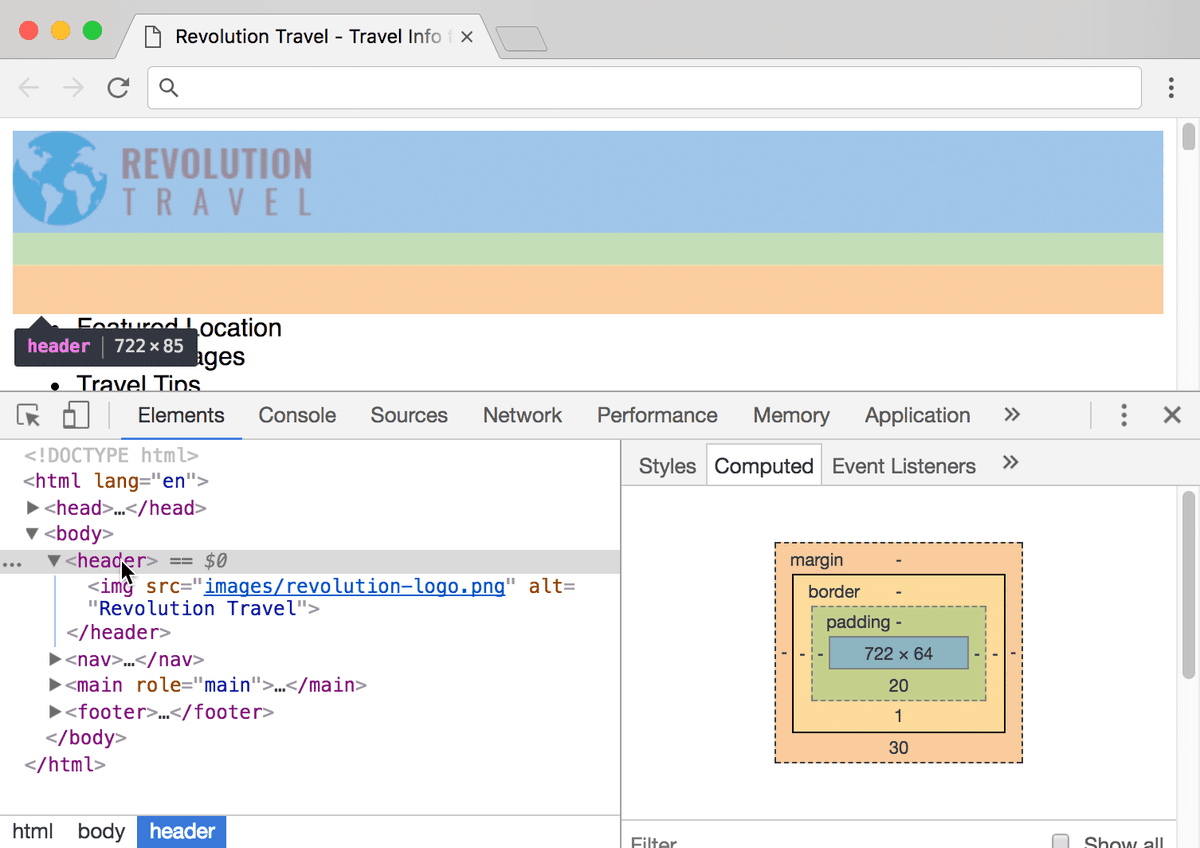
Margin is space outside an element. Padding is space inside an element. A border will appear at the edge of the element (between the padding and margin).
- Return to your code editor.
Let’s create a visual separation between the header (logo) and the nav with a border. Add the following new property to the header rule:
header { border-bottom: 1px solid #ccc; margin-bottom: 30px; }- Save the file, return to the browser, and reload the page. There should now be a gray border below the logo. The space below the border (margin-bottom) is fine, but we want more space above the border (between the logo and the border). This is where padding comes in handy.
- Return to your code editor.
Add the following new property to the header rule:
header {
   padding-bottom: 20px;
   border-bottom: 1px solid #ccc;
   margin-bottom: 30px;
}
NOTE: The order of the properties does not matter, but for the sake of clarity, we ordered them the same way they appear in the page.
- Save the file, return to the browser, and reload the page to see the improved spacing between the logo and the border.
You can keep sanfran.html open in the browser and the code editor. You’ll continue with this file in the next exercise.
Margin Vs. Padding
The margin and padding properties can be used to fine-tune the space between elements in a layout, though each adds space a bit differently. When thinking of a box, padding is inside the box. Padding actually opens up an element’s box by making it appear wider and/or taller. For instance, if the element has a background color or border, the padding stretches the background and pushes the border farther away from the content.
Margin, on the other hand, is outside the element’s box. The space is transparent.
For more information and to see a graphic that illustrates the difference between these two properties, see the Box Model reference at the back of the workbook.