April 1, 2026Dan Rodney/8 min read

Relative Sizes: Em and Rem

Master CSS relative units for scalable design

CSS Unit Types Overview

Absolute Units

Fixed sizes like pixels that don't change relative to other elements. Provide precise control but lack flexibility.

Relative Units

Sizes that scale based on parent elements or root values. Enable responsive and maintainable designs.

Topics Covered in This HTML & CSS Tutorial:

Em Units, Rem Units

Exercise Preview

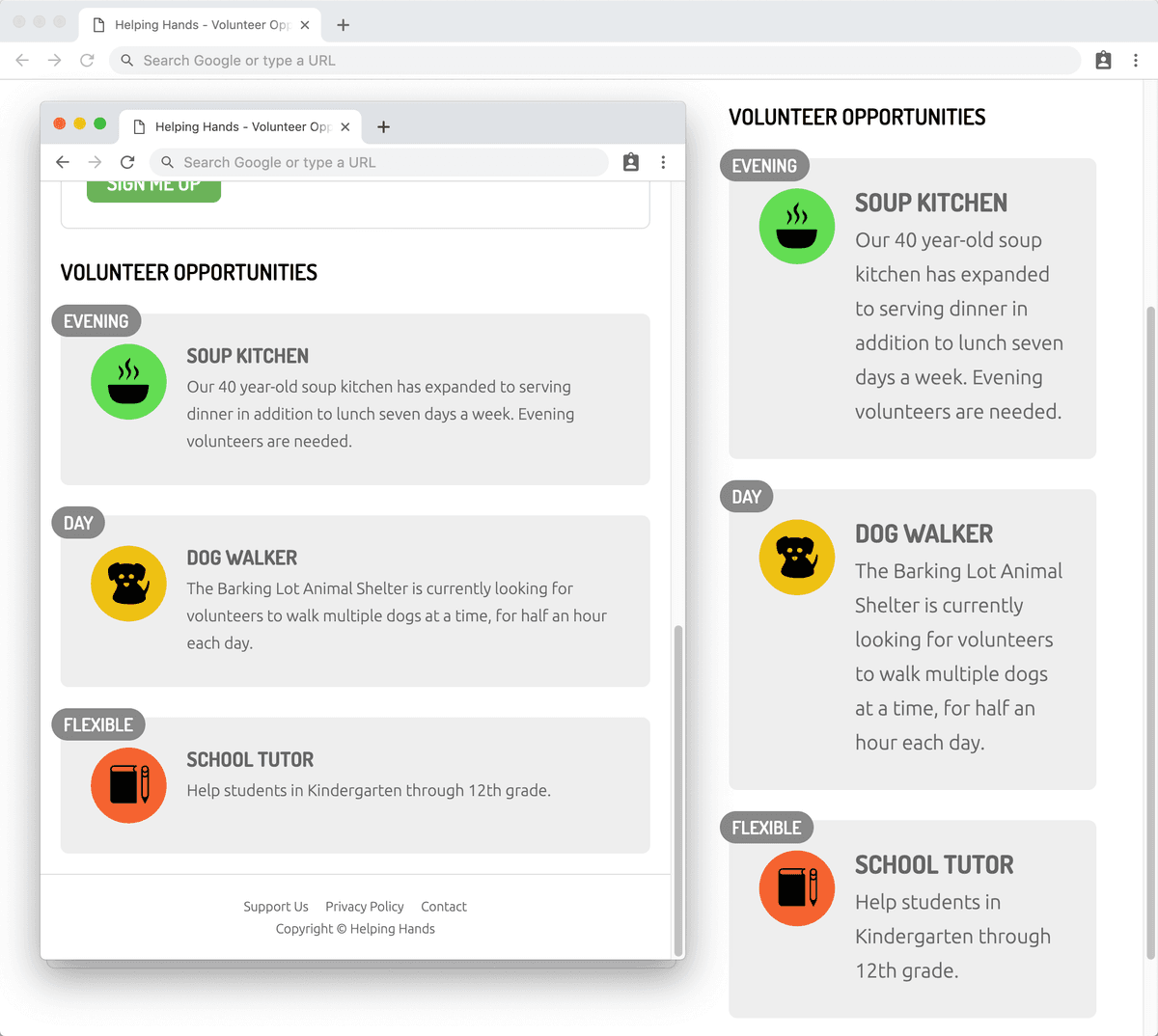
preview rem units

Exercise Overview

In this hands-on exercise, you'll master the fundamental differences between fixed sizing (pixels) and relative sizing (ems and rems). Understanding these CSS units is crucial for creating scalable, maintainable websites that adapt gracefully across devices and respect user preferences. By the end of this tutorial, you'll know when to use each unit type and how they impact your design system's flexibility.

Setup Instructions

1

Close All Files

Close all open files in your code editor to avoid confusion during the exercise

2

Open Exercise Folder

Navigate to Desktop > Class Files > Advanced HTML CSS Class and open the Helping Hands Em vs. Rem folder

3

Launch Files

Open volunteer.html and preview it in Chrome browser for DevTools inspection

Understanding Em Units in Practice

  1. Let's start fresh to avoid any confusion. In your code editor, close all open files and prepare to work with a new set of prepared files.
  2. Navigate to the Helping Hands Em vs. Rem folder located in Desktop > Class Files > Advanced HTML CSS Class. Open this entire folder in your code editor (Visual Studio Code and most modern editors support this workflow).
  3. Open volunteer.html from the Helping Hands Em vs. Rem folder.
  4. Preview volunteer.html in Chrome—we'll leverage its powerful DevTools for this exercise.

    This page builds upon our previous exercise with specific modifications designed to illustrate the behavior of relative units in real-world scenarios.

  5. In Chrome, CTRL–click (Mac) or Right–click (Windows) on the Sign Me Up button and choose Inspect Element.
  6. For optimal workflow, ensure the DevTools are docked to the right side of your browser window. If they're not already positioned there, click the chrome devtools menu button at the top right of the DevTools panel and select Dock to right as shown below:

    chrome dock to right

  7. In the Styles panel, locate the input[type="submit"] rule at the top of the cascade.
  8. Click directly on the 20px value for the font-size property to make it editable.
  9. Use your Up and Down Arrow keys to dynamically adjust the font size. Pay close attention to how the green padding area around the text remains relatively static as you change the font-size. While the padding does grow slightly due to line-height changes affecting vertical spacing, it doesn't scale proportionally.

    This demonstrates a key limitation of pixel-based sizing: to achieve truly proportional scaling of a button, you'd need to manually adjust both the font-size and padding values. This becomes unwieldy when managing complex design systems.

  10. Keep the page open in Chrome—we'll return to it shortly.

The Power of Em Units

Pixel-based sizing creates a maintenance nightmare when you need to resize components that contain multiple individually sized elements. Imagine scaling a navigation bar, sidebar, or card component—you'd need to manually recalculate and update each element's pixel values. This is where relative units like ems become invaluable.

An em unit represents a multiplier of the current element's font-size. In the document root, 1em equals the browser's default font-size (typically 16px, though users can customize this for accessibility). Within an article element styled with a 20px font-size, 1em equals 20px throughout that context.

The genius of ems extends beyond typography—you can use em units for any CSS property including padding, margin, width, and border-radius. This creates a cohesive scaling relationship between an element's text and its surrounding space, maintaining visual harmony across different sizes.

  • Return to your code editor to implement em-based sizing.
  • Open main.css from the css folder within the Helping Hands Em vs. Rem folder.
  • Locate the input[type="submit"] rule and replace the pixel-based padding with em units as shown below:

    input[type="submit"] {
       font-size: 20px;
       padding: .5em 1em;

    Code Omitted To Save Space

    }

    Here's the mathematical relationship: with a font-size of 20px, 1em equals 20px within this element. The original padding of 10px 20px converts to:

    • 10px ÷ 20px = 0.5em (vertical padding)
    • 20px ÷ 20px = 1em (horizontal padding)
  • Save the file and reload the page in Chrome.

    The Sign Me Up button should maintain its visual appearance, but now we'll see the magic of proportional scaling in action.

  • Ensure the Sign Me Up button is still selected with the input[type="submit"] rule visible at the top of the DevTools Styles panel.

    If it's not active, CTRL–click (Mac) or Right–click (Windows) on the button again and choose Inspect Element.

  • Click on the 20px font-size value to make it editable.
  • Use your Up and Down Arrow keys to adjust the font-size. Notice how the green padding area now scales proportionally with the text size—this is the power of relative units in action!
  • Switch to the Computed tab in the DevTools (or look for the panel displaying the colorful margin, border, and padding diagram).
  • Rather than scrolling through the alphabetical property list, click in the Filter field and type padding to quickly locate the relevant properties.
  • Observe how the browser has computed the final pixel values from your em units—this real-time conversion helps you understand the relationship between relative and absolute units.
  • Press Esc to clear the filter and return to the complete property list.
  • Switch back to the Styles tab to continue our exploration.

  • Implementing Em Units for Typography

    Now let's apply em units to create a cohesive typography system within the aside column (the right column on desktop layouts). This approach demonstrates how relative units can create scalable design systems.

    1. Return to your code editor and the main.css file.
    2. Near the top of the file, locate the h3 rule and update the font-size to use em units:

      h3 {
         color: currentColor;
         font-size: 1.25em;
         margin: 0 7px;
      }
    3. Scroll down to find the aside section p rule and convert its font-size to em units:

      aside section p {
         font-size: 1em;
         margin: 0;
         overflow: hidden;
      }
    4. To establish a baseline for our em calculations, locate the aside section rule and add a font-size declaration:

      aside section {
         font-size: 14px;
         background: #eee;
         border-radius: 8px;
         margin-top: 30px;
         padding: 30px;
         position: relative;
      }

      This creates a new context where 1em equals 14px within all section elements inside the aside. The h3 headings will now render at 17.5px (1.25 × 14px) and paragraphs at 14px (1 × 14px).

    5. Save the file and reload the page in Chrome to see your changes in action.
    6. CTRL–click (Mac) or Right–click (Windows) on the Volunteer Opportunities heading (positioned at the top of the right column on desktop, or below the form on mobile) and choose Inspect Element.
    7. In the DevTools Elements panel, click on one of the three section tags below the selected h2 element to shift focus to a section container.
    8. Verify that the aside section rule appears at the top of the Styles panel.
    9. Click on the 14px font-size value to make it editable.
    10. Press the Up Arrow key several times to increase the font-size and observe the cascading effects:

      • All headings and paragraphs within the three gray sections scale proportionally because they use em units tied to this parent context.
      • The time badges (Evening, Day, and Flexible) remain unchanged because they use fixed px units, demonstrating the selective nature of relative sizing.

    This exemplifies the strategic advantage of em units: a single size adjustment cascades through multiple related elements, maintaining design consistency while enabling easy scaling. This approach becomes particularly valuable when implementing responsive design patterns and maintaining design systems across media queries.

    Mastering Rem Units for Design System Consistency

    While ems excel in component-level scaling, they can become unwieldy in complex, deeply nested layouts where multiple font-sizes create shifting em contexts. Enter rem units—short for root em—which provide the predictability of a consistent reference point throughout your entire document.

    • Em units are relative to the current element's font-size, creating different values throughout your page hierarchy.
    • Rem units are relative to the root element's font-size, maintaining consistent values regardless of nesting depth.

    Since we haven't explicitly set a root font-size on this page, 1rem currently equals the browser's default 16px (or whatever the user has configured for accessibility purposes—a crucial consideration in modern web development).

    1. Return to your code editor and the main.css file.
    2. In the aside section p rule, convert the em unit to a rem unit by adding the "r" prefix:

      aside section p {
         font-size: 1rem;
         margin: 0;
         overflow: hidden;
      }
    3. Similarly, update the h3 rule to use rem units:

      h3 {
         color: currentColor;
         font-size: 1.25rem;
         margin: 0 7px;
      }
    4. Now let's establish explicit control over our root font-size. At the very top of the file, just above the body rule, add this foundational rule:

      :root {
         font-size: 1rem;
      }

      This establishes our base sizing for mobile and smaller screens, respecting user preferences while giving us a defined starting point.

      Notice we're using 1rem rather than a fixed pixel value. This approach honors users who have adjusted their browser's default text size for accessibility reasons. Using pixels here would override their preferences—a practice that's both disrespectful and potentially harmful to users with visual impairments. By using relative units (rem, em, or %), we create scalable designs that adapt to user needs while maintaining our intended proportional relationships.

    5. For larger screens, we'll implement a more generous base size. Locate the media query for min-width: 930px near the bottom of the file and add this rule:

      @media (min-width: 930px) {
         :root {
            font-size: 1.25rem;
         }

      This creates a responsive typography system where desktop users see larger text by default. Assuming the standard 16px browser default, this sets our desktop base to 20px (1.25 × 16 = 20px), while smaller screens remain at 16px.

    6. Save the file and reload the page in Chrome.
    7. Resize the browser window between mobile and desktop widths to observe how the heading and paragraph text in the aside sections scales automatically. The rem-based typography now responds to both screen size and user preferences, creating a more sophisticated and accessible design system.

    Em vs Rem Trade-offs

    Pros
    Em units scale with local font-size changes
    Perfect for component-level scaling
    Maintains proportional relationships within elements
    Cons
    Complex calculations in nested elements
    Difficult to match sizes across different elements
    Can become unpredictable in deep nesting
    Rem Solution

    Rem stands for 'root em' and is always relative to the page's root font-size, providing consistency throughout the entire page regardless of nesting.

    Em vs Rem Units

    FeatureEm UnitsRem Units
    Reference PointCurrent element font-sizeRoot font-size
    ConsistencyChanges with contextConsistent throughout page
    Best Use CaseComponent scalingGlobal consistency
    Recommended: Use rem for consistent sizing across the page, em for component-level proportional scaling

    Implementing Rem Units

    1

    Set Root Font-Size

    Define font-size on :root element using relative units to respect user preferences

    2

    Convert to Rem

    Change em values to rem for elements that need consistent sizing across the page

    3

    Add Media Query

    Set larger root font-size for desktop breakpoints to scale entire design

    Key Takeaways

    1Em units are relative to the current element's font-size, making them perfect for proportional scaling within components
    2Rem units are relative to the root font-size, providing consistent measurements throughout the entire page
    3Using relative units instead of pixels creates more flexible and maintainable CSS that adapts to user preferences
    4Em units become complex in nested elements where different font-sizes change the value of 1em at each level
    5Rem units solve the nesting complexity by always referencing the root font-size, regardless of element hierarchy
    6Setting root font-size with relative units (rem, em, %) respects user browser preferences rather than overriding them
    7Media queries can adjust the root font-size to scale the entire design proportionally across different screen sizes
    8Combining em and rem strategically allows for both component-level scaling and page-wide consistency

    RELATED ARTICLES