April 1, 2026Dan Rodney/10 min read

Hipstirred Layout: Fine-Tuning with the Box Model

Master CSS Box Model for Professional Web Layouts

Core Box Model Concepts

Image Alignment

Remove unwanted space below images by understanding vertical alignment and text baseline behavior in CSS.

Wrapper Strategy

Use outer and inner wrappers to control content width while maintaining full-width backgrounds for visual elements.

Selector Types

Learn when to use ID selectors for unique elements versus class selectors for reusable styling patterns.

Topics Covered in This HTML & CSS Tutorial:

Eliminating unwanted space below images, implementing responsive max-width constraints, mastering outer and inner wrapper strategies, and understanding the critical distinction between ID and class selectors

Exercise Preview

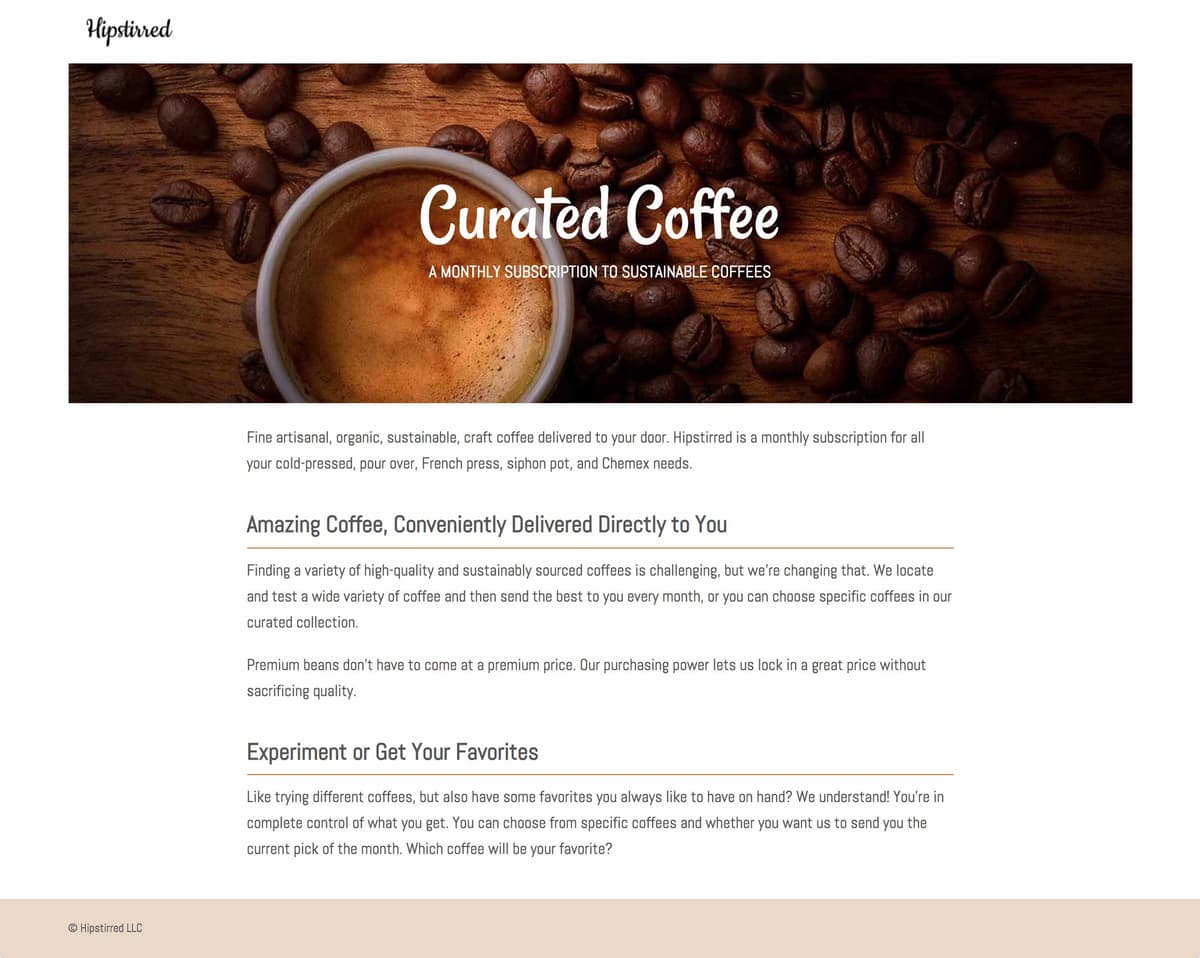
preview fine tuning max width

Exercise Overview

In this comprehensive exercise, you'll master essential layout refinement techniques for the Hipstirred site. You'll explore advanced container div strategies, solve common spacing issues that plague many developers, and solidify your understanding of when to use ID versus class selectors—a fundamental distinction that separates professional developers from beginners.

  1. Start fresh by closing any open files in your code editor to maintain focus and avoid potential conflicts between different projects.
  2. Navigate to the Hipstirred Box Model folder located in Desktop > Class Files > Web Dev Class. If you're using Visual Studio Code or a similar editor, open the entire folder to enable better file navigation and IntelliSense features.
  3. Open index.html from the Hipstirred Box Model folder to begin working with our base template.
  4. Preview index.html in Chrome to establish your baseline. We'll leverage Chrome's powerful DevTools throughout this exercise for real-time debugging and inspection.

    Our first objective is integrating the logo into the header section, followed by implementing professional footer styling that maintains visual hierarchy.

    PRO TIP: Keep index.html open in Chrome as you work, refreshing after each change to see immediate results. This iterative approach helps you understand how each modification affects the overall layout.

Getting Started with the Exercise

1

Open Project Files

Navigate to Desktop > Class Files > Web Dev Class > Hipstirred Box Model folder and open in your code editor

2

Preview in Browser

Open index.html in Chrome and keep it open to see changes as you work through the exercise

3

Enable Developer Tools

Use Chrome DevTools to inspect elements and understand how CSS properties affect the layout

Adding the Logo to the Header

Professional headers require careful attention to logo placement and sizing. Let's implement the Hipstirred logo with proper dimensions and semantic markup.

  1. Return to index.html in your code editor and locate the header section.
  2. Insert the logo image within the header tags:

    <header>
       <img src="images/logo.png" height="36" width="105" ALT="Hipstirred">
    </header>

    IMPORTANT: We're explicitly defining width and height attributes because this logo maintains fixed dimensions across all device contexts. For responsive images that need to scale, you would omit these attributes and handle sizing through CSS instead.

  3. Save the file and note the change in your editor's file indicator.
  4. Switch to Chrome and reload the page. You'll notice the logo appears cramped against the top-left corner, but more importantly, observe the subtle extra space beneath the logo. This common issue affects countless websites and has a specific technical cause we'll address next.

Fixed Image Dimensions

We're coding width and height attributes for the logo because it maintains a fixed size in the layout. For flexible sizing, omit these attributes and use CSS instead.

Removing the Extra Space Below an Image

This spacing issue represents one of the most frequently encountered problems in web development. Understanding its root cause will save you hours of debugging throughout your career.

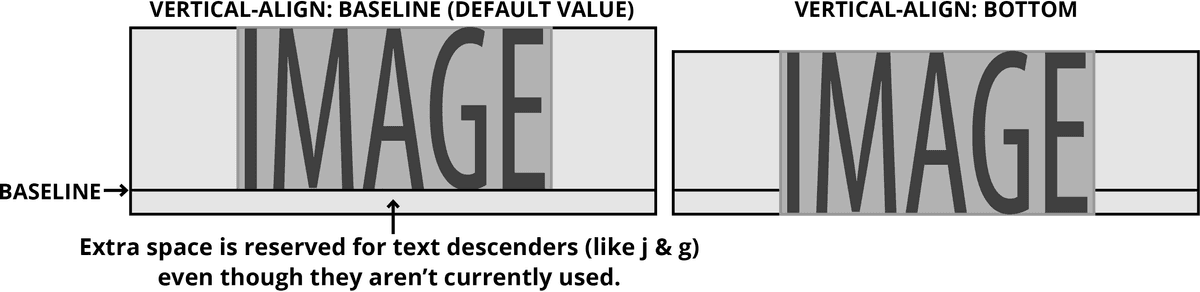
Images inherit text-rendering behavior from the browser's layout engine, positioning themselves along the text baseline—the invisible line where letters sit when you write on lined paper. This baseline alignment accounts for descending characters like 'j', 'g', and 'y', creating unwanted space below images that don't need this accommodation.

The solution involves overriding the default vertical-align property from 'baseline' to either 'bottom' or 'middle'. This seemingly simple fix eliminates the phantom space that frustrates many developers.

vertical align property example

  1. Return to index.html in your code editor and locate the header image.
  2. Add a semantic class attribute to enable targeted styling:

    <header>
       <img src="images/logo.png" class="logo" height="36" width="105" ALT="Hipstirred">
    </header>
  3. Save index.html to preserve your changes.
  4. Open main.css from the Hipstirred Box Model folder to begin styling.
  5. Add this targeted rule below the existing p rule:

    .logo {
       vertical-align: middle;
    }

    TECHNICAL NOTE: Both middle and bottom values eliminate the baseline spacing issue. Choose middle for centered alignment within text flows, or bottom for flush bottom alignment.

  6. Save main.css and observe your editor's file status indicator.
  7. Switch to Chrome and reload index.html. The unwanted space below the logo should now be eliminated, creating a cleaner, more professional appearance.
  8. Now we'll add appropriate spacing around the logo using CSS padding rather than relying on default browser spacing.
  9. In main.css, add this rule above the existing .logo rule:

    header {
       padding: 20px;
    }
  10. Save main.css to apply the changes.
  11. Return to Chrome and reload index.html. The header now displays professional spacing that creates visual breathing room while maintaining the logo's prominence.

Vertical Alignment Options

FeatureBaseline (Default)Middle/Bottom (Fixed)
BehaviorAligns to text baselineAligns to element edge
Extra SpaceCreates unwanted gapEliminates gap
Best forText elementsImages and icons
Recommended: Use vertical-align: middle or bottom for images to eliminate unwanted spacing

Styling the Footer

Professional footer design requires balancing visual separation with content accessibility. We'll implement a subtle background treatment while addressing common spacing challenges.

  1. Switch to main.css in your code editor to begin footer styling.
  2. Add this rule at the bottom of the file, just below the main rule:

    footer {
       background-color: #e9d8c8;
       padding: 20px;
    }
  3. Save main.css to apply the background styling.
  4. Return to Chrome and reload index.html. The footer now has visual distinction, but you may notice the copyright text doesn't appear vertically centered within the background area. Let's investigate using Chrome's diagnostic tools.
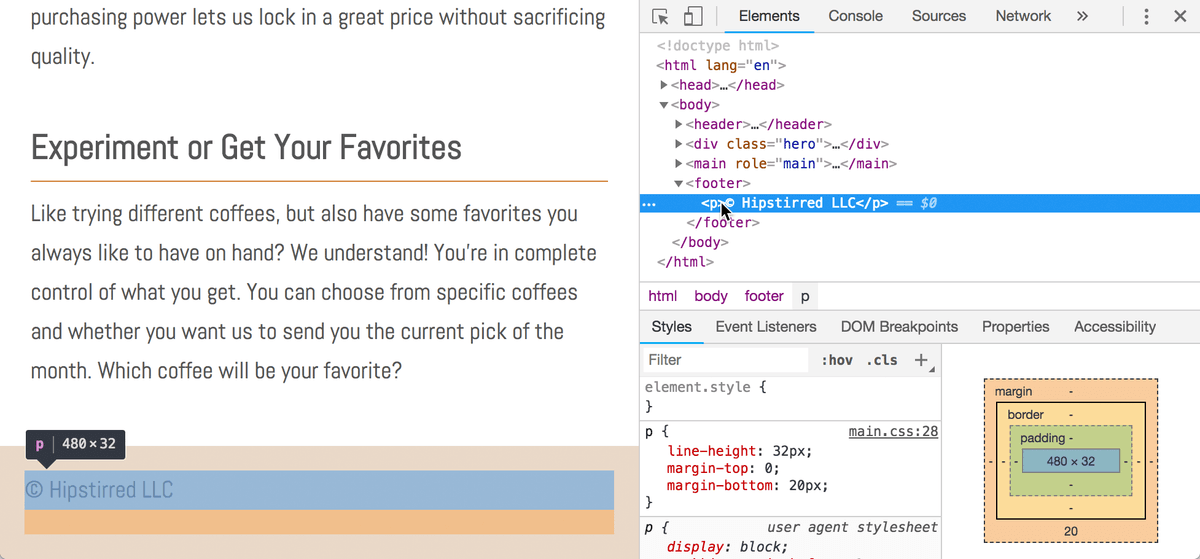
  5. CTRL–click (Mac) or Right–click (Windows) on the footer and select Inspect to open DevTools.
  6. In the Elements panel, click on the <p> tag within the footer. Chrome will highlight the element in the browser while displaying its applied styles in the Styles tab:

    hipstirred footer p margin

    The issue stems from the default paragraph margin, which works well for body content but creates unwanted spacing in isolated footer contexts. CSS descendant selectors provide the perfect solution, allowing us to target paragraphs specifically within footer elements without affecting other page content.

  7. Return to main.css in your code editor to implement the targeted fix.
  8. Add this descendant selector rule below the footer rule:

    footer p {
       margin: 0;
       font-size: 14px;
    }
  9. Save main.css to apply the refined typography.
  10. Return to Chrome and reload index.html. The footer now displays professional spacing with the copyright text properly centered within the background area, creating a polished, intentional appearance.
  11. Close the DevTools panel to return to normal browsing view, keeping the window open for continued testing.

Descendant Selectors

Use descendant selectors like 'footer p' to target specific elements within containers, allowing different styling rules for the same element type in different contexts.

Setting Limits with an Outer-Wrapper & Max-Width

Modern web design must accommodate diverse screen sizes while maintaining content quality and readability. Ultra-wide displays can stretch content beyond optimal viewing dimensions, potentially degrading user experience through pixelated images or uncomfortably long text lines.

  1. Expand your browser window to its maximum width and observe the hero image quality. At 1280 pixels or less, the image maintains crisp detail. Beyond this threshold, pixel interpolation creates visible quality degradation. Rather than requiring larger image assets, we'll implement intelligent width constraints.

    The wrapper div technique provides precise control over content width while maintaining responsive behavior. This approach has become a cornerstone of professional web development since the early days of responsive design.

  2. Return to your code editor and switch to index.html to implement the wrapper structure.
  3. Wrap all content within the body tags using a containing div element.

    PRODUCTIVITY TIP: Visual Studio Code users can leverage the wrap function by selecting all content, pressing Option–W (Mac) or ALT–W (Windows), typing "div", and pressing Return or Enter.

  4. Verify that your opening <div> tag appears immediately after the body tag:

    <body>
       <div>
          <header>
  5. Confirm that your closing </div> tag appears just before the closing body tag:

    </footer>
       </div>
    </body>
    </html>
  6. Add a semantic ID attribute to the wrapper div for targeted styling:

    <body>
       <div id="wrapper">
          <header>
             <img src="images/logo.png" height="36" width="105" ALT="Hipstirred">
  7. Save index.html to preserve the structural changes.
  8. Switch to main.css to implement the width constraints.
  9. Add this rule below the p rule to establish maximum width limits:

    #wrapper {
       max-width: 1100px;
    }
  10. Save main.css and test the changes.
  11. Return to Chrome and reload index.html. Test the responsive behavior by resizing your browser window. Content stops scaling at 1101 pixels width, but you'll notice the layout aligns to the left rather than centering—let's fix this.
  12. Return to main.css to implement horizontal centering.
  13. Enhance the #wrapper rule with automatic margin distribution:

    #wrapper {
       max-width: 1100px;
       margin-right: auto;
       margin-left: auto;
    }
  14. Save main.css to apply the centering behavior.
  15. Return to Chrome and reload index.html. The hero section now maintains optimal width while centering beautifully on wider displays. However, scroll down to examine the footer—while the content respects our max-width constraint, the background color would appear more professional extending edge-to-edge.

Implementing Max-Width Control

1

Wrap Content

Add a div wrapper around all content inside the body tag to create a container for width control

2

Set Max-Width

Apply max-width: 1100px to prevent content from becoming too wide on large screens

3

Center Content

Use margin-left: auto and margin-right: auto to center the wrapper when it reaches max-width

Setting an Inner-Wrapper

Complex layouts often require nuanced approaches to content constraints. While some elements benefit from width limits, others—like footer backgrounds—should span the full viewport for visual continuity.

  1. Return to index.html in your code editor to restructure the wrapper scope.
  2. Relocate the closing wrapper </div> to end after the main content section, excluding the footer:

    </main>
       </div>
       <footer>
          <p>© Hipstirred LLC</p>
       </footer>
    </body>
  3. Save the file and test in Chrome. The footer background now spans the full width while the main content remains constrained—exactly the professional appearance we're targeting.

    To maintain visual alignment between the footer content and the rest of the layout, we'll implement an inner wrapper specifically for footer content.

  4. Return to index.html for the final structural adjustment.
  5. Add an inner wrapper div around the footer paragraph content:

    <footer>
       <div id="wrapper">
          <p>© Hipstirred LLC</p>
       </div>
    </footer>
  6. Save and test in Chrome—the layout appears correct, but we've introduced a significant code quality issue. Using the same ID attribute twice violates HTML specifications and represents poor development practice, even though browsers may render it correctly through "silent failure" recovery.

Silent Failures in Web Development

Using the same ID twice creates invalid code that browsers handle with 'silent failures' - the page may work now but can cause problems later. Always validate your HTML and CSS.

ID Selectors Vs. Class Selectors

Understanding the distinction between ID and class selectors is fundamental to writing maintainable, standards-compliant code. IDs denote uniqueness—they should appear only once per page and target singular, specific elements. Classes enable reusability and are designed for styling multiple elements consistently.

While modern browsers often compensate for duplicate IDs through error recovery, this creates technical debt that can cause problems with JavaScript functionality, CSS specificity conflicts, and accessibility tools. Professional developers use classes for reusable styling patterns and reserve IDs for unique page landmarks.

  1. Return to index.html to correct the duplicate ID issue.
  2. Modify the first wrapper to use a class attribute instead:

    <body>
       <div class="wrapper">
          <header>
  3. Update the footer wrapper to use the same class attribute:

    <footer>
       <div class="wrapper">
          <p>© Hipstirred LLC</p>
       </div>
    </footer>
  4. Save index.html to implement the corrected markup.
  5. Switch to main.css to update the corresponding selector.
  6. Change the ID selector to a class selector by replacing the hash symbol with a period:

    .wrapper {
       max-width: 1100px;
       margin-right: auto;
       margin-left: auto;
    }
  7. Save the file and test in Chrome—the visual result remains identical, but your code now follows industry best practices and maintains long-term maintainability.

ID vs Class Selector Usage

FeatureID Selectors (#)Class Selectors (.)
Usage FrequencyOnce per pageMultiple times per page
PurposeUnique identificationReusable styling
CSS Syntax#wrapper.wrapper
HTML Attributeid='wrapper'class='wrapper'
Recommended: Use classes for styling multiple elements consistently; reserve IDs for unique page elements

Real-World Width Constraints

Our 1100-pixel max-width serves as an excellent learning tool, but professional implementations typically accommodate larger standard resolutions. Industry research from 2026 shows that 1280-pixel widths strike an optimal balance between edge-to-edge visual impact for standard users and reasonable constraints for high-resolution displays.

  1. Return to main.css to implement production-ready width constraints.
  2. Update the max-width value to accommodate modern display standards:

    .wrapper {
       max-width: 1280px;
       margin-right: auto;
       margin-left: auto;
    }
  3. Save main.css to apply the updated constraints.
  4. Test in Chrome by reloading index.html and adjusting your browser width. Users with 1280-pixel displays or smaller will experience full-width hero images, while those with larger displays will see centered, constrained content that maintains image quality and readability.

    DESIGN NOTE: Width constraints aren't universally required for hero images—many modern sites embrace full-width designs. However, understanding these techniques provides essential tools for projects where content optimization takes priority over edge-to-edge visuals.

Screen Resolution Analytics

StatCounter Global Stats (gs.statcounter.com) provides comprehensive, real-time web analytics data including global screen resolution trends, browser usage patterns, and device statistics. This free resource offers invaluable insights for making informed design decisions.

For detailed analysis of your specific audience, Google Analytics remains the industry standard, offering granular insights into user behavior, device preferences, geographic distribution, and engagement patterns. Google Analytics 4 (GA4), introduced in 2020 and now the sole Analytics option as of 2026, provides advanced machine learning insights and cross-platform tracking capabilities. Access these powerful tools at analytics.google.com to make data-driven decisions about your responsive design breakpoints and content strategy.

Key Takeaways

1Images are vertically aligned to text baseline by default, creating unwanted space that can be fixed with vertical-align: middle or bottom
2Use outer wrappers with max-width and auto margins to control content width while keeping backgrounds full-width
3Inner wrappers allow content alignment within full-width sections like footers with background colors
4ID selectors should be used only once per page for unique elements, while class selectors can be reused multiple times
5Descendant selectors like 'footer p' enable targeted styling of elements within specific containers
6Chrome DevTools inspection helps identify spacing issues and understand how CSS properties affect layout
7Real-world max-width values around 1280px provide good balance between edge-to-edge design and readability
8Web analytics tools like Google Analytics provide essential data for making informed design decisions about screen resolutions and user behavior

RELATED ARTICLES