CSS Position Property
What This Tutorial Covers
static & relative
Default flow vs. relative offset positioning.
absolute & fixed
Position relative to ancestors or viewport.
sticky
Hybrid that sticks to a position during scroll.
Noble Desktop's Front-End Web Development Certificate teaches HTML, CSS, and JavaScript — the complete front-end foundation.
Dive into an in-depth tutorial covering HTML and CSS topics like static value, normal document flow, relative value, absolute value, and more, with step-by-step guidance and exercises for gaining a comprehensive understanding of the position property.
Topics Covered in This HTML & CSS Tutorial:
The Static Value & the Normal Document Flow, the Relative Value, the Absolute Value, the Dynamic Duo: Relative Parent, Absolute Child, the Fixed Value
Exercise Preview
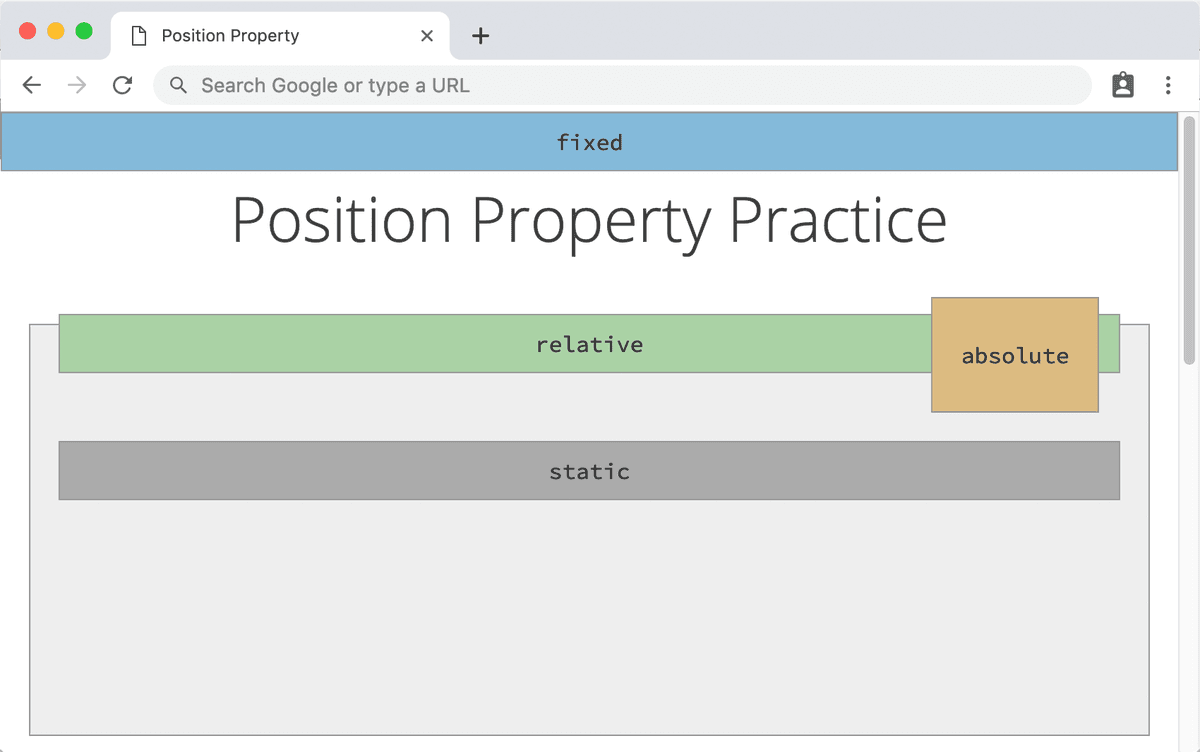
Exercise Overview
Browsers render page content in the order it’s listed in the code. This means that the topmost markup will display first, followed by content listed later in the HTML. This is called the normal document flow.
One way to take elements out of the normal document flow is using the CSS float property. Another way is the position property, which we’ll explore in this exercise. It opens up a world of “outside the box” possibilities.
The Static Value & the Normal Document Flow
- In your code editor, close any files you may have open.
- For this exercise we’ll be working with the Position Property folder located in Desktop > Class Files > Advanced HTML CSS Class. Open that folder in your code editor if it allows you to (like Visual Studio Code does).
- Open position.html from the Position Property folder.
Preview the page in Chrome (we’ll be using its DevTools).
The page is a playground to help you gain an understanding of the position property, to create interesting layouts.
Scroll down the page and note the following:
- There are 3 parent divs. In the CSS we gave them a light gray background, a border, and other basic styles.
- Inside each parent div, there are 2 divs: one colorful one and one darker gray div labeled static. Currently our CSS specifies only a different background color for each of the child divs. We haven’t yet specified any positioning for the child divs.
The darker gray child divs labeled static are there to demonstrate the position property’s default value. There is no need to declare this unless you are overriding a different value. It simply tells an HTML element to follow the normal document flow based on the order of the markup from top to bottom. All in all, it’s a very reliable default. This makes it the perfect control for the experiments we’ll perform on the more colorful divs.
The first value we’ll test is relative. Scroll to the top of the page if you aren’t already there. Leave the page open in Chrome so we can come back to it later.
Position: Relative
- Switch to your code editor.
- Open main.css from the css folder (in the Position Property folder).
In the .relative-div rule that starts around line 26, declare a relative position:
.relative-div { background: #aad2a6; position: relative; }- Save main.css.
Switch back to Chrome and reload position.html. Odd, nothing has changed.
Declaring a relative position in and of itself does not do anything. Thankfully, this makes it relatively harmless, as it cannot break your layout. However, declaring this value does allow us to utilize a set of CSS properties that would otherwise have no effect on static elements. Specifying top, right, bottom, and/or left properties allow you to move any element that is not statically-positioned. The value we are using is named relative because these coordinates are determined relative to the element’s natural position in the normal document flow.
In order to demystify what that means, let’s set a top coordinate and see how the div moves in accordance with it. Switch back to main.css in your code editor.
Let’s try to move the div down by 75 pixels. To do that, add the following bold code to the .relative-div:
.relative-div {
   background: #aad2a6;
   position: relative;
   top: 75px;
}
Save main.css and reload position.html in Chrome. The Relative div has moved down 75 pixels. But why is it mostly covering the static div?
Relatively-positioned elements are unique in that they can move around the page visually but they remain anchored in the normal document flow. They “remember their home” because that’s where they get their base position from. Static elements are a little clueless in that they can’t “see” where a relative element has wandered off to. However, they do remember where the relatively-positioned element should be. This is why the static div remained in the same position as if the relative div never moved.
- Let’s take a closer look in Chrome’s Developer Tools. CTRL–click (Mac) or Right–click (Windows) on the green relative bar and choose Inspect to open the DevTools.
- In the Styles tab on the right, find the .relative-div rule.
Try checking position: relative; off and on to see that the top coordinate has no effect when it is checked off and once more becomes static.
Make sure the property declaration is checked on before you go on to the next step.
- Click on the top property’s value (75px) to highlight it.
Use the Up Arrow on the keyboard to increase the value 1 pixel at a time. If you add the Shift key, you can modify the value 10 pixels at a time. Use the Down Arrow to decrease the value.
Watch how the top coordinate is updated live in the browser window. If you push it far above or below its starting position, you’ll see that it can pop right out of its containing element.
- Let’s see what it would look like if it moved over horizontally. Still in the Styles tab of the DevTools window, click below the top property declaration to create a new empty line (so we can add more CSS).
- Type left and hit Tab. Then type 100px
Use the Up and Down Arrow keys to modify the left position.
Positive Vs. Negative Values
The top, right, bottom, and left properties can accept both positive and negative values. Positive values move an element in the opposite direction from the name of the property. For instance, we gave the top property a positive value, which will push the div downward. Likewise, a positive left position would move the element to the right.
If we gave the top property a negative value, it would move in the same direction, moving up instead of down the page. A negative left position moves the element further to the left. The top and left properties are so useful that it’s usually not necessary to set a bottom or right coordinate.
Position: Absolute
You can move a relatively-positioned element anywhere on the page, but because it leaves a gap in its native position in the normal document flow, it’s best not to position these elements too far from “home”. If you want an element to really move around, you are going to want to use absolute positioning instead.
- Still in Chrome, scroll down to the next section of the page that shows the absolute label.
- Switch back to main.css in your code editor.
In the .absolute-div rule that starts around line 34, add the following bold code:
.absolute-div {
   background: #dcbb81;
   position: absolute;
}
Save main.css.
Switch back to Chrome and reload position.html.
The static div has moved up to where the absolute div used to be and the absolute div lost its natural width, collapsing to be only as big as it needs to be to hold the content inside it. That’s similar to what happens with a floated element. Like floats, absolutely-positioned elements are removed from the normal document flow and other elements are no longer aware of it. It may seem horrible, but that’s why it’s the best candidate for elements that you want to move anywhere in the document.
Let’s see if we can salvage this mess. Switch back to main.css.
Absolutely-positioned block-level elements collapse but they are still blocks. This means you can still add width, margin, padding, etc. Let’s try adding some padding as shown below in bold:
.absolute-div { background: #dcbb81; position: absolute; padding: 20px; }- Save main.css and reload position.html in Chrome. The “box” has gotten bigger and looks a lot less cramped. But it still hasn’t moved from its natural starting point.
- Let’s move the element down a tad. Switch back to main.css in your code editor.
Add the following bold code:
.absolute-div { background: #dcbb81; position: absolute; padding: 20px; top: 40px; }- Save main.css and reload position.html in Chrome. Oh no, where’d it go? Strange, it seems like the absolute div just vanished into thin air.
Scroll up to the very top of the page to see that the div did in fact move down 40 pixels… but from the top of the page! So how can we control an absolutely-positioned element?
The Dynamic Duo: Relative Parent, Absolute Child
Absolutely-positioned elements are freed from the restriction of their position in the normal document flow, which means that unlike relatively-positioned elements, they do not “know” where they originated in the document once you move them. Our absolute div can use some assistance understanding what you meant by top.
The browser will look to the nearest parent element that has its position declared. If there is no parent element with a position declared (as is the case here), the browser positions the absolute div in relation to the <html> element—the document itself. This is why our div is 20 pixels from the top of the browser window.
- Return to your code editor.
Whenever you declare an absolute position, you should think “I absolutely need to determine where this element gets its coordinates.” Switch to position.html in your code editor so we can find a suitable parent element to use as a positioning anchor.
Around lines 22–29, locate the markup for the segment of the page we are working with, as shown below:
<div class="parent">
   <div class="absolute-div">
      absolute
   </div>
   <div class="static-div">
      static
   </div>
</div>
Eureka! The .parent element looks like a great choice to set a position property on.
Switch to main.css.
In the rule for .parent that starts around line 19, declare a relative position as shown below in bold:
.parent {
   background: #eee;
   border: 1px solid #999;
   height: 250px;
   margin-top: 40px;
   padding: 20px;
   position: relative;
}
NOTE: We could have used either absolute or relative positioning. Relatively-positioning the parent is the natural choice because you don’t need to then tell the parent where to get its coordinates from, and it will stay in its natural place in the document with no extra work needed.
- Save main.css and reload position.html in Chrome. Ah! Now the absolute div is 40 pixels from the top of its parent container.
- Let’s experiment some more. Switch back to main.css in your code editor.
Change the.absolute-div’s top coordinate as shown in bold below:
.absolute-div { background: #dcbb81; position: absolute; padding: 20px; top: 0; }- Save main.css and reload position.html in Chrome. Now the absolute div’s top edge is flush with its parent’s top edge.
Feel free to use the DevTools to add or modify any of the .absolute-div’s coordinate properties. For instance, you could add a left property.
Position: Fixed
Let’s look at one more kind of positioning… fixed. Unlike the other positions value, fixed elements only take orders from the viewport (the browser window itself).
By default, the content on a page moves when you scroll. However, the viewport does not budge when you scroll through a page. This means whenever you declare a fixed position, that element will stay put no matter what happens on the page itself.
- Still in Chrome, scroll down to the next section of the page, fixed.
- Switch back to main.css in your code editor.
To see this in action, find the .fixed-div rule that starts around line 41 and add the following code:
.fixed-div { background: #84bada; position: fixed; }- Save main.css and reload position.html in Chrome. The static div has moved up to fit where the fixed div once was. Clearly the fixed div has been removed from the document flow. But where did it go?
Unless you have a tall enough display, the fixed div is nowhere to be seen.
It may appear as if the element has gotten sucked into the void, but it’s there. We just need to tell our fixed div where it needs to be in relation to the viewport to get it to show up.
- Switch back to main.css in your code editor.
Position the .fixed-div to the very top of the browser window by adding the following bold code:
.fixed-div {
   background: #84bada;
   position: fixed;
   top: 0;
}
Save main.css and reload position.html in Chrome. It’s now sitting flush with the top of the browser window!
Scroll through the page to see that the fixed div never budges. It’s clamped onto that browser window for dear life, impervious to any scrolling.
The element has also collapsed down to the minimum size required to hold the “fixed” text. Let’s expand the element so it stretches across the entire browser window, mimicking a common feature on modern websites: a header that stays put as you scroll.
Back in main.css, add the following bold coordinates:
.fixed-div {
   background: #84bada;
   position: fixed;
   top: 0;
   left: 0;
   right: 0;
}
Save main.css and reload position.html in Chrome. Awesome, our header stretched out to fill the width of the screen.