April 1, 2026/3 min read

FM Intro and Best Practices

Master Financial Modeling Fundamentals and Excel Best Practices

Financial Modeling Foundation

Financial modeling is a critical skill that bridges accounting, finance, and strategic analysis. These models form the backbone of investment decisions, valuations, and corporate strategy.

Core Financial Model Types

Three Statement Model

The foundational model linking income statement, balance sheet, and cash flow statement. Essential for understanding company financial health and projecting future performance.

DCF Model

Discounted Cash Flow Analysis values companies based on projected future cash flows. The gold standard for intrinsic valuation in investment banking and equity research.

LBO Model

Leveraged Buyout models analyze private equity transactions using significant debt financing. Critical for understanding returns and debt capacity in buyout scenarios.

Valuation and Analysis Models

M&A Model

Mergers and Acquisitions models evaluate deal economics, synergies, and accretion/dilution analysis. Essential for strategic transactions and investment banking.

Trading Comps

Comparable company analysis using market multiples from similar publicly traded companies. Provides market-based valuation benchmarks for quick analysis.

Transaction Comps

Precedent transaction analysis examining historical M&A deals. Offers insight into transaction premiums and market conditions for similar deals.

Five Essential Steps to Minimize Modeling Errors

1

Plan Structure

Design your model layout and flow before building. Map out inputs, calculations, and outputs to ensure logical progression.

2

Separate Inputs

Isolate all assumptions and inputs in dedicated sections. This makes sensitivity analysis easier and reduces errors.

3

Build Incrementally

Construct your model step by step, testing each component before adding complexity. This helps identify errors early.

4

Test and Validate

Perform sanity checks and cross-verify calculations. Ensure your model produces reasonable and consistent results.

5

Document Process

Add clear labels, comments, and explanations throughout your model. Future users and your future self will thank you.

Excel Efficiency Tip

Keyboard shortcuts can increase your modeling speed by 50-70%. Learning ALT sequences and function keys is one of the highest-return investments for financial professionals.

Excel Best Practices Checklist

0/5

Financial Modeling Career Impact

Pros
Essential skill for investment banking, private equity, and corporate finance roles
Provides analytical framework for complex business decisions
Highly transferable across industries and functions
Commands premium compensation in financial services
Builds logical thinking and attention to detail
Cons
Requires significant time investment to master
Models are only as good as underlying assumptions
Can create false precision in uncertain environments
Demands continuous learning as markets evolve

In today's data-driven financial landscape, mastering the right modeling frameworks can make or break your analytical credibility. These six financial models form the backbone of modern investment banking, corporate finance, and equity research:

  • Three Statement Model - The foundational framework linking income statement, balance sheet, and cash flow statement
  • DCF model (Discounted Cash Flow Analysis) - The gold standard for intrinsic valuation across industries
  • LBO model (Leveraged Buyout) - Essential for private equity analysis and debt capacity assessment
  • M&A Model (Mergers and Acquisitions) - Critical for evaluating deal structures and accretion/dilution analysis
  • Trading Comps Model - Market-based valuation using comparable public companies
  • Transaction Comps Model - Precedent transaction analysis for deal benchmarking

Each model serves distinct purposes, yet they often work in concert to provide comprehensive financial analysis. Investment professionals typically employ multiple models to cross-validate assumptions and build conviction in their recommendations.

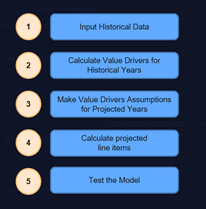
Financial modeling workflow diagram showing the five essential steps for building robust financial models

Building bulletproof financial models requires disciplined execution across five fundamental stages. These steps, refined through decades of Wall Street best practices, help eliminate the costly errors that can undermine your analysis and credibility:

The foundation of any robust model lies in meticulous planning and systematic execution. Senior analysts consistently emphasize that time invested upfront in structuring your approach pays dividends throughout the modeling process and during subsequent model updates or stress testing.

Excel Tips for Financial Modeling

Professional-grade financial modeling demands more than just technical knowledge—it requires mastering Excel as a precision instrument. In 2026's competitive environment, where models are scrutinized by increasingly sophisticated stakeholders, these practices separate seasoned professionals from novices:

Excel best practices for financial modeling showing formatting conventions and keyboard shortcuts
  • Master keyboard shortcuts ruthlessly - Elite modelers rarely touch their mouse. Speed and precision come from muscle memory with shortcuts like Ctrl+Shift+Arrow keys for range selection and F4 for toggling absolute references
  • Implement the blue font convention religiously - Hard-coded inputs and assumptions should always appear in blue, while calculated formulas remain black. This visual distinction allows users to instantly identify what can be sensitized versus what's derived
  • Break complex calculations into transparent steps - Avoid cramming multiple operations into single cells. Each intermediate step should be clearly visible and auditable, making your logic bulletproof during client presentations
  • Leverage cell comments strategically (Shift + F2) - Document your assumptions, data sources, and calculation methodologies. Your future self—and colleagues inheriting your models—will thank you for this professional courtesy

These practices become especially critical when models are shared across teams or presented to senior stakeholders who demand both accuracy and transparency in financial analysis.

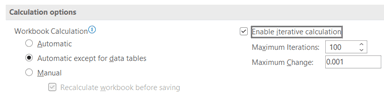
Recommended Setup for Professional Modeling (ALT F T F)

Screenshot of Excel's Calculation Options window with 'Automatic except for data tables' selected and 'Enable iterative calculation' checked, showing Maximum Iterations set to 100 and Maximum Change at 0.001.

This calculation configuration prevents Excel from recalculating data tables with every minor change, dramatically improving performance in complex models while maintaining accuracy. The iterative calculation setting handles circular references that commonly arise in sophisticated financial models, particularly those incorporating debt schedules or working capital facilities that reference their own outputs.

Key Takeaways

1Six core financial model types form the foundation of professional finance: Three Statement, DCF, LBO, M&A, Trading Comps, and Transaction Comps models
2Following five basic error-minimization steps dramatically improves model accuracy and reduces time spent on debugging and corrections
3Keyboard shortcuts and mouse-free navigation can increase Excel modeling efficiency by 50-70% compared to traditional point-and-click methods
4Visual coding with blue fonts for inputs and black fonts for formulas creates instant clarity about what users can modify in models
5Breaking complex calculations into simple, step-by-step formulas makes models easier to audit, debug, and understand for future users
6Cell comments using Shift + F2 transform models into self-documenting tools that remain usable months or years after creation
7Proper Excel setup using ALT F T F and consistent formatting standards create professional-grade models that meet industry expectations
8Financial modeling skills are highly transferable across investment banking, private equity, corporate finance, and strategic planning roles

RELATED ARTICLES