Selection Part 1
Essential AutoCAD Commands
OFFSET
Create parallel lines at a set distance — fundamental drafting move.
TRIM / EXTEND
Clean intersection of geometry — speeds up every drawing.
MIRROR
Reflect geometry across an axis — symmetric layouts in seconds.
ARRAY
Rectangular or polar duplication — handles repeating elements.
Noble Desktop's AutoCAD Certification teaches drafting, layouts, blocks, and dimensions.
Explore the intricacies of object selection in AutoCAD with this comprehensive tutorial, covering topics such as selection by clicking, crossing selection, window selection, and more.
Intro to Selection
Modify commands will prompt you to select objects, but you can also select objects when not in a command. While the process is similar in both cases, there are selection options only available when in a command. Also, selected objects will have a different appearance depending on whether or not you are selecting objects in a command. Either way you can click on individual objects, click and pull without holding down the mouse button to create a selection box, or click and drag while holding down the mouse button to create a selection lasso. If you start making a selection box and you want to disable it without making a selection, press Escape. You can disable the selection lasso by entering the OPTIONS command, clicking on the Selection tab of the Options Dialog box, and unchecking Allow press and drag for Lasso.
Selection by Clicking: You can select objects by clicking on them. You must click directly on an object’s edge unless it’s a solid color or hatch pattern fill. If you click on multiple objects you will keep adding to the selection. If you want to deselect individual objects, you can hold down the shift key and click on them. To deselect all objects, press the Escape key. You can select all objects by pressing CTRL–A.
Crossing Selection: If you are creating a selection box or lasso and pull the mouse the left, the selection area will be green. This is called a Crossing Selection. In this case, every object the box or lasso touches will be selected.
Window Selection: If you are creating a selection box or lasso and pull the mouse the right, the selection area will be blue. This is called a Crossing Selection. In this case, only objects completely encompassed by the box or lasso will be selected.
Selected objects by default will have a blue glow. If hardware acceleration is deactivated or not functioning, selected objects will appear as dashed lines. You can also deactivate the glow effect by entering the SELECTIONEFFECT command, which is a system variable, and setting the value to zero.
If you select objects when not in a command, you will see square grips and the endpoints and midpoints of lines. These grips can be used to manipulate objects, which will be covered later in this chapter.
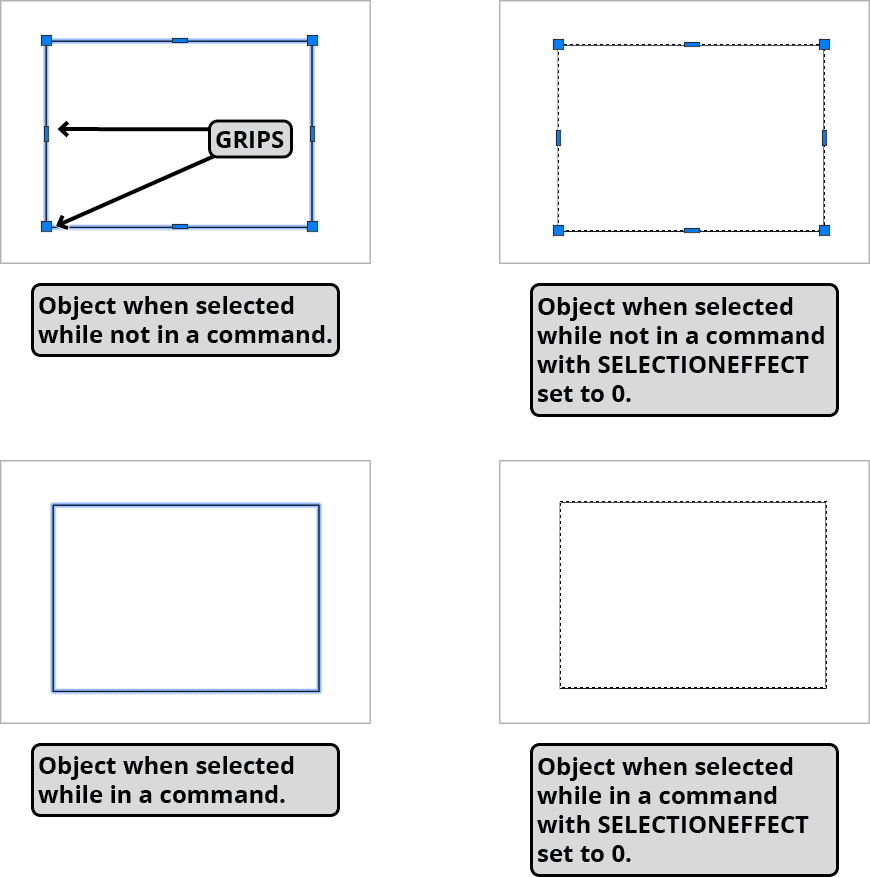
Select Similar: If you have selected and object or objects when not in a command, you can right click on a selected object and from the Right–click menu choose Select Similar. Objects of the same type on the same layer will also be selected. If you’re Right–clicking on a block, which is a named object, other blocks of the same name will be selected.
Selecting When in a Command: When you are at the stage of a command it will say Select objects: in the Command Line. You will stay in object selection stage until you press Enter to confirm that you are finished selecting objects. Most, but not all Modify commands will allow you to selected objects first and then start the command, but a few will ignore pre-selection, so it’s generally better to be in the habit of starting the tool first and selecting withing the command because that always works. However, Select Similar and Quick Select don’t work when other commands are active, so there are circumstances when you’ll use those tools to refine your selection before you start a Modify Command. If you press CTRL–A, you will select all of the objects, but the command you are in will be ended. However, if you type the word all and press Enter when the Select objects: prompt is visible in the Command Line, all objects will be selected while staying in the command. You will still need to press Enter to move on from the object selection stage.