April 1, 2026Kalika Kharkar Sharma/12 min read

Cellphone Commercial: Animating the Exclamation Mark!

Master After Effects Animation with Professional Techniques

Core Animation Techniques in This Tutorial

Matte Reveals

Learn to reveal graphics using position-based matte animations that sync with hand movements for realistic drawing effects.

Shape Layer Control

Master stroke width consistency and scaling techniques to maintain professional appearance during animations.

Expression Integration

Implement mathematical expressions to automate property relationships and create dynamic responsive animations.

Topics Covered in This After Effects Tutorial:

Master advanced compositing techniques by revealing an exclamation mark's "stick" element using sophisticated matte controls, animating the "dot" shape layer with precision timing, maintaining consistent stroke width throughout scale transformations, and implementing reusable expressions for professional motion graphics workflows.

Exercise Preview

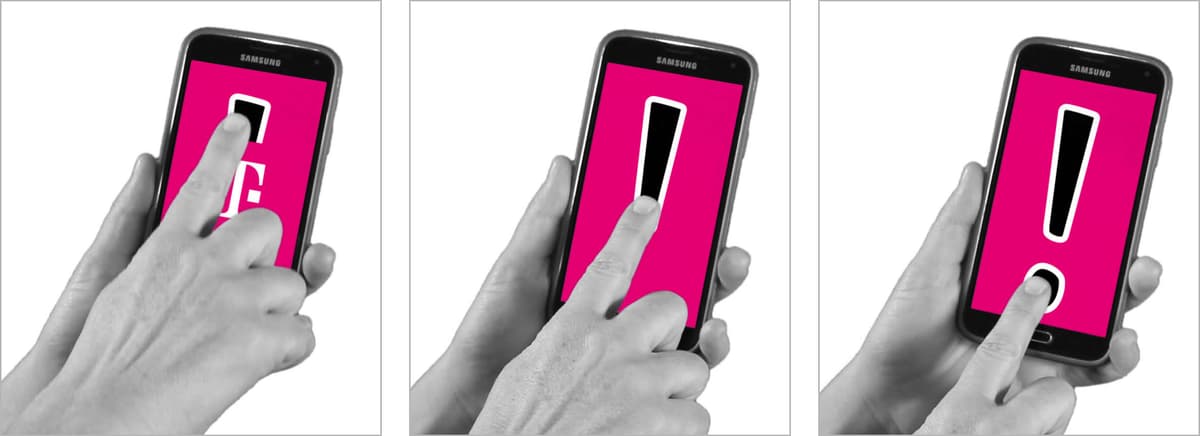
preview t mobile exclamation

Exercise Overview

After successfully completing the technical groundwork on Janet's phone screen compositing, you're ready to tackle a more creative and visually engaging challenge. This exercise represents the culmination of your compositing workflow—adding a dynamic exclamation mark animation that seamlessly integrates with the live-action footage. You'll learn to create the illusion that Janet is drawing this graphic element directly onto her phone screen in real-time, synchronizing the reveal animation with her natural hand movements. This technique is fundamental to modern motion graphics work, where the line between digital elements and practical footage must be invisible to the viewer.

Project Context

This exercise builds on previous work with Janet's phone screen compositing. You'll need exercises 3A-4B completed before starting this animation sequence.

Previewing What You'll Make in This Exercise

  1. Navigate to Class Files > After Effects Level 2 Class > Cellphone > Finished Clips on your Desktop and double-click Cellphone-Exclamation Mark.mov to launch the reference video.

  2. Study the finished animation carefully, noting how the hand appears to "draw" the exclamation mark onto the screen with natural timing and realistic interaction. Pay attention to the reveal timing, the stroke consistency, and the subtle overshoot animation on the dot—these details separate professional work from amateur attempts.

  3. Ensure yourname-Cellphone.aep remains open in After Effects. If you've closed the project, reopen it immediately. This exercise builds directly on the foundational work completed in exercises 3A–4B, so completion of those exercises is essential for success. If you haven't finished the prerequisite exercises, follow this alternative setup:

    • Open Cellphone-Ready for Exclamation Mark.aep from the Cellphone > Finished AE Projects folder.
    • Immediately save the file as yourname-Cellphone.aep in the Cellphone folder to maintain proper project organization.

Setting up for the Reveal

Before diving into the animation work, you'll establish a dual-view workspace that allows simultaneous monitoring of both the isolated graphic elements and the master composition. This setup is crucial for accurate timing synchronization—a skill that distinguishes professional compositors from beginners.

  1. Switch to the Cellphone-MAIN Timeline tab if you're not already viewing it. This serves as your master composition reference point.

  2. Double-click the [3-Janet-CUphone] layer to enter the phone screen composition where your tracked elements reside.

  3. Within the 3-Janet-CUphone timeline, double-click the [ExclamationPt-HDsize] layer. This pre-composition contains the motion-tracked graphic elements you created in the previous exercise, properly positioned to match the phone screen's perspective and movement.

  4. If the Composition panel displays a blank frame, press Home (or Fn–Left Arrow on compact keyboards) to jump to the composition's starting frame.

  5. Navigate deeper into the composition hierarchy by double-clicking the [ExclamationPt-Portrait] layer. This is your primary animation workspace where you'll create the reveal effect that covers the existing logo while maintaining perfect synchronization with the live-action footage.

  6. Protect your composition from accidental modifications by clicking the Toggle Viewer Lock icon unlock icon located to the left of the ExclamationPt-Portrait tab at the top of the Composition panel. This professional practice prevents costly mistakes during complex animation work.

    The dual-panel setup you're about to create mirrors the professional rotoscoping workflow from the previous exercise, but serves a different critical purpose. While you won't be creating masks this time, you absolutely must maintain visual reference to Janet's hand position in the master composition to achieve believable timing. This is a fundamental principle in motion graphics: animated elements must feel motivated by and connected to the live-action elements they interact with.

  7. Since mask editing isn't required for this exercise, you'll bypass the Layer panel and instead establish a dual Composition panel setup. Click on the ExclamationPt-Portrait name at the top of the Composition panel and select New Comp Viewer from the dropdown menu.

  8. Configure the newly opened Composition panel by clicking on 3-Janet-CUphone at the top, switching its view to display the scene with Janet's hand movement.

    Your workspace now displays the isolated phone screen content on the left and the complete scene context on the right—an optimal setup for precision timing work.

  9. Optimize both Composition panels with these professional settings (click into each panel before adjusting to ensure proper targeting):

    • Disable the title safe grid, which isn't needed for this exercise. Rather than clicking the grid button grid and guides options icon, use the faster apostrophe (') key to toggle the grid off instantly.
    • Lock both Composition views lock column at their top-left corners. This prevents accidental composition switching during animation work.
    • Set both views to Full resolution and Fit magnification for optimal visual clarity and performance balance.
  10. Maximize your animation workspace by pressing Cmd–Zero (0) (Mac) or Ctrl–Zero (0) (Windows) to hide the Project panel temporarily. This provides more screen real estate for the dual composition setup without requiring manual panel rearrangement.

  11. Adjust both composition view sizes to ensure clear visibility of both the detailed graphic work and the timing reference footage. Balanced panel sizes are essential for efficient workflow.

  12. Access the animation timeline by clicking the ExclamationPt-Portrait view (positioned on the left) and pressing the backslash (\) key. This keyboard shortcut instantly reveals the corresponding Timeline tab—a significant time-saver during intensive animation sessions.

  13. Examine the pre-built layer structure in ExclamationPt-Portrait by selecting the Matte reveal layer and pressing P to reveal its Position property.

  14. Test the reveal mechanism by dragging the Y Position value to the right. Notice how the exclamation graphic becomes visible as you adjust the position—this demonstrates the matte-based reveal system you'll be animating. The key to professional results lies in synchronizing this reveal with Janet's finger movement rather than creating arbitrary timing.

  15. Return the Position property to its original state using Cmd+Z (Mac) or Ctrl+Z (Windows) to undo your test adjustments.

  16. Prepare for focused animation work by locking lock switch the following layers to prevent accidental modifications:
    • Tmo-logo Outlines (the original logo being covered)
    • Both White Solid layers (Layers 3 and 5, which serve as matte sources)
    • Top Excl (the exclamation mark's main body)
    • BG (the background element)
  17. Study the sophisticated matte system that drives this animation. Notice how the layer colors provide visual organization: the Cellphone logo (tmo-logo Outlines) uses alpha matting with the Matte reveal layer, while the exclamation point elements (top Excl and dot) employ alpha inverted matting with their corresponding solid layers. This color-coding system is a professional practice that makes complex compositions more manageable and reduces errors during intensive animation work.

Composition Setup Process

1

Navigate to Target Composition

Access Cellphone-MAIN timeline and drill down through Janet-CUphone and ExclamationPt-HDsize layers to reach the animation workspace.

2

Lock and Secure Composition

Enable Toggle Viewer Lock to prevent accidental changes while setting up the dual-panel workspace for precise timing control.

3

Configure Dual View Setup

Create side-by-side composition panels showing both the exclamation mark detail and the full scene for accurate hand movement synchronization.

4

Optimize Workspace

Hide project panel, adjust panel sizes, and ensure both views are set to Full resolution and Fit display for maximum working efficiency.

Keyboard Efficiency

Use apostrophe key to toggle grids, backslash key to show timeline tabs, and Cmd/Ctrl-Zero to hide project panel for faster workflow.

Revealing the Exclamation Mark's Stick

Now you'll create the primary animation that reveals the exclamation mark's vertical element in perfect synchronization with Janet's finger movement. This requires careful observation and precise keyframe timing to achieve the illusion of real-time drawing.

  1. Position the playhead in the ExclamationPt-Portrait timeline at approximately 0;17, where Janet's finger makes initial contact with the screen surface. This contact point serves as your animation's starting reference and must be identified precisely for convincing results.

  2. Observe how the parent 3-Janet-CUphone composition on the right automatically displays the same frame at 0;17. This synchronization occurs because of the "Synchronize Time of All Related Items" preference setting established at the beginning of your After Effects configuration. This feature is invaluable for maintaining timing consistency across complex nested compositions.

  3. Initialize the Y Position animation by clicking the stopwatch stopwatch next to the Y Position property. Since the exclamation mark reveals vertically (matching the natural drawing motion), you'll only animate this single axis, keeping the animation clean and focused.

  4. Advance the playhead to 0;19, maintaining the 2-frame interval that provides smooth motion without excessive keyframes.

  5. Select the Matte reveal layer and use the Down Arrow key to reposition it, setting the Y Position to approximately 1200. This value begins revealing the top portion of the exclamation mark in sync with the finger's initial drawing motion.

  6. Continue building the reveal animation with strategic keyframe placement. Professional animators understand that too many keyframes create unwanted "wobble" in motion, so you'll use the optimal 4-frame intervals already established. Move to 0;23 to set your next timing point.

  7. Adjust the Matte reveal layer's Y Position to approximately 1512, continuing the downward reveal that follows Janet's finger movement across the screen.

  8. At 0;27, set the Y Position to approximately 1960, maintaining the consistent reveal pace that matches the live-action timing.

  9. Complete the stick reveal by setting the Y Position to approximately 2232 at 1;01. This timing point should align with Janet's finger reaching the bottom of where the exclamation mark's main body ends.

  10. Preview your animation work by clicking on the 3-Janet-CUphone view and pressing the backslash (\) key to access its timeline view.

  11. Navigate to approximately 2;27 and press the Spacebar to initiate playback. You should observe Janet's finger appearing to draw the exclamation mark's upper portion in real-time. If the timing feels off, return to the ExclamationPt-Portrait timeline and make fine adjustments to the Y Position values until the synchronization feels natural and convincing.

Animation Keyframe Schedule

0:17

Initial Touch

Janet's finger touches screen, animation begins

0:19

First Reveal

Matte reveal Y Position moves to 1200

0:23

Mid Animation

Y Position reaches 1512 for continued reveal

0:27

Extended Reveal

Y Position extends to 1960

1:01

Stick Complete

Final Y Position of 2232 completes stick reveal

Keyframe Spacing Strategy

Adding keyframes 4 frames apart prevents unsightly wobble while maintaining smooth synchronization with finger movement.

Revealing the Dot & Keeping Its Stroke Width Consistent

The final phase of this animation involves creating the exclamation mark's dot with a sophisticated scale animation that maintains visual consistency. You'll also implement an expression-based solution for stroke width consistency—a technique that's essential for professional motion graphics work in 2026.

  1. Return to your primary animation workspace by clicking on the ExclamationPt-Portrait view and pressing the backslash (\) key to access its timeline.

  2. Identify the timing for the dot animation by observing Janet's finger contact with the screen where the dot will appear, occurring around 1;19. Set your playhead to 1;18—one frame before contact—to create a more natural animation start.

  3. Initialize the dot's scale animation by selecting the dot layer and pressing Opt–S (Mac) or Alt–Shift–S (Windows) to create a Scale keyframe at the current time.

  4. Set the initial Scale value to 0%, making the dot invisible at the animation's start. This creates the appearance of the dot growing from nothing as Janet's finger "draws" it.

  5. Move the playhead to 2;00 to establish the dot's final size timing.

  6. Set the Scale to 136%, which represents the dot's final visible size. Note that the dot's outline expands with this scale change, but remains hidden beneath the Cellphone logo's magenta color until properly revealed.

  7. Reveal the animated dot by adjusting the Matte reveal layer. Select this layer to prepare for positioning adjustments.

  8. Return to 1;18 where the dot layer's initial keyframe resides, ensuring timeline synchronization for your reveal animation.

  9. Set the Y Position to approximately 2933, moving the matte completely off-screen so the dot can be revealed independently of the main exclamation mark body.

  10. Test your animation by scrubbing the playhead through the timeline. You should observe the dot appearing and growing smoothly within the ExclamationPt-Portrait view, creating a natural drawing effect.

  11. Examine the stroke width consistency system by selecting the dot layer and pressing EE to reveal all applied expressions. This shortcut displays the sophisticated code that maintains visual quality during scale animations.

  12. Expand the Timeline panel's expression view by dragging the border between the Stroke Width property and the BG layer downward. This reveals the expression code that automatically calculates appropriate stroke width values regardless of the layer's current scale.

  13. Understand the expression's importance by temporarily disabling it. Click the expression enabled icon icon to the right of Expression: Stroke Width, switching the expression off.

  14. Deselect all layers by clicking on an empty Timeline area, then scrub through the animation timeline to observe the problematic results.

  15. Notice how the dot's stroke appears thin and unprofessional during the initial animation phases without the expression active. This demonstrates why modern motion graphics workflows rely heavily on expressions for maintaining visual consistency across complex animations.

  16. Reactivate the expression by clicking the expression disabled icon icon. The expression ensures consistent stroke width regardless of scale values, which is fundamental for professional motion graphics work in 2026, where clients expect pixel-perfect consistency across all animated elements.

  17. Enhance the dot animation with subtle overshoot behavior that adds professional polish. Navigate to 1;26 to create an intermediate keyframe.

  18. Select the dot layer and press Shift–S to display the Scale property for keyframe creation.

  19. Create a natural overshoot effect by setting the scale to 120% of the final size. Click on the Scale value field, enter 136*1.2, and press Return (Mac) or Enter (Windows). After Effects will automatically calculate this expression (163.2%), demonstrating the application's built-in mathematical capabilities that save time during animation work.

  20. Apply professional easing to the overshoot keyframe by ensuring it remains selected and pressing F9 to add Easy Ease. This creates smooth acceleration and deceleration that feels natural to viewers and matches contemporary motion graphics standards.

  21. Review the complete animation by clicking the 3-Janet-CUphone view and pressing backslash (\) to access its timeline.

  22. Press Spacebar to preview the entire exclamation mark reveal sequence. The animation should demonstrate seamless integration between the live-action footage and the animated graphics, with natural timing and professional visual consistency throughout.

  23. Clean up your workspace by collapsing expanded layers in the Timeline and closing all tabs except Cellphone-MAIN to maintain project organization.

  24. Restore your default workspace configuration by navigating to Window > Workspace > Reset "Standard" to Saved Layout.

  25. Save the project using Cmd–S (Mac) or Ctrl–S (Windows) and leave it open for continuation in the next exercise.

    Dot Animation Implementation

    1

    Time Dot Appearance

    Set initial keyframe at 1:18, one frame before Janet touches the dot area at 1:19, with 0% scale for invisible start.

    2

    Establish Final Scale

    Move to 2:00 and set scale to 136% to create the dot's final size appearance on screen.

    3

    Position Matte Reveal

    Move Matte reveal Y Position to 2933 at 1:18 to keep dot hidden until proper timing, then reveal during animation.

    This expression ensures that the Stroke Width stays the same regardless of what the layer's Scale value is. This looks much better in motion graphics.
    Explaining the critical importance of maintaining consistent stroke width during scaling animations for professional results.

Copying an Expression

The stroke width expression you've just worked with represents a valuable asset for future projects. Here's the professional workflow for replicating this expression across other shape layers in current and future compositions:

  1. Select the source layer containing the desired expression (in this case, the dot layer) and press EE to reveal all expressions applied to that layer.
  2. Click directly into the expression text field on the right side of the Timeline and select all text using Cmd–A (Mac) or Ctrl–A (Windows).
  3. Copy the complete expression code using Cmd–C (Mac) or Ctrl–C (Windows). Store frequently used expressions in a text document for future reference.
  4. Navigate to your target shape layer and locate its Stroke Width property by expanding the Contents group and any nested groups until you find the Stroke # property you want to modify.
  5. Create an expression field by Opt–clicking (Mac) or Alt–clicking (Windows) on the stopwatch stopwatch icon next to Stroke Width. This converts the property to expression control mode.
  6. Paste the copied expression code into the newly created text field using Cmd–V (Mac) or Ctrl–V (Windows). The expression will immediately take effect, maintaining stroke consistency across scale animations.

Expression Transfer Process

0/5
Mathematical Integration

After Effects can calculate expressions like '136 * 1.2' automatically, eliminating manual math for overshoot effects and precise scaling values.

Key Takeaways

1Dual composition panel setup enables precise timing synchronization between detailed animations and master compositions
2Matte reveal animations using Y Position keyframes create realistic drawing effects when timed with hand movements
3Strategic keyframe spacing of 4 frames prevents animation wobble while maintaining smooth motion tracking
4Stroke width expressions maintain consistent line thickness during shape layer scaling for professional motion graphics
5Easy Ease keyframes combined with overshoot scaling create natural bounce effects in dot animations
6Expression copying workflow allows efficient reuse of mathematical relationships across multiple shape layers
7Toggle Viewer Lock prevents accidental composition changes during complex multi-panel animation workflows
8After Effects automatically calculates mathematical expressions, streamlining precise animation value calculations

RELATED ARTICLES