April 1, 2026Tziporah Zions/9 min read

Audio Spectrum in After Effects

Create Dynamic Audio-Reactive Visual Effects in After Effects

What You'll Create

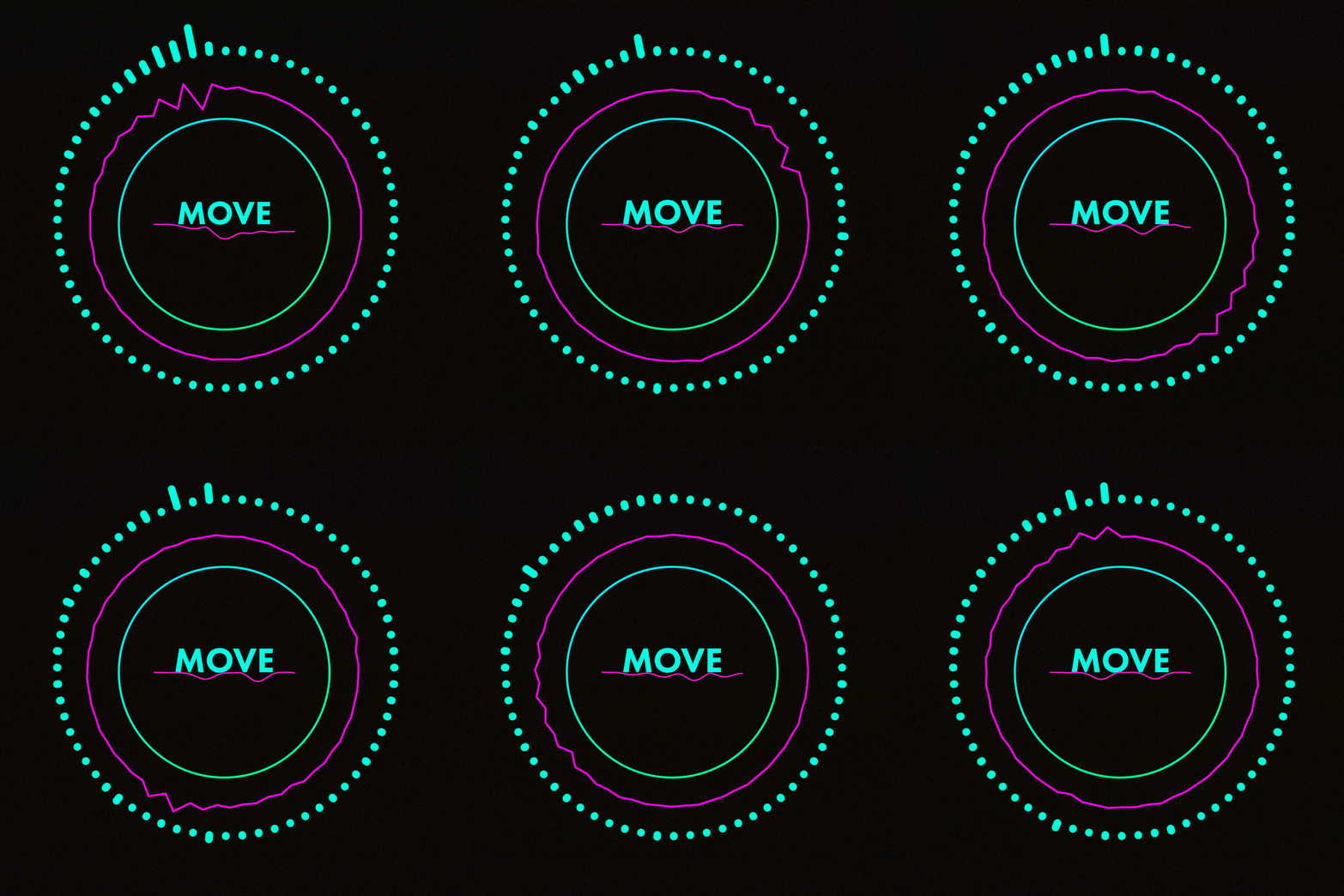
This tutorial will guide you through creating a dynamic audio spectrum visualization with rotating circles and reactive lines that respond to music in real-time.

The Audio Spectrum Effect in <a href=After Effects">

Getting the Project Files

  1. Download the project files.
  2. After the download completes, extract the archive if your system hasn't done so automatically. You'll find an After Effects Audio Spectrum folder containing all necessary assets for this tutorial.

Pre-Tutorial Setup

0/3

Project Overview

In this comprehensive tutorial, we'll master the Audio Spectrum effect—one of After Effects' most powerful tools for creating dynamic, music-driven visualizations. You'll learn to craft multiple spectrum layers with distinct visual characteristics, implement strategic masking techniques to shape your effects, and add sophisticated animation elements that elevate your compositions from basic reactive graphics to professional-grade motion design.

The Audio Spectrum effect remains a cornerstone technique in modern motion graphics, particularly valuable for social media content, music videos, and brand presentations where audio-reactive elements create compelling viewer engagement. By the end of this tutorial, you'll have the skills to create complex, layered spectrum visualizations that respond intelligently to audio frequencies.

Let's dive into the technical implementation and creative possibilities.

Key Techniques You'll Learn

Audio Spectrum Effect

Apply and customize the core effect with different settings for varied visual results. Master frequency bands and height adjustments.

Mask Integration

Create circular masks and combine them with audio effects. Learn to invert masks for creative shapes.

Layer Animation

Add rotation animations and parent layers together. Create synchronized motion across multiple elements.

File Setup

  1. Open the project file and examine the existing layers. These foundation elements provide visual polish and demonstrate professional composition structure—we'll build upon this framework while creating our own spectrum layers.
  2. Select the text layer in the timeline, then navigate to Layer > New > Solid in the menu bar. Image6
  3. Click Solid to create a new solid layer.
  4. Name this layer inner audio circle—descriptive naming conventions become crucial when managing complex spectrum compositions.
  5. Click OK to generate the solid layer.
  6. Your new solid will appear in the composition, positioned according to its layer stack order. Layer organization is critical for maintaining control over complex spectrum builds.
  7. Activate the Shape Tool from the toolbar. Image4
  8. Select the Shape Tool to access geometric creation options.
  9. Press Q repeatedly to cycle through shape options until the Ellipse Tool is active—this keyboard shortcut streamlines your workflow significantly.
  10. Hold Shift while clicking and dragging on your solid to create a perfectly proportioned circle. The Shift constraint ensures geometric precision essential for professional results.
  11. A Mask property will automatically appear in your layer stack. If it's not visible, press M with your solid layer selected to reveal mask properties—mastering these keyboard shortcuts accelerates your editing process.
  12. Locate the Inverted checkbox and activate it. Image3
  13. Inverting the mask transforms your solid from an opaque circle into a layer with a transparent circular center. This technique creates the foundation for our inner spectrum ring by providing the negative space our audio effect will occupy.
  14. With the inner audio circle layer selected, position it precisely by dragging until the circular mask centers around the existing smaller circle.
  15. For exact positioning, press P to reveal Position properties and adjust coordinates manually. My coordinates are 960,480, though yours may vary based on your mask creation. Precision in positioning ensures professional alignment across all spectrum elements.
  16. Navigate to Effect > Generate > Audio Spectrum while your inner audio circle layer remains selected.
  17. Apply the Audio Spectrum effect to begin creating your audio-reactive visualization.
  18. In the Effect Controls panel, locate the Audio Layer dropdown menu—this critical connection determines which audio track drives your visual response.
  19. Select Xtasy by Lahar (the .mp3 file) to establish the audio-visual relationship.
  20. Your spectrum effect now responds dynamically to the audio track. Scrub through the timeline to observe how different frequency ranges trigger varying visual responses—this real-time feedback is what makes spectrum effects so engaging.
  21. To shape our effect into a circular pattern, click the Path dropdown menu. Image2
  22. Select Mask 1 to conform the Audio Spectrum effect to your circular mask shape. This demonstrates the powerful integration between After Effects' masking and effects systems.
  23. Now we'll fine-tune the spectrum parameters for optimal visual impact. Set Frequency Bands to 65 for detailed frequency resolution without overwhelming visual noise.
  24. Adjust Maximum Height to 1150 to establish appropriate visual scale relative to your composition size.
  25. Set Thickness to 5 for clean, defined spectrum lines that maintain clarity at various viewing sizes.
  26. Reduce Softness to 0 for crisp, precise edges that enhance the technical aesthetic.
  27. Click the Inside Color swatch to access the color picker and create your inner gradient point.
  28. Enter hex code #E800FF for a vibrant magenta that provides strong visual contrast.
  29. Click OK to apply the color selection.
  30. Select the Outside Color swatch to define the gradient's outer boundary.
  31. Input hex code #FF00D1 for a complementary pink that creates smooth color transition.
  32. In Display Options, select Analog Lines for smooth, flowing spectrum visualization that mimics traditional audio equipment aesthetics.
  33. To add dynamic rotation, we'll leverage the existing animated circle layer. Select it using the Selection Tool. Image5
  34. Press R to reveal the pre-animated rotation keyframes that create continuous 360-degree motion.
  35. In the Parent & Link column for your inner audio circle layer, locate the spiral Pick Whip icon. Image8
  36. Drag from the Pick Whip to the animated circle layer to establish parenting. This creates inherited animation where your spectrum inherits the rotation motion, adding sophisticated movement to your audio-reactive visualization.
  37. Return the playhead to 00;00;00;00 using the timeline controls. Image1
  38. Press Spacebar to preview your animated spectrum. Notice how the rotation combines with the audio reactivity to create multi-dimensional visual interest.

Creating the Inner Audio Circle

1

Create Solid Layer

Select text layer, go to Layer > New > Solid, name it 'inner audio circle'

2

Add Circular Mask

Use Ellipse tool with Shift-click and drag to create perfect circle mask

3

Invert Mask

Click the Inverted checkbox to create a solid with hole in the middle

4

Position Layer

Center the circle around coordinates 960,480 using Position attribute

Mask Inversion Technique

Inverting the mask transforms an opaque circle into a solid layer with a hole in the middle, creating the foundation for your circular audio spectrum effect.

Outer Circle

Building on our inner circle foundation, we'll create a complementary outer spectrum ring with distinct visual characteristics. This layering approach is fundamental to professional spectrum design, creating visual depth and frequency separation.

  1. Select the inner audio circle layer in your timeline. Image5
  2. Duplicate the layer using Cmd+D (Mac) or Ctrl+D (PC)—this preserves all effect settings while allowing customization.
  3. With the duplicate selected, press Return (Mac) or Enter (Windows) to enter rename mode.
  4. Rename the layer outer audio circle to maintain clear project organization.
  5. Press S to access Scale properties for size adjustment.
  6. Increase the scale to 125% to create distinct visual separation between your inner and outer spectrum rings.
  7. Click the Parent & Link dropdown menu for this layer. Image7
  8. Select None to remove parenting and prevent rotation inheritance—our outer ring will remain stationary for visual contrast.
  9. Access the Effect Controls panel to customize this layer's spectrum parameters. Image9
  10. Set Maximum Height to 1330 for increased visual prominence.
  11. Adjust Thickness to 3 for subtle differentiation from the inner ring.
  12. Click the Inside Color swatch to access the color picker.
  13. Enter hex code #00FFFC for a bright cyan that contrasts beautifully with the inner ring's magenta palette.
  14. Click OK to confirm the color selection.
  15. Select the Outside Color swatch for gradient completion.
  16. Input hex code #00FFC5 for a complementary cyan-green transition.
  17. Click OK to apply the color.
  18. In Display Options, select Digital for a distinctly different visualization style that creates visual variety between your spectrum layers.
  19. Access the Side Options dropdown menu.
  20. Choose Side B to restrict spectrum visualization to the outer edge, creating clean separation from the inner ring's full-circle display.

Inner vs Outer Circle Settings

FeatureInner CircleOuter Circle
Scale100%125%
Maximum Height11501330
Thickness57
Display TypeAnalog LinesDigital
Side OptionsBothSide B
Parent LinkLinked to circleNone
Recommended: The outer circle uses larger scale and different display options for visual variety

Audio Spectrum Color Schemes

Inner Circle Colors40%
Outer Circle Colors40%
Background Elements20%

Audio Spectrum Line

Our final element adds a central linear spectrum that responds to different frequency ranges, completing our multi-layered composition with focused bass and low-mid frequency visualization.

  1. Create a new solid layer via Layer > New > Solid in the top menu. Image6
  2. Click Solid to proceed with layer creation.
  3. Name this layer audio line for clear identification in your project structure.
  4. Click OK to generate the solid.
  5. Ensure your new layer is selected in the timeline.
  6. Apply the Audio Spectrum effect via Effects > Generate > Audio Spectrum.
  7. Press S to access Scale properties.
  8. Set the scale to 22% to create an appropriately sized central element.
  9. Press P to reveal Position properties.
  10. Enter coordinates 960,540 for precise centering, or manually drag the layer to your preferred position within the composition.
  11. In the Effect Controls panel, configure the spectrum for bass frequency focus. Set Start Frequency to 1 to capture the lowest audible frequencies.
  12. Set End Frequency to 150 to concentrate on bass and low-mid frequencies, creating focused reactivity to the track's rhythmic elements.
  13. Adjust Maximum Height to 3550 for dramatic vertical extension during peak moments.
  14. Set Thickness to 50 for substantial visual presence.
  15. Reduce Softness to 0 for sharp, defined edges that match your other spectrum elements.
  16. In the Display Options dropdown, select Analog Lines for consistency with your inner ring styling.
  17. Access Side Options and choose Side B to create upward-directed spectrum lines.
  18. Position your playhead at 00;00;06;05 to establish the optimal preview duration.
  19. Press N to trim your work area to these six seconds, focusing on the most dynamic portion of the audio track.
  20. Return the playhead to 00;00;00;00 for complete preview preparation.
  21. Press Spacebar to play your completed multi-layered audio spectrum composition and observe how the three elements work together to create a sophisticated, professional visualization.

Your comprehensive audio spectrum project is now complete, demonstrating advanced layering techniques and strategic effect parameter management.

Audio Spectrum Line Configuration

22%
Scale percentage for proper sizing
150 Hz
End frequency range
3,550 px
Maximum height setting
6 sec
Animation duration
Frequency Range Optimization

Setting Start Frequency to 1 and End Frequency to 150 captures the most visually interesting audio frequencies while maintaining smooth animation performance.

Conclusion

Congratulations on mastering this sophisticated audio spectrum composition! You've successfully implemented multiple spectrum layers with distinct visual characteristics, strategic masking applications, and dynamic animation integration. This project demonstrates several professional techniques that extend far beyond basic spectrum effects.

The skills you've developed here—layered effect management, strategic parameter adjustment, and audio-visual synchronization—form the foundation for advanced motion graphics work. Consider experimenting with different audio tracks to observe how various musical genres affect your spectrum behavior, or explore applying these techniques to custom mask shapes for unique branding applications.

These spectrum visualization techniques remain highly relevant in 2026's content landscape, where audio-reactive graphics drive engagement across social platforms, streaming services, and live event productions. The principles you've learned adapt seamlessly to emerging formats and platforms, making this knowledge a valuable long-term investment in your motion graphics capabilities.

Continue pushing these techniques further by integrating Gradients, Layer Styles, and composite modes for even more sophisticated results. Your spectrum compositions can serve as compelling overlays for photography, video content, or standalone pieces for music visualization projects.

Happy animating, and remember that mastery comes through experimentation and creative exploration!

Creative Applications

Music Videos

Layer audio spectrum effects over photos or videos for contemporary music video aesthetics. Combine with gradients for enhanced visual appeal.

Custom Shapes

Apply the effect to different mask shapes beyond circles. Experiment with polygons, organic shapes, or text paths.

Layer Styling

Enhance with gradients and layer styles for more sophisticated visual treatments. Stack multiple effects for complex compositions.

Learn More About After Effects & Video Editing

Ready to advance your motion graphics expertise? We offer industry-leading After Effects and video editing courses designed for New York City's creative professionals. Our flexible scheduling accommodates working professionals, while our curriculum reflects current industry standards and emerging technologies.

Whether you're transitioning into motion graphics or expanding your existing skillset, our comprehensive programs provide the technical proficiency and creative insights needed to excel in today's competitive motion graphics landscape.

Credit: Xtasy by Lahar https://soundcloud.com/musicbylahar / Creative Commons—Attribution 3.0 Unported—CC BY 3.0 / Free Download / Stream: https://bit.ly/xtasy-lahar / Music promoted by Audio Library https://youtu.be/rmy7xcKNMWY

Key Takeaways

1The Audio Spectrum effect in After Effects can create professional-looking visualizations with minimal setup when properly configured with audio layers and appropriate frequency settings.
2Mask inversion is a powerful technique that transforms solid circles into rings, providing the foundation for circular audio spectrum displays.
3Parenting layers allows synchronized animation across multiple elements, with rotation effects creating dynamic visual movement that enhances the audio-reactive display.
4Different display options like Analog Lines and Digital provide distinct visual styles, while Side Options control which parts of the spectrum are visible.
5Proper frequency range selection (1-150 Hz for the line effect) captures the most visually interesting audio data while maintaining smooth performance.
6Color coordination across multiple spectrum layers creates cohesive visual designs, with hex codes ensuring consistent branding and aesthetic appeal.
7Scale and positioning adjustments allow multiple audio spectrum layers to work together harmoniously without visual conflicts or overlap issues.
8The effect can be applied creatively beyond music visualization, including integration with photos, videos, and various mask shapes for diverse design applications.

RELATED ARTICLES