April 1, 2026Dan Rodney/8 min read

Creating 3D Transforms

Master 3D transforms and depth in Adobe XD

Core 3D Transform Concepts

Rotation Controls

Use horizontal and vertical arrows in the 3D transform widget to rotate objects around different axes. Hold Shift to snap to 15-degree increments for precise control.

Z Position Override

Z position takes precedence over layer panel ordering. Objects with different Z values will ignore traditional front-to-back layering rules.

Size Scaling Effect

Objects farther away automatically become smaller, while closer objects appear larger, mimicking real-world perspective and depth perception.

Topics Covered in This Adobe XD Tutorial:

Adding 3D Transforms, Front to Back Versus Z Position

Exercise Preview

preview 3D transforms

Setting Up Your Workspace

1

Open the Project File

Navigate to Desktop > Class Files > Adobe XD Class and open '3D Transforms—Info Cards.xd'

2

Select Your Objects

Use the Select tool to choose the Weather, Getting Around, and Things to Do cards below Hawaii Travel Information

3

Enable 3D Transforms

In the Property Inspector, click the 3D Transforms icon next to Transform to activate the 3D control widget

Exercise Overview

In this exercise, you'll master Adobe XD's 3D transform capabilities to create compelling depth and dimension in your designs. These techniques are essential for modern UI/UX work, enabling you to craft more engaging user experiences that stand out in today's competitive digital landscape. While 3D transforms may seem purely aesthetic, they serve a crucial functional purpose—guiding user attention, creating visual hierarchy, and enhancing the perceived quality of your interface designs.

Adding 3D Transforms

We'll start by exploring the fundamental mechanics of 3D transforms using a practical travel information card layout. This hands-on approach will give you immediate visual feedback as you learn each technique.

  1. In Adobe XD, go to File > Open from Your Computer or hit Cmd–Shift–O (Mac) or CTRL–Shift–O (Windows).
  2. Navigate into Desktop > Class Files > Adobe XD Class and double–click on 3D Transforms—Info Cards.xd to open it.
  3. In the Toolbar, choose the Select tool select tool.
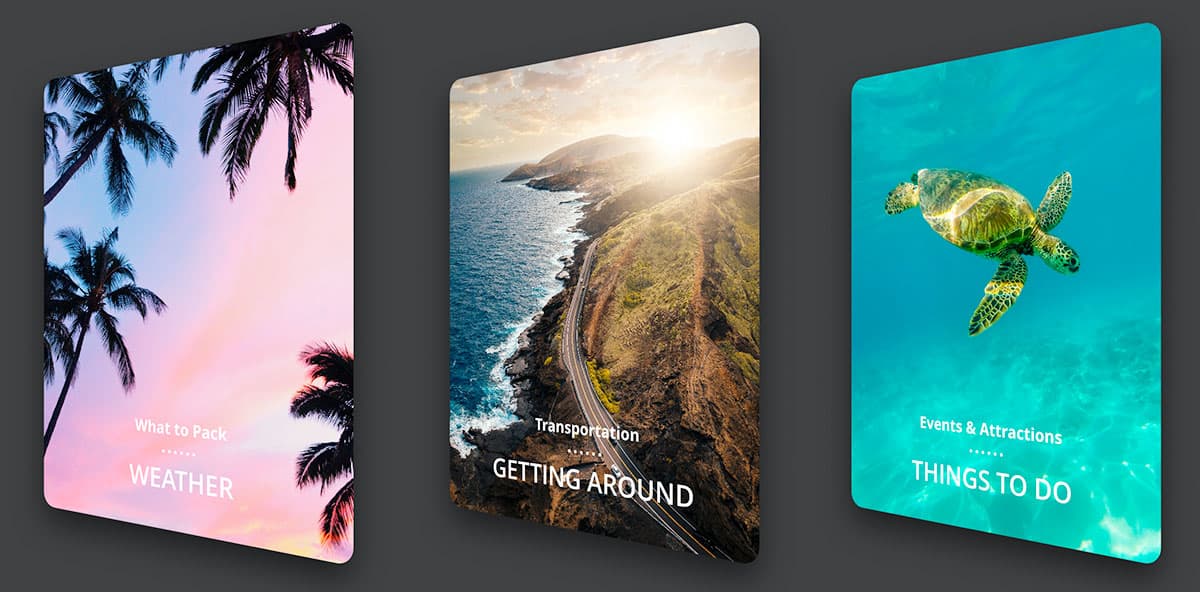
  4. Below Hawaii Travel Information select the 3 cards (Weather, Getting Around, and Things to Do). These cards will serve as our canvas for exploring transform behaviors.
  5. In the Property Inspector, to the right of Transform click the 3D Transforms icon 3D transforms to toggle it on. This activates XD's powerful 3D manipulation controls.
  6. A 3D transform control widget will appear on the cards—this is your primary tool for spatial manipulation. The widget consists of 2 rotation circles and a central dot, each serving specific transform functions. Hover over the horizontal arrow (as shown below) and drag left/right to rotate the shapes around their vertical axis. Notice how the perspective changes create realistic depth.

    3D horz arrow highlighted

  7. All 3 cards should transform to look something like this, demonstrating how horizontal rotation creates the illusion of cards turning away from the viewer:

    cards 3D rotated horz

  8. Now hover over the vertical arrow (as shown below) and drag up/down to rotate around the horizontal axis. This creates a tilting effect that's particularly useful for creating card flip animations or perspective-based layouts.

    3D vert arrow highlighted

  9. All 3 cards should now demonstrate compound rotation, showing how multiple transform axes work together to create sophisticated 3D positioning:

    cards 3D rotated horz and vert

  10. Let's reset and explore a different approach. CTRL–click (Mac) or Right–click (Windows) on cards and choose Reset 3D Transforms. This returns all objects to their default state while preserving the 3D transform capability.
  11. With all 3 cards still selected, Hit Cmd–G (Mac) or CTRL–G (Windows) to group them. Grouping changes how transforms behave fundamentally.
  12. Drag the 2 arrows (horizontal and vertical) for the 3D transforms to observe how the entire group gets transformed as a single unit, rather than each card individually. This technique is crucial for creating cohesive animation sequences and maintaining design relationships.
  13. Let's explore individual control again. CTRL–click (Mac) or Right–click (Windows) on cards and choose Reset 3D Transforms.
  14. Hit Cmd–Shift–G (Mac) or CTRL–Shift–G (Windows) to ungroup them, returning to individual object control.
  15. Click somewhere outside the cards to deselect them, clearing your current selection.
  16. Click on the Weather card to focus on individual transformation techniques.
  17. In the 3D transform widget that appears, hover over the horizontal arrow, hold Shift (to snap to 15° increments) and drag right 2 snaps. The Shift key is essential for precise, consistent rotations that align with design standards:

    weather card rotated

  18. In the Property Inspector's Transform section, notice that Y Rotation y rotation reads 30°. This numerical feedback helps you maintain consistency across similar design elements.
  19. Click on the Things to Do card to apply complementary positioning.
  20. Hover over the 3D transform widget's horizontal arrow, and holding Shift drag left 2 snaps to create a symmetrical arrangement. This creates visual balance and draws attention to the center element:

    things to do card rotated

  21. Move the 2 outer cards inward so they overlap as shown below (drag anywhere on the card except the 3D widget). This creates a layered composition that demonstrates depth relationships—a technique commonly used in modern card-based interfaces:

    3 cards rotated inwards

  22. Select only the center Getting Around card to establish proper layering hierarchy.
  23. Choose Object > Arrange > Bring to Front to ensure the focal element remains visible and accessible.

Individual vs Group Transforms

FeatureIndividual ObjectsGrouped Objects
Transform BehaviorEach object transforms separatelyEntire group transforms as one unit
Control MethodSelect multiple ungrouped itemsGroup items first (Cmd/Ctrl+G)
Visual ResultVaried individual perspectivesUnified group perspective
Recommended: Use individual transforms for varied card layouts, group transforms for cohesive movement
Keyboard Shortcuts for Efficiency

Use Cmd+Shift+O (Mac) or Ctrl+Shift+O (Windows) to open files quickly. Hold Shift while dragging transform arrows to snap to 15-degree increments for precise rotations.

Front to Back Versus Z Position

Understanding the relationship between traditional layer ordering and 3D positioning is crucial for professional design work. While most designers are familiar with basic layering, 3D transforms introduce a more sophisticated spatial system that can override traditional stacking rules.

Traditional layers operate on a simple front-to-back system controlled by the Layers panel order (or using Arrange commands). However, 3D transformed objects introduce an additional dimension called Z Position, which creates true spatial depth and can fundamentally change how objects relate to each other in your composition.

  • X represents horizontal position from the left edge of the artboard. Y represents vertical position from the top edge of the artboard. Z represents spatial depth—the front-to-back position in 3D space, with 0 as the default baseline value.

  • Negative Z values move objects backward in space (larger negative numbers = farther from the viewer). Positive Z values bring objects forward (larger positive numbers = closer to the viewer). This spatial positioning mimics real-world depth perception.

  • Z position takes precedence over Layer panel ordering, fundamentally changing how objects stack. Only objects sharing identical Z values will follow traditional layer hierarchy. Crucially, Z position affects object scale—just like in reality, objects closer to you appear larger, while distant objects appear smaller. This scaling behavior adds authentic spatial realism to your designs.

Let's explore these concepts through a practical slideshow example that demonstrates advanced layering techniques:

  1. In Adobe XD, go to File > Open from Your Computer or hit Cmd–Shift–O (Mac) or CTRL–Shift–O (Windows).
  2. Navigate into Desktop > Class Files > Adobe XD Class and double–click on 3D Transforms—Slideshow.xd to open it.
  3. At the bottom of the artboard, examine the 3 overlapping photos. This layout simulates a common UI pattern found in gallery interfaces and carousel designs.
  4. Select the rainbow photo on the left to begin applying individual transforms.
  5. In the Property Inspector, to the right of Transform click the 3D Transforms icon 3D transforms to toggle it on.
  6. In the Property Inspector's Transform section, set Y Rotation y rotation to 20°. This creates a subtle perspective effect that suggests the photo is angled away from the viewer.
  7. Select the whale photo on the right to create symmetrical positioning.
  8. In the Property Inspector's Transform section, set Y Rotation y rotation to -20° and don't miss the minus sign! The negative value creates the opposite rotation, establishing visual balance.
  9. Observe how the photos have rotated around their vertical center axis. The portions farther from you have become smaller while closer portions appear larger. This realistic perspective scaling means the side photos now visually dominate the center photo. Our goal is to make them appear as supporting elements by scaling them down and positioning them behind the focal image.
  10. Select the rainbow photo to begin adjusting its spatial position.
  11. Hold Shift and click on the whale photo so both outer photos are selected simultaneously.
  12. Notice that while the 3D Transform widget appears centrally, the middle photo remains unselected—this gives you precise control over just the supporting elements.

    Before making final adjustments, experiment with the central dot control. Hover over the dot in the middle of the 3D transform widget and drag it in all directions to observe how it moves photos through 3D space. This control manages Z-axis positioning and provides intuitive spatial manipulation.

  13. After experimenting, hit Cmd–Z (Mac) or CTRL–Z (Windows) to undo and return to your starting position.
  14. Now let's create the final effect with precision. Hold Shift to constrain movement to vertical only, and drag the dot upward until the side photos achieve appropriate scale for supporting elements.

    Monitor the Property Inspector to see the exact Z value. A Z position around -175 typically provides good visual balance, making the side photos appear as contextual previews rather than competing focal points.

  15. To open the Layers panel for examining the hierarchy, go to the bottom left of the window and click the layers panel icon icon.
  16. At the bottom of the Layers list, observe that even though Maui Rainbow appears on top in the layer order (which would normally place it in front), the Z position override takes precedence. This demonstrates how 3D transforms create a secondary spatial hierarchy system.
  17. In the Property Inspector, to the right of Transform click the 3D Transforms icon 3D transforms to toggle it off.

    IMPORTANT: This button functions as a view toggle, not a settings eraser. Turning it on/off only controls whether you can see and manipulate 3D controls—it doesn't affect any transforms you've applied to objects. The keyboard shortcut Cmd–T (Mac) or CTRL–T (Windows) provides the same show/hide functionality, which is useful for quickly switching between 2D and 3D editing modes.

  18. Save the file and close it to preserve your work.

Understanding 3D Coordinate System

X Position

Controls horizontal placement from the left edge of the artboard. Standard 2D positioning that works with traditional layout methods.

Y Position

Controls vertical placement from the top edge of the artboard. Functions as expected in normal 2D design workflows.

Z Position

Controls depth positioning with 0 as default. Negative values move objects back and make them smaller, positive values bring them forward and larger.

Z Position Override Behavior

Z position completely overrides the layer panel ordering. Only objects sharing the same Z value will follow traditional layer stacking rules, making depth management crucial for complex layouts.

Creating Depth with Photo Slideshow

1

Open Slideshow File

Open '3D Transforms—Slideshow.xd' and locate the three overlapping photos at the bottom of the artboard

2

Apply Rotation

Set rainbow photo Y Rotation to 20°, whale photo to -20° to create angled perspective views

3

Adjust Z Position

Select both side photos and drag the center dot upward while holding Shift to move them back approximately -175 Z position

4

Verify Layer Override

Check Layers panel to confirm Z position takes precedence over traditional layer ordering

Toggle Viewing Without Losing Settings

The 3D Transform toggle button or Cmd/Ctrl+T only changes visibility of 3D controls, not your applied settings. Use this to switch between 2D and 3D views while preserving all transformations.

3D Transforms & Repeat Grids

When working with repeat grids, understanding how 3D transforms interact with grid structures is essential for creating professional layouts. The behavior changes dramatically depending on where you apply the transform:

  • Applying a 3D transform to an entire repeat grid treats the grid as a single unified object (similar to the grouped behavior we explored earlier). This approach is ideal for rotating entire galleries or card collections as cohesive units.

  • Double–clicking to enter the repeat grid and applying a 3D transform to one element propagates that same transform to every element in the grid (like transforming ungrouped individual objects). This technique is powerful for creating consistent perspective effects across large datasets, such as product galleries or image carousels with uniform depth.

These repeat grid behaviors are particularly valuable in 2026's design landscape, where component-based design systems and scalable layouts are essential for responsive, data-driven interfaces.

Repeat Grid Transform Methods

FeatureGroup TransformElement Transform
Application MethodApply to entire repeat grid groupDouble-click into grid, transform one element
Visual ResultSingle unified transformationSame transform applied to each element
Best Use CaseRotating entire card deckCreating consistent card angles
Recommended: Choose based on whether you want unified group movement or individual element consistency

3D Transform Best Practices

0/5

Key Takeaways

13D transforms in Adobe XD provide depth and dimension through rotation controls and Z positioning, accessible via the 3D Transforms icon in the Property Inspector
2The 3D transform widget consists of horizontal and vertical rotation arrows plus a center dot for Z position adjustment, with Shift-drag providing 15-degree snap increments
3Z position overrides traditional layer panel ordering, with negative values moving objects back and making them smaller, positive values bringing them forward and larger
4Grouping objects before applying 3D transforms creates unified movement, while individual selection allows separate transformations for each element
5The coordinate system uses X for horizontal position, Y for vertical position, and Z for depth, with 0 as the default Z value
6Repeat grids can be transformed as entire groups or by double-clicking to enter the grid and transforming individual elements
7The 3D Transform toggle button and Cmd/Ctrl+T shortcut control visibility of 3D controls without affecting applied transformations
8Real-world perspective applies automatically, making closer objects appear larger and distant objects smaller for natural depth perception

RELATED ARTICLES