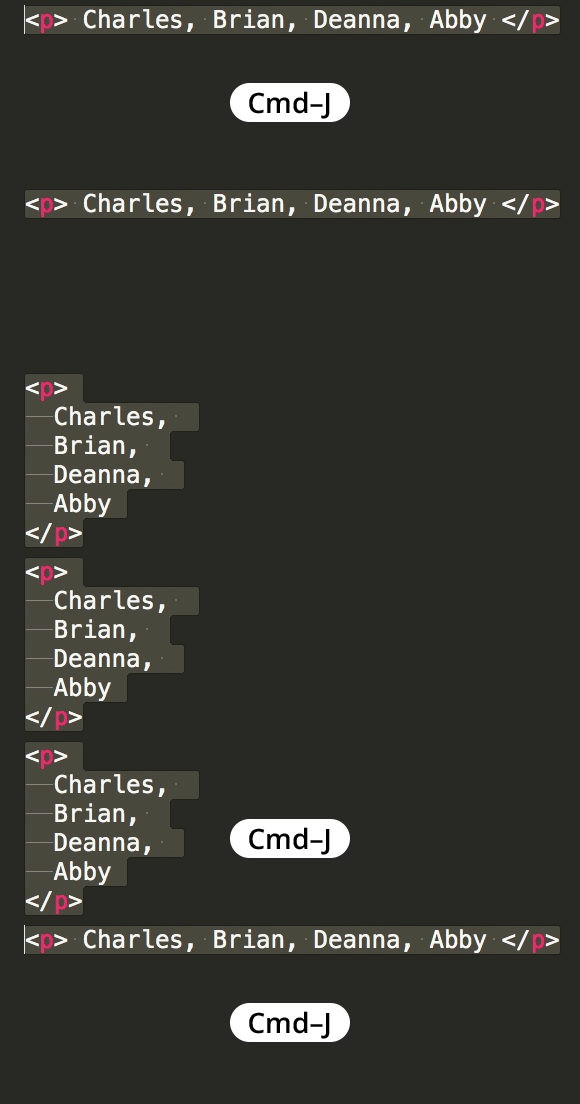
Join Lines in Sublime Text
Master Essential Text Editing Techniques in Sublime
Joining lines is a fundamental text manipulation skill that can significantly speed up your coding workflow when reformatting code or combining multiple statements.
Related Sublime Text Skills
Emmet Integration
Powerful toolkit for HTML and CSS shortcuts. Accelerates web development with abbreviation expansions and time-saving snippets.
Sass Preprocessing
Advanced CSS features including variables, nesting, and mixins. Essential for modern front-end development workflows.
Multi-cursor Editing
Edit multiple lines simultaneously with advanced selection techniques. Dramatically improves code refactoring efficiency.
Key Takeaways
RELATED ARTICLES
Quickly Write Nested Tags in Sublime Text
Use > (greater-than symbol) to quickly write nested tags. For example, if you type article>h1and hit Tab, Emmet expands article>h1 to <article>...
Quickly Delete a Word in Any Text Editor
Hit Option–Delete (Mac) or Ctrl–Backspace (Windows) to delete the word to the left of the cursor. This is an operating system feature so it should work in any...
Proper Character Encoding with Unicode
To ensure special characters display properly on your website, do one of the following: Add <meta charset="UTF-8"> into the <head> of every HTML page....