March 22, 2026Noble Desktop/1 min read

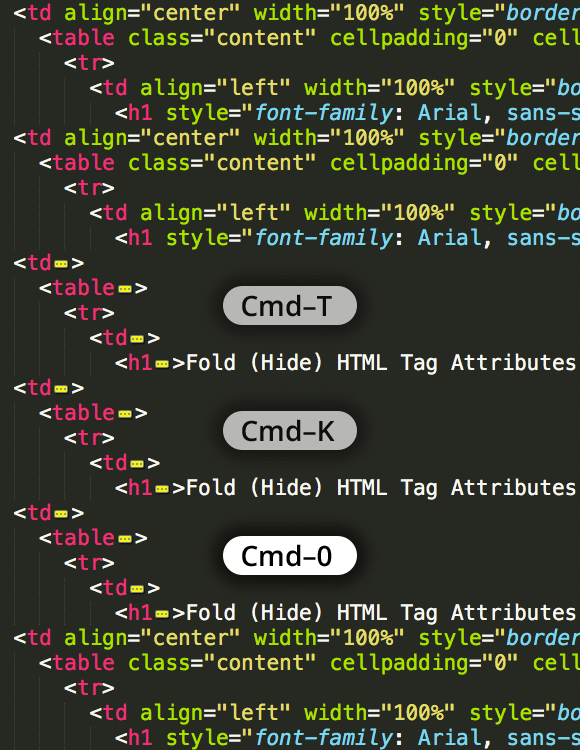
Hide HTML Attributes in Sublime Text

Master Sublime Text HTML Attribute Visibility Controls

Why Hide HTML Attributes?

Hiding HTML attributes in Sublime Text reduces visual clutter and improves code readability, especially when working with complex markup containing multiple classes, IDs, and data attributes.

Essential Sublime Text Skills

Emmet Integration

Advanced HTML and CSS abbreviation expansion. Streamlines markup creation with shorthand syntax.

Sass Processing

Built-in support for Sass compilation and syntax highlighting. Enhances CSS workflow efficiency.

Custom Shortcuts

Configurable key bindings and snippets for repetitive tasks. Maximizes development speed and consistency.

Setting Up Attribute Hiding

1

Access Preferences

Navigate to Preferences menu and select Settings or use Ctrl+comma keyboard shortcut to open configuration

2

Locate Color Scheme

Find your active color scheme file in the Packages directory or create custom modifications

3

Modify Attribute Rules

Add or edit scope rules for HTML attributes to adjust opacity, color, or visibility settings

4

Test Configuration

Open HTML files to verify attribute hiding works correctly across different markup patterns

Elevate your development workflow with our comprehensive Sublime Text Coding Tips. These advanced productivity techniques and best practices are integrated throughout our hands-on coding classes and bootcamps in NYC, where you'll master the tools and shortcuts that separate efficient developers from the rest.

Ready to accelerate your development skills? Explore Noble Desktop's professional training programs:

Key Takeaways

1Sublime Text attribute hiding improves code readability by reducing visual clutter in HTML markup
2Configuration requires modifying color scheme settings or user preferences for HTML attribute scopes
3Emmet integration enhances HTML development speed through abbreviation expansion and shortcuts
4Sass support provides advanced CSS preprocessing capabilities within the Sublime Text environment
5Noble Desktop offers comprehensive web development certificates covering front-end and full-stack skills
6Hands-on coding bootcamps in NYC provide practical experience with industry-standard development tools
7Custom Sublime Text configurations can significantly improve development workflow efficiency
8Professional web development requires mastering both editor functionality and underlying technologies

RELATED ARTICLES