March 22, 2026Noble Desktop/7 min read

Getting Started with Python: A Survival Guide

Master Python fundamentals with confidence and systematic approach

Getting Started Doesn't Have to Be Overwhelming

Many beginners get stuck at the installation stage, and that's completely normal. This guide provides a clear path through the most common challenges you'll face when starting with Python.

Installing Python

Python installation represents one of the most common stumbling blocks for newcomers to programming. The challenge isn't your technical aptitude—it's the inherent complexity of integrating two sophisticated systems: your operating system and a programming language. The abundance of conflicting online guides, many written years ago or targeting experienced developers, only compounds the confusion. Rather than navigating this maze alone, let's establish a proven path forward.

Common Installation Challenges

Pros
Many installation guides available online
Multiple methods to choose from
Community support available
Cons
Guides often written years ago
Instructions vary between sources
Many guides target experienced programmers
Difficult to know which guide to trust

Anaconda Distribution

After evaluating numerous installation methods across different platforms, I consistently recommend the Anaconda Distribution for beginners on both Windows and macOS. Developed by Anaconda Inc., a leading company in the Python data science ecosystem, this distribution eliminates installation complexity while providing immediate access to essential tools.

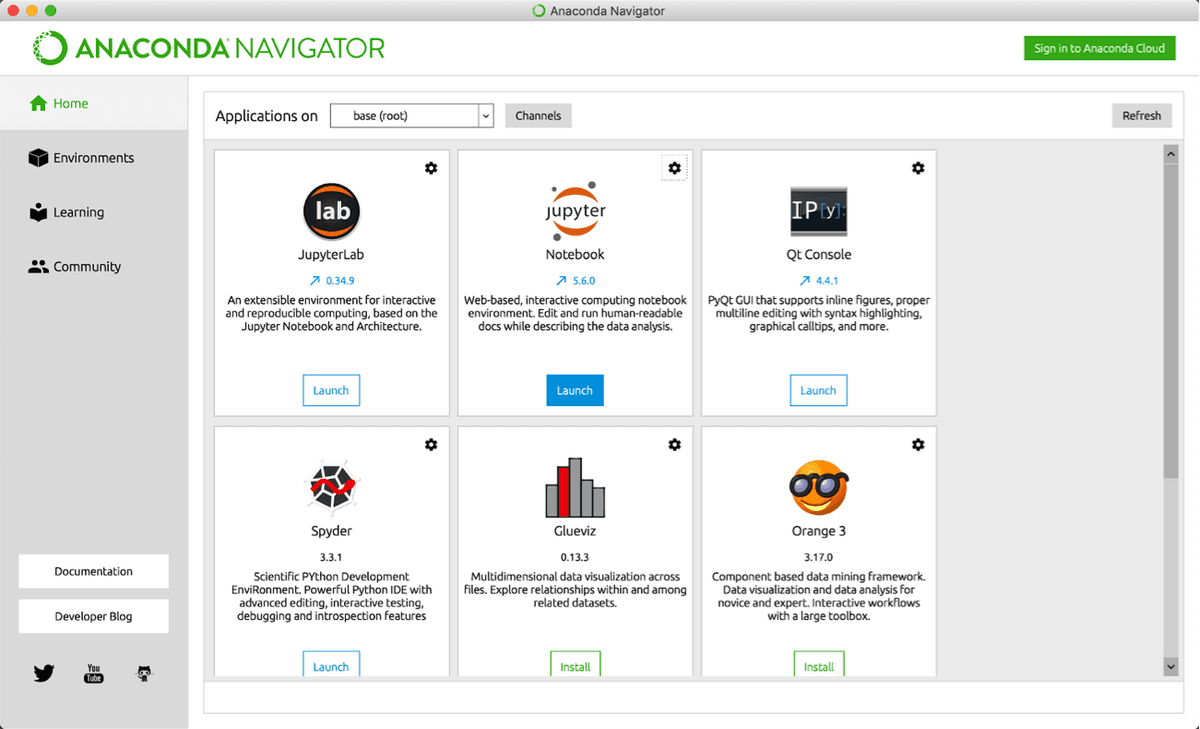
Anaconda's primary advantage lies in its comprehensive approach. The installation wizard handles all technical dependencies automatically—simply download and install like any standard application. Once installed, Anaconda Navigator provides an intuitive graphical interface for accessing multiple Python environments. For first-time programmers, I recommend starting with Jupyter Notebooks from the Navigator's application list. While Jupyter was originally designed for data analysis workflows, its interactive cell-based structure creates an ideal learning environment where you can execute code incrementally and see immediate results.

Anaconda Distribution

Beyond convenience, Anaconda includes over 250 pre-installed packages that would otherwise require individual installation and configuration. Libraries like NumPy, pandas, and scikit-learn—foundational tools for data science and machine learning—come ready to use. This comprehensive package ecosystem becomes invaluable as you progress beyond basic programming concepts.

The trade-off is storage space: Anaconda requires approximately 3GB of disk space compared to Python's base installation of under 100MB. However, on modern systems with hundreds of gigabytes or terabytes of storage, this represents a negligible cost for significant convenience. The time saved on troubleshooting package conflicts alone justifies the additional space requirement.

Now that you have Python installed, you're ready to write code—and inevitably encounter your first errors. Understanding how to interpret these errors is crucial for productive programming.

Anaconda vs Bare-bones Python Installation

FeatureAnaconda DistributionStandard Python
Installation Size300MB50MB
Installation ProcessGraphical wizardCommand line
Included ToolsData science packages includedMinimal packages
User InterfaceAnaconda Navigator GUICommand line only
Beginner FriendlyVery accessibleMore technical
Recommended: Anaconda Distribution is recommended for beginners, especially those interested in data science

Key Anaconda Advantages

Reliable Installation Wizard

Simple click-through installation process that works like any normal application. No technical configuration required.

Jupyter Notebook Integration

Provides beginner-friendly sandbox environment through Anaconda Navigator. Perfect for learning and experimentation.

Pre-installed Data Science Tools

Includes wealth of data science packages that are typically difficult to install separately. Ready to use out of the box.

Your First Error Message

Error messages are not failures—they're Python's way of communicating. Even senior developers encounter errors multiple times daily; the difference lies in how quickly they can interpret and resolve them. When Python encounters invalid syntax or logical issues, it generates a "traceback"—a detailed report explaining exactly what went wrong and where.

Simple errors produce concise tracebacks like this:

Python Error Message

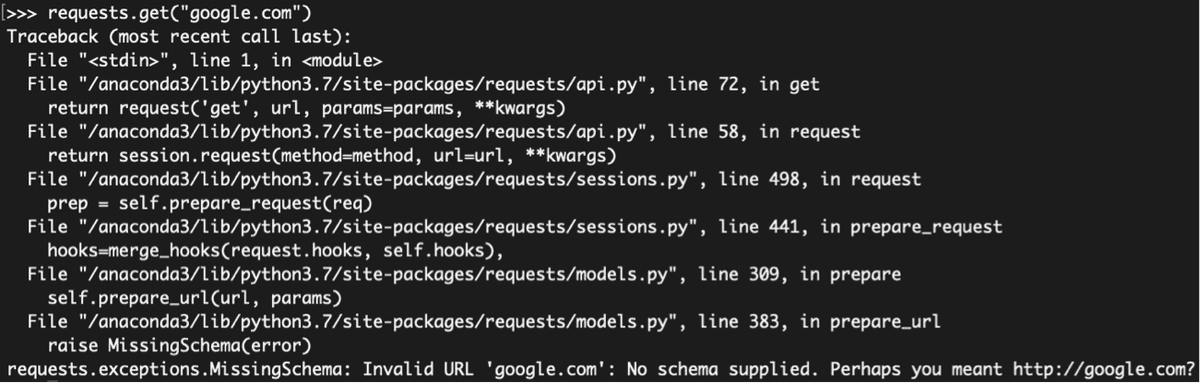
Complex programs involving external libraries generate more detailed tracebacks:

Python Error Message

Mastering traceback interpretation requires understanding two components: the structural layout and error message translation.

Error Messages Are Normal and Healthy

Getting error messages is a frequent occurrence, even for professional programmers. Python's traceback system is designed to help you identify and fix problems in your code.

Layout

Traceback layout follows a consistent pattern that reveals the error's origin. Each entry begins with "File" and contains three comma-separated elements: the filename (or "<stdin>" for interactive input), the line number where the error occurred, and the function or context being executed. When you see "in <module>", Python is executing top-level code rather than a specific function.

Complex tracebacks appear when using external libraries or calling multiple functions. Python reports the complete execution stack—every function call leading to the error. This creates a chronological trail from your initial code down to the specific line that caused the crash. The most recent and relevant information appears at the bottom, making it your primary focus point.

Understanding this structure helps you distinguish between errors in your code versus issues in external libraries, dramatically improving your debugging efficiency.

Reading a Traceback Layout

1

Identify the File

First section shows the file name where Python encountered the error. Often shows '<stdin>' for direct user input.

2

Find the Line Number

Second section indicates the specific line number where Python crashed while executing your code.

3

Understand the Context

Third section shows what procedure Python was executing. May show '<module>' for main program execution.

4

Focus on the Bottom

Most important information appears at the bottom of complex tracebacks. Start your debugging here.

Translating Errors

The final line of every traceback contains the error type and description—your key to understanding what went wrong. Common errors like TypeError often provide clear explanations, such as "expected int but got string." For these frequent issues, the accompanying message usually provides sufficient guidance for resolution.

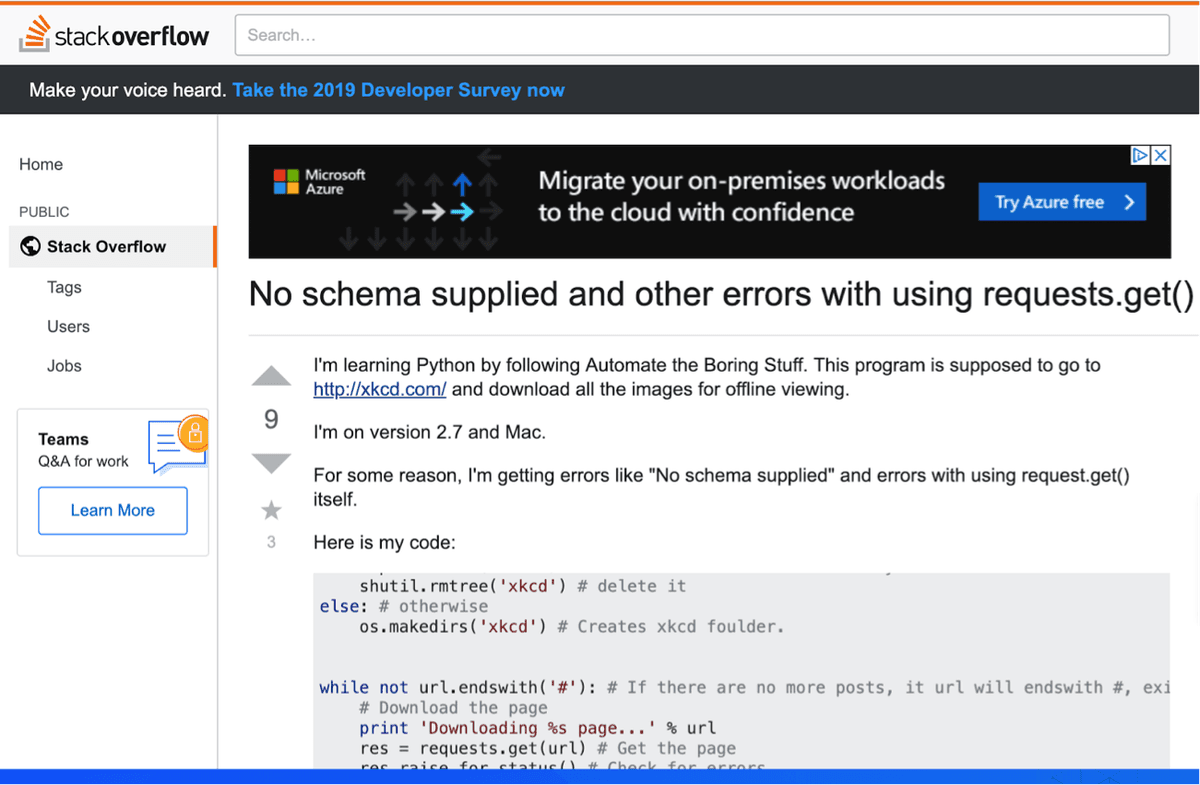
Unfamiliar errors require additional research. The Python error documentation provides comprehensive explanations for all built-in exceptions. However, the fastest resolution path often involves Stack Overflow, the programming community's primary Q&A platform.

Stack Overflow contains solutions for virtually every Python error you'll encounter. Copy the error message and search it along with "Stack Overflow"—the community's voting system ensures high-quality solutions appear first. This approach leverages millions of programmers' collective experience rather than forcing you to solve problems from scratch.

Stack Overflow Schema Error

When error messages don't immediately reveal the solution, systematic debugging becomes essential.

Common Error Translation Strategies

Simple Errors

TypeError and similar common errors often have clear error messages. Use Python documentation to understand the specific issue.

Complex Errors

Unfamiliar errors like MissingSchema require research. Copy-paste the error into Google with 'stack overflow' for community solutions.

Stack Overflow Integration

Professional programmers rely on Stack Overflow's voted answers. The best solutions typically appear in the first two responses.

Hunting Down a Bug

The natural response to unexpected program behavior is immediate correction attempts—guessing at solutions and repeatedly running code. This approach occasionally works for simple issues but becomes counterproductive with complex problems. As failed attempts accumulate, frustration grows exponentially, often leading to more careless mistakes.

Professional developers learned long ago that systematic debugging outperforms random fixes. The initial time investment in proper debugging saves hours of futile guessing.

Avoid the Guessing Game Trap

Making random guesses and changes to fix bugs leads to frustration and often makes problems worse. A systematic approach saves time and reduces stress.

Systematic Debugging

Effective debugging rests on two fundamental principles that distinguish professional problem-solving from amateur guesswork.

First, achieve visibility before making changes. Your mental model of what the code should do clearly differs from reality—the bug's existence proves this disconnect. Before attempting fixes, identify where your expectations diverge from actual program behavior. The print() function remains the most reliable debugging tool for beginners. Insert print statements at key points to examine variable values, function returns, and program flow. Modern Python also offers the built-in breakpoint() function for more advanced debugging with interactive inspection.

Second, apply divide-and-conquer methodology. Rather than examining every line individually, strategically verify your program's state at the midpoint. If values appear correct halfway through, focus on the second half. If they're already wrong, examine the first half. This binary search approach works for programs of any size—a 1000-line program requires only about 10 strategic checks to isolate problem areas.

These debugging skills will serve you throughout your programming journey, but developing them requires sustained practice—which brings us to the most challenging aspect of learning Python.

Two-Principle Debugging Approach

1

Get Visibility First

Use print functions to examine intermediate steps before making any changes. Your mental model of what the code is doing is likely incorrect.

2

Divide and Conquer

Check variables at the midpoint of your program to determine if the bug is in the first or second half, then narrow down systematically.

Sticking with It

The greatest challenge in learning Python isn't technical complexity—it's maintaining motivation through the inevitable frustration periods. Most people approach programming with admirable but ultimately self-defeating strategies. They purchase comprehensive textbooks, dedicate hours to study sessions, complete numerous exercises, then gradually lose momentum within weeks.

This pattern stems from a fundamental motivational flaw: no immediate rewards for effort invested. You're essentially playing a game where the score never increases until you've "completely learned Python"—an endpoint that doesn't actually exist. This creates an exhausting cycle of input without visible output.

Sustainable learning requires restructuring your reward system around achievable milestones. Initially, reward pure effort—every hour of practice earns something you enjoy. As fundamental concepts solidify, shift toward project-based rewards where working code provides intrinsic satisfaction.

Choose tutorials with engaging endpoints, like this rock-paper-scissors project, which builds toward a playable game. Better yet, identify workplace applications where Python can solve actual problems you face. Automate the Boring Stuff with Python excels at this approach, teaching practical skills like email automation, PDF manipulation, and data processing through real-world scenarios.

When your code solves genuine problems or creates something entertaining, motivation becomes self-sustaining. Each success builds confidence and curiosity for the next challenge, creating positive learning momentum that carries you through difficult concepts.

Ineffective vs Effective Learning Approaches

FeatureIneffective ApproachEffective Approach
Goal SettingLearn all of PythonSmall concrete victories
Reward SystemNo immediate rewardsReward effort and results
Project ChoiceAbstract exercises onlyFun and practical projects
TimelineUndefined completionRegular milestones
Recommended: Focus on small wins and practical applications to maintain motivation and momentum

Motivation Strategies That Work

Reward Your Effort

Initially reward yourself for time invested rather than results achieved. One hour of Python study earns one hour of Netflix or other treats.

Build Fun Projects

Choose tutorials that create enjoyable outcomes like rock-paper-scissors games. Tangible results provide natural motivation to continue learning.

Apply to Your Work

Find ways Python can solve real problems in your current job. Practical applications provide immediate value and sustained engagement.

Python Classes at Noble Desktop

Python has evolved into one of today's most valuable and versatile programming languages, driving everything from web development to artificial intelligence. Noble Desktop offers comprehensive Python education pathways designed for working professionals seeking practical skills.

Begin your journey with our Python in a Day intensive or Intro to Python Programming course for foundational concepts. For deeper specialization, our 30-hour bootcamps provide career-focused training in Python for Data Science and Python for Web Development. Professionals seeking to automate data collection and web monitoring will find our Python for Webscraping course particularly valuable for building competitive advantages in their current roles.

Noble Desktop Python Learning Path

0/4

Key Takeaways

1Use Anaconda Distribution for the easiest Python installation experience, especially if interested in data science applications
2Error messages and tracebacks are normal debugging tools designed to help identify problems - focus on the bottom of complex tracebacks for key information
3Systematic debugging requires getting visibility through print functions before making changes, then using divide-and-conquer to narrow down bug locations
4Avoid making random guesses when debugging - this leads to frustration and can worsen problems rather than solving them
5Maintain motivation by setting small, concrete goals and rewarding effort rather than waiting to 'completely learn Python'
6Stack Overflow is an essential resource for translating complex error messages - copy-paste errors with 'stack overflow' in Google searches
7Choose projects that are either fun or solve real workplace problems to maintain engagement and see practical value
8Professional programmers encounter errors frequently - struggling with bugs and installation issues is part of the normal learning process

RELATED ARTICLES