March 22, 2026 (Updated April 1, 2026)David Karlins/8 min read

Collecting Content for Your Design Portfolio from Day One

Build Your Design Portfolio From Day One

Two-Track Approach

Think of every project on two levels: Track one for learning technique and skills, Track two for building your portfolio. This dual mindset transforms classwork into career assets.

Start now to build your library of design projects

Step one in building a portfolio is collecting exceptional material to present—and that process should begin from day one of your design journey.

As you pursue a pathway to a design career, develop a dual-track mindset for every project you create:

  • Track one: Master core competencies—technical skills, design principles, stakeholder collaboration, and the critical abilities that will differentiate you in a competitive design market.
  • Track two: Build portfolio-worthy assets that demonstrate your evolving expertise.

As you complete coursework and personal projects, systematically document your growing skill set and archive every piece of work. Create a dedicated folder structure using Google Drive, Dropbox, or similar cloud storage—cloud-based solutions are essential since they preserve your work through device changes and provide accessible backup for your professional assets. This organizational system becomes the foundation of your design career, housing everything from early sketches to polished final deliverables.

It's never too early to begin curating portfolio material. Design careers take unexpected turns, and you'll be surprised which early projects become valuable examples of specific skills or problem-solving approaches. That experimental typography exercise from your first semester might perfectly demonstrate your creative process to a future employer seeking innovative thinking.

Storage Options for Your Design Library

FeatureLocal StorageCloud Storage
AccessibilitySingle device onlyAccess anywhere
Backup SecurityRisk of lossAutomatic backup
CollaborationLimited sharingEasy sharing
Storage LimitsHardware dependentExpandable
Recommended: Cloud storage (Google Drive or Dropbox) recommended for accessibility and security

What goes in your library of projects?

Every successful designer's portfolio began with their first project—imperfect as it may have seemed at the time. The key is starting your collection process immediately, rather than waiting for work that feels "professional enough."

  • Be systematic: Create consistent folder structures and naming conventions
  • Suspend judgment: Your perspective on what constitutes strong work will evolve
  • Archive everything: Every sketch, iteration, and final piece has potential value

Really? Everything?

Absolutely.

Here's why this comprehensive approach pays dividends: First, you cannot predict which projects will ultimately showcase your strongest skills or resonate most with potential employers. Even foundational exercises can demonstrate growth, process thinking, or specific technical competencies that become crucial differentiators. Second, portfolio curation is itself a professional skill—one that requires practice and develops over time through hands-on experience.

The most strategic approach is building comprehensive project documentation from the start:

  • Create individual project folders with consistent naming conventions
  • Save multiple file types: source files, exports, process sketches, and iterations
  • Document your methodology: Create detailed text files outlining skills demonstrated, challenges solved, and techniques applied

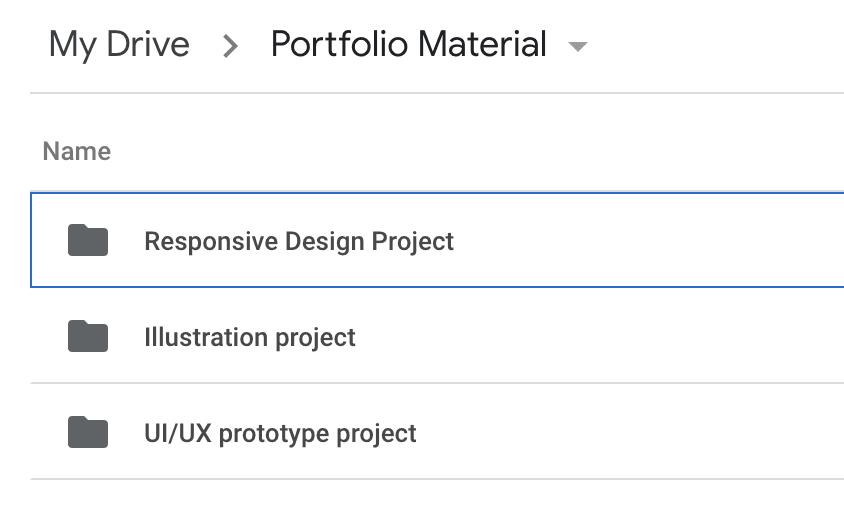
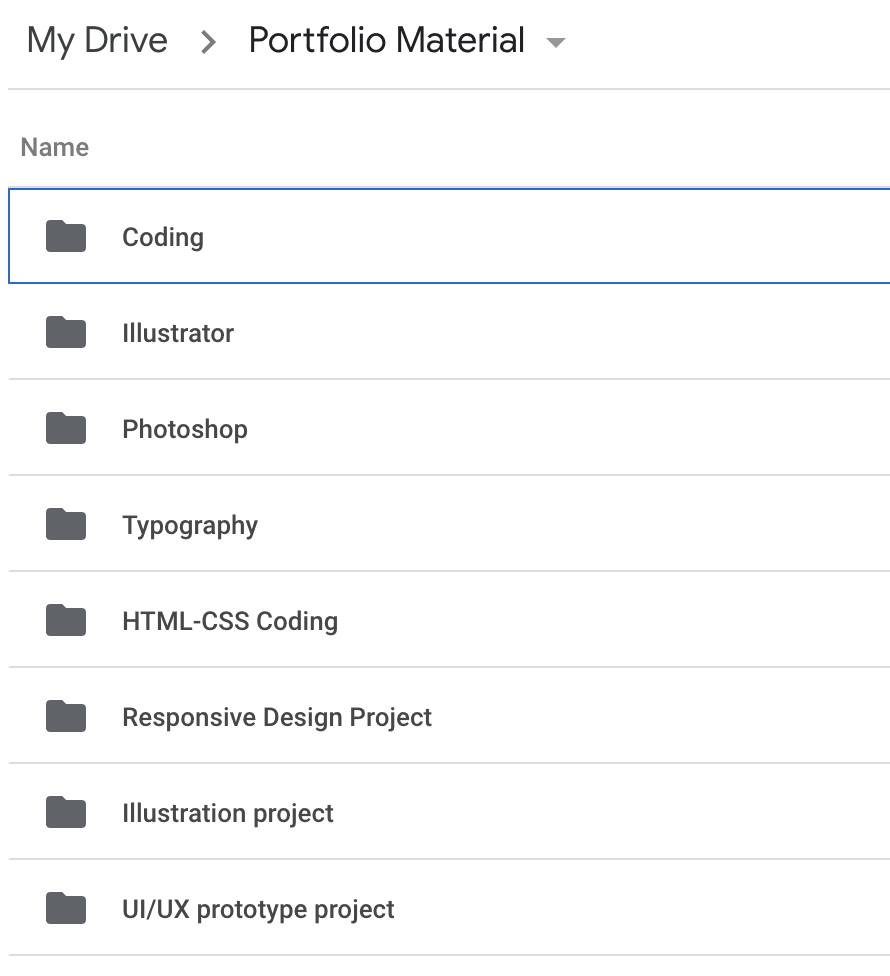
A well-organized Google Drive portfolio structure might look like this example, showing clear project separation and logical naming:

Google drive portfolio example

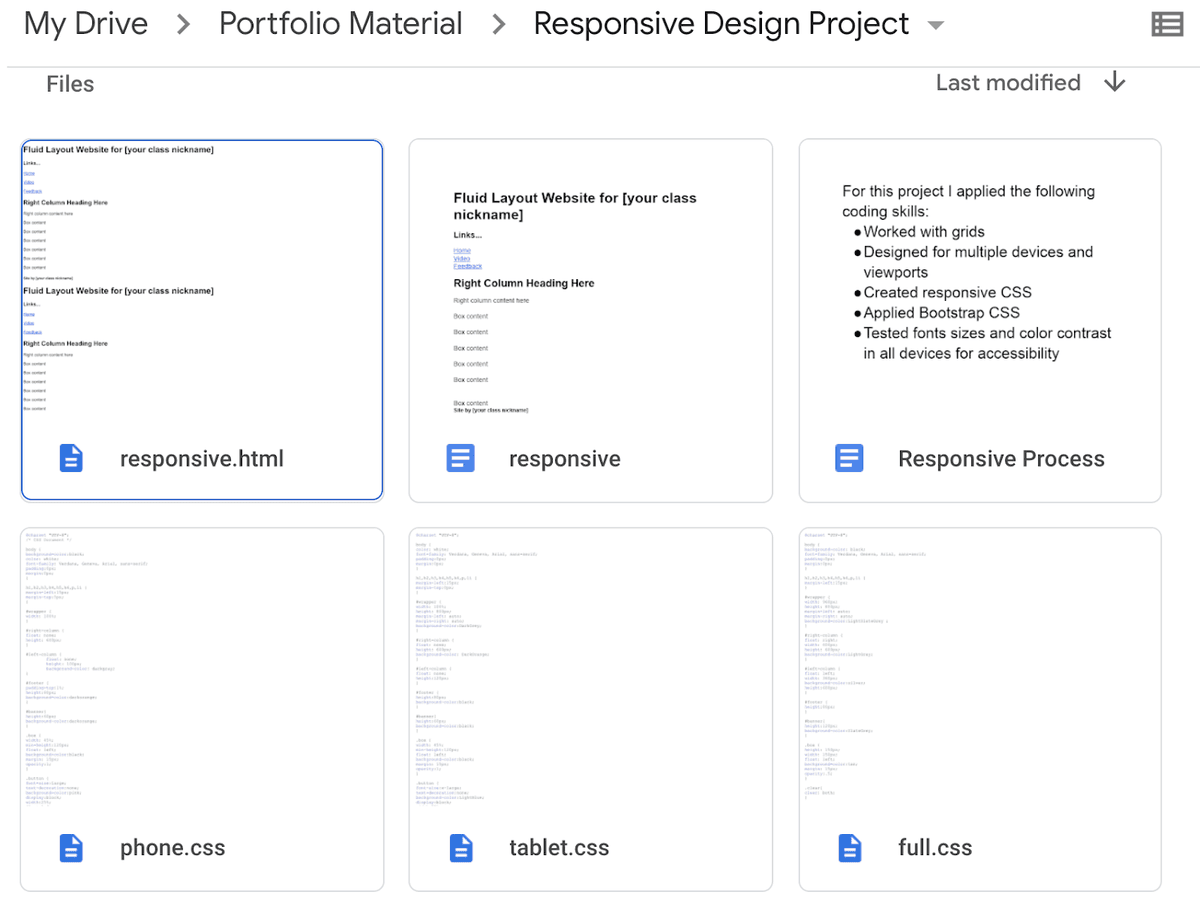
Within each project folder, maintain comprehensive documentation that captures both deliverables and process insights:

portfolio example

Project Documentation System

1

Create Project Folder

Make a dedicated folder for each project you create, no matter how simple

2

Save All Elements

Store different components, versions, and iterations of your work

3

Document Skills

Create a text file listing all skills acquired and demonstrated in the project

Save Everything Philosophy

You cannot predict which projects will become portfolio material or can be developed into portfolio-quality work. Even simple, beginning-level projects can evolve into valuable portfolio pieces.

Appreciate and document your assets

As your project collection expands, regularly assess your accumulated skills and begin envisioning how this material translates into compelling portfolio presentations. This reflection process helps you recognize growth and identify areas for continued development.

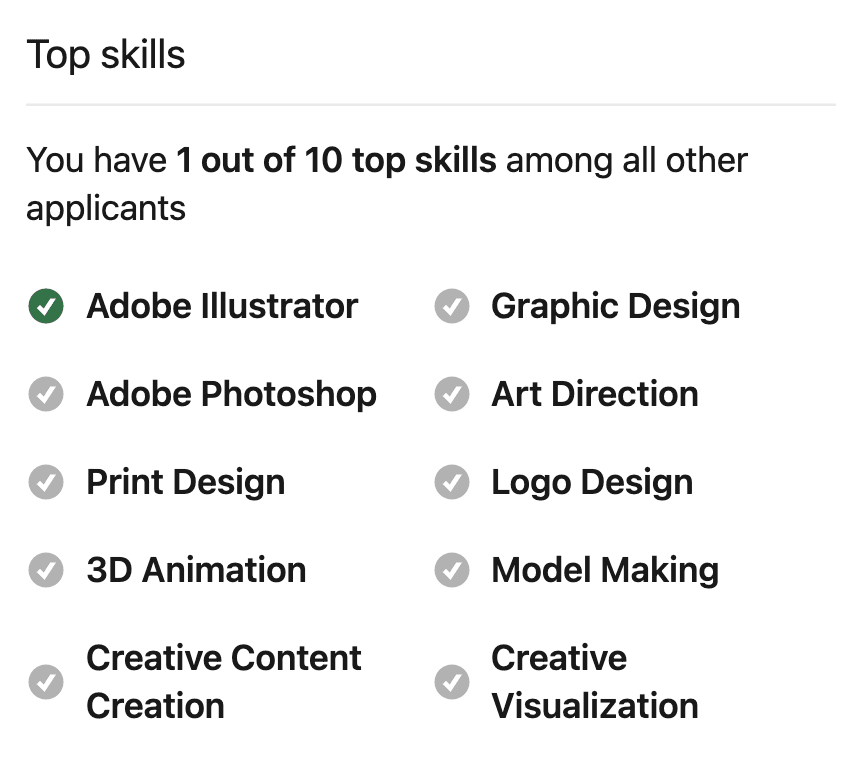
The most effective portfolios align directly with industry demands. Research current job postings and identify the skills, software proficiencies, and competencies employers prioritize. LinkedIn's job posting interface provides valuable intelligence—when you view design positions, you'll see skills breakdowns comparing your qualifications with other applicants:

list of LinkedIn skills

This competitive intelligence reveals both your existing strengths (such as Adobe Illustrator proficiency in this example) and skill gaps worth addressing through targeted learning.

Don't overlook course syllabi as documentation resources. Educational institutions invest significant research into identifying industry-relevant competencies, and syllabi articulate learning objectives that directly translate to professional qualifications. Maintaining links to coursework syllabi provides ready-made language for resume building and helps you articulate your educational foundation to employers.

Building this systematic approach to project documentation creates a powerful foundation for the next critical decision: selecting which projects deserve portfolio inclusion.

Asset Documentation Checklist

0/4

Quality over quantity

Employers expect focused, high-caliber work from emerging design professionals—not extensive project lists. The optimal portfolio size for someone entering the field? Three exceptional projects.

This number provides sufficient range to demonstrate versatility while maintaining quality control. Fewer than three projects suggests limited experience; more than three risks diluting impact unless every additional piece truly elevates your presentation. Remember: three outstanding projects create far stronger impressions than three strong projects accompanied by one that's not quite ready for professional scrutiny.

When selecting and refining portfolio pieces, adopt an employer's perspective:

  • Test functionality ruthlessly: Ensure websites work flawlessly, check all interactions, and verify responsive design across devices
  • Scrutinize every detail: Proofread all text multiple times—a single typo can undermine an otherwise sophisticated project
  • Apply evolved skills: Revisit earlier projects with techniques learned since completion, upgrading elements that now seem basic

Portfolio curation is both educational and transformative—it teaches you to evaluate work critically while developing the ability to elevate good projects into exceptional ones through strategic refinement.

Optimal Portfolio Size

Recommended Projects43%
Too Few29%
Acceptable Range29%

Portfolio Curation Guidelines

Employer Perspective

Review your work through the eyes of potential employers or clients. Test functionality and scrutinize every detail.

Quality Control

One misspelled word can ruin an otherwise substantial project. Proofread everything meticulously before presenting.

Continuous Improvement

Update and enhance projects using skills acquired after the original class ended. Curation is itself a learning experience.

Your library of projects should evolve as your skills improve

Continuously update your project documentation to reflect expanding capabilities and deeper understanding of your creative process. This living documentation becomes increasingly valuable as you articulate your professional value proposition.

Document specific competencies with precision and context:

  • Software expertise with technique specificity: Instead of simply listing "Photoshop," write "Created complex photo manipulations using advanced masking techniques, color correction through curves adjustment, and custom brush effects for texture."
  • Technical implementation details: "Developed interactive animations using vanilla JavaScript and CSS3 transforms, optimized for 60fps performance across all modern browsers."
  • Strategic problem-solving approach: Reframe academic assignments as professional challenges—"Developed brand identity system addressing client requirements for versatility across digital and print applications" rather than "Completed class logo project."
  • Project management capabilities: Highlight deadline adherence, revision cycles, and stakeholder feedback integration
  • Creative decision-making rationale: Document why you selected specific typefaces, color palettes, or layout approaches—this process thinking demonstrates strategic design capability

This detailed documentation practice builds a crucial professional skill: the ability to clearly communicate your value and methodology to clients and employers. In 2026's competitive design market, technical execution alone isn't sufficient—you must articulate the strategic thinking behind your creative decisions.

Skills Documentation Categories

Technical Proficiencies

Document specific software apps, coding languages, and your level of proficiency with detailed examples of techniques used.

Design Implementation

Frame your work as solving design challenges rather than completing assignments. Show problem-solving capabilities.

Professional Skills

Highlight deadline management, stakeholder interaction, and other soft skills that employers value.

Learn from pros

Study how established designers present their work to understand portfolio best practices and presentation strategies that resonate with industry professionals.

Analyze successful portfolios through two critical lenses:

  • Work presentation: How do they photograph projects, sequence images, and highlight key details?
  • Process documentation: What level of behind-the-scenes insight do they provide into their methodology?

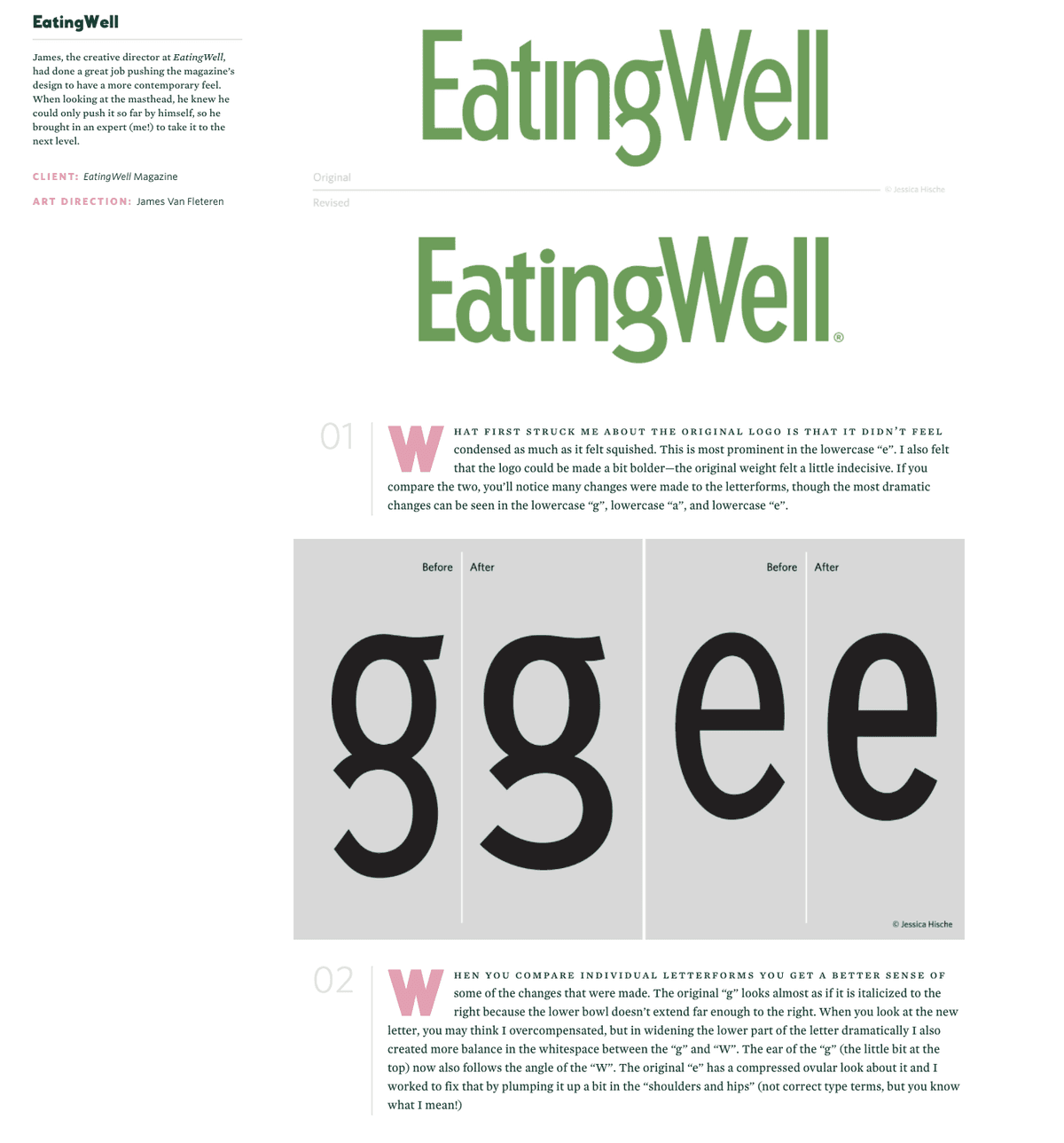
Jessica Hische's portfolio exemplifies thorough process documentation—notice how comprehensively she details the typographic development for this branding project, providing specific insight into design decisions and technical execution:

Jessica Hische project example

This level of detailed process narrative cannot be reconstructed years later—it requires real-time documentation as projects develop. This reinforces why comprehensive work documentation from day one is essential for building compelling portfolio presentations.

Understanding presentation strategies helps inform how you should organize your growing collection of work, which leads to important decisions about portfolio structure.

You can't pull that kind of process narrative out of a hat years after you've completed the project.
Professional designers like Jessica Hische document their work with thorough detail throughout the process, not after completion.

Learning from Professional Portfolios

0/4

Organizing by skill set and project

Strategic portfolio organization requires understanding when to present work as complete projects versus organizing by specific competencies—both approaches serve different professional objectives.

Complete project presentation works best when demonstrating versatility and the ability to manage complex, multi-faceted challenges. A single project showcasing photo retouching, vector illustration, front-end development, and JavaScript interaction demonstrates valuable cross-disciplinary capabilities that many employers prize. This approach highlights your ability to shepherd projects from concept through technical implementation.

Skill-focused organization proves more effective when targeting specific roles or client needs. If an employer specifically seeks vector illustration expertise, presenting a curated collection of your strongest Illustrator work creates more impact than diluting that work across multiple mixed-skill projects.

The most sophisticated approach? Organize your archive to support both presentation strategies. Create parallel folder structures that allow you to repurpose the same work for different contexts:

portfolio example screenshot

This organizational flexibility allows you to quickly customize portfolio presentations for specific opportunities—a crucial advantage in today's fast-moving design market where personalization often determines who advances to the next round.

Organization Strategies

FeatureProject-BasedSkill-Based
Best ForShowing versatilityTargeting specific roles
DemonstratesMulti-dimensional abilitiesSpecialized expertise
Employer AppealProject management skillsTechnical depth
FlexibilityBroad applicationsNiche positioning
Recommended: Use both approaches - organize content to support either presentation style as needed
Double-Dipping Strategy

Repurpose the same projects to highlight either comprehensive project capabilities or specific technical skills, depending on the opportunity.

Key Takeaways

While collecting and organizing projects provides essential raw material, remember that creating an effective portfolio presentation requires additional strategic design work. However, systematic documentation throughout your learning journey creates the foundation that makes compelling portfolio development possible.

Four essential principles for building your portfolio library:

  1. Begin immediately: Start building professional work habits and organizational systems now, regardless of your current skill level—these "muscles" strengthen with consistent practice and become invaluable as your work improves
  2. Maintain dual awareness: Approach every project with both learning objectives and portfolio potential in mind, maximizing the value of your creative efforts
  3. Document extensively: Capture not just final deliverables but your entire creative process, problem-solving approach, and technical methodology
  4. Stay market-informed: Regularly research job postings on LinkedIn, Indeed, and industry-specific platforms to understand evolving skill demands and integrate relevant competencies into your project documentation

Portfolio Building Action Plan

1

Start Immediately

Begin collecting and organizing projects now, regardless of current skill level

2

Adopt Dual Perspective

View every project as both a learning opportunity and potential portfolio material

3

Document Thoroughly

Save process details, skills used, and project context as you work

4

Research Industry Needs

Monitor job postings to align your skill documentation with employer requirements

Key Takeaways

1Begin building your design portfolio library immediately, regardless of your current skill level or project quality
2Treat every project with a dual mindset: learning technical skills while simultaneously building portfolio assets
3Save everything systematically in cloud storage with organized folders for each project and comprehensive documentation
4Document not just final outputs but also the process, skills acquired, and techniques used in language that matches industry job requirements
5Aim for three high-quality projects rather than many mediocre ones, and continuously refine work as your skills improve
6Study professional designer portfolios to understand effective presentation methods and process documentation standards
7Organize your library to support both project-based and skill-based presentation approaches for maximum flexibility
8Leverage course syllabi and job postings to identify and document industry-relevant skills employers actively seek

RELATED ARTICLES