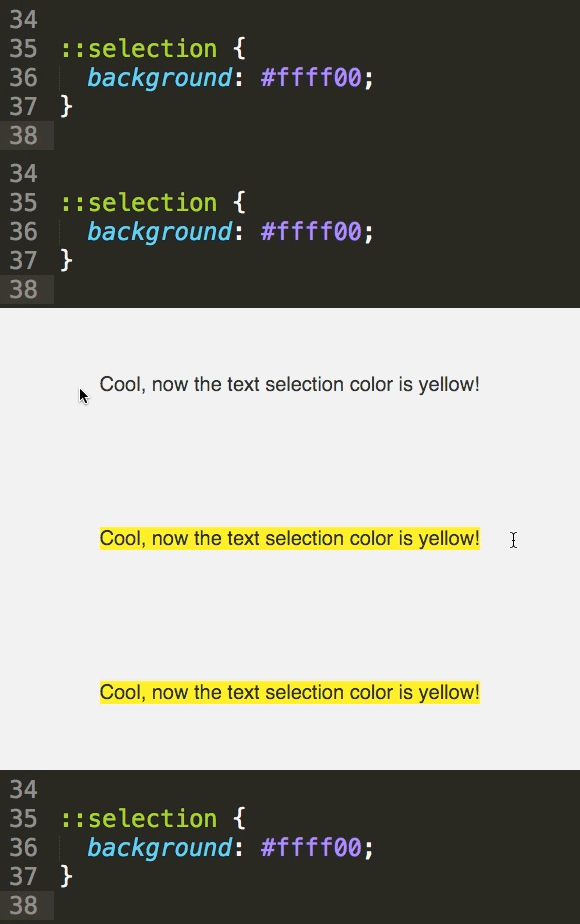
Change the Text Selection Color with CSS
Master Custom Text Selection Styling with CSS
CSS text selection styling is widely supported across modern browsers, with vendor prefixes required for complete compatibility.
CSS Selection Properties
::selection pseudo-element
The standard CSS pseudo-element for styling selected text. Works with background-color and color properties.
::-moz-selection
Mozilla Firefox specific vendor prefix. Required for Firefox compatibility in older versions.
::-webkit-selection
WebKit based browsers vendor prefix. Some older WebKit browsers may require this syntax.
Implementation Steps
Define Base Selection Style
Start with the standard ::selection pseudo-element and set your desired background-color and text color properties.
Add Vendor Prefixes
Include ::-moz-selection for Firefox compatibility, ensuring consistent appearance across all browsers.
Test Cross-Browser
Verify your selection styles work correctly in Chrome, Firefox, Safari, and Edge browsers.
Apply to Specific Elements
Target specific elements like paragraphs or headings for more granular control over selection appearance.
CSS Text Selection Styling
Implementation Checklist
Ensure selected text remains readable with sufficient contrast ratio
Verify selection styling works with single words and paragraphs
Test in Chrome, Firefox, Safari, and Edge for consistency
Maintain WCAG compliance for color contrast in selected states
Test touch selection behavior on tablets and smartphones
CSS selection styling has minimal performance impact since it only applies when users actively select text, making it safe to implement on any website.
Key Takeaways
RELATED ARTICLES
Quickly Write Nested Tags in Sublime Text
Use > (greater-than symbol) to quickly write nested tags. For example, if you type article>h1and hit Tab, Emmet expands article>h1 to <article>...
Quickly Delete a Word in Any Text Editor
Hit Option–Delete (Mac) or Ctrl–Backspace (Windows) to delete the word to the left of the cursor. This is an operating system feature so it should work in any...
Proper Character Encoding with Unicode
To ensure special characters display properly on your website, do one of the following: Add <meta charset="UTF-8"> into the <head> of every HTML page....