March 22, 2026Noble Desktop/1 min read

Change Text Case in Sublime Text

Master Text Case Conversion in Sublime Text Editor

Essential Skill for Developers

Text case conversion is a fundamental skill that saves developers significant time when working with code, especially when dealing with naming conventions across different programming languages and frameworks.

Common Text Case Use Cases

Variable Naming

Convert between camelCase, snake_case, and PascalCase for different programming languages. Essential for maintaining consistent code style across projects.

CSS Classes

Transform text for CSS class names and HTML attributes. Quickly convert content text to proper kebab-case formatting for web development.

Database Fields

Format column names and table identifiers according to database conventions. Convert user input to proper database naming standards.

Quick Text Case Conversion Process

1

Select Text

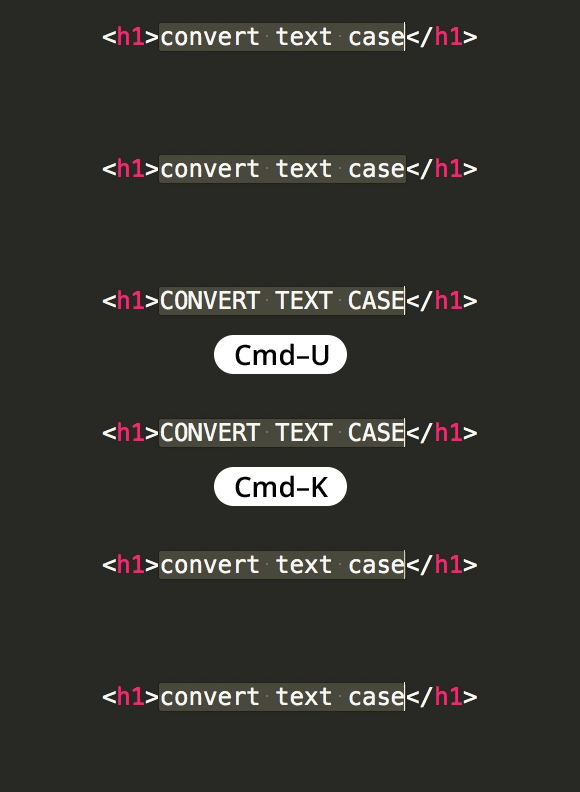
Highlight the text you want to convert. You can select single words, multiple words, or entire lines depending on your needs.

2

Access Command Palette

Use Ctrl+Shift+P on Windows/Linux or Cmd+Shift+P on Mac to open the command palette in Sublime Text.

3

Choose Case Option

Type the desired case conversion command and select from options like uppercase, lowercase, title case, or use keyboard shortcuts for quick access.

Master advanced Sublime Text Coding Tips that can dramatically improve your development workflow and productivity. These professional-grade techniques and shortcuts are thoroughly covered in our comprehensive hands-on coding classes and bootcamps in NYC, where you'll learn directly from industry experts through practical, project-based learning.

Ready to accelerate your coding career? Explore Noble Desktop’s professional training programs:

Key Takeaways

1Text case conversion in Sublime Text streamlines coding workflow and maintains consistent naming conventions across projects
2Command palette shortcuts provide quick access to uppercase, lowercase, and title case transformations for selected text
3Proper text case handling is essential for variable naming, CSS classes, and database field formatting in web development
4Sublime Text's text manipulation features integrate seamlessly with other development tools like Emmet and Sass preprocessing
5Noble Desktop offers comprehensive training programs that combine Sublime Text skills with broader web development competencies
6Hands-on coding classes in NYC provide practical experience with professional development tools and industry best practices
7Certificate programs cover full-stack development skills, from front-end frameworks to back-end server technologies
8Learning proper text editor usage early in development career significantly improves long-term productivity and code quality

RELATED ARTICLES