March 22, 2026 (Updated March 23, 2026)Noble Desktop/9 min read

Building Websites with WordPress

Master WordPress 5.0 for Modern Web Development

WordPress Dominance

Among dozens of CMSs that fought for control of the market, WordPress quickly emerged as the unequivocal leader, revolutionizing how websites are built and maintained.

How is WordPress Different than Traditional Site-Building?

For decades, website creation remained the exclusive domain of programmers. Building even a basic site required fluency in multiple coding languages—HTML for structure, CSS for styling, JavaScript for interactivity, PHP for server-side logic, and MySQL for database management. This technical barrier meant that most early websites reflected their creators' engineering mindset rather than thoughtful design principles. The result was a web dominated by functional but aesthetically limited sites that required entire development teams to create and maintain.

The emergence of Content Management Systems (CMSs) in the early 2000s solved the most pressing problem: content updates. Traditional websites required developers to hand-code every text change, making simple updates both expensive and time-consuming. CMSs separated content from code, allowing editors and content specialists to update text, images, and other materials without touching the underlying structure. Among the numerous CMSs competing for market dominance, WordPress quickly established itself as the unequivocal leader, powering over 40% of all websites by 2026.

The shift to WordPress-powered sites delivered immediate business value: organizations could update their content in real-time at a fraction of traditional development costs. Marketing teams could launch campaigns without waiting weeks for developer availability, and small businesses could maintain professional websites without ongoing technical support contracts.

This democratization of web publishing transformed the digital landscape, enabling millions of non-technical users to create sophisticated, dynamic websites. However, WordPress's evolution was far from complete.

Traditional vs WordPress Development

FeatureTraditional Site BuildingWordPress CMS
Team Size RequiredMultiple developersSingle user
Technical SkillsMultiple languagesMinimal coding
Content UpdatesDeveloper requiredSelf-service
CostHigh developer feesFraction of cost
Turnaround TimeSlowFastest ever
Recommended: WordPress significantly reduces complexity, cost, and time-to-market for website development.

WordPress for Design

Pre-WordPress 5.0 Theme Options

Pros
Free themes available for basic functionality
Licensed themes offer more customization options
No coding required for simple site setup
Logo and color customization possible
Cons
Limited visual control without coding skills
Designers still needed developers for unique designs
Conversion programs were precarious and hard to update
Free themes had minimal customization features

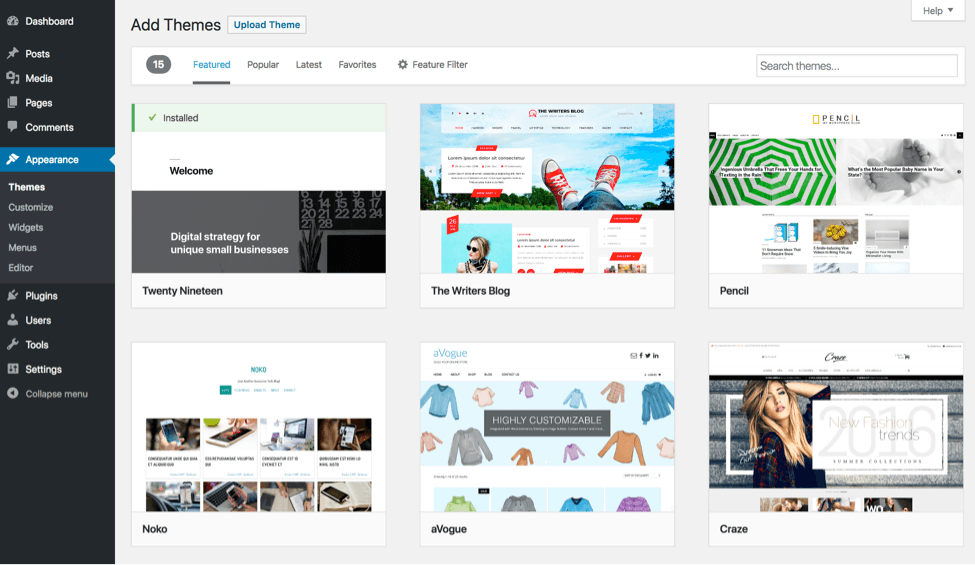
Wordpress Themes Editor

While WordPress revolutionized content management, early versions still demanded significant coding expertise for visual design. Users needed to create custom themes and templates to control their site's appearance—a process that remained inaccessible to most graphic designers. These professionals, accustomed to the intuitive drag-and-drop interfaces of Adobe Creative Suite, found themselves locked out of web design by the requirement to master PHP, HTML, and CSS. Creating truly unique websites still required collaboration with developers, limiting design innovation.

Wordpress Active Theme

For users prioritizing function over form, this limitation proved manageable. WordPress offered thousands of free themes alongside premium options that provided greater customization capabilities. Free themes included basic personalization features—custom logos, color schemes, and typography choices—while premium themes expanded these options significantly. This ecosystem functioned similarly to template-based tools like PowerPoint, offering good results within defined parameters.

However, professional designers faced a frustrating choice: invest months learning to code, rely on unreliable design-to-code conversion tools that produced unmaintainable websites, or surrender creative control to developers. This bottleneck stifled innovation and kept sophisticated design techniques out of reach for most WordPress users.

Why WordPress 5.0 Was Such a Huge Change?

Recognizing this design bottleneck, third-party developers created page builder plugins that bridged the gap between visual design tools and WordPress functionality. Plugins like Elementor and Beaver Builder introduced drag-and-drop interfaces, pre-built widgets, and visual editing capabilities that finally gave designers the creative control they demanded. These tools enabled users to create complex layouts, interactive elements, and multimedia experiences without writing code.

WordPress's leadership understood that these plugins addressed a fundamental user need. Rather than allowing third-party tools to define the platform's future, WordPress committed to developing a native solution. This ambitious project culminated in WordPress 5.0, featuring the revolutionary Gutenberg editor—a complete reimagining of how users create and manage website content.

WordPress Evolution Timeline

Pre-5.0

Early WordPress

Basic CMS with limited design control

Mid-Development

Plugin Era

Page Builder plugins emerged for drag-and-drop functionality

Version 5.0

WordPress 5.0 Launch

Revolutionary Gutenberg editor with block-based design

5.x Series

Modern WordPress

Continued evolution with enhanced block capabilities

What's New in WordPress 5?

WordPress 5.0 introduced Gutenberg, which the platform's creators describe as "a whole new way to use WordPress." This wasn't marketing hyperbole—Gutenberg fundamentally transformed content creation and site design through its innovative block-based approach.

Wordpress Blocks New Feature

The most dramatic change was the shift from simple text fields to flexible content blocks. Previously, WordPress offered only basic title and content areas with limited formatting options. The new block system provides unprecedented layout flexibility, allowing users to construct sophisticated page designs by combining and arranging individual content elements.

  • Reduced plugin dependency. Most WordPress plugins existed to overcome design limitations, but they significantly impacted site performance and stability. Multiple plugins often created conflicts that could crash entire websites. Gutenberg's comprehensive feature set eliminates the need for many plugins, resulting in faster, more reliable sites.
  • Modern, multimedia-rich layouts. Native blocks for images, videos, audio, galleries, and slideshows make it effortless to create engaging, media-heavy content that meets contemporary web standards.
  • Mobile-first responsive design. All Gutenberg blocks automatically adapt to different screen sizes and devices. This solved a persistent problem where desktop-optimized elements became unusable on mobile devices—a critical issue given that mobile traffic now exceeds desktop usage.
  • Real-time visual editing. Designers can now see exactly how their changes will appear while editing, eliminating the guesswork that plagued earlier WordPress versions and enabling more confident, efficient design decisions.

Wordpress Blocks Text Editor

The block system's intuitive drag-and-drop functionality mirrors professional design tools, enabling anyone to create precisely formatted content quickly. This democratization means that marketing professionals, small business owners, and content creators can produce sophisticated layouts without technical expertise or developer support.

Wordpress Search for Blocks

Gutenberg includes dozens of specialized blocks covering everything from basic text and headings to advanced elements like columns, quotes, file downloads, and interactive lists. This comprehensive library addresses the majority of content creation needs that previously required custom coding or third-party plugins.

Wordpress Embeds

Embed blocks simplify the integration of external content, making it effortless to include YouTube videos, SoundCloud audio, social media posts, and content from dozens of other platforms. WordPress continues expanding this embed library, recognizing that modern websites must seamlessly integrate with the broader digital ecosystem.

Wordpress Blocks are Reusable

The reusable block feature enables users to save complex layouts and content combinations for future use. This functionality is invaluable for maintaining design consistency across multiple pages or creating efficient workflows for repetitive content types, such as product showcases or team member profiles.

Collectively, these improvements have reduced website development time by 60-80% for typical projects while dramatically improving the quality and consistency of results.

WordPress 5.0 Key Innovations

Block-Based Editor

Revolutionary Gutenberg editor replaces simple text fields with flexible block system for sophisticated layouts.

Reduced Plugin Dependency

Built-in functionality eliminates need for many plugins, improving site speed and reducing conflicts.

Multimedia Integration

Native support for images, video, audio, slideshows, and galleries with seamless integration.

Real-Time Preview

Designers can see changes instantly without guesswork, streamlining the editing process.

WordPress 5.0 Block Features

0/6

So We Don't Need Page Builders Anymore?

While Gutenberg represents a massive leap forward, it hasn't completely eliminated the need for specialized page builders. WordPress 5.0 successfully incorporated many page builder features, but advanced design requirements often still demand more sophisticated tools.

Wordpress Plugins

Premium page builders like Elementor, Beaver Builder, and newer entrants like Bricks continue to offer superior customization capabilities, advanced animation options, and specialized design elements that exceed Gutenberg's current feature set. These tools remain essential for agencies and designers creating highly customized websites or those requiring advanced interactions and animations that can significantly enhance user engagement and conversion rates.

However, the gap continues to narrow. Each WordPress update brings new blocks and enhanced functionality, gradually reducing reliance on third-party builders for all but the most demanding projects.

Page Builders Still Relevant

While WordPress 5.0 was a substantial upgrade, plugins like Elementor, Beaver Builder, and SiteOrigin still offer more customization and freedom than WordPress currently provides.

WordPress 5.0 vs Page Builder Plugins

FeatureWordPress 5.0 BlocksPage Builder Plugins
Ease of UseGoodExcellent
Customization OptionsLimitedExtensive
Animation FeaturesBasicAdvanced
Learning CurveModerateSteeper
Site PerformanceBetterVariable
Recommended: Page builders still offer superior customization for complex design requirements.

What About My Pre-5.0 Site?

WordPress handled the transition to Gutenberg with characteristic attention to backward compatibility. Existing sites continue functioning normally, with older content automatically wrapped in "Classic Editor" blocks that preserve original functionality and appearance.

While upgrading to Gutenberg isn't mandatory, the writing is on the wall. WordPress has signaled that future development will focus on block-based editing, making the eventual transition inevitable. Organizations planning significant website updates or redesigns should prioritize learning the new system to take advantage of improved efficiency and expanded capabilities.

Wordpress Classic View

When ready, users can easily convert classic editor content to blocks, opening up new design possibilities for existing content while preserving years of invested effort.

Upgrading Your Pre-5.0 WordPress Site

1

Current Protection

Your existing content is wrapped in Classic Editor, ensuring no harm comes to your site during the transition period.

2

Optional Transition

You can continue using old features without being forced to adopt new WordPress 5.0 functionality immediately.

3

Gradual Conversion

When ready, convert classic editor fields to blocks at your own pace and comfort level.

4

Future-Proofing

Eventually all users will need to upgrade, making it worthwhile to learn the new WordPress 5.0 environment.

So Do You Not Need to Know Code Anymore?

WordPress 5.0 dramatically expanded what non-programmers can accomplish, but coding skills remain valuable and often necessary for professional results. While Gutenberg enables sophisticated content creation without code, websites still rely on themes that determine overall design and functionality. Even premium themes, despite offering extensive customization options, cannot anticipate every design requirement or brand need.

Knowledge of CSS, HTML, and PHP continues to provide significant advantages for fine-tuning designs, optimizing performance, and implementing custom functionality. These skills become particularly valuable when working with clients who demand unique branding elements or specific user experience requirements that go beyond theme limitations.

For entrepreneurs and designers, the theme development market remains lucrative. Well-designed themes that leverage Gutenberg's capabilities command premium prices, and the demand for specialized themes in niche markets continues growing. Understanding code enables designers to create themes that fully utilize modern WordPress features while maintaining the performance and accessibility standards that professional websites require.

The relationship between code and design has evolved rather than disappeared. Modern WordPress development requires understanding both visual design principles and technical implementation, creating opportunities for professionals who can bridge both worlds.

Coding in the WordPress 5.0 Era

Pros
Much more functionality available without coding knowledge
Drag-and-drop interface reduces technical barriers
Block system handles most layout requirements
Real-time preview eliminates guesswork
Cons
Themes still require some customization knowledge
CSS, HTML, and PHP helpful for advanced changes
Free themes offer limited customization options
Custom themes still require significant coding skills
Market Opportunity

There's a huge market for well-designed themes that take advantage of WordPress 5.0 features. You might even turn a profit licensing themes for others.

WordPress 5.x

WordPress 5.0 and its subsequent iterations represent the platform's most significant evolution since its launch. The block-based editing system has democratized professional web design, enabling small businesses, content creators, and design professionals to create sophisticated websites efficiently and cost-effectively.

For existing WordPress users, the learning curve proves worthwhile. The increased design flexibility, improved performance, and streamlined workflow more than compensate for the initial adjustment period. New users entering the WordPress ecosystem today benefit from starting with a mature, powerful platform that continues expanding its capabilities with regular updates.

As we move through 2026, WordPress maintains its position as the web's dominant CMS by continuously evolving to meet user needs while preserving the accessibility that made it successful.

This is a huge leap forward for WordPress, and how it functions. It gives a tremendous amount of control and freedom for non-coders and designers to create fantastic looking, modern and dynamic websites in a fraction of the time.
WordPress 5.x represents a paradigm shift in web development accessibility and efficiency.

WordPress & Web Development Courses at Noble Desktop

Key Takeaways

1WordPress emerged as the unequivocal leader among Content Management Systems, dramatically reducing website development costs and complexity compared to traditional coding approaches.
2WordPress 5.0 introduced the revolutionary Gutenberg editor with block-based design, providing designers with drag-and-drop functionality and real-time preview capabilities.
3The new block system reduces plugin dependency, improving site performance while offering multimedia integration for images, video, audio, and interactive elements.
4While WordPress 5.0 significantly improved design capabilities, page builder plugins like Elementor and Beaver Builder still offer superior customization options for complex projects.
5Existing pre-5.0 sites are protected through Classic Editor wrapping, allowing gradual transition to new features without immediate disruption.
6Coding knowledge remains valuable for theme customization and advanced functionality, though much more can be accomplished without technical expertise.
7The market for well-designed WordPress 5.0 themes presents significant opportunities for designers and developers to create profitable licensing ventures.
8WordPress 5.x represents a fundamental shift toward democratized web development, enabling non-technical users to create sophisticated, responsive websites efficiently.

RELATED ARTICLES